Desertcart purchases this item on your behalf and handles shipping, customs, and support to Hong Kong.
⌨️ Elevate your Mac setup with the keyboard Apple should’ve made.
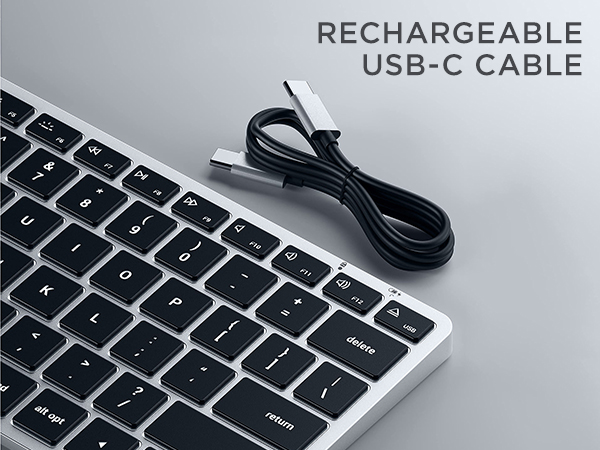
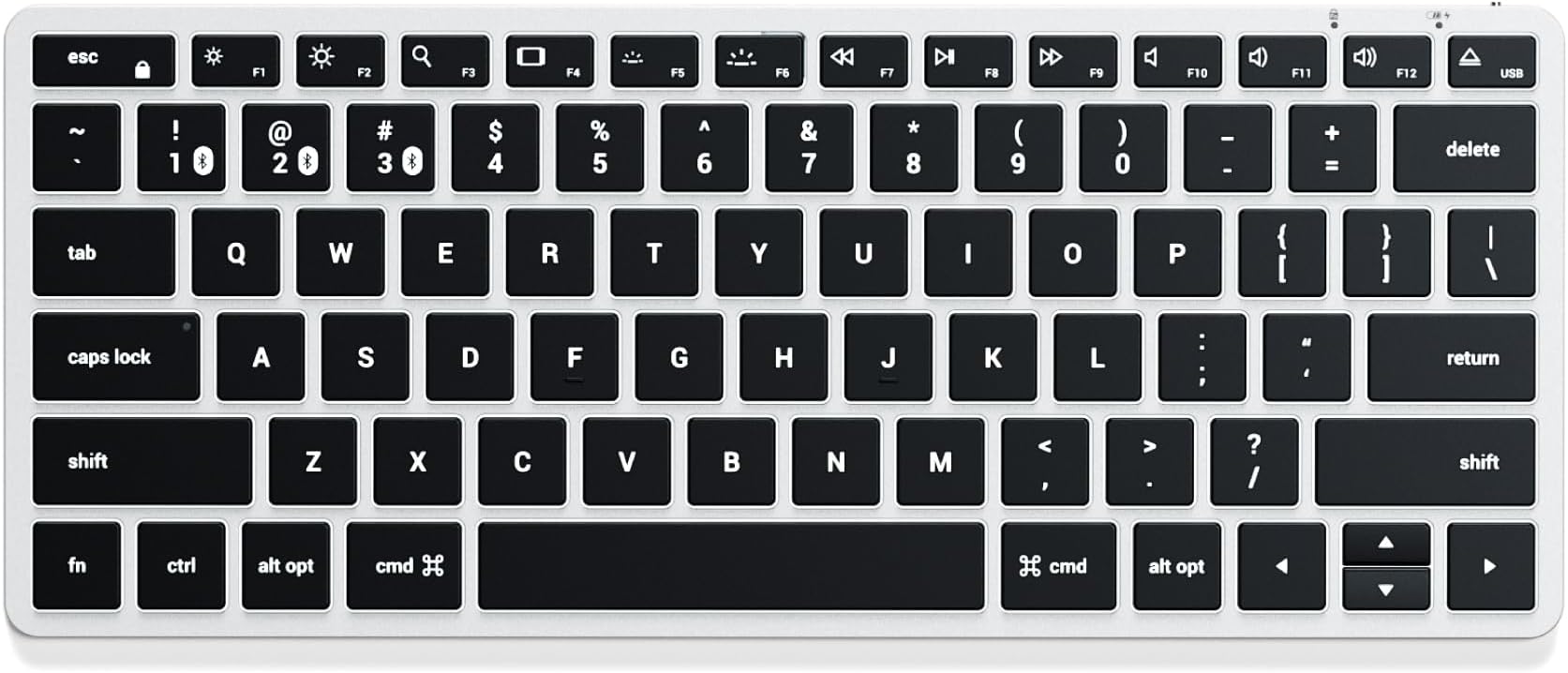
The Satechi Slim X1 Bluetooth Backlit Keyboard is a compact, aluminum-bodied keyboard optimized exclusively for MacOS. It features a full QWERTY layout with Mac function keys, multi-device Bluetooth connectivity for up to three devices, and 10-level adjustable backlit keys powered by a rechargeable USB-C battery. Designed for professionals seeking a premium typing experience and seamless Apple ecosystem integration, it offers plug-and-play convenience without the need for drivers or dongles, backed by a 2-year limited warranty.


| ASIN | B0BR64NGD6 |
| Additional Features | Optimized for Mac, Multi-Device Bluetooth, Illuminated Keys, Rechargeable, Compact Modern Design |
| Antenna Location | Office |
| Best Sellers Rank | #35 in Tablet Keyboards |
| Brand | Satechi |
| Built-In Media | USB Cable |
| Button Quantity | 78 |
| Color | Silver |
| Compatible Devices | MacBook Pro 14/16-inch (2026 M5/M4/M3/M2/M1), MacBook Air 13/15-inch (2026 M5/M4/M3/M2/M1), MacBook Neo 13-inch (2026), iPad Pro 11/13-inch (2025 M5/M4/M3/M2/M1), iPad Air 11/13-inch (2026 M4/M3/M2/M1), iPad Mini (A17 Pro/6), iPad (A16/10th Gen), iPad Pro 12.9-inch (6th/5th/4th/3rd/2nd/1st gen), Mac Mini (2024 M4/M2/M1), iMac (2024 M4/M3/M1), Mac Studio (2025 M4/M3/M2/M1), Lenovo ThinkPad, Microsoft Surface, Google Pixelbook, Google Pixel Pro 8/9, Samsung S24/Z Flip 5 Compatible Devices MacBook Pro 14/16-inch (2026 M5/M4/M3/M2/M1), MacBook Air 13/15-inch (2026 M5/M4/M3/M2/M1), MacBook Neo 13-inch (2026), iPad Pro 11/13-inch (2025 M5/M4/M3/M2/M1), iPad Air 11/13-inch (2026 M4/M3/M2/M1), iPad Mini (A17 Pro/6), iPad (A16/10th Gen), iPad Pro 12.9-inch (6th/5th/4th/3rd/2nd/1st gen), Mac Mini (2024 M4/M2/M1), iMac (2024 M4/M3/M1), Mac Studio (2025 M4/M3/M2/M1), Lenovo ThinkPad, Microsoft Surface, Google Pixelbook, Google Pixel Pro 8/9, Samsung S24/Z Flip 5 See more |
| Compatible Operating System Family | iPadOS |
| Compatible Tablet Computer Models | Apple iPad mini 6 |
| Connectivity Technology | USB-C, Bluetooth, Wireless |
| Customer Reviews | 4.3 out of 5 stars 1,263 Reviews |
| EU Spare Part Availability Duration | 2 years |
| Enclosure Material | Aluminum |
| External Testing Certification | Não Aplicável |
| Generation | 1st Generation |
| Hand Orientation | Ambidextrous |
| Item Dimensions L x W x H | 11.93"L x 5.83"W x 1.46"H |
| Item Highlight | Illuminated keys, for MacBook, iPad, iPad mini, Mac mini, iMac |
| Item Weight | 10.15 ounces |
| Keyboard Backlighting Color Support | Single Color |
| Keyboard Description | Wireless |
| Keyboard Layout | QWERTY |
| Keyboard Plate Material | Aluminum |
| Manufacturer | Satechi |
| Mfr Part Number | ST-BTSX3M |
| Model Name | Slim X1 |
| Model Number | ST-BTSX1S |
| Number of Batteries Required | 1 |
| Number of Items | 1 |
| Number of Keys | 78 |
| Number of Packs | 1 |
| Number of Sections | 1 |
| Recommended Uses For Product | Office |
| Special Feature | Optimized for Mac, Multi-Device Bluetooth, Illuminated Keys, Rechargeable, Compact Modern Design |
| Style Name | X1 |
| Switch Type | Mechanical |
| Theme | Apple accessories |
| UPC | 879961009281 |
| Unit Count | 1 Count |
| Warranty Description | 2-year limited warranty |
J**S
Premium Mac Feel, Compact Design — Satechi Nailed It
I finally had to accept that full-size keyboards with number pads just are not for me. They look great on a desk, but having to reach halfway across the planet every time I wanted to use my mouse was getting old fast. My shoulder, wrist, and patience were all filing complaints. So I started looking for something compact, black, premium, and as close as possible to the feel and polish of an Apple keyboard. I’ve tried a lot of options, from ProtoArc to the Logitech MX Keys Mini. They’re all good keyboards in their own way. Funny enough, the ProtoArc came closest to that Apple-style typing feel, while the MX Keys Mini had the better feature set. But the MX Keys Mini, even though it looks great, became pretty finger-fatiguing for me over time. After hours of research, I came across the Satechi Slim X1 and ordered it within about 10 minutes. It showed up the next day, and honestly, it was exactly what I had been looking for. It’s lightweight, has a premium aluminum body, includes backlighting, and the keys feel fantastic. Apple really nailed the scissor-style keyboard feel — the key travel, resistance, and overall typing experience are just comfortable and satisfying. Satechi definitely captured that same kind of magic here. The lack of Touch ID is a bummer, but it is not a dealbreaker. Would I love to have it? Absolutely. Am I losing sleep over it? No. If you’re looking for a high-quality compact keyboard with that clean Mac-style feel, this is the one. It gives me the premium typing experience I wanted without forcing me to do a full upper-body stretch just to grab my mouse.
M**.
Very nice alternative to the iPad screen-based keyboard.
Purchassed for use with current version iPad Pro. Easy pairing of bluetooth connection and subsequent re connection following powering off of both devices. The keyboard is much more useful for email and writing in general than the iPhone screen keyboard in that both numbers and letters are always available. Function key work well for key illunination, screen illumionaton and sound volume. Direction arrows keys (up and down) work for some apps, not for others. Key action is good, printed instructions are minimally acceptable, and the support for three devices is smart. Not that this is rerally not designed for use while traveling. The divice is wider than the iPad in landscape mode and is an added piece of kit. Keep the box if you plan to pack it for travel. The battery function and recharge time seems OK, but there should be a telltale to indicate percentage of change remaining. On balance, and after a only a few days of use, I can recommend it.
T**E
Perfect desktop companion
I personally picked up this keyboard to use with my ipad pro 12 inch. I must say it is a perfect companion especially with the grey color choice which matches my apple trackpad and ipad very nicely. Besides the look and feel of this keyboard being premium it provides an additional handful of useful options. * Perfect length size as it is the exact length of my ipad pro 12 inch. * Backlighting keys (only in one color though but with 10 brightness levels) * The keys are large in size where you wont be pressing other keys by accident. * Function shortcut row * LED indicator for CAPS lock, FUN lock and battery charging LED * Can LINK up to 3 BT devices * Comes with two rubber stubs to be able to lift the keyboard to a more angled view * Comes with USB C to USB C cable that is used for charging and can also be used as a wired keyboard solution. One other huge benefit with his keyboard and its battery level is that this works with the Apple battery widget. I have not come across any 3rd party KBs that are compatible with this widget so I was happy to see this manufacturer was able to get this to work. The one issue I have faced with the keyboard is typing errors. First I was feeling that the keyboard was not registering all the key presses and it was a BT issue. The more I use it, I am feeing that since the individual keys are pretty large and need a little force to press, its more of a physical typing user issue rather then electronically. I am hoping overtime as this keyboard gets used more frequently the keys will register a bit more easily and wont have to be pressed down so much, as the key travel time might be the issue on not all keys registering. I am coming from an apple keyboard where the slightest touch would register and with this one it takes a little more persistent push of a key. So I am feeling this typing experience will get better overtime as it seems to have already gotten better. Well done Satechi. Hope they continue to make revisions with this keyboard on updating BT version and look into the travel time on the key presses and it’s Sensativity.
J**H
Possibly the best bluetooth keyboard for mac
I was torn between the logitech mx keys mini and this satechi slim x1 for my mac and other devices. Both offer some similar features such as backlighting and multi device support. However... On the mx keys mini, device switching is on keys F1, F2, and F3, and because of that, there is no monitor brightness control there as you normally have on a mac keyboard. On the satechi, they put multi device switching on keys 1, 2, and 3, and you hold the FN button down and press one of those to switch. This way they were able to keep the monitor brightness controls and other F-keys virtually identical to what we are used to having on our macs, including back and forward buttons for music. The Mx keys also doesn't have back and forward keys for music because they opted for other buttons there. So basically this one is more true to the mac key layout. You CAN, in the logi software remap some of the F keys to compensate for what's missing, but on the satechi there are no compromises to be made. The satchi is MUCH lighter, so if you ever lounge back in your chair and type from your lap, this one is more comfortable to pull off of your desk. There is also an issue with the mx keys mini, where on an initial bootup or restart, it doesn't pair until after you enter your passkey. Meaning you need to use another keyboard, or if you're using it with a laptop, use the laptop keyboard for that first login. That's wild, because the satechi works on the initial login without issue. It takes a second or two before the keyboard pairs on startup, but it does work for that initial login. So whatever reason logitech gives as an excuse for that, satechi seems to have made it work. The backlight stays on around a minute but dims after a few seconds, but overall works nicely. The MX keys mini now allows users to set anywhere from 5 seconds to 30 minutes of backlight though - which I believe is a new feature. This comes at the cost of battery and I normally don't need more than a minute of idle backlight anyways. Overall/TLDR: The satechi is light weight, closely resembles the true mac key layout, quickly switches between three devices, can be used corded, and can be used for an initial password screen on your mac unlike the mx keys mini by logitech. The logitech looks nicer and feels a bit higher quality, but the drawbacks still put this one ahead in my opinion. I will say though, that my power switch broke and fell into the keyboard so it is stuck on, and it took less than a month of use for the keys to get shiny from use even though I try to keep it clean. That is inevitable for any keys on a keyboard, but it happened very fast on this one, and those are the reasons I took a star off.
C**X
EDIT: Update ::Get This Keyboard. Maybe not . . .
Update Sept, 18, 2024 It worked 9 Days then. . . died. It just stopped working. Began acting up, backlights went out, keys not responding, disconnecting- 100% battery charge . . .Tried to revive it, reconnect, lights - nothing. Died. Charge it up, RED Light on Keyboard, On/Off Switch same thing Red light. Zero response. No charge. Goner. Sad to say, it's going back. Hello, Ateck and MX Mini Keys (w/o Logi Software) _-_-_-_-_-_-_-_-_- Should have just gotten this Satechi Slim X1 keyboard for Mac Mini from the get-go. I have the Logi MX Keys Mini for Mac. It has connection issues falls asleep fast, wakes up too slow. Expensive Own the Arteck el cheapo $25 but still really good always connected keyboard. Small size and price. The Satechi is just right in every way. Well lit with 10 light levels, quickly connects and stays connected, easily connects to Mac, iPad, and iPhone, never wakes up my sleeping Mac, and does not need any supporting drivers or software to function correctly. Truely connect and play. The included foot pads angle the keyboard perfectly and comfortably. The Battery Widget on Mac desktop connects and allows battery level viewing just as a Mac Keyboard would. This is the keyboard Apple should have made for Mac. In all, Satechi Slim X1 is a 10/10 with zero downsides and no compromises. Bluetooth, Backlighted, Easy connection 3 devices, perfect size, no numerical keys, no dongle or drivers/software required. It just works. It's a keeper. (In 25 years of Apple products, this is the best non-Apple product ever purchased). Awsome.
J**R
Nice replacement keyboard
UPDATE 4/25/2023 I am starting to notice the "sticky T" problem that others have reportted. (Haha. There you go.) Doesn't happen every time, but oftten enough to get annoying. Decided to knock off another star. *** I needed a replacement for my iMac keyboard, as many of its keys were worn beyond recognition. It is a true replacement and has the same footprint as the magic keyboard, but it is very slightly deeper. So far, so good. I would recommend this as either a replacement for an iMac or as an external KB for a MacBook, with one small caveat noted below in "Undecided." Pro - Price is about $30 less than the Magic KB it replaces - Variable backlight brightness - Multi-device connection. This is a bigger deal to me than I expected, to be able to switch between desktop, tablet and phone so easily. - Certain shortcuts (like the app switcher) work nicely on mobile devices, which I was not expecting. Con - It does have some weight, which is good, but otherwise does not feel as sturdy as the Apple KB. For about $10 more, you can get the aluminum model, but it comes with the numeric keypad, which makes it a little less portable. - The backlight key bleed is distracting, especially if I am not sitting right over the keyboard Undecided - As others have mentioned, there is a noticeable difference in travel distance between this keyboard and the Magic KB. - fn keys are good. The search button launches Alfred, which I use in place of Spotlight. And the app switcher is nice. But I'm still used to the cmd+ keyboard shortcuts I have been using for years, so I probably won't use these too often. - Does not have Touch ID, but I am not currently using this KB with my M1 MBP anyway, or I would consider this an obvious con.
J**T
Nice keyboard
This keyboard is very light but doesn’t feel cheaply made. Keys feel good to me when typing but that’s going to be subjective to others. The backlighting is good and the Bluetooth connection works perfectly for me. So far I have no negative feedback to offer. For the price I think it’s a good choice. Update: 08/30/2025 This is still worth purchasing and customer service is very good. My 6 year old grandson got a hold of the keyboard and pulled a couple of the keys off and I couldn’t find one of them so I couldn’t fix the keyboard. My warranty had expired so I just put the keyboard in the storage cabinet. Some days later I thought maybe I should contact Satechi Customer Support. Satechi’s repy: “Thank you for reaching out to us about your Satechi keyboard! We’d be happy to help you with the issue you’ve encountered. Our keyboards don’t have replaceable individual keys, so if a key breaks, the best solution is to replace the entire keyboard. If your keyboard is still covered under our limited warranty, we can get a replacement request started for you right away. Could you please share the order number from your purchase? This will help us verify your product and get the process moving as quickly as possible. Once these details are confirmed, I'd be happy to assign your inquiry to one of our customer support advocates to further assist you. Best regards, Kyle Satechi Customer Support” Long story short, Satechi Customer Support sent me a new keyboard at no cost to me and covered shipping.
J**Z
Great Keyboard
This keyb5oard looks n6ice b5ut it doesn6't work perfectly well b5ecause itran6domly does this... Yes, I'm writin6g this review usin6g this keyb5oard con6n6ected to my Mac Airb5ook, an6d when6 pressin6g certain6 keys (e.g. the n) it gen6erates extra characters. I can6 turn6 it off an6d on6 again6, b5ut it persists. It feels fin6e, very similar to the Mac keyb5oard, b5ut this is an6n6oyin6g. If I press the down6 arrow, it starts deletin6g text. The color is much like the silver color on6 Macs, it con6n6ects seamlessly to the computer with the cab5le, an6d the b5attery has last well. B%ut the on6e thin6g that it's supposed to do, it does n6ot do it perfectly well, whcih is, typin6g. I would N6OT recommen6d this keyb5oard n6or would I b5uy this b5ran6d again6. I chose somethin6g more b5udget frien6dly than6 the Apple Magic Keyb5oard an6d well, I'm payin6g the price, I suppose. EDIT: Sept 27, 2025: After having the issues I described before, I performed a proper troubleshooting and unpaired the keyboard from my computer. After pairing them again, the keyboard has been working flawlessly. This was a couple of months ago since I tried it and was giving it a chance to see if the issue reappeared, but no--it's been great. So, in the end, I can say this keyboard is a recommended peripheral for a Macbook.
M**Y
Nice compact keyboard with a good build quality and nice typing feel.
What a great little keyboard. Initially I bought it to use with my new Mac Mini G4, but after a few months I added a gaming laptop to my desk and this works on that too (I'm typing this review on it!). It's very compact and slides out the way when not in use and has the ability to work on 3 different devices. Typing feels nice, very much like a Mac keyboard and the berry lasts for ages. It was great value too as I got an open box one that looks like new!
G**H
Super
Super jakość, dobrze się sprawdza z kilkoma urządzeniami na raz
H**E
Förväntade mig bättre kcalitet
Fick tyvärr ett måndagsexemplar som ej gick att ladda
M**Y
Teclado de alta calidad
Utilicé un teclado bluetooth de Logitech con mi iPhone durante varios años y me encantó. Pero una letra empezó a pegarse y decidí reemplazarla. Elegí este Satechi porque tenía retroiluminación y a un precio ligeramente más alto, supuse que sería de buena calidad. Estoy encantado con la sensación de calidad de esto y lo recomendaría totalmente. Mientras escribo en inglés, me alegré de tener un teclado de estilo americano. Existen algunas diferencias en comparación con los teclados en inglés que se venden en Inglaterra. No hay tecla de retroceso y la tecla de eliminar tiene una lógica ligeramente diferente. Las posiciones de las claves de cotización y hash están invertidas. No creo que haya un símbolo de moneda euro. Hasta ahora, ninguno de estos me ha causado problemas importantes.
N**I
Best keyboard for your Apple ecosystem!!!
I’ve been eyeing the Satechi Slim X1 keyboard for the longest time to pair it with my MacBook and iPad Pro. Sleek design and made for Apple makes this keyboard the best third party keyboard for your Apple ecosystem. Get it and you will never regret.
Trustpilot
2 weeks ago
1 month ago