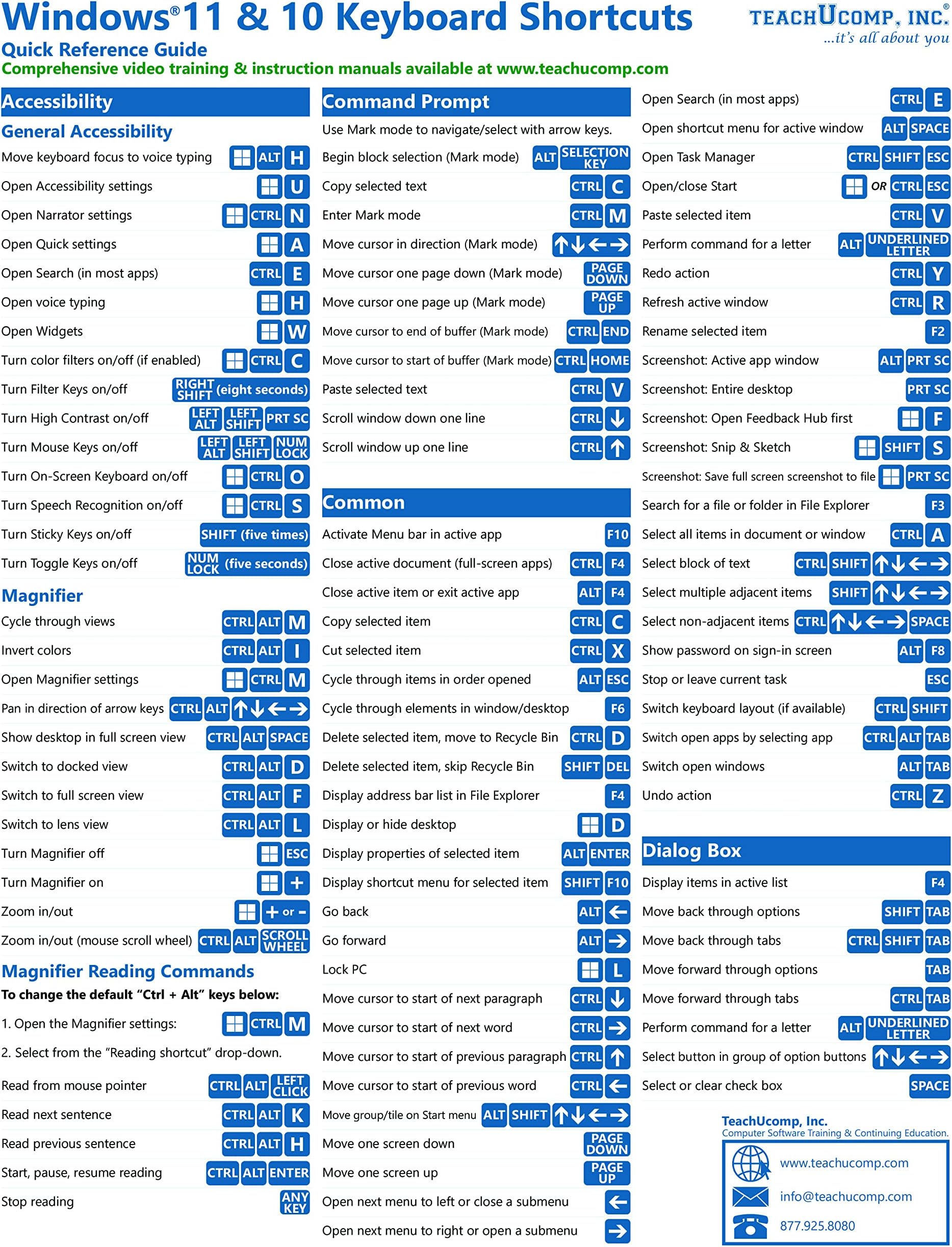
Windows 11 and 10 Keyboard Shortcuts Quick Reference Training Tutorial Guide Cheat Sheet- Laminated
Product ID: 508274580
Buy anything from 5,000+ international stores. One checkout price. No surprise fees. Join 2M+ shoppers on Desertcart.
Desertcart purchases this item on your behalf and handles shipping, customs, and support to Hong Kong.
Designed with the busy professional in mind, this 2-page quick reference guide provides 209 keyboard shortcuts for Windows 11 and 10. When you need to find a shortcut, you will find it right at your fingertips with this Windows Keyboard Shortcuts Quick Reference Guide. Clear and easy-to-use, quick reference cards are perfect for individuals, businesses and as supplemental training materials. Review: Handy - The Windows 11 and 10 Keyboard Shortcuts Quick Reference is a handy guide that you can keep at hand. It's laminated to last a long time and contains both common and uncommon key combinations. Review: Got Windows 11? You need this - I recommend buying two of these or more, one for yourself and one to give to someone who is always asking you how to manipulate Windows 11. it's a time saver. When someone calls you with a question - you're all set. I refer to it constantly along with it's sister "Windows 11 Introduction"


| Best Sellers Rank | #48,195 in Books ( See Top 100 in Books ) #2,965 in Reference (Books) |
| Customer Reviews | 4.5 out of 5 stars 148 Reviews |
R**L
Handy
The Windows 11 and 10 Keyboard Shortcuts Quick Reference is a handy guide that you can keep at hand. It's laminated to last a long time and contains both common and uncommon key combinations.
E**D
Got Windows 11? You need this
I recommend buying two of these or more, one for yourself and one to give to someone who is always asking you how to manipulate Windows 11. it's a time saver. When someone calls you with a question - you're all set. I refer to it constantly along with it's sister "Windows 11 Introduction"
K**R
Useful, links your win 10 skills to the win 11 skills your trying to acquire.
Good buy. my only complaint is that its got tooo many words so the hole punches kill some of the edge text. SStill good to have.
D**E
Has nearly all of what you need!
Very handy and organized well. You can accomplish the same thing by bookmarking various short-cut pages, but I'm older and like to hold something to look at!! LOL!!
M**N
Good Information but laminate damaged
These plastic sheets have good information but Amazon needs to not ship out damaged sheets. Received one where laminate was cut wrong. Not worth returning 1 plastic sheet but should not have shipped damaged product. Overall, Amazon service and delivery is very good.
C**T
Super helpful!
These are awesome for those of us who like to use shortcuts on the computer! Great quality and laminated to perfection! Has literally every windows shortcut needed and more!!
M**K
Wish I had had this when I was first forced to work on a desktop with 10.
This makes life so much easier.
J**I
Good shortcuts!
I like it!
Trustpilot
1 month ago
1 month ago