Desertcart purchases this item on your behalf and handles shipping, customs, and support to Hong Kong.
🚀 Elevate your dual-screen hustle with power, speed, and seamless control!
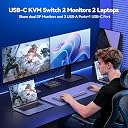
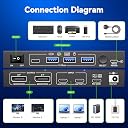
The Camgeet USB-C KVM Switch empowers professionals to effortlessly toggle between two laptops and two 4K@60Hz monitors, delivering ultra-fast 10Gbps USB 3.2 connectivity and 100W power delivery charging. Designed for cross-platform compatibility and equipped with a wired remote, it streamlines multi-device workflows with plug-and-play simplicity and robust performance.


| ASIN | B0H52LW8YQ |
| Best Sellers Rank | #104 in KVM Switches |
| Brand | camgeet |
| Brand Name | camgeet |
| Circuit Type | 2-way |
| Color | Black |
| Compatible Devices | Windows, macOS, Linux, Chrome OS |
| Connector Type | Plug In |
| Contact Material | Metal |
| Contact Type | Normally Open |
| Control Method | Push Button, Remote |
| Current Rating | 2 A |
| Customer Reviews | 4.2 out of 5 stars 563 Reviews |
| Included Components | USB C KVM Switch,2*USB C Cable(40Gbps),Wired Remote,12V/2A Power Adapter |
| International Protection Rating | IP54 |
| Item Dimensions | 7.48 x 3.15 x 0.79 inches |
| Item Weight | 260 g |
| Manufacturer | MLEEDA |
| Material Type | Metal |
| Number of Items | 1 |
| Number of Positions | 2 |
| Operating Voltage | 5 volts |
| Operation Mode | ON-OFF |
| Part Number | KVM Switch 2 Monitors |
| Specification Met | CE |
| Switch Type | Push Button |
| Terminal | Solder |
| UPC | 748415511758 |
| Unit Count | 1 Count |
| Upper Temperature Rating | 70 °C |
| Warranty Description | 1 year warranty |
| Wattage | 100 watts |
G**O
Incredible KVM — feature-packed
⭐⭐⭐⭐⭐ Incredible KVM — feature-packed, but missing a crucial cable for RS232 control This is a fantastic 10-port HDMI KVM switch. It handles 10 computers, delivers flawless 4K@60Hz video, shares USB 3.0 devices seamlessly, and includes audio switching, EDID simulation, and even wired remote support. It’s rock-solid and works exactly as advertised — no complaints on the performance front. 👏 The KVM also includes an RS232 serial control port, which allows you to automate switching (for example, sending X3,1$ over serial to switch to PC 3). This is a powerful feature if you're managing a rack or scripting your environment. 👉 But here’s the catch: They don’t include the RS232 cable — and the manual simply says: “Please prepare RS232 serial cable by yourself.” That sounds simple, but it leads to a common pitfall: Most USB-to-serial adapters today output TTL logic levels (0–5V) — not true RS232 voltage levels (±12V). The KVM expects real RS232 signaling, and TTL adapters won’t work. I learned this the hard way. ✅ Here’s the correct solution (works perfectly): USB to RS232 Adapter with Phoenix 3-pin Output: OREI USB to RS-232 Phoenix Serial Cable (7ft): 🔗 https://www.amazon.com/dp/B0D4VVBFZ8 → This adapter outputs proper ±12V RS232 levels and connects directly to the KVM's RS232 screw terminals (TX, RX, GND). No level shifting required. No soldering or extra wiring. Just plug it in and go. → Match with NanoKVM-USB and you have IP-KVM solution: https://www.amazon.com/dp/B0DWXPV4DL 🟢 Performance: Flawless 🟢 Video quality: Beautiful 4K60 🟢 Switching: Fast and responsive 🟢 RS232 automation: Works great — once you have the right adapter 🔴 Missing cable: Would be nice to include or at least recommend one Final verdict: This is one of the best HDMI KVM switches I’ve ever used, but don’t get tripped up by the RS232 cable situation. Just grab the OREI adapter above, and you’ll unlock the full power of scripted KVM control. Highly recommended.
F**N
Great KVM switch
Works great as a desktop KVM. The on/off switch is also a niche benefit many switches are missing. Makes it easy to turn the whole desk (all attached devices) on/off with a single switch and Ive ended up using that functionality more often than the switch itself. Word of caution: be sure to check HDMI version compatibly on monitor and GPU. My monitor is stuck at 2.0, limit performance versus a display port version.
J**N
Works for Ultrawide BUT You Must Find the Hidden EDID Switch
**UPDATE AFTER DISCOVERY:** I was about to return this and write a 1-star review, but I found a physical EDID switch on the front panel labeled "2K/4K". Switching it to 4K mode **completely fixed** the ultrawide resolution issue. All 7 machines now display 3840x1080 correctly on my Samsung CHG90. **TL;DR:** - ✅ DOES work with ultrawide (3840x1080) when EDID switch set to 4K - ✅ Linux boxes work flawlessly (Ubuntu, Mint, NVIDIA's DGX flavor) - ⚠️ Macs require external EDID emulators (industry-wide issue, not unique to this KVM) - ⚠️ EDID switch is poorly documented in manual **What I'm Running:** - 7-8 development workstations (mix of Windows, macOS M-series, Linux) - Samsung CHG90 49" ultrawide (3840x1080@144Hz, 32:9 aspect) - Mission-critical dev cluster for software engineering **Initial Problem:** Out of box, every computer locked to 1920x1080 instead of native 3840x1080. I thought the KVM couldn't handle ultrawide and was ready to return it. **The Fix:** There's a small EDID switch on the **front panel** (not well documented) with two positions: "2K" and "4K". It was set to 2K by default. Switched it to 4K → **instant fix**. All machines now get proper 3840x1080 resolution. **What Works Perfectly:** - ✅ Linux boxes - zero issues - ✅ Windows machines - work great - ✅ Resolution support - 3840x1080@60Hz confirmed working - ✅ Switching speed - acceptable for dev work - ✅ Build quality - solid, rack-mountable if needed - ✅ Price - $139 for 10 ports is excellent value **What Doesn't Work (Mac-Specific):** - ⚠️ macOS M-series has display blackout when switching between computers - This is a **known macOS + KVM issue**, not specific to Camgeet - macOS aggressively caches EDID and refuses to re-detect displays - Solution: External EDID emulators ($15-50 each) - standard fix for Mac + KVM setups - Linux/Windows handle hot-plug gracefully, macOS does not **Documentation Issues:** - EDID 2K/4K switch is barely mentioned in manual - No explanation of when to use 2K vs 4K mode - Should have big warning: "For ultrawide monitors, set switch to 4K" **Why 3 Stars Instead of 5:** - ⭐⭐⭐ It works great once you find the switch, BUT... - -1 star: Poor documentation almost caused a return - -1 star: Mac compatibility requires additional hardware (though this is industry-wide) **Recommendation:** - ✅ **BUY** if you have Linux/Windows machines with ultrawide - ⚠️ **BUY with caution** if you have Macs (budget $50-150 for EDID emulators) - ✅ **Great value** at $139 for 10 ports - 🔍 **FIRST THING:** Find the EDID switch on front panel, set to 4K for ultrawide **Bottom Line:** This KVM does NOT deserve 1 star. It works excellently for ultrawide monitors once properly configured. The EDID switch should be documented better, and Mac users should know upfront they'll need external emulators (standard for Mac + KVM setups). At $139 for 10 ports, it's solid value for Linux/Windows dev clusters. Would have been 5 stars with better docs and Mac compatibility.
S**B
Allows keyboard/mouse sharing to up to 4 devices with four button remote
This works perfectly using one keyboard and mouse with 4 computers. Super useful as I have PCs, a laptop, and a SBC test desk. Have been using this for months and the durability and design have been great.
K**I
Great Switch, Great Price - but be sure to use your best cable between the switch and the monitor.
Excellent product at an excellent price. I also got great service from the seller. There is some things you'll need to know to be successful with this switch. I had an HDMI 2.1 cable between my computer and the KVM, and an HDMI 2.0 cable between switch and monitor. This caused the monitor to turn full black for a second or two at a time. I was certain it was a problem with the switch. When I replaced the KVM -> Monitor cable to HDMI 2.1, the problem cleared up. The switch itself works great. You must have matching cables. Probably all HDMI 2.0 cables is ok. But if you have HDMI 2.1 cables, be sure to use one of them for the link between KVM and monitor.
B**Y
Only one Monitor output worked
I closed down an office and wanted to add the gaming laptop I used there to my home office setup, but all 4 inputs on my current KVM were in use. I ordered the 8-port model, which has HDMI and DisplayPort inputs for each port but two HDMI outputs. Only one monitor output worked. I tried two different KVMs, but neither worked. I had HDMI-only sources and tried both HDMI-to-DisplayPort and DisplayPort-to-HDMI adaptors. The two monitor outputs worked fine with the old KVM I wanted to replace, and to the monitors directly. I am experienced in IT, but it could have been something I missed. I finally decided just not to put the oldest computer into the setup and move on. I wasted a full day on this 30-minute project.
J**R
Works, but reboots itself and requires to be turned off and one of my PCs with a NVidia 3060 TI
I purchased two of these, one to use daily and the other to sit in my closet as a backup. I am going to leave this for both units. I installed it without issues, but I am noticing that it will reboot every now and then. Screen goes black , number on display is off then comes back within a few seconds. Not the end of the world, but worth mentioning. My second issue is I have one computer (its a year old - Intel i7-13700,64GB,4TB NVME, Nvidia 3060 Ti Graphics Card) and just about every time I turn it on, I get no display on the monitor, have to reach up and turn the power switch off and back on. The it works fine. I tried looking for a support page for this device; thinking I might need to flash the firmware. But it doesn't appear to be a support page for it. Just and email. I am using Cable Matters 6' HDMI cables found here on Amazon. I've been using there stuff for years without problems. Last info I have this connected to a Samsung 40" 4K TV which work flawlessly with my old 1080 KVM. This unit is a inexpensive compared to my old KVM, so I am willing to just live with it now, but I am going to find another 4K KVM soon. I probably should have tested it more than a few days before buying a 2nd one.
F**M
Excellent, well laid out and compact.
This is a great little device to connect four computers to your monitor, keyboard, and mouse. I also put the webcam on it as well so the webcam is always connected to the active computer. The HDMI and USB connection from each computer connects in the back as well as the output to the monitor and the power cord. Four USB inputs are on the front for your mouse and keyboard and in my case webcam. That leaves one that I often plug in flash drive so that I can transfer files from one computer to the other without unplugging the drive. There are individual push buttons and LEDs for switching between the four inputs. As well as a remote switch to cycle through them if you want to use it. Plus a power switch right on the front as well. Everything is very well laid out and very compact. My only issue is that on Windows 11 PCs only, sometimes when switching to that computer, there is no video. You can try switching to a different computer and back again, which often works. Or use the windows key, shift key, control key and the letter B to reset the video card in the PC. I give the kvm switch five stars nonetheless, because this is a Microsoft problem, not a problem with the product.
A**R
Does what it says on the box
So far so good. Setup was pretty easy (bonus points for providing USB cables with the unit) and it operates as I would expect for a KVM. More bonus points for it acting as a USB hub instead of just supporting keyboards and mice. I noticed a couple of reviews mentioning problems around the 4 month mark. Fingers crossed I won't be reconsidering this review in a couple months.
L**B
Share one mouse and keyboard to many computers
The 4 port USB switch hub saves a lot of space and a lot of fuffing around. Just one button click and I can control a different machine. I use this to share my Logitech Mouse and Keyboard amongst many computers. 2 PCs and 1 Mac. With an additional slot to spare for another computer. It works fine. I like the remote control. There's a 1 second delay when switching as the computers re-detect the USB. I dont mind that.
U**R
Mala compra
En el segundo mes utilizando el dispositivo, dejó de funcionar un puerto de puertos de entrada. Reconecté el dispositivo en otro puerto. Despues de unos 5 meses que lo he usado el puerto 4 de salida ya no funciona. Tuve que reconectar el cable correspondiente al puerto 2, ahora en el puerto 3. Considero que el termino dispositivo de "mala calidad" se queda corto. Casi catalogaria este dispsitivo, virtualmente como "una estafa". Es el dispositivo de mas baja calidad que he comprado en mi vida. He comprado dispositivos que no funcionan desde que llegan. Pero eso es menos peor porque puedo regresarlo. Pero este empezo a fallar cuando el tiempo para devolver el producto (30 dias) ya habia expirado.
S**U
3x2 dual monitor KVM
Works without any issues with 3 computers and two monitors, using all four usb inputs.
L**A
Prático e funciona muito bem
Muito bom, funciona perfeitamente e vem com um "controle remoto" muito prático
Trustpilot
1 week ago
1 month ago