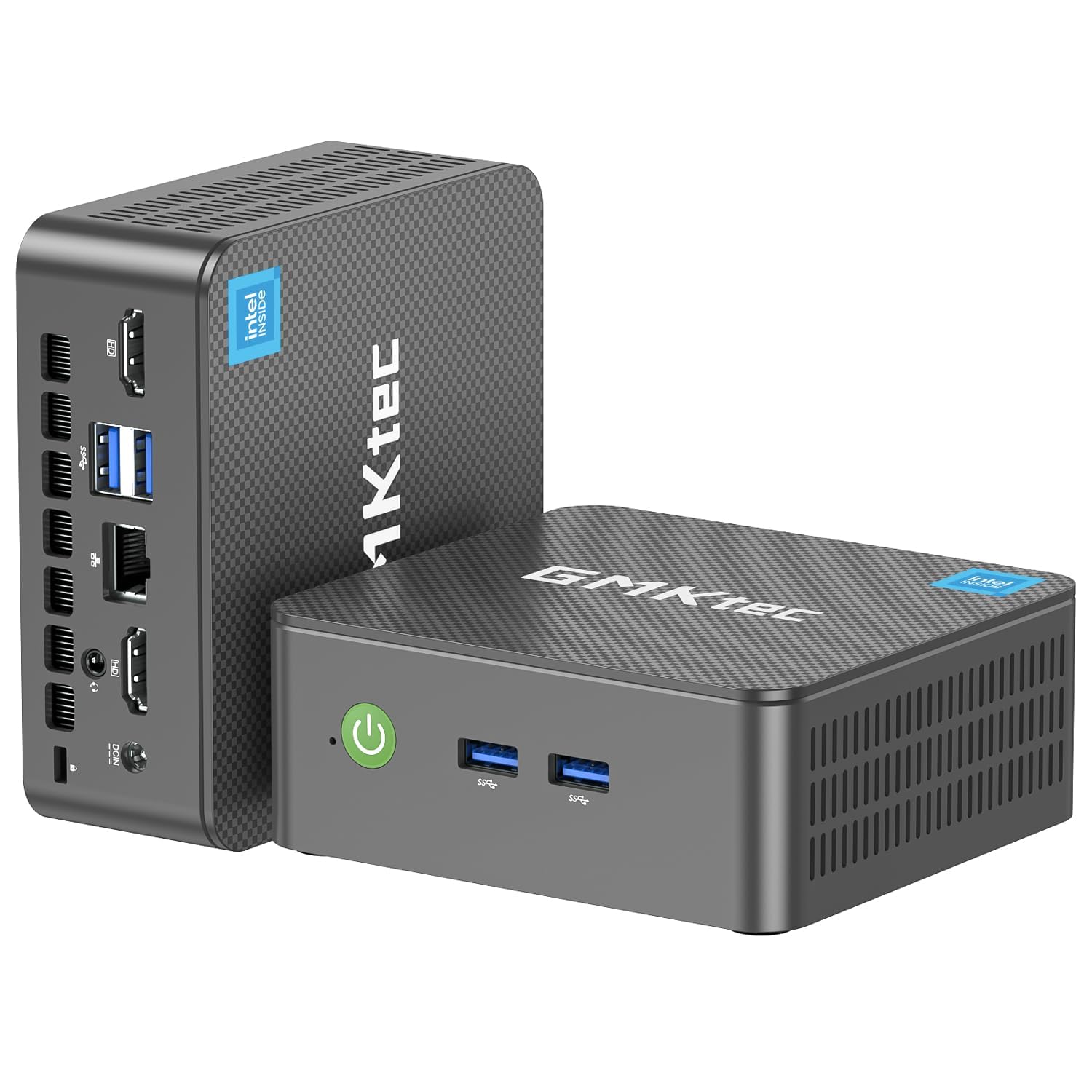
🚀 Tiny Titan: Big Power, Zero Clutter
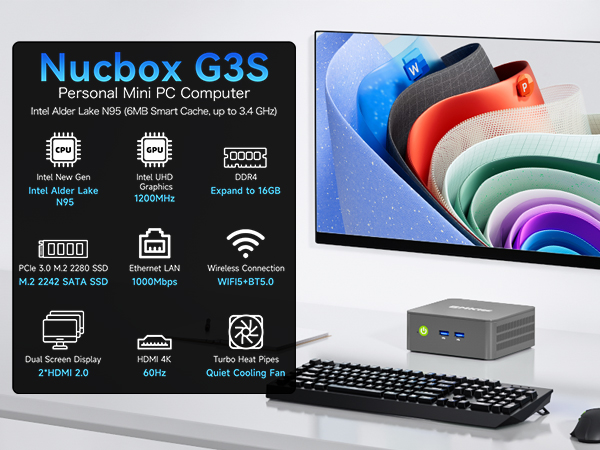
The GMKtec Nucbox G3S Mini PC packs a 12th Gen Intel N95 processor with turbo speeds up to 3.4GHz, 16GB DDR4 RAM, and a 512GB SSD into a compact design. It supports dual 4K HDMI displays, WiFi 5, Bluetooth 5.0, and multiple USB 3.2 ports, making it perfect for professionals seeking a powerful, space-saving desktop solution with advanced connectivity and fast performance.




| ASIN | B0FQJBPS9C |
| Additional Features | Auto Power On, Dual SSD Slots, PXE Boot, RTC Wake, Wake On LAN |
| Aspect Ratio | 16:9 |
| Best Sellers Rank | #984 in Computers & Accessories ( See Top 100 in Computers & Accessories ) #28 in Mini Computers |
| Brand | GMKtec |
| Built-In Media | 1 x GMKtec Nucbox G3S Intel N95 Mini PC, 1 x HDMI Cable, 1 x Power Adapter, 1 x User Manual, 1 x VESA Mount with Screws |
| CPU Model Number | Intel N95 |
| CPU Model Speed Maximum | 3.4 GHz |
| Cache Memory Installed Size | 16 GB |
| Color | Black |
| Compatible Devices | Headphone, Keyboard, Monitor, Speaker, Television |
| Connectivity Technology | Bluetooth, Ethernet, HDMI, LAN, USB |
| Cooling Method | Cooling Fan |
| Customer Reviews | 4.3 out of 5 stars 1,652 Reviews |
| Display Resolution Maximum | 5120 x 2880 Pixels |
| Display Type | LED |
| Graphics Card Interface | Integrated |
| Graphics Card Ram | 16 GB |
| Graphics Coprocessor | Intel UHD Graphics 1200MHz |
| Graphics Description | Integrated |
| Graphics Ram Type | DDR4 SDRAM |
| Hard Disk Description | M.2 2280 PCIe Gen3*2+1*M.2 2242 SATA |
| Hard Disk Interface | PCIE x 16 |
| Hardware Interface | 3.5mm Audio, Bluetooth 5, Ethernet, HDMI, PCI Express 3.0, USB 3.2 Gen 2×2 |
| Human-Interface Input | Buttons |
| Keyboard Description | Not Included |
| Keyboard Layout | QWERTY |
| Manufacturer | Shenzhenshi Jimokekejiyouxiangongsi |
| Memory Clock Speed | 3200 MHz |
| Memory Speed | 3200 MT/s |
| Memory Storage Capacity | 512 GB |
| Model Name | G3S |
| Model Number | G3S |
| Model Year | 2025 |
| Native Resolution | 5120 x 2880 |
| Number of Component Outputs | 2 |
| Operating System | Pre-installed 11 Pro |
| Personal Computer Design Type | Mini PC |
| Power Consumption | 15 Watts |
| Power Plug Type | Type A - 2 pin (North American) |
| Processor Brand | Intel |
| Processor Count | 4 |
| Processor Series | Intel Mobile CPU |
| Processor Socket | TSMC 4nm FinFET |
| Processor Speed | 3.4 GHz |
| RAM Memory Installed | 16 GB |
| RAM Memory Technology | DDR4 |
| RAM Type | DDR4 SDRAM |
| Ram Memory Maximum Size | 16 GB |
| Resolution | 4K |
| Screen Size | 75 Inches |
| Specific Uses For Product | Business, Education, Everyday Use |
| Specification Met | CE, FCC, UL |
| Style Name | G3S |
| Total Expansion Slots Quantity | 2 |
| Total Number of HDMI Ports | 2 |
| Total Usb Ports | 4 |
| Video Output | HDMI |
| Video Output Interface | HDMI |
| Video Processor | Intel |
| Warranty Description | GMKtec offers a 1-year limited warranty for each mini PC, starting from the date of the purchase |
| Wireless Compability | 2.4 GHz Radio Frequency, 5 GHz Radio Frequency, 5.8 GHz Radio Frequency, Bluetooth |
| Wireless Technology | Bluetooth, Wi-Fi |
Y**I
Cool little computer!
This is a great little computer. Its about as basic as it gets, but that's what I was in the market for. As I age, I've found I barely even use a computer at home for personal stuff at all any more. I have a work laptop that docks to a couple monitors for work from home stuff. I have an extensive steam game library from the old days, but i just don't really have a place in my life for gaming anymore, and i have a Nintendo switch for what little gaming i do. So, I sold my personal laptop and old gaming PC and replaced it with this... Its attached to the back of one of my work monitors, and runs 24/7 as a plex server and network storage computer. I can switch the monitor over to it if i want to, but i will probably just remote into it from my phone for most quick media and file management tasks. It serves up full 4k over wifi no problem. During setup and configuration, it seemed speedy, and responsive enough, and would probably be just fine for a daily use computer for just about everything. It came with Windows 11 pro pre-installed with no bloatware, and setup was super easy. I'm honestly amazed what you can get for so little money, and in a package not much bigger than a deck of cards. I heavily considered getting a "better" mini PC with better graphics, more RAM, etc... but i tried to be honest with myself on my use case, and this is probably better, as it is so efficient for 24/7 mini-server type use. At some point i may try running some basic 3d modeling software of it, as this is about the most demanding thing i can think of that i may still want to do in my personal life, but bottom line, this is a lot of computer for a little money and no space at all. Pretty cool. Note that i was considering using it with my USB-C laptop dock to switch in and out with my work laptop,and the user manual confirmed that the usb-c port is only for power, and its not a thunderbolt port, so that wouldnt work. If you want USB4/thunderbolt, you may need to upgrade a bit more.
K**T
Small, powerful and priced right
Basically, I tried to do everything I could to test this unit and see if it stumbled in any way. I have not been able to make it stumble so I am very pleased with this purchase. I love the small size and because of it I may just keep components in several places and just transport the small box as my portable computer. It has plenty of power for the type of work I do, which is normal homeowner type of uses. It has all the ports I could use or anticipate needing. It has a DP Port (Display Port) which is used to string multiple monitors together. I haven’t considered this in the past, but may in the future and it will be nice to have the option with this machine. Some of the USB ports I’m using could be freed up by using Bluetooth components. I would recommend this computer for people looking for an alternative to laptops or towers and the price is right considering what you get. It also appears to me that upgrading to larger RAM and Storage may not be necessary as the cloud appears to be taking over. I upgraded my other mini to larger RAM and a 1 terabit drive. But after using this unit I’m not sure it is necessary. All in all I can’t say anything negative about the unit. I’m very pleased! Keep reading for additional detailed description. This is my second minicomputer from GMKtec. I purchased one about 1 year ago. It worked well but the SSD crashed. The company worked with me, and I was able to replace the SSD, and rebuild the software and it has been working ever since. So, they have been responsive and stand behind their products. I had a need for a second computer so spotted this and decided to give it a chance. The unit came nicely packaged and intact. All the items listed were in the package as advertised. The difference with the minicomputer is that all the peripherals are not included. I have many of the peripherals so it is not an issue for me but be aware that if you don’t you need a monitor (I’m using a small TV I had), a keyboard (I bought a $13 USB one) and a mouse (I already had one). After acquiring the components, you literally just plug the components in and turn it on. The first thing you notice is how fast the screen comes up. Remember when you would turn your computer on then go get some coffee and hope it was up and running? Not so here it is a fast boot up. It went through some introductory screens and askes you some questions. The only one that gave me hesitation was the password one. It turns out this is to log into the computer every time you turn it on. So, make that a simple one to remember. I didn’t but went in to change it later. It comes loaded with Microsoft Windows 11 After that I started downloading software and Apps, all the ones that I use. I had no difficulty or problems with any of them. I connected it wirelessly through my home router with no difficulty. It comes with the latest wifi-6. I’m connected with 2.4 GHz channel and get 55 Mbps download and 33.42 Mbps upload. I know this depends on your systems but shows that there is plenty of speed. The minicomputer unit is 1.5 inches high and 3 3/8 inches square (see picture). Plenty of USB ports and if necessary, you can put a USB expander in one port. I used the headphones jack to listen to some music and connected my Bluetooth ear buds also both worked with a hitch and there is no lag or distortion. The package also comes with an angle support so you can hang it on the back of the monitor. This cleans up the area and make the monitor appear to be an all in one. I loaded Microsoft 365, a mechanical drawing program, iTunes and quicken and used them thinking that they may put the unit to a test for speed and any potential problems. There were none and it performed flawlessly. I have some “sleep” issues with the other unit, but this unit goes to sleep and wakes up with no issues even if left for a long period and with the monitor disconnected. Another improvement I noticed was that they have changed the way they screw the cover on. On my previous unit you had to remove the rubber feet to access the screws, and this will eventually cause problems with them coming off. This newer unit has the screws accessible trough the feet. This is much better for those looking to do any upgrading.
S**E
Shockingly Effect Mini Server, Intel N150 really is THAT GOOD
I have spent the last few days putting this device through tests working on making sure it can actually do the jobs I got it for. So far, this appears to be a really solid choice for a home server network hub / main box for anything that doesn't require mass storage. I have replaced the internal m.2 card with a Transcend 2TB drive: https://www.amazon.com/dp/B092W8G8C6?th=1 My system is running ProxMox VE as the base operating system, then I deployed Docker and Docker Compose natively on the host system and used handy ProxMox helper scripts to setup and spin up VM and containerized versions of Opnsense, Adguard, and Home Assistant. Via Docker Compose I deployed Traefik, sabnzbd, Audiobookshelf, Lidarr, Navidrome, VaultWarden, Bookstack, Baikal, DocMost, Joplin, prowlarr, and a WebDAV sync server for RetroArch. Using even "just" an SSD style m.2 to host everything, I'm finding the 12GB of RAM version to be just about perfect as a spot to put those services and then I'm using the rest of the bulk storage for a music collection, audiobook collection, and podcast storage. Audiobookshelf runs nice and responsively with this as a host. I ran my unit through like 8 hours of memtest86, no errors at all (woo!). Then I installed the OS as documented above. Then I felt like it would make sense to run some download tests. Sabnzbd++ running in a container on this system ran (I'm pretty sure) faster than it has for me before on this connection. So this system is outperforming a router while also deliverying Opnsense's enterprise class control and firewall. 69.6 GB - downloaded in 15m 37s, average 76.2 MB/s, unpacked in 28m 50s 90.9 GB - downloaded in 22m 37s, average 68.6 MB/s, unpacked in 20m 49s 91.1 GB - downloaded in 18m 39s, average 84.1 MB/s, unpacked directly 15.2 GB - downloaded in 3m 6s, average 83.5 MB/s, direct unpack Obviously, my MUCH bigger and more electrically inefficient AMD AM4 system would unpack these jobs faster, but these are basically the most difficult jobs I could think of for the sabnzbd++ chain, a couple of untouched full size ISOs where the system has to download and handle 10s of GBs at a time. No hiccups or problems encountered, this tiny guy crunched that data out like a champ. Basically, the Intel N150 really is that good! Downsides & Notes: I didn't touch the WiFi / BlueTooth unit on mine at all and can't speak to its usefulness. Also, with only one m.2 2242 slot and the stated max capacity of 2TB means, unless you slap some USB3-based storage on, this guy will be limited by its data storage in terms of workloads it can do. Overall: I was shocked at how tiny and cute this device is, and the BIOS lets you change the LED ring light at the bottom to a bunch of different colors, so it seriously overdelivered for me in terms of asthetics and build quality. It's priced competitively with a good router, but running Opnsense on real hardware with multiple GB of RAM to throw at the problem, you are going to outperform any router that costs the same price this does. Just add a wireless access point and go :) A dual NIC mini PC as gateway and main home services host is going to be my go-to solution going forward, it's great!
N**K
Excellent mini-computer. Robust performance, outstanding value
Incredible little machine! I'm a repeat GMKtec customer and I'm yet again blown away by the quality, performance and value of their NUC mini computers. As a kid that grew up on X86 processors in the 90's, it's hard to believe you can get such a high quality, self contained computer at this price, in this form factor. This unit runs on an Intel N95 and does not slouch in the processing department. Multi-tasking with common applications (MS office, browsing, streaming, etc) is no problem at all. Ports are ample, 4 USB (w/ USB supers), 2 HDMI & headphone - you're covered! This particular build does not feature Ethernet/LAN or USB C, but that is available on alternate, competitively priced models. See my pics of the unit & UserBench performance. Sure, you're not going to be gaming on this guy but for family/household/everyday use - no sweat. My first GMKtec is running my streaming server at home and it rarely flinches even under heavy, multiple stream loads. Also, I had to contact GMKtec support on my first unit due to a stability issue. They sent a completely new NVME w/ preloaded Windows OS basically no-questions asked. Couldn't ask for a better product and company!!
P**W
Even decent for lite gaming
I'm honestly quite shocked at the value this thing has packed into it. I originally wanted to just convert this into a Linux-only machine and set up emulation there but I quickly found that there were some issues with display and processing. What I thought was going to be a fairly light load, turned out to be more than it could handle. It was not even running a sega Genesis game well. I also found that there's something with the display/graphics that I couldn't even get dual screens to work in Ubuntu Linux. Nor could I send audio out via HDMI. GMKTec had a build of Ubuntu but when I tried to install it, the computer did not seem to like it. I never was able to get their build of Ubuntu working. I feel like their build could have solved some of the Linux issues. I don't think it was inherently that the machine couldn't handle the graphics processing. So after wiping the machine a few times through trial and error I was able to get both Linux and Windows installed and either selectable during the boot menu. Having reinstalled Windows again I needed to download the drivers from GMKTec's website and run the install script. This was necessarily to ensure that the graphics and sound worked properly. This time attempting to run emulation (on windows) I was been pleasantly surprised. This machine, currently being under $200, has been able to handle a wide variety of retro gaming from original NES to Wii U. The Wii and Wii U emulation has some stuttering during assets loading or busy environments, but when the games are running things are generally smooth and appropriately 30 or 60 fps. Switching to Steam, I was able to run Ori and the will of the wisps, but only after turning down the graphic settings to Low. Running normal day to day web browsing works fine and it has a great amount of storage 1TB. This is a perfect day to day machine for probably 70-80% of users. This is also a perfect solution for travel or hooking up to a TV where the small form factor is preferred over a big tower or laptop. I think for more serious PC gamers this is not going to be enough processing power to run any powerful modern games. For the price, this is also a perfect machine to try out configurations that might break your normal computer, like trying to install multiple OS's and accidentally wiping the machine. For me this is going to be a perfect machine for learning different technologies on where I don't want to clutter my main machine. What's crazy is that a machine like this would have been completely sufficient to do all of my college homework on, though I think a laptop is better for that job (especially taking notes). PC's have come extremely far since the late 90s and early 00s. From that perspective it is mind blowing what this thing can do. From the perspective of today, this is adequate to handle almost any task, but intensive gaming, number crunching, video editing, or 3d rendering this is probably going to fall short. That being said the price to value ratio is still extremely high.
C**L
I really like this little box. Running Linux Mint. Great for browsing and light applications.
It really does well for what I use it for. I have a second monitor and a KVM switch set up and I run Linux Mint on this box and it is basically a glorified media streaming box for watching YouTube while I am doing something else on my larger desktop machine. The RAM is very generous, the 1TB drive is ample and fast, combine that with the CPU and the desktop is fairly snappy and a pleasure to use. It isn't a workhorse machine, but it is more than ample for browsing, streaming, or running light application. I haven't had any issues with Linux when installing. Very happy with the price and power.
R**O
Great specs for the price, quality build.
Having purchased a GMKTec product almost a year ago (MiniPC Gaming specs) which I now use as my main machine, I thought of trying to find a suitable one to replace my current Plex server (already on non-supported Windows 10). I came across this configuration with a reasonable price tag, and already pre-loaded with Windows 11. The small footprint is always ideal, and out of the box, setting up was nice and easy, and has enough ports and HDMI. Considering I came from Windows 3.1 486 machines, its always amazing to have everything done quickly now. I don't plan to use this machine for anything heavy - as mentioned, it would only be replacing my Plex media streamer. The specs are not high end (given the price) but it suit my needs at this point. I installed the Plex app, and video and sound are decent, no slowdown or lag. The real test when Plex streams over the home network, but I'm confident it would be sufficient. It would eventually be wired to the router, but over wifi, its still very good (it may also be due to my competent internet service provider). At this price point, this machine would cover most needs like casual personal computer use, or student work. Highly recommended if you're looking for a budget mini-PC that is fast and reliable enough for everyday use. GMKTec has a very good product again and should ensure all units are of consistent quality.
S**H
Great little unit
Day 1 Review, will update if I'm let down. Aesthetic Notes: -You can disable the 360 blue LED in BIOS (or change its color). I was about to return it but then thought to check :P -You can't disable the super bright green LED on the power adapter - I'm taping it for now but might buy a separate one instead (USB C 12V/3A/36W) -Comes with a Black top-cover, and a space Blue one. If you're confused by the picture - it's swappable. Can't speak for Windows - installed Linux on it straight away. Worked like a charm, put out 4K onto a TV with good playback performance. Does what I need it to do. It's my mistake but I saw that USB-C port and assumed it was available to use. It's the power port though. This is another reason I may try to use a Dock for it or something, but I'm unsure yet if it does Data. I was hoping to attach a DAS there, but I'll have to settle for the USB-A. Not much else to say. Comes with an HDMI Cable and VESA mounting bracket. I find it quiet (basically silent). It didn't get particularly hot from 5min of video or 1h+ of being on with the single display. This will be a 24/7 device so if this changes I'll update.
Trustpilot
2 weeks ago
5 days ago



