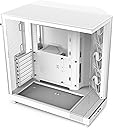
🖥️ Elevate your workspace with the NZXT H6 Flow — where style meets unstoppable airflow.
The NZXT H6 Flow is a compact dual-chamber mid-tower PC case featuring panoramic tempered glass panels for an unobstructed view, three pre-installed 120mm fans optimized for superior airflow, and a smart cable management system. Designed to enhance thermal performance and aesthetics, it includes airflow-optimized perforated panels and convenient front I/O ports, making it a top choice for professionals seeking a sleek, high-performance build.


| ASIN | B0C89G9QDK |
| Best Sellers Rank | #7 in Computer Cases |
| Brand | NZXT |
| Color | White |
| Customer Reviews | 4.8 4.8 out of 5 stars (4,109) |
| Date First Available | November 2, 2023 |
| Item Dimensions LxWxH | 16.34 x 11.3 x 17.13 inches |
| Item Weight | 20.7 pounds |
| Item model number | CC-H61FW-01 |
| Manufacturer | NZXT |
| Number of USB 3.0 Ports | 2 |
| Product Dimensions | 16.34 x 11.3 x 17.13 inches |
| Series | H6 Flow |
J**E
Great case
Beautiful case. I love the way it looks and it was super eay to setup. The fans make almost no noise and keep everything pretty cool. The dust filters work great and are easily removable for cleaning. It is a very well made case with plenty of room for pretty much anything you want to put in it. I also really like the separate compartment it has for the power supply and cables. The fans are pretty bright and look great.
S**L
Value, Size, Awesome design, Great Price!
In the 1980s’/ 90’s, transparent electronic devices started to become available for consumers. As a kid then, I was always in awe of being able to see behind the “scenes” at the electronics being displayed. With the obsolete nature of CD/DVD Rom’s inbound, I guess simpler, more refined cases were inevitable and luckily for me them having transparency was just another bonus! Enter NZXT H6 Flow, the first fish-tank style case I laid my eyes upon and simply had to have. The H6 Flow is smooth, sleek, refined, simple, artistic, roomy, inviting, low profile, pleasant and a pleasure to work with. All removable panels and windows remove smoothly with an audible snap (not scary version) and realign with a reassuring click. The tempered glass is thick and has reinforced corners with a sizeable latch handle, which makes removal and replacement easier and adds more confidence to the user, plus it offers something to grip will holding/ moving the glass and metal panels. The body design is sleek looking and adds to the function. In general, the angled front with the three fans, have been noted to add an increased air flow with meaningful direction and amounts of air being pulled in. In addition, If you’re using this case on your desk, like me, the power button, two usb ports, one usb c port along with a headphone jack are lined up on the bottom front, so very convenient. Also, as long as RGB lighting is enabled on your motherboard, the power button has a led ring that says white while the pc is on and intermittingly flashes when the pc is in sleep /standby mode. Nice and easy way to see if your pc is off at a glance. Another positive design choice includes the space on the bottom between the bottom of the case and the feet. This adds two positives. The intake 140mm fans located on the bottom have ample suck shin space for fresh air and I can slide my hand underneath with ease, which makes under-case cable routing a breeze, they really did almost think of everything. The rear chamber where the power supply is located is very large. It’s so large; I have 2 hdd’s and 4 ssd’s. Now, I’m using unofficial areas that were not really designated as locations for them but it works, they stay tight in place so there’s little movement and I’m just happy there was space to cram them in. Also, with the dual chamber design, there is less of a need to do extreme cable management. It’s lightly done in my H6, which offers just enough space to move around and not show the cables in the front through the grommet case cut outs. The H6 Flow has plenty of ventilation with fine holes on the panels and bigger holes in the rear for exhaust. One thing to note, if you are adding RGB fans, you’ll probably need splitters depending on how many rgb inputs your motherboard has. This only really relates to the case because you can use 8 fans, not including the cpu cooler fans. The only cons I realized are the grommet holes on the case for cable pass thru lack rubber grommets which is an odd design choice for two reasons. First, almost every other case on the market includes them and secondly, this makes rear cable management a slight issue because you can see some of the mess if not properly managed. All in all, I highly recommend this case. The price is fair for what you will receive which increases the value of the Flow.
M**.
Ideal airflow with a clean design.
Had a gargantuan NZXT Phantom for several years, and had been seeing this style of case explode in popularity over the last several months. The H6 Flow kinda came out of nowhere (to me, at least), just as I was about to start ordering upgrades so I could actually run some of the most recent pc releases. This case is a far more manageable size, and as a long time fan of NZXT cases, this new offering does not disappoint. Obvious comparisons to other dual chamber/aquarium style cases aside, the H6 boasts a functional clipped front corner that comes stock with 3x120mm intake fans. At this angle, the fans blow air directly towards your GPU, as well as your CPU's air cooler tower, if you're using one. The biggest objective con in this case is that the bottom fan mounts, which are recessed to allow for a clean and streamlined installation, are restricted to 140mm fans. As seen in my attached picture, 120mm fans will just kinda... float there, but since the RGB is so extensive on mine, I almost consider it a feature. But for the sake of maximum airflow and making sure the case is a positive air pressure environment, it is something I'll address at a later date. One other important thing to bear in mind is the available depth for tower coolers. I'm not sure if it's obvious from the picture, but the leading fan is actually contacting the glass side panel. It literally could not fit any tighter. That being said, I'd either recommend opting for water cooling on the CPU, or having low profile RAM sticks for air cooling, but that's mostly dependent on how your MOBO is laid out. :P Overall, the H6 Flow was fun to build in and looks spectacular once everything's up and running. Build quality is sturdy, along with good options for cable management tucked behind the motherboard tray, and all at a very competitive, budget-friendly price.
N**E
Good case , but screws fittings a little bit harder. coolermaster is better in terms of build material and screws fitting. The best thing its design and look and airflow. 10 out of 10.
E**A
La caja de amazon llego hecha una porqueria, no se si es culpa de seur o de los de amazon. En cuanto a la caja es un 10 en absolutamente todo, me ha encantado. El hecho de que los ventiladores esten de manera diagonal hace que el aire fresco vaya directamente hacia la grafica, cpu y placa madre en general, refrescando de mejor manera los componentes, cosa que no es igual con los ventiladores laterales que solo empujan aire hacia el cristal. La caja tiene un espacio tremendo para los cables y puedes tener mas espacio todavia si retiras el soporte para el ssd. Tiene huecos por toda la caja para el manejo de cables y que queden todos los cables escondidos, dando un aspecto mas limpio en la zona de los componentes. Además tiene unas gomillas en la parte de abajo para los dos ventiladores de 140mm que evitan vibraciones y ruido de esos ventiladores, te ahorras 8 tornillos y dejas que el ventilador sin atornillar, a mi me gusto esa idea y simplemente los conecté dejandolos sobre esas gomas, sin atornillar ya que esta pensado para eso. Es muy facil de desmontar, tanto los paneles como los cristales, yo tuve que desmontarla toda para meter todos los componentes y fue todo muy sencillo. Requiere tiempo y si es la primera vez que montas un pc puedes tardar un poco más, pero consultando en internet y con los manuales vas avanzando, en mi caso use IA para hacer resolver dudas que tenia y algun que otro video de youtube, por si a alguien le sirve. Conclusion, la caja no tiene ningún pero, no le falta absolutamente nada, viene equipada y preparada para todo y el precio que tiene la hace todavia mejor, tal vez el tamaño sea un poco grande para algunos, al ser doble camara es más ancha, para mi esta genial y hace que fluya más el aire, en mi caso buscaba una asi precisamente para eso. De todas las cajas doble camara, esta es la mejor sin duda en relacion calidad/precio. Otras cajas de doble camara te sacan los ojos con 200 300€ y son mil veces peor.
M**E
Il NZXT H6 Flow è un case mid-tower compatto ma sorprendentemente spazioso. Il sistema a doppia camera semplifica la gestione dei cavi e migliora la ventilazione interna. I pannelli in vetro temperato angolati offrono una vista panoramica pulita e moderna, perfetta per build RGB o minimaliste. Le 3 ventole da 120 mm preinstallate garantiscono un flusso d’aria diretto e silenzioso, ideale anche per GPU di fascia alta. Il montaggio è intuitivo, con spazio dedicato per SSD, PSU e radiatori fino a 360 mm. Un case pensato per chi vuole estetica, ordine e prestazioni termiche senza compromessi.
P**K
The NZXT H6 Flow Compact case is perfect for my build. It looks modern and clean, with great airflow thanks to the mesh front panel. Building inside was straightforward with plenty of room for components despite the smaller size. Cable management options are good, and the overall build quality feels premium. Ideal if you want a compact case without sacrificing cooling or style. Highly recommend!
M**A
The NZXT H6 Flow RGB (2023) is hands down one of the best cases I’ve worked with. It’s sleek, functional, and designed with modern PC builders in mind. Here’s why I’m loving it: Design & Build Quality Minimalist Aesthetic: The clean lines and subtle RGB accents give it a premium, modern look that complements any setup. Compact Dual-Chamber Design: The internal layout is well thought out, keeping cables neatly tucked away for an ultra-clean build. Performance Highlights Optimized Airflow: The mesh front panel ensures excellent airflow, keeping my components cool even during intense gaming sessions. Pre-Installed RGB Fans: The included RGB fans are a great touch—quiet yet effective in both cooling and adding visual flair. Ample Space for Hardware: Despite its compact size, it easily fits an ATX motherboard, large GPUs, and multiple storage drives. 🛠️ Ease of Use Tool-Less Panels: Removing and reattaching panels is a breeze, making the building process much smoother. Cable Management: The dedicated cable routing channels and velcro straps make it easy to keep things tidy. Radiator Support: Plenty of room for AIO coolers, supporting up to 280mm radiators at the top or front. What Could Be Better? The PSU chamber is a bit tight, so installing larger power supplies requires some patience. More USB ports on the front panel would have been a nice addition for users with multiple peripherals. Who Is This For? Gamers building a compact, high-performance rig. PC enthusiasts who want a balance of aesthetics and functionality. Beginners looking for a user-friendly case with advanced cooling features. Final Verdict The NZXT H6 Flow RGB blends style, cooling performance, and ease of use into a fantastic package. It’s perfect for anyone looking to build a sleek, modern PC without compromising on airflow or RGB customization. Despite minor nitpicks, it’s a standout choice in its price range. Highly recommended! Build your dream rig in style with this case—it’s a showstopper! 🖥️✨
Trustpilot
2 weeks ago
4 days ago