Desertcart purchases this item on your behalf and handles shipping, customs, and support to Hong Kong.
🚀 Elevate your home network to WiFi 7 — speed, coverage, and security that future-proofs your digital life!
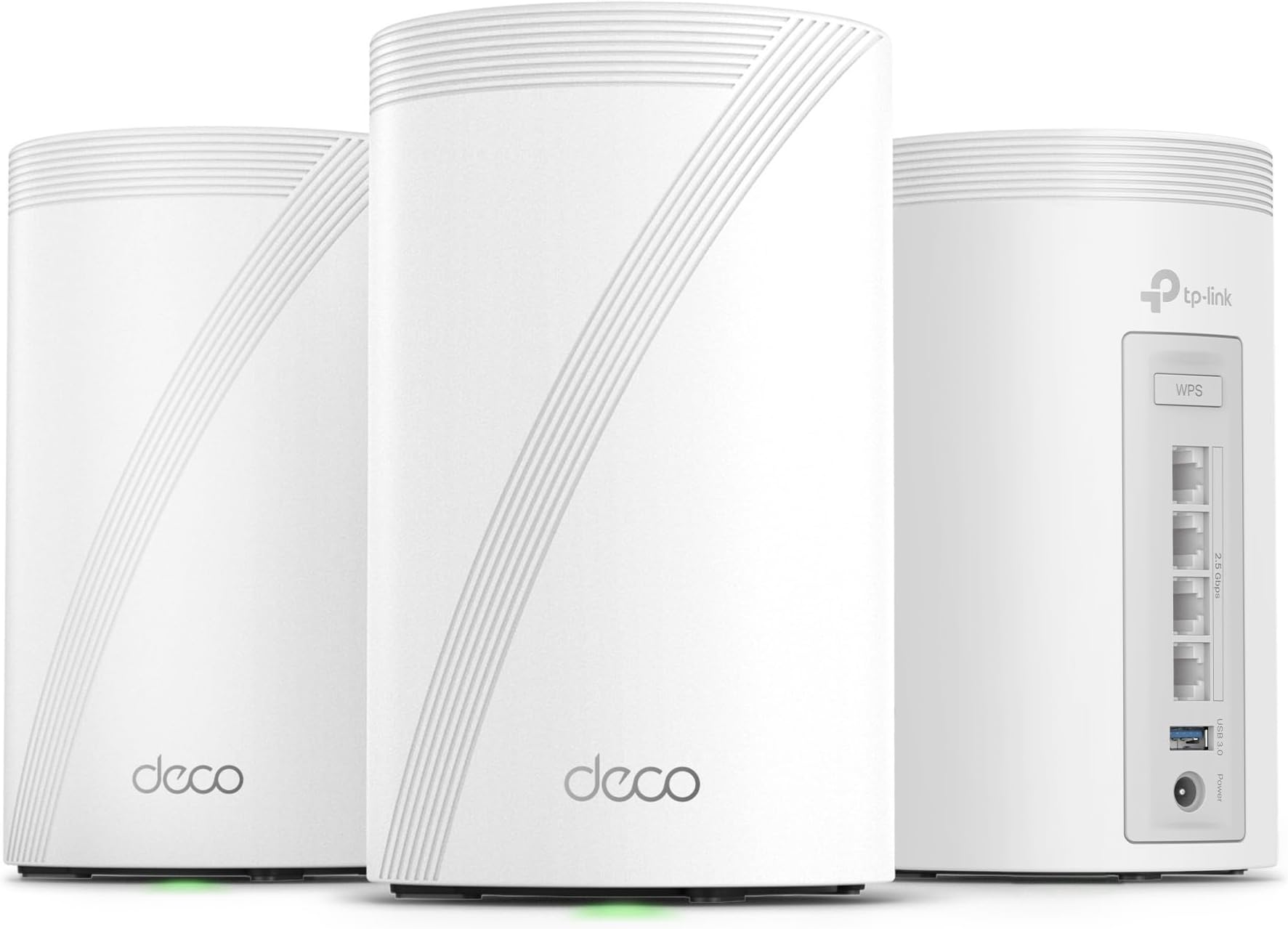
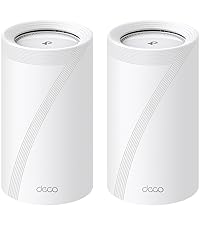
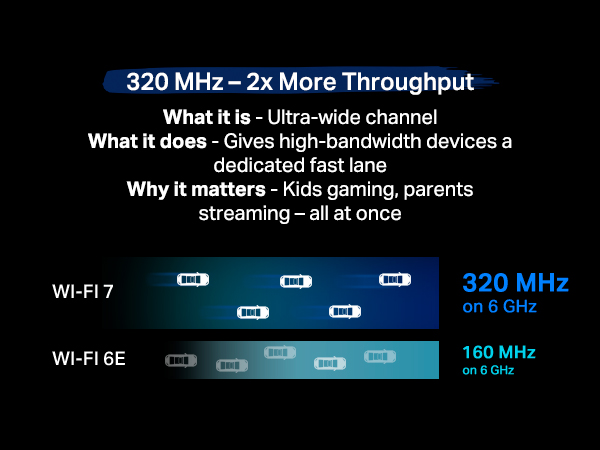
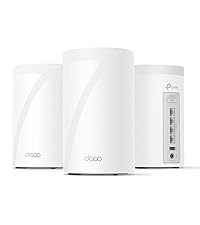
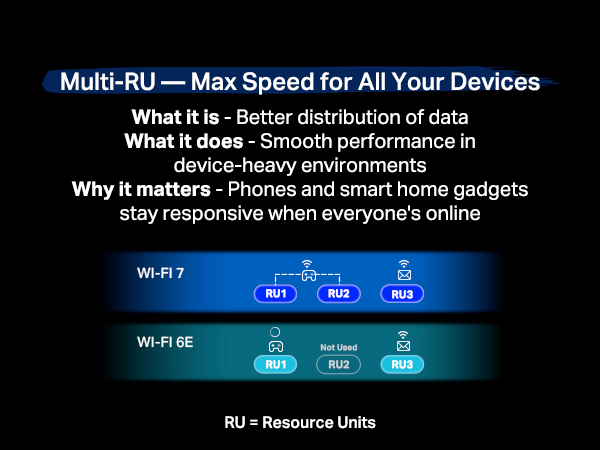
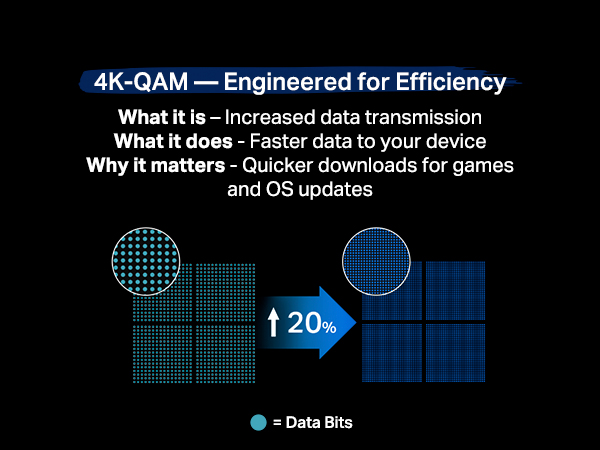
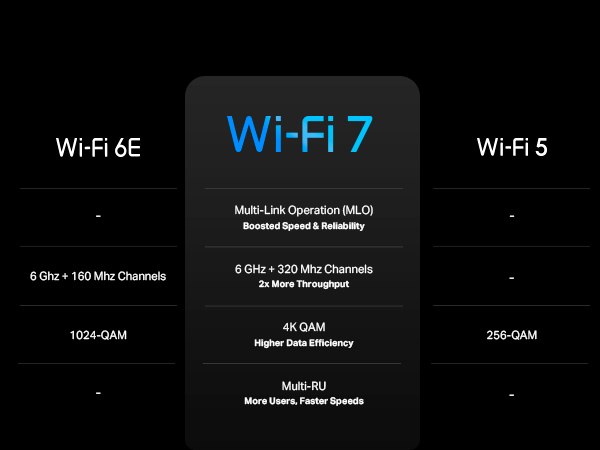
The TP-Link Deco 7 Pro BE63 is a cutting-edge tri-band WiFi 7 mesh system designed for expansive whole-home coverage up to 7,600 sq.ft. It delivers ultra-fast combined speeds up to 10 Gbps across 6 GHz, 5 GHz, and 2.4 GHz bands, supports over 200 devices simultaneously, and features four 2.5G Ethernet ports for wired backhaul. With AI-driven seamless roaming, advanced security via HomeShield, VPN client/server support, and easy app-based setup, it’s engineered to meet the demands of modern smart homes and professional environments.


| ASIN | B0CN8QLS4K |
| Antenna Location | Gaming, Home |
| Antenna Type | Internal |
| Best Sellers Rank | #9 in Computers & Accessories ( See Top 100 in Computers & Accessories ) #2 in Whole Home & Mesh Wi-Fi Systems |
| Brand | TP-Link |
| Built-In Media | 1 RJ45 Ethernet cable, 3 Deco BE63 units, 3 Power adapters, Quick Installation Guide |
| Color | White |
| Compatible Devices | Smartphone |
| Connectivity Protocol | Wi-Fi |
| Connectivity Range | 7600 Square Feet |
| Connectivity Technology | Wi-Fi |
| Control Method | App, Voice |
| Controller Type | App Control |
| Coverage | 7,600 Sq.Ft |
| Customer Reviews | 4.2 out of 5 stars 1,025 Reviews |
| Data Transfer Rate | 10 Gigabits Per Second |
| Frequency | 6 GHz |
| Frequency Band Class | Tri-Band |
| Has Internet Connectivity | Yes |
| Is Modem Compatible | Yes |
| Item Dimensions L x W x H | 4.23"L x 4.23"W x 6.93"H |
| Item Weight | 4.98 Pounds |
| LAN Port Bandwidth | 2.5 Gbps |
| Manufacturer | TP-Link |
| Maximum Upstream Data Transfer Rate | 10 Gigabits Per Second |
| Mfr Part Number | Deco BE63(3-Pack) |
| Model Name | WiFi 7 Mesh System |
| Model Number | Deco BE63(3-Pack) |
| Number of Antennas | 4 |
| Number of Ports | 4 |
| Operating System | Omada |
| Other Special Features of the Product | Access Point Mode, Guest Mode, QoS, Remote Access, WPS |
| Router Firewall Security Level | Advanced |
| Router Network Type | hybrid |
| Security Protocol | WPA-PSK, WPA2-PSK, WPA3 |
| Smart Home Compatibility | Smart Home Compatible |
| Special Feature | Access Point Mode, Guest Mode, QoS, Remote Access, WPS |
| UPC | 840030712685 |
| Unit Count | 1.0 Count |
| Warranty Description | 2 year manufacturer |
| Wi-Fi Generation | Wi-Fi 7 |
| Wireless Communication Standard | 802.11.be, 802.11ac, 802.11ax, 802.11g, 802.11n |
| Wireless Compability | 802.11.be, 802.11ac, 802.11ax, 802.11g, 802.11n |
R**K
Goodbye EERO!
Goodbye EERO! We have been EERO users since 2024 when our ISP (Frontier) sent us a “free” EERO 6 PRO for a $10 shipping fee. It was easy to setup and we got good, not great, performance. About 140 Mbps down and 50 Mbps up on a 500/500 system. Compared to the router it replaced we were happy. I run a home network with android phones/apple Ipads, windows computers ( 5 on W11, 1 on W10 ) , a Linux computer and 3 TVs . The EERO was easy to set up and easy to add additional nodes. Connections were never a problem with the EERO. The TVs would often buffer when we watched YouTube-TV. The android phone app used to control the EEROs has problems. The status screen, used to show the health of your EERO nodes, is terribly unreliable. Often it will show EERO nodes that are unplugged as online. We called EERO support and spent several hours debugging this problem. I had android 11 at the time but my son had android 16 and both showed the same error. EERO support wrote a ticket on this problem but we have noticed no improvement in the app since. In Feb 26, I noticed Frontier had been charging us $7/month for the “free” EERO. We called and they took it of the account and required that we ship the “free” EERO PRO 6 back to them – which we did. We were using EERO 6 non-pro nodes on our system for some time. The EERO PRO 6 ran so hot we were a little afraid of it. In mid March 26 we noticed Amazon had a EERO 7 PRO on sale for $199. We ordered that and connected it to our system. As always, it was super easy to add a new node with the EERO app. The EERO PRO 7 was getting 370 Mbps/170Mbps which seemed like a huge upgrade! We noticed in the status it was connecting on the 6Ghz network to our intel and AMD boxes. This was great! On the Linux host, it connected and did 350/320. Wow, awesome! The joy did not last long, however. Later in the day, on the intel computer I was seeing 120 / 57 again. I found it was back on the 5 GHz band. If I disconnected and reconnected. It reconnected and we were back on the 6Ghz band with great performance. Later in the day it had gone back to the 5 Ghz band along with disappointing performance. It appears the EERO are coded to go after the strongest signal even if a good signal on a super performance band is available. I read a review online of the TP-LINK DECO B3 10000. The review indicated you could set a per-device preference of the band to use for the connection. EERO does not have this! I felt this might be just what I needed. The router arrived later in the day thanks to prime! We installed the 3 node TP-LINK DECO B3 10000 in the same locations as 3 of our existing EERO nodes. The TP-LINK app is not as easy to use to install the system as the EERO app. After a couple of failed attempts we got it to install. Yea! Once you have the first node set up it is really easy to add the additional nodes. The app does let you customize the network to use for each device. Excellent! I checked the intel windows box again. It was hitting 430/420 on WiFi. Wow! Damn! We had not seen that performance before with EERO, ever! The other WiFi devices where showing good performance too. The LG/TCL TVs are no longer buffering on YouTube-TV. All of our phones were on the 6Ghz band. There was one big exception to this joy! The UBUNTU Linux 24.04 node wold not connect to the TP-LINK DECO. I suspect it was a problem with WPA3 protocol DECO uses! We tried all sorts of things but it would never work. Edit: We were able to show that it was related to WPA3 Simultaneous Authentication of Equals (SAE) or more commonly WPA Personal. We reenabled the eero 7 which uses wpa/wpa2 protocols for all bands. It connected. The TP-LINK DECO is set to only use WPA3 SAE for the 6 Ghz band. We set the preference for the device to connect any band in the DECO app as opposed to 6 Ghz. It connected immediately on the less efficient 5 Ghz band. End Edit: Wait, there are 4 Ethernet ports on the back of each TP-LINK DECO node. There is a network node ( EERO and TP-LINK) right by the Linux computer. Let me try that. It worked! The Linux box was hitting 480/470 with the Ethernet connection. The intel box, which is right next to the Linux box, hits over 500/500 when hooked up to the Ethernet cables from TP-LINK DECO. We have let it run for a couple days to see if there are gotchas. None so far. We have the winner. We are done with EERO. We are shipping the EERO PRO 7 back to Amazon tomorrow.
M**R
Solid mesh system, especially for the price
I purchased this to replace my 6E TP-Link since I was having some drop issues, but it turns out it wasn't my router. I decided to keep these anyway since I switched to a 1GB connection and wanted the headroom. The system was easy to set up and configure using the TP-Link app. It took a couple of attempts to get the two mesh nodes set up with the base station, but overall it was quite easy. In use the system is rock solid and fast. I have a 2300 square foot two story house with the base unit downstairs in the den, one node across the house, and another upstairs. Both nodes attach using a wireless backhaul and have a full strong signal even at distance. The system has now been running for 3 months straight without a glitch or reboot needed. I highly recommend thys system.
A**R
Best wifi investment ever made
5 star wifi mesh!!! Finally solved all my wifi signal and speed problems i had before in my 2 floor house. Now i get 1GB speed in both floors with only 2 units! Very easy to install and take control of the system.
A**N
INFERIOR RUBBISH TERRIBLE TECH SUPPORT - DO NOT WASTE YOUR MONEY ON TP-LINK
Final Update 2-May-2025: Okay I have grown to hate this mesh system and I seriously don't see myself purchasing another TP-Link device ever again! I suspected that the price point was good to be true and I was 100% correct. This mesh system is a hot mess and a great compilation of "unstability". It is constantly dropping connections to the Internet (it's not the ISP as they equipment remains up and running when the TP-Link is experiencing problems). This in no way compares to some of the other brands. This was supposed to be an upgrade from my two node Asus Wi-Fi 6E mesh system but now I see that was in a completely different class to this piece of junk.. Further Update: The tech support finally admitted that it was a FW issue and released a beta FW for me to upload manually and check. After successfully flashing the FW with the beta version the mesh remained up for me to confirm the new FW and that it was pushed to all three nodes. I then tried activating the VPN and encountered the same problem. I was able to deactivate the VPN but it brought my entire network is down as none of my clients remained connected to the WiFi for longer than a minute or two and they couldn't access the internet. This experience calls to question if the beta FW they gave me was properly tested suggesting that there is a lack of a proper quality assurance process. Fortunately I have a technical background so I was able to download and revert to a prior FW version, disable auto update and restore my network and get the VPN working again. I will try to exchange this mesh system but rest assured I never want to see the name TP-Link ever again!! This was truly an atrocious experience and am appalled that companies actually treat their customers in this manner and still expect to be in business.. Update after 1 month: This has to be one if the absolutely worst purchases I have ever made!! This excuse for a mesh system spends more time down than up. The VPN via my NORD subscription simply stopped working and the techs wasted my time troubleshooting when it is obvious that the issue is the router and not NORD itself as the same config works in the OpenVPN client for Windows. Every day I wake up I discover yet another reason to dislike this piece of junk.. I WILL NEVER BUY TP-LINK AGAIN AND WILL NEVER RECOMMEND THEM!! ========================= Original Review: Pros: 1. Setup is very intuitive (great App). 2. Great performance in terms of speed (wired/wireless backhaul). Cons: 1. iOT network is pointless as it's on the same VLAN (false sense of security). 2. The Guess network is pointless as it's on the same VLAN (false sense of security). 3. You cannot isolate devices on the guest network. 4. The VLAN option is tied to IPTV functionality (extremely poor design for a solution at this price point). 5. Extremely limited feature set overall 6. Not very stable and specific clients can periodically fail to connect for whatever reason until the device is rebooted. You get the feeling that it's a beta product because these same devices work fine on other routers.. At the end of the day this is a residential device! This is not a corporate or soho classified device. There is no basic firewall, there is no comprehensive DHCP reservation functionality, etc. If you are looking for a robust, secure and feature rich solution look elsewhere - this is NOT the solution.. Also, all of a sudden, the VPN no longer works with no change in configuration. Support was useless as he kept telling me that the issue was with Nord and hence never really listened.. Meanwhile the exact same config file works on an Asus router with no issues.. I cannot recommend this mesh set. It's simply not a quality product!
B**K
My House Is Now the Matrix
BLUF: Upgraded from Starlink to fiber and my old mesh system basically fainted. Swapped to this TP‑Link WiFi 7 setup and now my entire 3‑story house is a wireless paradise — the walls look like I’m living inside the Matrix and I’m expecting Keanu Reeves to step out of my hallway at any moment. This system is insanely fast, stupid easy to set up, and finally lets my fiber connection stretch its legs instead of tripping over itself like my old mesh. Coverage is flawless — basement, attic, random corner behind the laundry room, all full bars. Devices roam smoothly, speeds stay consistent, and the wired backhaul ports are a dream for anyone who likes their network to feel like it was engineered by NASA. Ever since installing it, my home has gone from “buffering again?” to “I can see the WiFi code in the air.” If you want your internet to feel like a sci‑fi upgrade, this is the one.
M**.
Easy setup, excellent WIFi coverage and speed, but requires app for system administration
I bought this mesh system to cover my 3100 sq. ft. home, connected to a 1.1 Gbps internet service through a cable modem. Setup was straightforward, and the two satellites connected automatically once I had the first unit set up. Performance is great, I get the full 1.1 Gbps download speed even over WiFi or on hardwired connections to the satellites when I'm nearby to one of the nodes. Coverage is great everywhere in the house, with high speeds even away from the router and satellite nodes. Also, the white cylindrical units are nice looking (no spider-like routers!). The only thing I'm not crazy about is the requirement to use the app for all system administration. There's a web page on the unit acting as router, but it only gives system status. Using the app requires going through a TP-Link server, I'd prefer being able to do all the system administration directly on the router rather than depend on an external server.
J**T
WOW THIS SETUP IS WORTH EVERY PENNY!!!
Recently we just had Fiber ran (finally) to our house and went with a 1gb speed. The twin lakes hardware includes a wifi router that seems to work just fine for the house which is about 3500sqft. The problem I have is my detached garage loft is where my home office is... I had an old ORBI system with 2 satellites and have been using that the past few months and it's coverage / speed was usable at best. The Deco system to the ORBI there is literally no comparison in performance the Deco is lightyears ahead in performance. I went from 80-90mbps with Orbi to low 500mbps with Deco! As a tip if you are going to put one of the satellites near your computer use the included CAT-5e cable and direct wire to the Deco that picked me up another 150is MBPS! Coverage is flawless, setup was super simple. Download the app, plug the main unit in answer a few q's and it's done! Plug the other towers in and it's just that easy! I couldn't be happier with the product especially when they had them on lightning deal for $350! Also I was curious so I tested the Twin Lakes router speed to the Deco at about 10' distance and the Deco is 30mbps down and about 120mbps up faster than the internet companies hardware!
H**P
Very good, pricey, Mesh system
I was replacing my older Eero mesh system with this one. My old one was becoming unreliable with dropped signals, slower wi-fi, etc. After reading up on various systems out there, this one seemed to bubble up to the top for a mid-tier priced system. I wanted to very wide coverage and there are deadspots around my house (especially towards the front, which is furthest away from the base unit). The actual units are very nice looking and have a good design that if they're sitting somewhere visible it won't distract from any decor. Setup was very easy, just plugged it in, and connected the ethernet cable to the port. Plugged in the other two units in their respective areas and was ready to go within 10 mins. They do take a bit of time to set and get connected, but the light indicators are clear in what the unit is doing. The app is the highlight of this. It's super easy to use, and gives you all sorts of control. I was able to optimize the signal with a push of a button. I'm still having similar issue with the signal in the same areas as before, but the signal's stronger than before. It's not the unit's fault, and more related to interference due to the house. However, in the rest of the areas, it's a massive boost to the speeds. I have 1GB service coming in and this wifi is taking FULL advantage of it. I have so many different devices on the wifi and zero slow down. The streaming is faster and more instanteanous after switching. I'm just looking to see if I can get an extender (that works with this) to maybe add in the spot that I'm seeing issues with the signal, but I have zero compliants about this mesh system. I would highly recommend it. It's probable the best value for what you get.
M**.
Awesome
Love these things. I set these up as a mesh system for the ground floor, which doesn't have any router signal. Just connect one of them by Ethernet, then let the rest repeat off of that. You'll get great coverage for the entire ground floor. Also, setup is super easy as TP-Link has a great app for this. Thinking of buying another pack just to extend coverage even more.
A**L
Excelente tecnología
La mejor inversión que pude haber hecho solucionó todos mis problemas lo utilizo en una casa de 3 pisos y me funciona excelente
M**S
Top tier mesh system, for a reasonable price
Easy to set up, app connects quickly, and the speeds are top notch. Probably the best option for the price.
E**R
Si buscan estabilidad, gran rango y velocidad este es el producto indicado!!
Anteriormente tenía un sistema de 3 Decos M5 los cuales me salieron muy buenos, sin embargo, nunca logré obtener toda la velocidad contratada con mi plan de internet, ni siquiera conectado con en el Deco principal. Todas mis conexiones entre Decos han sido Wireless por lo que siempre se degrada un poco la velocidad, sobre todo con los Decos Satelites. Desde hace un tiempo quería dar un brinco a las nuevas tecnologías del mercado y despues de leer bastantes opiniones positivas me incliné por comprar este dispositivo y creanme que es excelente!!!, buen rango, velocidad igual a la contratada en la mayoría de los casos incluyendo los Decos Satélites aun cuando siguen estando conectados inalambricamente, en conclusión, es una excelente opción.
R**L
Excelente sistema Mesh
Excelente sistema de malla. Lo use para sustituir mi Deco M3 y se nota la diferencia además de que tiene mayor cobertura. Muy recomendable.
Trustpilot
5 days ago
3 days ago