🎨 Elevate your mobile creativity—draw like a pro, wherever you go!
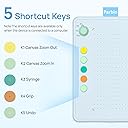
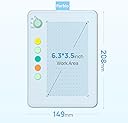
The Parblo Ninos Q is a sleek, lightweight 6.3x4.5 inch drawing tablet designed for Android phones and multiple platforms. Featuring 8192 pressure sensitivity levels, a battery-free stylus with tilt support, and 4 device switches, it offers versatile, professional-grade digital art capabilities on the go. Compatible with major creative software and equipped with customizable shortcut keys, it’s the perfect tool for millennial creatives seeking portable, powerful artistry.


| ASIN | B0CLLX7P44 |
| Best Sellers Rank | #369 in Computer Graphics Tablets |
| Brand | Parblo |
| Color | Sky Blue |
| Customer Reviews | 4.2 4.2 out of 5 stars (56) |
| Date First Available | January 10, 2024 |
| Item Dimensions LxWxH | 8.19 x 5.87 x 0.04 inches |
| Item Weight | 14.1 ounces |
| Item model number | Ninos Q |
| Manufacturer | Parblo |
| Operating System | Android 6.0 and above,Window 8.0 and above,Mac 10.12 and above,Harmony OS 1.0 and above |
| Product Dimensions | 8.19 x 5.87 x 0.04 inches |
| Screen Resolution | 5080LPI |
| Series | Ninos Q |
| Standing screen display size | 1.0 |
S**E
Truly Underrated!
These drawing tablets are probably the most underrated thing I've ever bought. Don't let their preschool look deceive you! These are surprisingly powerful little plug and play devices that are perfect for using with a phone (most are designed for a tablet experience). I've bought two now (one for each kid) and I'm seriously considering one for myself. Not only do they plug and play, they are immediately compatible with most of the apps I tried (including a 3d sculpting app and several drawing ones). And they're so perfectly priced for sticking a toe in the waters of digital art!
T**N
I regret nothing
My daughter LOVES this drawing pad! Cute but does everything a professional pad would do. Nothing better for the price!
M**H
Semi works for Linux
The quality isn't bad but not top notch. It feels like a kids toy yet serious and fun enough. It works with android and pressure sensitivity works fine. I no longer have Windows OS and have been using Linux Ubuntu/Debian variant for years, Zorin OS 17.3 core. It is plug and play under the OS but no pressure sensitivity.
J**N
Parblo Ninos Q Drawing Tablet: A Decent Starter Tablet, But Confusing Marketing (3 Stars)
As with any new drawing tablet, there's definitely a learning curve. It takes some time to adjust to the fact that you draw on the tablet surface while looking at the screen of your device. One thing I do like is that the connection cable is permanently attached to the tablet itself, so there's no chance of losing it. The design is a bit quirky, though. The name "Ninos" translates to "children" in Spanish, and the packaging even has a cute cartoon creature. However, the tablet itself is a pastel color and labeled as for adults only. This mixed messaging is confusing. Instruction Woes and App Issues The instructions that came with the tablet were less than helpful. I wasn't able to decipher most of them, and the recommended apps weren't great either. In the end, I found much better success with a different app called Sketchbook. Sketchbook offers a wide variety of drawing tools that mimic real-world art supplies like pencils, charcoal, and airbrushes. Using the Parblo Ninos Q with Sketchbook has given me a surprisingly good digital art experience. Overall Impression While I'm happy with the tablet now, there are some things to consider. If you're looking for a drawing tablet for a child, the marketing for the Ninos Q is misleading. Despite the name and design, there's no reason a child couldn't use it. However, be prepared to do your own research on compatible apps, as the included instructions and recommendations are lacking. That said, if you're an adult looking for an affordable starter tablet to experiment with digital art, the Parblo Ninos Q can be a decent option, especially when paired with a good app like Sketchbook.
(**A
Great Christmas/ birthday present
Great gift for young adults. Easy to use and lightweight. Sleek design and money well spent. Recommend for anyone wanting an easy gift that will be very useful.
A**A
Me gustó bastante, soy estudiante así que buscaba una tableta gráfica que se ajuste a mi presupuesto que pueda llevar a todos lados. Se conecta a mi celular y a mi computadora muy bien, y vino con un porta celular, puntas de repuesto. Es mi primera tableta gráfica y me he adaptado bien a ella desde que llegó.
C**O
A mi nena no le sirvió
B**.
High-quality product
From the moment I opened the Parblo Ninos Q's package, I was pleasantly surprised with its quality and with the thoughtfulness that had clearly gone into designing this product. The quick start manual is written in slightly imperfect English, but that actually adds to the charm of this whole experience. The first thing the manual told me to do was make sure my phone's OTG (On The Go) function was turned on. But the manual didn't tell me, specifically, where I needed to go in my phone's settings to accomplish that. Happily, a Google search informed me that on Samsung phones such as mine, OTG mode is automatically turned on by default, so there was nothing else I needed to do. If you have some other brand of phone where OTG is not turned on by default, you'll need to possess at least a modicum of digital literacy in order to get your phone talking to this device. I downloaded the first drawing app mentioned in the quick-start manual, plugged the tablet into my phone's USB-C port, and I was drawing sketches in seconds. The Ninos Q includes an adapter in case your phone has a Mini-USB port, but if your phone is old enough to have one of those, I hope for your sake you get a new phone soon! This device gets its power from your phone's USB port, so it never needs to be charged. And the included pen is not a powered device, so the whole setup is as simple as can be. What's not included is an adapter for standard USB-A ports. So if you're looking to use this tablet with an older computer that didn't come from the factory with at least one USB-C port, you'll need to get a USB-C-to-USB-A adapter. If you plan to use this tablet with a Windows computer, there's a driver to download from Parblo's Web site. Using this item with a Mac should be a simple matter of plugging it in. I had not used a graphics tablet since the days of my Atari 800 personal computer, so I didn't have a modern frame of reference, but the Ninos Q was easy and enjoyable to use. I like that when I hovered the pen over the tablet, it knew where the pen was, and displayed a dot on my phone's screen to let me know where the line would appear if or when I pressed the pen to the tablet. And from an industrial design standpoint, the look and feel of this tablet and its packaging are just so endearing. Like, honestly, I want to find the people who designed this thing and give them hugs. They put so much love into this product that I feel like I know something about them as people. It's not every day you can say all that about a phone accessory! I'm obviously not yet very good at drawing on a graphics tablet, but the attached photo is a screen shot of my first effort, using the Ninos Q with an Android app called Autodesk Sketchbook. If you're a careful or committed artist, I'm sure you can produce much better results!
M**S
Amazing for the price. I love the cute design of the tablet with the nice pastel colours. The tablet comes with six spare nibs as well as the one in the stylus. The software downloaded within 30 minutes and works well with my new windows 11 pc. Instructions have clearly drawn graphics and the tablet has a cloth loop to hold the sylus when not in use. There is an adjustment knob at the top of the tablet to adjust the speed of the stylus. I would definately recommend this tablet as it does everything I need at a bargain price and is a stylish little unit. Thanks.
M**O
Me encantó totalmente es muy bueno para principiantes y te acostumbras fácil.El lapiz es bueno en cuanto a sensibilidad e inclinación y se pueden personalizar los botones.Tuve algunos problemas configurandola para mi dispositivo pero al final si pude y no tuve ningún otro inconveniente.
B**I
Es muy bueno y conveniente. Dibujo desde hace tiempo, pero me faltaba una tabla que pudiera llevar conmigo a todos lados, compre una tablet pero era muy pesada asi que esta tiene el peso adecuado para mi. adjunto sketch, utilizo la app sketchbook. no he hecho un dibujo "completo" usualmente solo hace sketch aqui y lo paso a computadora para el lineart y coloreo
Trustpilot
4 days ago
2 weeks ago