We remain fully operational. Our teams are working around the clock to ensure your deliveries continue safely.

DOWNLOAD THE APP


Customer Services
Copyright © 2025 Desertcart Holdings Limited
DOWNLOAD THE APP


Buy anything from 5,000+ international stores. One checkout price. No surprise fees. Join 2M+ shoppers on Desertcart.
Desertcart purchases this item on your behalf and handles shipping, customs, and support to Hong Kong.
🚀 Upgrade to the future-proof WiFi 7 powerhouse and never settle for slow again!
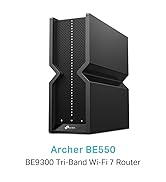
The TP-Link Archer BE550 is a cutting-edge WiFi 7 tri-band router delivering ultra-fast 9.2Gbps speeds, enhanced by 6 internal antennas for expansive coverage up to 2,000 sq. ft. It features five 2.5G WAN/LAN ports to surpass traditional gigabit limits, supports seamless mesh networking via EasyMesh, and includes advanced security with TP-Link HomeShield. Designed for professionals and tech-savvy users, it ensures stable, high-performance connectivity for streaming, gaming, and smart home setups.



| ASIN | B0CT94XNX3 |
| Antenna Location | Home |
| Antenna Type | Fixed |
| Best Sellers Rank | 1,758 in Computers & Accessories ( See Top 100 in Computers & Accessories ) 12 in Routers |
| Box Contents | Archer BE550 |
| Brand Name | TP-Link |
| Colour | Black |
| Compatible Devices | Laptop, Personal Computer, Smart Television, Tablet |
| Connectivity Protocol | Wi-Fi |
| Connectivity Range | 2000 Square Feet |
| Connectivity Technology | Wi-Fi |
| Control Method | App |
| Controller Type | App Control |
| Coverage | Maximized Coverage |
| Customer Reviews | 4.0 4.0 out of 5 stars (191) |
| Data Transfer Rate | 9214 Megabits Per Second |
| Frequency | 6 GHz |
| Frequency Band Class | Tri-Band |
| Has Internet Connectivity | Yes |
| Has Security Updates | Yes |
| Is Modem Compatible | Yes |
| LAN Port Bandwidth | 2500 Mbps |
| Manufacturer | TP-Link |
| Manufacturer Part Number | Archer BE550 |
| Maximum Upstream Data Transfer Rate | 9214 Megabits Per Second |
| Model Name | Archer BE550 |
| Model Number | Archer BE550 |
| Number of Antennas | 6 |
| Number of Ports | 5 |
| Operating System | RouterOS |
| Other Special Features of the Product | Wi-Fi 7, Multi-Link Operation, 2.5G Ports, EasyMesh-Compatibility, TP-Link HomeShield |
| Router Firewall Security Level | True |
| Router Network Type | Tri-Band |
| Security Protocol | WPA/WPA2/WPA3 (Likely includes WPA2) |
| Unit Count | 1.0 count |
| Voltage | 12 Volts (DC) |
| Wi-Fi Generation | Wi-Fi 7 |
| Wireless Compability | 802.11.be |
S**.
Superb Wifi Router Replacement for Sky
Bought to replace a Sky fiber router and it doesn't disappoint: * Great wifi speed with no random drop outs (unlike the Sky router) * Great range covering all corners of our 3 storey house * VPN options for specific devices * Simple easy to use app for your phone * Rock solid stability, and been online since Day 1 for over 22 days now
M**E
Excellent Router! 👍🏼😁👍🏼
I bought this to replace my TP-Link AXE 5400 Router. I have a 2Gbps broadband contract and the Sagemcom standard, and Pro routers provided by YouFibre only gave me a maximun of 800-900Mbps, and lots of dropouts and disconnections. I now get a consistent max of about 1.7Gbps less than a meter from the router. About half of that 6 meters away. The claims about "entire home coverage" are of course pure fantasy. I have an extender about 6 meters away in an open plan kitchen, dining and living room to get good whole house coverage. Importantly, the BE550 is super reliable, great ping rates, with no dropouts or disconnections. I have only had to reboot it once (yesterday) since buying it in February
N**O
1/5 – Definitely NOT an upgrade. Looks great on paper, but performs worse than older TP-Link models.
I upgraded from a TP-Link Archer AX73 to this BE550, expecting better speeds and wider Wi-Fi coverage. The specs suggest it should be incredible: Wi-Fi 7, up to 9214 Mbps, and a 2.5Gbps port and LAN ports. But in real-world use, it’s honestly been a letdown. The key difference is the antennas: The BE550 has internal/hidden antennas, whereas the AX73 has six proper external high-gain antennas. And that matters. A lot. In my house (Victorian walls, two floors), the AX73 delivers strong, stable Wi-Fi everywhere — upstairs, downstairs, even into the garden. But the BE550 really struggled. Coverage dropped off sharply after just one or two rooms, speeds became inconsistent, and devices would occasionally disconnect. It feels like this router was designed for a small apartment or studio space, not an actual home with brick walls. (I barely got 20mbps on my phone and maybe 55mbps on macbook) After a couple of frustrating days, I’ve boxed the BE550 and instead ordered the Archer AX72 Pro, which has Wi-Fi 6 + a 2.5Gbps port — and if it performs anything like the AX73, it’ll be a far better fit for a full house. Pros: ✅ 2.5Gbps WAN/LAN for faster internet backhaul ✅ Clean, minimal design ✅ Easy setup Cons: ❌ Internal antennas = noticeably weaker range ❌ Struggles through real-world walls ❌ Worse performance than cheaper TP-Link models ❌ Not suitable for house-sized coverage Verdict: If you live in a flat or open-plan apartment, this might be fine. But for a house, especially with solid walls, stick to the Archer AX series (AX72 Pro / AX73 / AX5400 range). They simply perform better where it matters. Sometimes the newest isn’t the best — and in this case, the “upgrade” was actually a downgrade.
I**T
Good router - even better now price has dropped
While I have noticed some issues with wifi overall this is a very good router. My only issue is how much the price of this has dropped since I bought it. I should of waited!
A**R
Good, but signal strength and reliability could be improved
Generally good. However, as per some tech reviews, signal strength drops off quickly if you have walls or floors in the way compared to my old BT WiFi 5 router. Also noticed the odd drop in connection where unable to rejoin WiFi network for a minute or so. Router logs only show from last reboot and minimal, so hard to tell what's causing it. Hopefully a future update might fix it?
J**Y
7 Months Later, Rock Solid Performance Even in a Victorian Terrace
I bought the TP-Link Archer BE550 in August 2025 and I’m writing this review in March 2026, so that’s about 7 months of daily use. I’ve had zero issues with it. At the moment I’m running it in Access Point mode behind my ISP router and it’s been completely stable. No random drops, no freezing, and the coverage has been very good. For context, I live in a Victorian terrace with thick solid brick walls and heavy plaster. WiFi in houses like this is normally difficult because signals struggle to get through the walls. My setup is the ISP router connected by Ethernet to another TP-Link router upstairs, and then that connects by Ethernet to the BE550 downstairs in the hallway where most of the activity in the house happens. Because the nodes are wired rather than repeating WiFi, the network stays very stable and devices move between them properly. Speeds depend on where you are in the house. In the same room I can get close to full gigabit speeds. Through one or two brick walls I usually see somewhere between 200 and 500 Mbps on WiFi, and sometimes even around 900 Mbps depending on where you’re sitting. One thing I noticed is that the TP-Link routers actually perform better than my ISP router. On the ISP router I normally see around 700 to 900 Mbps on my gigabit line. When connected through the BE550 or the other TP-Link node I often see results around 1.1 to 1.2 Gbps on internal tests. I think a lot of the lower ratings come from people expecting a single router to cover an entire house. In older houses with thick walls that just isn’t realistic. Using multiple access points or mesh nodes makes a big difference. The hardware itself feels powerful and the app makes everything easy to manage. Long term I plan to put my ISP router into modem mode and use the BE550 as the main router instead. That will also let me enable a VPN server so I can connect back to my home network when travelling. Overall I’m very happy with it. If you set it up properly and understand your home layout it performs exactly how you’d expect from a high end router.
C**N
Buon prodotto, esattamente come descritto.
Trustpilot
1 day ago
2 weeks ago