Buy anything from 5,000+ international stores. One checkout price. No surprise fees. Join 2M+ shoppers on Desertcart.
Desertcart purchases this item on your behalf and handles shipping, customs, and support to Hong Kong.
🚀 Elevate your remote management game with PiKVM V4 Plus — the ultimate KVM over IP powerhouse!
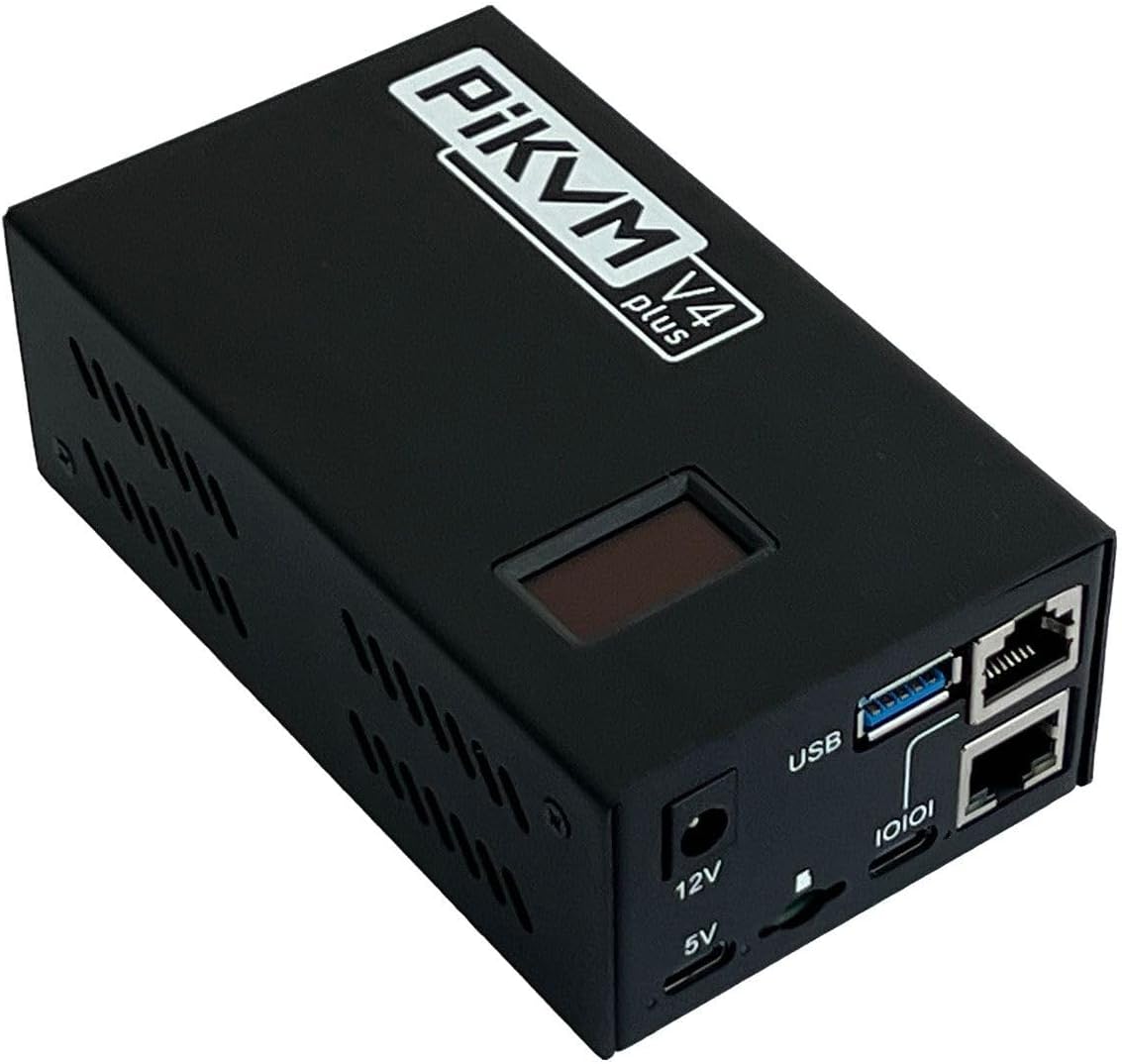
PiKVM V4 Plus is a cutting-edge, open-source Raspberry Pi CM4-based KVM over IP device designed for professional remote server and PC management. Featuring dual HDMI outputs at 1920x1080@60Hz, tri-channel connectivity (WiFi, Ethernet, Cellular), and an internal USB 3.0 slot for extra storage, it delivers industrial-grade reliability with CE certification. The turnkey package includes all necessary cables and mounting hardware, making it a plug-and-play solution for complex tech support and remote access scenarios.
| ASIN | B0CVB82PXY |
| Best Sellers Rank | #42 in KVM Switches |
| Brand | PiKVM |
| Brand Name | PiKVM |
| Circuit Type | 1-way |
| Color | black |
| Compatible Devices | Servers, PCs, devices with USB, Ethernet, or cellular connectivity |
| Connectivity Protocol | Wi-Fi |
| Connector Type | Plug In |
| Contact Material | Metal |
| Contact Type | Normally Open |
| Control Method | Remote |
| Control Type | remote |
| Current Rating | 2 Amps |
| Customer Reviews | 4.4 out of 5 stars 37 Reviews |
| Included Components | PiKVM |
| Item Dimensions | 4.72 x 2.68 x 1.73 inches |
| Item Weight | 0.35 Kilograms |
| Manufacturer | PiKVM |
| Material Type | Metal |
| Model | Plus |
| Mounting Type | Panel Mount |
| Number of Items | 1 |
| Number of Positions | 1 |
| Operating Voltage | 12 Volts (DC) |
| Operation Mode | ON-ON |
| Part Number | 9025 |
| Specification Met | CE |
| Switch Type | Kvm |
| Terminal | Through Hole |
| UPC | 605926258261 |
| Unit Count | 1.0 Count |
| Upper Temperature Rating | 50 Degrees Celsius |
| Wattage | 24 watts |
A**.
Works on MacBook Pro - USB 2.0 is the Key
I was about to return this unit - I was pulling my hair because my MacBook Pro was not recognizing the HID components (mouse/keyboard) but finally I got it to work. Trial and error and perseverance paid off! my MacBook only has USB-C ports and the standard cable that comes with the unit (the USB-C to USB-A 3.0) nor a USB-C to USB-C will not work on the mac. After trying different things by pure luck I stumbled upon a workable solution: the OTG USB port must be connected to a USB 2.0 port on the mac (not into a USB 3.0!). I just happened to have a USB-C hub that contains most USB-A 3.0 ports and one USB-A 2.0. Upon plugging the OTG cable into that USB-A 2.0 it automatically worked. For me the real value comes with the functionality of pass-through audio both ways (to hear audio from the target and to transmit microphone audio from the client), that way I can literally connect to real live Zoom meetings from a client machine and transmit my voice via a local microphone into the target machine. You have to make some technical changes to a .yml file, so it's not really a walk in the park, but if you have no clue how to do this any competent AI model can help you along the way for setting it up. I have not had any connectivity issues with the PiKVM as of yet, but I have only been using it for 2 weeks (so far so good). So MacBook users, this is indeed compatible!. You are required to buy that extra hub and you are home free. I'm real happy with my set up and I definitely recommend it. The fact that this is compatible with audio pass-through makes it worth the money!
J**B
Nice remote connection to my KVM in my rack
Worked great. I web browse to the PiKVM that is connected to the 8 port TESmart KVM and now I have remote access to all my servers in my cabinet. Took a while to get both devices to communicate to each other but it's working now just fine.
S**N
Powerful KVM Over IP - Feels Like Using the Laptop Locally
I recently purchased the PiKVM V4 Plus and I must say it is an excellent and very powerful device. Setup was straightforward, and once connected with an Ethernet cable the performance is extremely smooth. The responsiveness and speed feel almost the same as using the laptop directly in front of you, with very minimal latency. One of the best things about this device is its compatibility. It works flawlessly with both Mac and Windows systems without any complicated configuration. I was able to access BIOS, manage the system remotely, and even troubleshoot boot issues without physically touching the computer. The build quality is solid and the web interface is clean and easy to use. Features like virtual media, remote keyboard/mouse control, and reliable video streaming make it a perfect solution for remote system management. It’s especially useful if you manage multiple machines or need secure remote access. Overall, PiKVM V4 Plus is a fantastic product for anyone who needs reliable KVM over IP functionality. Powerful, fast, and very well designed. Highly recommended.
D**.
Really nice product
I think the most highlight of this product is the little display screen on the top of the unit. I don't have to go searching for the IP address that it gets assigned by the DHCP server. The one thing it lacks is the firmware upgrades and can be a little cumbersome because you have to go to SSH or terminal to do the upgrades. However the web interface is very intuitive and useful and has helped with maintaining servers in rack where no monitor a keyboard is available
T**R
Do you enjoy banging your head against a brick wall for 6 hours? Then this is for you!
I’m a tech professional who has been building computers since I was 12, and maintain a large home lab and extensive network, with multiple containers and RPIs. I’ve had issues with a Mac Mini M1 mounted in a rack not loading up the remote management client, so thought I’d give one of these a try. Despite the fact I’m a huge fan of open source software projects like HA and others, and have plenty of experience with RPIs- this experience was 6 hours of swapping cables, re-flashing OS, editing YAML files and tweaking MacOS config only to eventually figure out that sometimes these just might not work with M series Mac Mini’s based on another hour of research. Anyone attempting to use these with M based Mac Mini’s - be warned. I’m almost tempted to take mine apart and see if the USB C header is even connected to the main board. Video works, but keyboard and mouse control does not. No HID device shows up on the Mini when this is connected through dozens of test cables, running the gamut from beefy thunderbolt to USB A to C just to mix things up. Sadly, after i return this, i will have lost money after wasting 6 hours. As others have pointed out, the documentation isn’t great- and the discord offered me no help. I have a little 80 dollar product from another company ordered that also supports Tailscale, and i predict I’ll plug it in and it will work instantly. I’ll definitely report back here if that’s the case. And...the much less expensive product worked instantly, that being the GL.iNet Comet (GL-RM1). Mouse and Keyboard instantly recognized on M1 Mac mini in the rack. it also seems to not require a fan, is smaller, and runs much cooler. Obviously YMMV- still love open source products and RPIs- but in my case it feels like I received a physically faulty unit with the USB header not connected or configured, or there is a general incompatibility with some/all M Series Macs and PiKVM. in either case- their documentation should be more accurate and transparent regarding this.
I**S
A fantastic way to save on-site trips
These really are an awesome remote management tool. I have saved a trip out on-site in the middle of the night so many times because I can access BIOS and power cycle remotely. There is so much you can do with this platform, and the independent network port means you can also salvage a network after a switch configuration gone wrong if it is wired to the master router. What a great invention!
K**A
Excellent device
Excellent device for remote access and management. Setup was straightforward and the performance is very stable. Video quality and keyboard/mouse responsiveness are great, making it perfect for managing systems remotely without any issues.
M**I
Funcionalidad
Gran producto para integración
V**R
Funciona bien
Funciona bien 😃 puedo desbloquear remotamente el servidor
Trustpilot
5 days ago
2 weeks ago