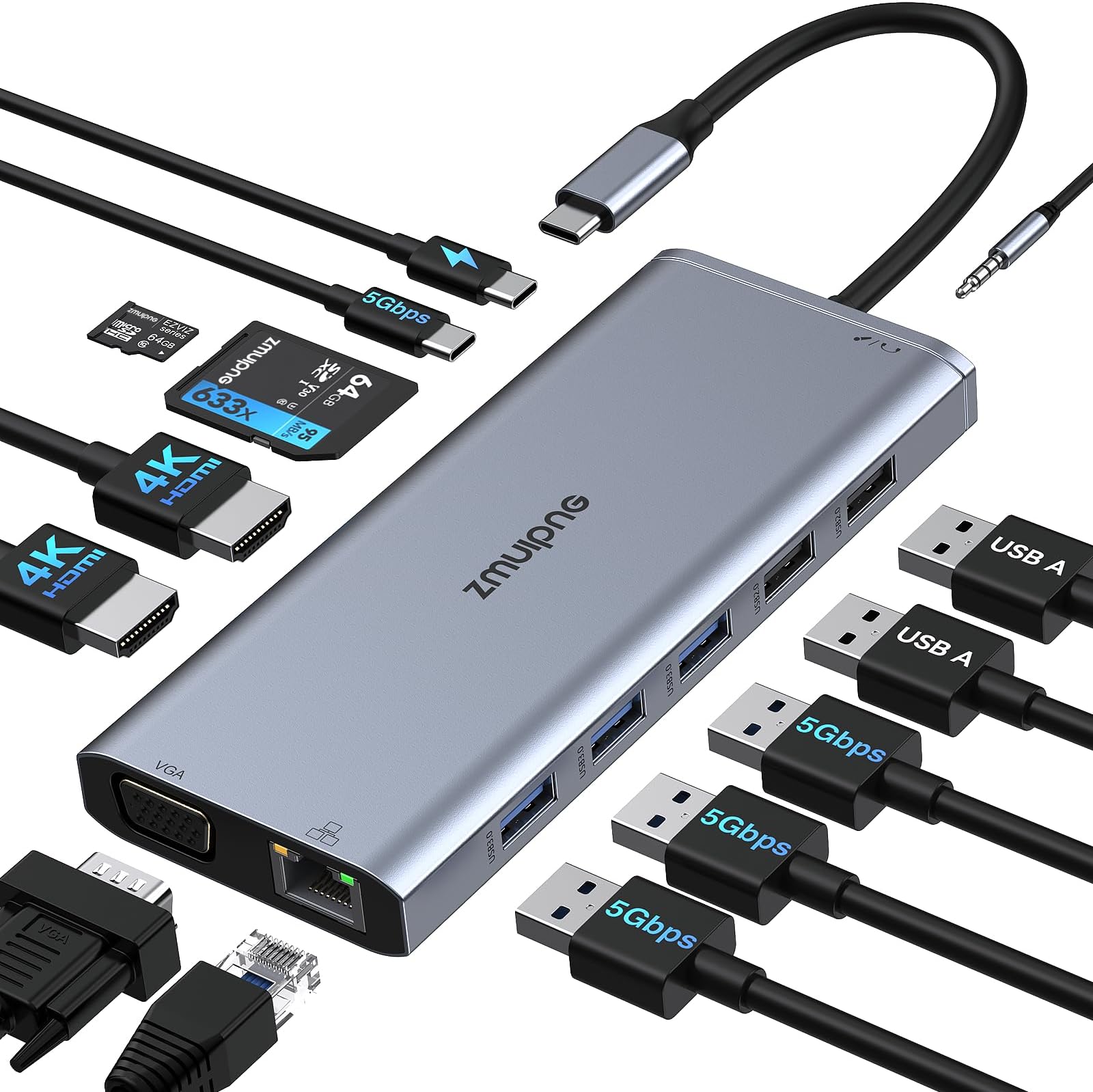
🚀 Elevate your laptop to a powerhouse workstation—because your productivity deserves the best!
This premium 14-in-1 USB-C docking station delivers dual and triple monitor support up to 4K, 100W power delivery, multiple USB ports, gigabit Ethernet, and SD card readers in a sleek, plug-and-play aluminum design. Compatible with major laptop brands, it’s engineered to transform your laptop into a full-featured desktop setup, perfect for millennial professionals craving efficiency and seamless connectivity.


| ASIN | B08H5CYC43 |
| Best Sellers Rank | 5,103 in Computers & Accessories ( See Top 100 in Computers & Accessories ) 44 in Docking Stations |
| Brand Name | ZMUIPNG |
| Colour | Grey |
| Compatible Devices | Dell Laptops: XPS 13 9380/ 9365/ 15 2018/ 9300/ New with i7 Dedicated Graphics, 64GB RAM and 2TB SSD; Latitute 7280/ Latitude 5310 2-in-1; Precision 7730/ 7750; Laptop 59 HP Spectre 13-af001TU/ x360 13t/ Folio (13t-ak00cto)/ 360 Laptop/ Specter x369; Elitebook 840 G5 Series/ X2/ 1030 G3/ 745 G6/ 830 2018 Elite 800 G4 Lenovo Yoga 720-13IKB/ 730/ 900-13ISK/ 910/ 920/ 930/ 940-14IIL; 3. Generation Th… |
| Country of Origin | China |
| Customer Reviews | 4.2 4.2 out of 5 stars (1,425) |
| Data Transfer Rate | 5 Gigabits Per Second |
| Enclosure Material | Aluminum |
| Hardware Interface | 3.5mm Audio, Ethernet, HDMI, MicroSD, USB 3.0 Type A, VGA |
| Item Dimensions L x W x H | 17L x 9W x 1.5H centimetres |
| Item Weight | 100 Grams |
| Manufacturer | ZMUIPNG |
| Manufacturer Part Number | ZM1822 |
| Model Number | MH18 |
| Number of Ports | 14 |
| Operating System | Windows 10, Windows 7, macOS |
| Product Features | Fast Data Transfer, Plug and Play |
| Product Warranty | 6 Months |
| Total USB Ports | 7 |
J**Y
Perfect
Works perfectly with my laptop, two monitors via HDMI, various USB peripherals, Ethernet connection, and more. The setup is smooth and everything runs without lag or connection drops. You do need a decent power supply for all ports to function—I use my MacBook’s 60W charger and it handles everything flawlessly. Anything lower and you’ll notice some ports won’t work as they should. Build quality feels solid, and it doesn’t overheat even after hours of use. Overall, a great all-in-one solution for turning your laptop into a full workstation.
J**K
Excellent fully-featured dock for a Surface Pro 9
Bought this as a dock for my Surface Pro 9, and it's been perfect so far. I needed a dock that has: * 5 x USB-A for external keyboard, mouse, Jabra, and external USB ASIO sound interface and MIDI keyboard * 1 x USB-C for external SSD drive * Ethernet port * Headphone jack * Long cable so that I can put the dock on my desk when connected to the Surface Pro 9's inconveniently placed Thunderbolt ports. As I have a lot of devices connected, I've used an additional external power supply connected directly, and have had no problems at all. I've run music software, playing VST instruments live, reading sample files from the connected USB audio drive, using the external audio + MIDI interface, over this dock with no problems at all. I've not needed the two HDMI connectors or VGA port (or card readers) yet, as I use a separate Thunderbolt -> DisplayPort cable using the second Thunderbolt connector on my SP9. The headphone adaptor worked fine when I tested it. The unit is compact and not too heavy, considering how many adaptors are built in. So far I'm absolutely delighted with this - it's a perfect dock and excellent value for money.
M**S
Great docking station
Works really well to provide dual screen output for works laptop. Plenty of ports for wireless mice etc, enabling the laptop to sit on the desk out of the way with no need to use its other ports. Had several months with no issues. Very satisfied.
S**N
Super neat, very flexible. Buy a USB-C extension if this is for a desk
Update: The original dock was defective, and has been replaced. The new one is excellent. Combined with a USB-C extender, as I find the cable too short and would rather have had a port for a C-C cable on the dock. --- Seriously improved my laptop experience, despite only costing £45 (and I was eyeing ~£200 Thunderbolt docks before buying, so I've saved quite a bit there) Rather than plugging/unplugging USB-C power and a slightly loose USB-DVI cable every time I want to move my laptop, and being perpetually short of USB ports, I've now got 2x HDMI (with audio), Ethernet, USB-PD power, an extra USB-C, more USB-A ports than I could ever need, and an SD reader, all through one connector. Ethernet is a significant improvement when playing Stadia, and reduces contention on our highly contended WiFi, whilst an extra monitor is always nice to have. However, occasionally (can't even say hourly, there might be come correlation with changes in CPU load) both displays go blank and act as if disconnected, whilst the laptop thinks they're still connected. The displays come back within a few seconds, its never been at any annoying time, and my windows are where I left them (unlike if the displays were unplugged from the laptop) so this doesn't frustrate me enough to return. Also note the extra USB-C port doesn't support display out, not that it was expected to.
J**N
Works ok, but doesn't seem to handle many connections at the same time
I have been using this for about 2 years now. It has about 12 ports total and works ok, but for some reason I cannot connect more than 4/5 ports at the same time. I have 2 monitors connected, 1 web cam, and 1 small ring light. But when I try to add another ring light it simply doesn't work and the monitors turn off and power cuts. It's extremely frustrating and I wouldn't buy this again. If someone could also tell me why this happens and how to avoid, I would be extremely grateful.
E**Y
Robust and use it daily, almost 5 years
Robust, does what it says on the tin. Bought it 4.5 years ago.
C**U
Great.
Fantastic. I use it everyday with 2 external screens. Not had a single problem in 2 years. Buy.
A**C
Well made but headphone jack doesn't work
Very well made, all functions work except for the headphone jack. It worked for about a couple of weeks and then stopped. However, everything else works well. I would recommend it but not if a headphone jack is essential to you.
S**T
Works well with both my windows and mac, no issues
B**S
Degelijk ding, werkt direct en probleemloos met een HP G6 Elitebook. Getest met de volgende hardware ingeprikt: logitech unified receiver, een 1440p LG monitor (max refresh rate zit vast op 75hz), een muis en een logitech brio 4k webcam. Ook opladen gaat goed waarbij de temperatuur van de hub hoogstens handwarm wordt.
J**Y
I got this because I was setting up multiple monitors linked to my laptop without enough hdmi ports. Suffice to say this was exactly what I needed, while also giving extra port functionality I didn't know I needed (mouse, keyboard, ssd, etc).
H**I
Ich habe an diesem Dock Ethernet, zwei FullHD-Monitore bei 60 Hz, eine HD-Webcam von Microsoft, einige USB-Devices (nur zum Laden) und ein separat gekauftes 90W-USB-C Netzteil. Meinen LG gram kann ich nun mit einem einzigen USB-C Kabel mit dem Dock und damit mit allen genannten Geräten verbinden, inkl. Power Delivery. Tastatur/Mouse (Logitech Unifying) und ein Headset-Bluetooth-Dongle (Sennheiser) stecken dauerhaft direkt im Notebook, da ich diese Geräte auch unterwegs verwende. Das Dock funktioniert einwandfrei - besser als erwartet - und wir zwar warm aber nicht heiß im Betrieb. Ich hatte einmal den Fall, dass nach dem Hochfahren aus dem Energiesparmodus die Monitore schwarz blieben - das ließ sich aber lösen indem ich einmal den Strom vom Dock getrennt und wieder eingesteckt habe - auch hier tut scheinbar Reboot gut, ab und an. Manchmal geht das Notebook nicht in den Energiesparmodus, wenn es noch am Dock hängt - die Bildschirme schalten sich zwar aus, aber man hört den Lüfter weiterlaufen. Das passiert nicht immer, ich habe mir dennoch angewöhnt, abends das Kabel vom Dock am Notebook abzuziehen. So stelle ich sicher, dass er nachts nicht weiterläuft. Morgens stecke ich ihn wieder ein. Da diese Problem vermutlich nicht dem Dock anzulasten ist, sondern irgendeine Inkompatibilität mit dem Notebook, vergebe ich trotzdem fünf Sterne - es ist bei weitem günstiger als vergleichbare Docks von Lenovo oder Dell und bietet sogar noch mehr Funktionen.
W**R
Ich muss für eine Übergangszeit drei Monitore (Full HD) am Surface Pro 7 anschließen. Das funktioniert sofen man den Bildschirm vom Surface abschaltet (Windows Taste und P gleichzeitig drücken, "Nur zweiter Bildschirm" wählen). SDHC Card mit 512 GB funktioniert auch problemlos. Lediglich mit der Ethernetverbindung gibt es manchmal Probleme, so dass ich diese nicht mehr nutze und statt dessen das WLAN nutze. Eine Dauerlösung sollte das nicht sein. Drei Monitore betreibt man dann doch besser an einem richtigen PC.
Trustpilot
1 month ago
1 month ago