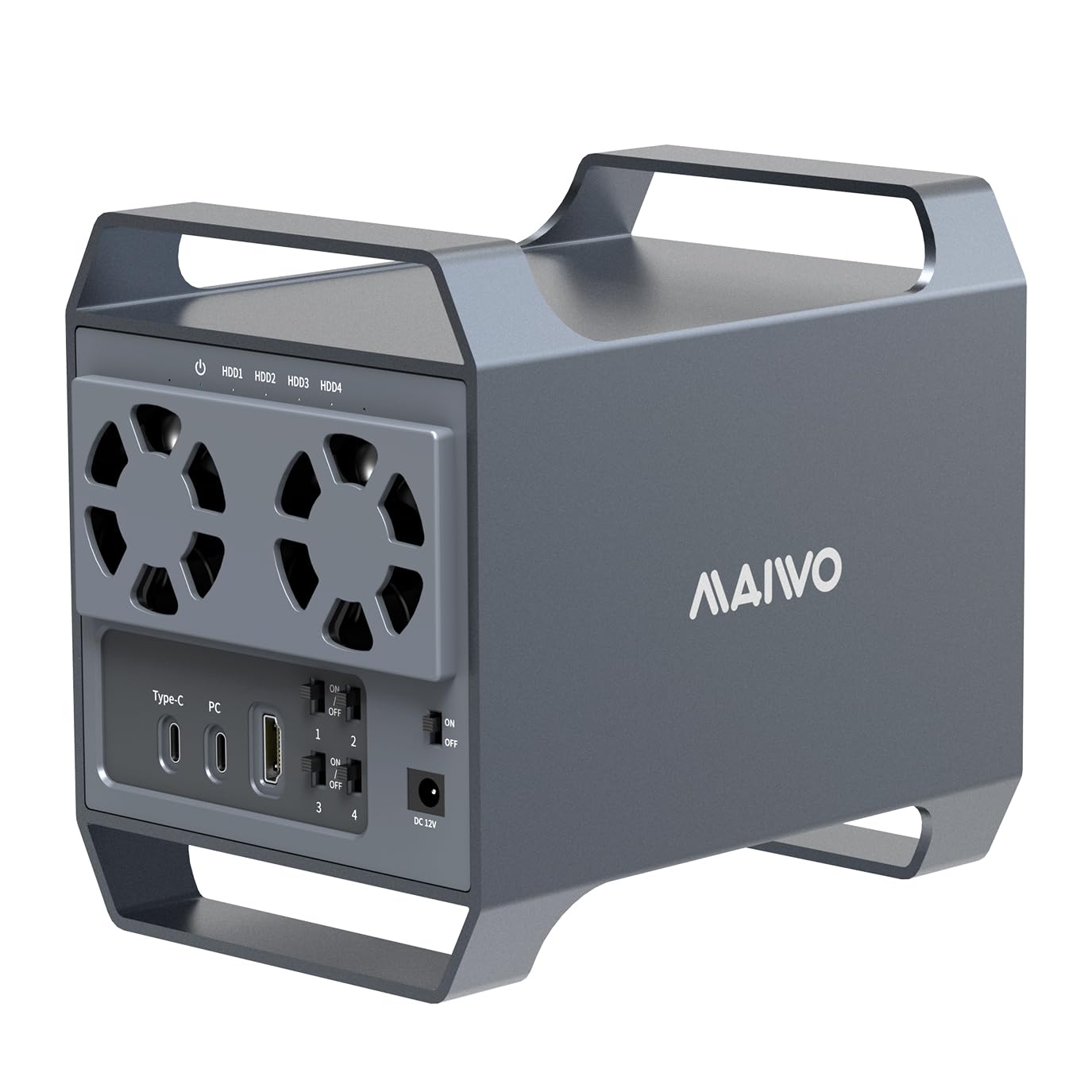
🚀 Elevate your storage game with MAIWO’s powerhouse 4-Bay enclosure—where speed meets cool efficiency!
The MAIWO 4 Bay SATA Enclosure is a high-capacity, non-RAID hard drive docking station designed for professional-grade storage expansion. Featuring an aluminum alloy chassis with two intelligent cooling fans, it supports up to 96TB total capacity across four 3.5” SATA drives. With blazing 10 Gbps USB-C connectivity, daisy chaining capabilities, and a 4K HDMI port, it offers versatile compatibility across Windows, macOS, Linux, and smart TVs. Independent power switches and an 84W power supply ensure stable, efficient operation, making it an ideal solution for demanding data management and multimedia workflows.


| ASIN | B0D28Q187R |
| Best Sellers Rank | #59,127 in Computers ( See Top 100 in Computers ) #259 in Enclosures |
| Compatible devices | Computers, Laptops, and Smart TVs |
| Data transfer rate | 10 Gigabits Per Second |
| Hard disk form factor | 3.5 Inches |
| Item model number | K35284A |
| Item weight | 1.1 Kilograms |
| Manufacturer | MAIWO |
| Material | Aluminum Acrylonitrile Butadiene Styrene (ABS) |
| Max number of supported devices | 4 |
| Memory storage capacity | 88 TB |
| Product Dimensions | 18.47 x 12.78 x 16.26 cm; 1.1 kg |
R**I
This enclosure replaces an Akitio Thunder3 Quad enclosure that was not working with my mac. This Maiwo enclosure works with Windows and macOS. No additional drivers needed.
K**X
This is an initial review. I may update later if there are issues. TLDR; It works great, with a few minor annoyances. Excellent value. Update: I created a basic Windows Storage Space with 2 of the drives: a 2TB and a 1TB. The process was easy - if you follow the instructions. You Must back up whatever is on the drives before you create the storage space. Everything on the drives gets wiped out in the process. Then you can restore it afterwards. 1) It was easier, to set up than putting internal drives into a PC case. Granted, the font in the instructions is fairly small - not the best if you don't have good eyesight. Truth is, I found the setup to be straightforward enough that I didn't refer to the instructions. There are _lots_ of screws to deal with - remove 1 to get part of the frame out, then 27 to be screwed in to hold it all together. That is a PITA, for sure, and you _could_ use fewer and I'm sure it would be fine. 2) There is a procedure for creating a software RAID or JBOD. It involves some technical knowledge, or the ability to follow step-by-step instructions. And THAT may involve re-initializing the drives. If you have anything on the drives, you must back them up or the contents will be lost and unrecoverable. I'm not using Windows Storage Spaces, although I might at some point in the future. 3) The fan isn't THAT loud. Certainly not loud enough to deduct any stars. It is a 2-speed fan. The speeds are 0 and 1. Again, mildly annoying but not worth deducting a star. 4) The USB-C ports. You have to get them right. Use the one labelled PC to connect to the computer. The other one allows you to connect more stuff, such as a hub or card reader or another drive enclosure. 5) Make sure the drives are properly seated before you lock them down. I put in "HDD 2" and seated it before putting the HDD 1 / HDD2 cage in place. It would be difficult to move the drive and seat it properly if you put it in the cage first. (I just thought of a different way. I'll try it if I buy another of these enclosures.) 6) I tried the HDMI port. Apparently it only works if you have a USB-C connection from the PC. I don't. I can confirm that there is no HDMI output if you use a USB-A connection from the PC. Not worth deducting a star - for me - because I didn't buy it for the HDMI port. It would be a nice extra, but not something I require.
A**R
This is such a shame! I really liked this disk enclosure and it is working perfectly as a TrueNAS disk pool for just over one month, and then it died! Similar to what others have said, when turned on the power light just flashes briefly, but it won't come on. I tested the power brick and everything is good there. The unit needs more robust electronics, particularly on the power internals.
M**H
It never worked. Installed as instructed, adapter’s light turns on but the power button on the system doesn’t work. Unfortunately I sent it to a friend abroad and cannot request a return :/
A**R
Buyer beware! Read the reviews on this, they are accurate. Purchased this April 4th. Died tonight, two months later. Seems to be a power issue. Nothing wrong with the power block the best I can see. The indicator light is illuminating anyway. But for whatever reason when I flip the power to On, the power LED basically turns of for a fraction of a second then turns off and nothing happens beyond that. No start up, no fan movement, no additional lights turn off. In short this thing is a total brick. I wanted to love this thing. Functionally it was great for the last two months. Had no issues installing my HHDs. Speeds where alright. Seemed like a win at the price until tonight. I checked the manufacturers website and the instructions given to combat an outage were futile. I'll attempt to reconcile this with there customer service department but from what I've read it sounds like its an uphill battle to find a resolution that doesn't involve buying another unit. I hate wasting my hard earned money and that sadly is how I feel tonight. Such a shame.
Trustpilot
2 weeks ago
3 days ago



