Buy anything from 5,000+ international stores. One checkout price. No surprise fees. Join 2M+ shoppers on Desertcart.
Desertcart purchases this item on your behalf and handles shipping, customs, and support to Hong Kong.
🚀 Elevate your desk game with precision, power, and style — don’t get left behind!
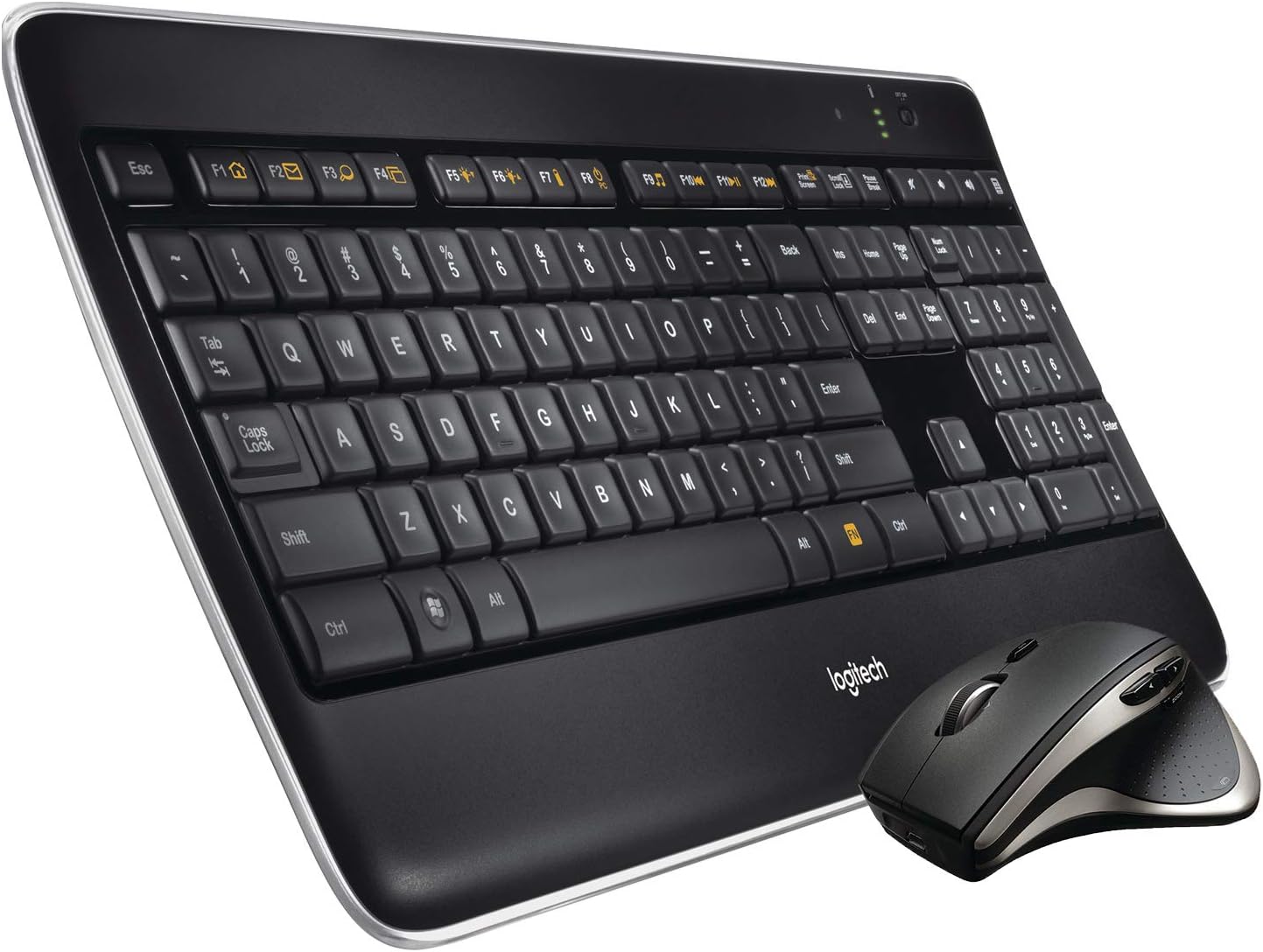
The Logitech MX900 Performance Premium Combo pairs a full-sized, backlit keyboard with a darkfield laser sensor mouse that tracks flawlessly on glass. Featuring smart speed-adaptive scrolling, multi-device Easy-Switch connectivity, and up to 10 days of battery life, this combo is engineered for professionals demanding precision, comfort, and seamless productivity across multiple devices.


| ASIN | B00I14395A |
| Antenna Location | Office |
| Are Batteries Required | Yes |
| Best Sellers Rank | #1,861 in Computer Keyboard & Mouse Combos |
| Brand | Logitech |
| Built-In Media | Wireless Keyboard^Wireless Mouse^Unifyed USB Receiver^Micro USB Charging Cable^ Received Extender Cable^AA Batteries (3)^User Documentation |
| Color | Black |
| Compatible Devices | Personal Computer |
| Compatible Operating System Family | Windows |
| Connectivity Technology | Wireless |
| Customer Reviews | 4.1 out of 5 stars 816 Reviews |
| Global Trade Identification Number | 00097855104380, 10097855104387 |
| Hand Orientation | Ambidextrous |
| Item Weight | 3.5 Pounds |
| Keyboard Description | Indoor |
| Keyboard Layout | QWERTY |
| Manufacturer | Logitech |
| Mfr Part Number | LOG920006237 |
| Model Number | 920-006237 |
| Movement Detection | Optical |
| Number of Batteries | 3 AA batteries required. (included) |
| Number of Keys | 104 |
| Operating System | Windows |
| Other Special Features of the Product | Backlit |
| Power Source | Corded Electric |
| Special Feature | Backlit |
| UPC | 012302458199 097855104380 735213111389 642125169547 801593250977 631058220807 809200120620 806792052285 808112924555 804993513970 807320197409 804067725483 801049959249 |
| Warranty Description | 3-year limited hardware |
M**G
Linux users, be not afraid!
AWESOME keyboard and mouse! (Any type-o's in this review are due to my fat fingers and not the keyboard ;) Probably unlike most reading this review, I have this combo running on a Linux (Centos 6.6) machine (which I believe has a Tyan motherboard, fwiw). I was a little concerned having read some of the other reviews. Not that it wouldn't work eventually, but that I would have to hunt down a script or scripts in order to get it to work smoothly. In particular, it looked like people were able to get the first device working but getting the Unifying Receiver to find the second device (the mouse) was not working out of the box. This was not the case at all with me. Half thinking it wasn't going to work, I shut down my machine, plugged the Unifying Receiver and restarted. It worked! Period. Both devices were identified and functional. The speaker volume was controlled by the volume keys. The F8 key put my system into sleep mode (hibernate) which is exactly what I want it to do while I'm asleep or at work. I probably don't use all of the features of the mouse but the left, right, forward, and back buttons work. I haven't found anything yet that uses the "application" button. I'm not actually sure what it is supposed to do. Is it supposed to let me switch between apps like the F4 key? It doesn't appear to do that. Then again I haven't totally figured out the F4 key's use either. That appears to let me switch between the app I'm using and I guess the previous one that had focus? Meh. I should be able to zoom by just using the mouse and a mouse button combination but that is not working for me out of the box. Instead, I zoom in and out using the scroll wheel while holding down the control key. I'm guessing I could load some software to get the zoom working with just the mouse but I just don't have a problem using the CTL key. The panning by scroll wheel also worked as expected though. I was already using a wireless keyboard/mouse combination (Microsoft) and it took all of 10 seconds to realize the Logitech hardware was light years ahead of that cheap feeling thing. It feels more solid. The keyboard is ultra smooth, ultra quiet, and just makes typing a breeze. I wanted an illuminated keyboard because I tend to use it at night and don't like a lot of ambient light in the room. Even if the Microsoft keyboard were backlit (whch it was not) the text on the Function keys was far too small. This keyboard has larger, backlit text and is great. I keep the keyboard on the desk, the wireless aspect is mainly important to me for the mouse but it's still welcome for the keyboard. If I wanted a wireless keyboard for using on my lap I would think one with a mouse pad might be more tempting than removing my hand to grab a mouse on the desktop. It's not a cheap combo but you get what you pay for in this case. The fact that it just plain works out of the box with Linux is fantastic. Hopefully it will last!
R**.
Great Upgrade from Previous Combo MX5500
I have been using Logitech's performance combo line for a while now. I had the Performance combo MX5500 before this but those were getting old and full of crumbs, grim, etc. First the Mouse: One of the main differences that I really like with the mouse is that you no longer have to use a charging cradled. The mouse uses a micro USB plug that works from any USB port to charge your mouse Also in the old Performance MX mouse it would automatically sense if you were trying to go into free scroll or not which could sometimes be problematic. In the new mouse you only have to press a button right under the scroll wheel to switch from click to free scroll. As with all performance MX mouses the forward and back buttons right above where your thumb hits are incredibly useful when web browsing or looking through folders. Keyboard: I am very impressed with the upgrades to this keyboard over the MX5500. First and foremost is you no longer have to use 4 AA batteries, instead you can just charge the keyboard directly with the same micro USB cable as the mouse. The backlit keys are a really nice touch even if not completely necessary. The biggest change from the MX5500 to this is that there is no longer a small screen top-center of the keyboard. Not a big deal as that was mostly a novelty anyways. Love the calculator button that quickly launches a calculator for you to do quick math. Software: Not much to say here its the same Logitech Setpoint software that they have been using for years. It works really well and gives you lots of customization options. Overall a very solid Mouse and Keyboard combo, I have been using Logitech for years and its obvious that they are still doing very good work. Highly recommended.
F**Y
Almost There but for a Charge
I've used Logitech for years and love their products. I previously had a MK700 keyboard with MK710 mouse combo that was very good but the mouse was a little too small for me and the keyboard has too much keyboard above and below the keys taking up too much space for me. The MX800 combo is great for multiple reasons. It's slim and fits my "play" area very well. The lighted keys are a great feature so I don't have to keep a light on if I don't want to also well lit in that it does not bother / tax my eyes in low light. The Performance MX mouse is a little larger and fits my hand much better also having multiple features for the thumb as well as the wheel like all Logitech devices do. The best part of this set? The ability to "pair" multiple devices to the USB wireless device! I went to Logitech and downloaded the MX800 Pairing Utility program (only 486KB) click it and immediately paired my existing MK700 keyboard and MK710 mouse with it so if there is any problem I can immediately fall back to the old equipment to work a fix on the new stuff. That is a great advantage in my book. So why only 4 stars you ask? It has been mentioned here is other reviews but I'll say it again. It got to me and the keyboard was not usable at all. The mouse was fine but when I plugged the USB charging cable into the keyboard I only got a flashing red light which means that the keyboard batteries are not charging. I tried changing the USB slot being used, computer, PS3 and PS4 all with the same results. Not knowing at the time what was going on, I went to a Logitech forum and figured the best (cheapest) option before returning the set was to replace the batteries. I ordered a 4 pack of Amazon 2400mAh batteries and add in a two day wait (yes, I'm too lazy to go to a store! That's why Amazon is here! HA! HA!) put the new batteries in and immediately got the sequential green lights meaning that the new batteries are in fact charging. I also immediately got the keyboard lights coming on. Fully charged in a couple of hours (3 solid green lights on the keyboard) and no problems since. Bottom line? For the money, put some decent batteries in the keyboard if you advertise it's ready to go or sell it without batteries. Otherwise best keyboard & mouse I've purchased thus far.
P**K
The MX800 Offers Outstanding Performance Along With a Little too Much Hype
A Logitech fan for decades, the company in my opinion has build it's strong reputation by remaining in the computer peripheral market and introducing innovative and progressive technologies. When it came to this model I had qualms about spending $150 for a keyboard and mouse. However after some thought and realizing both how much I have invested in my computers, why not give this a chance and see if the mouse and keyboard deliver on the promise and enhance the overall experience of working in front of my PC for hours at a clip. Right of the bat I'll tell you this is by far the nicest keyboard I've ever had and I've been using computers since the world ran on DOS Based 286 Antiques! Some nice touches regarding the keyboard are: * Wonderfully comfortable keys the "Perfect Stroke" technology really does allow for whisper quiet typing, the perfect resistance and more accurate and fast typing. * Great back lighting can be adjusted and senses your fingers immediately turning itself on and off after you're done typing. * Ultra slim, sleek design * Superb quality. As for the mouse, I love it, it's larger than the other Logitech mice we have which are all wireless as well and work on their three years of battery life from two double A batteries, a great innovation that I wish had been incorporated into this mouse. However the comfort level is a ten and the mouse is incredibly responsive. Some nice touches on the mouse include: * Ultimate comfort * extremely accurate performance and response times * Great Scrolling * Excellent variation of programmable buttons I find the "Darkfield" laser technology to be a bit of a hype. So the mouse can work on glass, so what? All I can see this doing is scratching both your glass desk or table beneath the mouse and the underside of the mouse itself, not much of a selling feature. Although I've read some complaints about Logitech service my experience has always been excellent. When I called to register my MX800 and get some support for a year old MK700 keyboard I was offered a replacement right away at no cost. What is more I like the Logitech unifying receiver, it's plug and play, can run multiple devices, takes up only one USB port and I find it more reliable than BlueTooth. On the somewhat downside, other Logitech combos at half the price carry a 5 year warrantee on keyboard and mouse. You get three years on the MX800. In addition the battery life is estimated at 10 days (less if you keep the backlighting on high) so you're still dependant on cables to charge both the mouse and keyboard. Less expensive models have as I mentioned earlier a 3 year run time without having to be charged. That technology should have been incorporated into the MX800 especially considering the price. However you can charge both via USB and still use both mouse and keyboard while you're charging up. Despite the few drawbacks, if you're looking for a superb keyboard and mouse that offer both excellent comfort and accuracy the MX800 is certain to provide a better work flow and efficient experience. Highly Recommended
C**S
Fundamental Design Flaw
Logitech Performance Combo MX800 Wireless Keyboard/Mouse We bought this mouse back in 2014. It was only after some time of use that it came to our attention that this mouse has a very critical flaw. I have attached an image in order for me to explain. On the bottom side of the mouse there are the little rubbers that help the mouse slide along one's desk as well as prevents it from scratching the desk. However if you notice there are also these grooves along side each rubber pad. These grooves are very abrasive to the touch. They serve absolutely no purpose whatsoever. I do not know why they are there. The problem is that these grooves actually stick out a little bit farther than the rubber padding. So every single time you move the mouse you are scratching at the surface on which you are operating on. Said surface happened to be my very nice, and very expensive wooden desk. So every time unbeknownst to me when I used this mouse, I would be slowly scooping/shaving small layers of the varnish from the wood finish. Now after some time of use this eventually removed the finish in that area completely. I have owned many mice in the past and this has not been an issue, I was unaware of this fact. Normally you do not need a mouse pad. Especially with the newer mice and there advanced infrared/optical sensors. This was an absolutely stupid design choice. The mouse itself works fine as far as connectivity and responsiveness but the fact that it will scratch away your workstation due to this inexcusable flaw is irritating to say the least. Again this is the only mouse I have encountered this issue. I've owned mice from logitech, corsair, razor, asus, acer, dell, etc. A none problem.............................................. Honestly while I may suggest just using a mousepad to avoid the problem I think I would actually suggest just buying a mouse that doesn't have this problem altogether. If it scrapes up varnish it'll probably mess up your (nice) mouse pad as well.
J**.
Great keyboard, comfortable mouse, infuriating battery life (on the mouse)
I've had this keyboard and mouse for a few months now. On the plus side, they keyboard is comfortable and types well. The backlight is a big plus and even lasts a few weeks between charging, which I'd think is no easy feat. Then there's the mouse. It took a while to get used to the scroll wheel, which turns with the ease of spinning a well-oiled wheel on a toy car (meaning if you spin it, it just goes and goes and goes- no clicking or traction). Overall I've found this to be a neat feature when you're trying to get through something quickly. However, the battery life is enough to piss me off in ways I never imagined a mouse would. I mean, it's 2015 and most nice have battery life in the weeks or months range, but i could barely get a week's worth of use before it starts clmplaining that the battery is low. If I work a typical day with it, it's dead in about 4 days. I'm not sure if it's defective or what, but I've changed the battery and it's still the same with any of them. It eats the charge far too quickly considering its cost and the competition's ability to last well over 2 to 3 months with the use I give it.
T**T
The Good, Bad & the Ugly - updated
GOOD. Love the back-lit keyboard. Wish the caps-lock light was a little brighter. The keyboard is slim, attractive and easy to type - very quiet. Mouse is slick and feels good in the hand. Use the wheel 'click' mode - great! BAD. Wireless dongle connectivity with mouse was intermittent when connected to PC rear USB (& yes ... I downloaded and installed all software). Works good when in front USB. Logitech cannot get a USB wireless connection to work at 3 feet - seriously? While the mouse form is excellent, the zoom button is way too easy to inadvertently click . Accidentally pressed too many times already, but still love the mouse. Battery life? Yet to find out, but reading from the instructions (which incidentally, have to be downloaded - too tacky for a combo this price), battery life that is counted in hours and not months or years is not acceptable. My old Logitech wireless keyboard & mouse AA batteries lasted for well over a year. UGLY. Nothing ugly about the combo - overall design is just great. Despite the foregoing comments, I still love this set-up, even if it has only been 24 hours. UPDATE: I have used this combo extensively on a daily basis and found that the mouse lasts 6 weeks before needing to charge (easy to do), and the keyboard (which I keep the backlight on) still has two of the three indicators lights on, so I would expect to be ok for several more weeks yet. This is very acceptable and am happy to say have upgraded to 5 stars. Love the feel of the keyboard and mouse (just wish the darned zoom button was not there, but use the back page one all the time)
R**Y
It's ok
Really not sure about this keyboard. It's pretty nice to type on, although I'd prefer the keys were a little more defined (sunken in the middle/raised on the edges. I'm noticing many more typing errors now with this keyboard. However, overall its a pretty nice keyboard for typing. I also like the key layout (home/end, delete/insert, page up/page down) and am glad that is correct. My problems with the keyboard/mouse are 2 (two). 1) battery life: The manual states if they back lighting is 100% they keyboard will last for 15 hours. I believe max keyboard life with back light off is 2 weeks. So effectively I either have to charge it every night or turn off the back light. For the price of this device, I'd sure expect a decent battery! 2) No 'right click' button. The function button is large and takes up the place of the 'right click' and 'windows key' on a traditional keyboard. I can live without the windows button, as there is one on the left side of the space bar, but Logitech left out a helpful shortcut key by omitting the 'right click' key. Overall the mouse is great with no issues, except battery life again. If this combo were $50 i'd give it 4 or 5 stars. But for $150 Logitech is massively overcharging for what you get. Look elsewhere. I'm using this at work and charging it every night is possible but annoying. I won't be buying one to use at home though! I'm debating returning this and just getting a standard old style dell keyboard for $20. My typing would improve and I'd save $100...
D**R
Definitely a performance device!
The best peripheral device I had purchased for my rig so far. Really compliments my Alienware 17 R4 in its build quality, size and back lighting. The keyboard performs really well. Typing is very comfortable. The contours and key design are well thought out with decent tactile feel. Mouse is awesome. Fits my large palm and there is literally no lag esp after the software installation. I am a programmer more than a gamer and that's why I went with this rather than a gaming keyboard as I dont want to extensively punch into my laptop's keyboard. The best decision I made in a while. This device are made durable and can take all the strokes I am gonna give it! Love it!
C**.
EL MEJOR .
LOGITECH EL PRIMERO EN DISEÑO Y CONSTRUCCIÓN . NO NECESITAS MAS -POR LO MENOS CON ESTAS CARACTERISTICAS- ...
D**N
Désastreux
A la lecture de la description plus que sommaire, avec code produit renvoyant vers un combo K800 de chez Logitech, l'image en description du produit et une indication "qwerty", je pensais acheter le clavier + la souris + le récepteur. Quand j'ai reçu le colis en point relais, je prends en charge mon colis aux couleurs d'amazon (une grande boite). A mon retour en mon domicile, j'ouvre la boite et je constaté qu'il n'y a rien d'autre que du papier chiffoné (en grande quantité) et le récepteur (sorte de mini clé USB). Je retourne voir la description du produit (qui a changé) et je constate que la mention adaptateur de réception a été ajoutée. Je procède donc au renvoi de mon colis (dans la même boite que celle reçue) et avec les articles en ma possession, soit la clé récepteur. J'attends quelques semaines et j'ai la surprise de récupérer un colis amazon avec la mention "article incomplet". Très sincèrement, j'ai vraiment l'impression d'avoir été trompé, autant par amazon que par le vendeur ! Résultat, avec les divers frais, j'ai perdu environ 30 euro ! Je ne peux que déconseiller cet achat et surtout la malhonnêteté de la transaction !
R**A
LIFE CHANGER
Logitech Wireless Performance Combo Mx800 Illuminated Keyboard and Mouse (920-006237) The Amazon price was comparable to sale prices at stores so it was a great deal from the beginning. The keyboard and mouse are fantastic. Light display intensity is adjustable and as stated the keys are marshmallow smooth (no annoying clacking). Mouse and keyboard are both rechargeable on your PC USB port with one cable (5-pin) supplied. This is a very small pain in the butt but I have overcome this but purchasing a two port USB 5V/120V charger plug-in and one extra cable designed for 5-pin smart phones. This way I can charge both at the same time if needed. https://www.amazon.ca/dp/B0122TZ9PM/ref=cm_cr_ryp_prd_ttl_sol_4 https://www.amazon.ca/dp/B019CM44DA/ref=cm_cr_ryp_prd_ttl_sol_5 Using the PC works however I have mine set to sleep in fifteen minutes so I had to keep changing the sleep times to accommodate the re-charging. This is a wonderful product and the illuminated keyboard makes life just that much easier. Go ahead and spoil yourself...you won't regret it! I have not received compensation in any form for this review. Just enthusiastic about a great product.
R**R
Ne correspond pas à l'objet mentionné
Bonjour, Une remarque qui concerne le référencement du produit, et pas le produit en lui-même, qui est un produit de qualité. J'ai commandé ce bundle à 2 reprises, et je l'ai renvoyé à 2 reprises... Les 2 fois, la colis ne contenait que le récepteur USB, ni clavier, ni souris... Retours, bien évidemment pris en charge par Amazon. Dommage
Trustpilot
1 month ago
3 days ago