Desertcart purchases this item on your behalf and handles shipping, customs, and support to Hong Kong.
๐จ Elevate your digital canvas with precision and freedom โ donโt just draw, create your future!
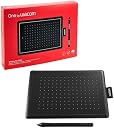
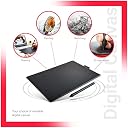
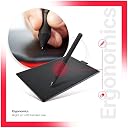
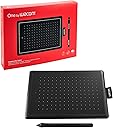
The One by Wacom CTL-472/K0-CX is a compact, professional-grade digital drawing tablet featuring 2048 levels of pen pressure sensitivity and a battery-free, cordless pen for uninterrupted creativity. Its 6x3.5 inch active area offers precise control ideal for beginners and educators alike. Compatible with Windows, Mac, and Chromebook via USB plug-and-play, itโs designed to enhance digital art, note-taking, and classroom collaboration with trusted Wacom reliability.


| ASIN | B078HRR1XV |
| Active Surface Area | 6 x 3.5 centimeters |
| Best Sellers Rank | #616 in Computers & Accessories ( See Top 100 in Computers & Accessories ) #4 in Graphic Tablets |
| Box Contents | One pen tablet, pen, Replacement Nibs, USB Cable,Quick start guide,Warranty Card |
| Brand | Wacom |
| Brand Name | Wacom |
| Colour | Red/Black |
| Compatible Devices | Tablet |
| Connectivity Technology | USB |
| Country of Origin | China |
| Customer Reviews | 4.3 out of 5 stars 16,466 Reviews |
| Display Type | LCD |
| Item Dimensions L x W | 9.5L x 15.2W Centimeters |
| Item Type Name | Creative Pen Tablet |
| Item Weight Unit of Measure | 0.25 Kilograms |
| Manufacturer | Wacom India Pvt. Ltd, 426, DLF tower B, Jasola Vihar, New Delhi - 110025 |
| Manufacturer Part Number | CTL-472 |
| Model Name | One By |
| Model Number | CTL-472/K0-CX |
| Native Resolution | 2560x1440 Pixels |
| Network Connectivity Technology | USB |
| Number of Items | 1 |
| Number of Packs | 1 |
| Operating System | ChromeOS, MacOS, Windows 7 or later |
| Packer Contact Information | Wacom India Pvt. Ltd. |
| Pressure Sensitivity | 2048 Levels |
| Product Features | Anti-Glare Glass |
| Screen Size Unit of Measure | 10 Inches |
| Special Feature | Anti-Glare Glass |
| Specific Uses For Product | Drawing |
| Target Audience | Teacher |
| Unit Count | 1 Count |
P**A
Good
Good for learning students best option for budget must buy learner
P**R
Reliable Earlier, But Recent Build Quality Isnโt the Same
I've been using this product since 2020, and as an online teacher, it's been a perfectly usable teaching tool. It's super comfy and easy to use, plus it's small and a good value for the money. The writing quality on any software is spot on; I personally use OneNote. I always loved this tool, but it broke in 2025, so I guess it lasted five years. Now I need to buy it again, but I'm not happy with the recent quality after using the same product for so long. The material isn't as good, and I'm also bummed about the packaging.
B**A
Greattt!! Go for it!
I have been using this for the past 6 months and it is a really good quality product! Good connectivity even to mac and touch sensitivity is great! Pressure is amazing and size is a bit compact but works really well for me!!
S**L
Perfect for Microsoft Whiteboard usage
Love this. Take s a bit of time for hand coordination and then its been going great. I am using it for drawing and sharing diagrams in Tams using Microsoft Whiteboard.
P**R
Good
Good
N**L
Wacom CTL-472/K0-CX Digital Drawing Graphics Pen Tablet
The Wacom CTL-472 is an excellent entry-level graphics tablet, perfect for beginners, students, and digital art enthusiasts. Its compact size fits easily on small desks, while the battery-free pen delivers smooth, precise strokes with natural pressure sensitivity. Drawing, editing photos, and taking digital notes feel effortless and responsive. The simple plug-and-play setup works seamlessly with most design and learning software. Although it lacks shortcut buttons and advanced features, its performance is reliable for daily creative work. Lightweight, durable, and highly accurate, this tablet offers great value for money and is ideal for learning and everyday digital creativity.
D**H
Teaching help
Nice product go for it , as I using , giving review after 3 months of owning
D**R
Good product for art creators
I am a professional multimedia content creator. I was looking for a pen tablet at an affordable price to try it out. After lot of online surfing I found One by Wacom the most suitable for me. I am using this for last 30 days now. This is my first pen tablet. I never had any prior experience with any kind of pen tablet. This pen tablet is compatible with multiple OS. For technical details please visit product website. WHAT I LIKE - Easy to use, good for small work space, portability, no power required WHAT I DID NOT LIKE - Connecting port in only on one side. I would prefer to have one on the left / right and the other on top / bottom. I had to flip it horizontally in the dedicated Wacom application to accommodate the tablet in my work space. Secondly, the pen holder on the side is not really practical. Some kind of removable string attachment between the pen and the tablet will be more secured. When not in use, pushing the pen through that pen holder is tedious. IMPORTANT - Download the driver from Wacom website, install and register your product to avail the warranty. Till now I found this product very good for my work. VERY IMPORTANT - You will need some practice to get used to any pen tablet in all aspects. Even if you are good with drawing, you still will need practice along with the application of your choice. FOR THE BUDDING DIGITAL ARTISTS - There are many free full version of digital drawing applications available online. There are many more brands of pen tablets which are equally good. I purchased this one because I found One by Wacom most suitable for my present need.
C**.
Works great
Definitely works great, but it does wear out over time so you'll notice discolouration and scratches but I can't say it's unexpected. Good product.
A**ใผ
ๅคๆฎตใชใ
ๆ ฃใใใฐ่ฏใใใ
G**E
Great Tablet for OSU
This tablet is very smooth and very good for the price. Although more expensive than other cheaper tablets this one works well having a pen without battery and great hover distance. Using it for OSU and it works really well. The only thing is that the driver that comes with it is a bit funny but you can easily get around it Highly recommend 4/5
A**R
Fantastic for online teaching
Works seamlessly with Microsoft whiteboard and in PowerPoints. So easy to write and show students 'how to'. Also very handy to sign digital documents. Great info on Wacom website- very clear how to set up and use. This will be going back with me when face to face teaching to 'write' on projector screen.
R**N
Good "osu!" tablet.
I made good use of this tablet when I used to play the game "osu!". I have since stopped playing, but, throughout, the tablet worked perfectly.
Trustpilot
2 months ago
1 day ago