


Desertcart purchases this item on your behalf and handles shipping, customs, and support to Hong Kong.
🚀 Flex Your Productivity with Lenovo’s Sleek Powerhouse!
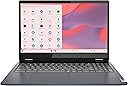
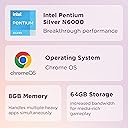
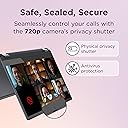
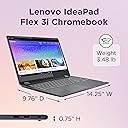
The Lenovo IdeaPad Flex 3i Chromebook is a stylish, lightweight 15.6” convertible laptop featuring a Full HD touchscreen, powered by an efficient Intel Pentium N6000 processor paired with 8GB RAM and 128GB SSD. Designed for professionals and students on the move, it offers up to 10 hours of battery life, integrated Intel UHD graphics, and versatile connectivity including USB-C, USB-A, and Bluetooth 5.1. Chrome OS ensures a streamlined, secure experience enhanced by a privacy-shutter webcam and MaxxAudio speakers for premium sound.


| ASIN | B0CWB3QTGF |
| Audio Output Type | Headphones, Speakers |
| Audio Recording | Yes |
| Automatic Backup Software Included | MaxxAudio |
| Battery Cell Type | Lithium Polymer |
| Battery Life | 10 Hours |
| Best Sellers Rank | #155,889 in Computers ( See Top 100 in Computers ) #6,167 in Traditional Laptops |
| Bluetooth Version | 5.1 |
| Bluetooth support? | Yes |
| Brand | Lenovo |
| Built-In Media | Computer, User Guide, 45W USB C Charger |
| CPU L2 Cache | 2 MB |
| CPU L3 Cache | 4 MB |
| CPU Model Generation | 6th Gen |
| CPU Model Number | Intel Pentium N6000 |
| CPU Model Speed Maximum | 4.3 GHz |
| CPU model | Pentium |
| Cache Memory Installed Size | 12 |
| Camera Description | Front, Privacy |
| Color | Blue |
| Colour | Blue |
| Compatible Devices | External displays, mice, keyboards, storage devices, audio accessories, wireless headphones, wireless mice, wireless keyboards |
| Connectivity Technology | Bluetooth, Ethernet, HDMI, USB, Wi-Fi |
| Control Method | Touch |
| Customer Reviews | 4.3 out of 5 stars 284 Reviews |
| Display Resolution Maximum | 1920x1080 |
| Display Technology | LED |
| Display Type | LCD |
| Form Factor | Convertible |
| Graphics Coprocessor | Intel UHD Graphics |
| Graphics Description | Integrated |
| Graphics Ram Type | Shared |
| Hard Disk Description | SSD |
| Hard disk size | 128 GB |
| Hard-Drive Size | 128 GB |
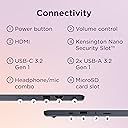
| Hardware Interface | Bluetooth, HDMI, Headphone, USB |
| Has Color Screen | Yes |
| Human-Interface Input | Touchscreen |
| Item Dimensions L x W x Thickness | 24.8L x 36.2W x 1.9Th centimeters |
| Item Weight | 1.6 Kilograms |
| Keyboard Description | Island-style |
| Lithium-Battery Energy Content | 47 Watt Hours |
| Manufacturer | Lenovo |
| Maximum Display Brightness | 300 Nit |
| Memory Clock Speed | 3200 MHz |
| Memory Slots Available | 1 |
| Memory Speed | 3200 MHz |
| Model Name | Flex 3 Chromebook 15" |
| Model Number | 82T3001NUS |
| Model Year | 2024 |
| Model name | Flex 3 Chromebook 15" |
| Native Resolution | 1920 x 1080 pixels |
| Number of Ports | 3 |
| Operating System | Chrome OS |
| Optical Storage Device | NO |
| Other Special Features of the Product | HD Audio |
| Processor Brand | Intel |
| Processor Count | 1 |
| Processor Series | Pentium |
| Processor Speed | 1.1 GHz |
| RAM Memory Installed | 8 GB |
| RAM Memory Technology | LPDDR4X |
| RAM Type | DDR4 SDRAM |
| Ram Memory Maximum Size | 8 GB |
| Resolution | 1080p |
| Screen Size | 15.6 Inches |
| Screen size | 15.6 Inches |
| Speaker Description | 2 x 1.5W |
| Specific Uses For Product | Student |
| Total Number of HDMI Ports | 1 |
| Total PCIe Ports | 1 |
| Total Usb Ports | 3 |
| Touch Screen Type | Capacitive |
| UPC | 198153226733 |
| Unit Count | 1.0 Count |
| Video Output | USB-C |
| Video Processor | Intel |
| Voltage | 11.1 Volts |
| Webcam Capability | Yes |
| Wi-Fi Generation | Wi-Fi 6 |
| Wireless Compability | 802.11ax |
| Wireless Technology | Bluetooth |
M**Y
This is a great value and I'm super happy with the performance
This Chromebook met all my requirements and has surpassed my expectations for both work and home use. With 8G Ram, it never bogs down, even with multiple windows open and a lot of low-med level processing. The touch screen works great, keys feel fantastic, track-pad is perfect, the screen size and overall look and feel is great. Couldn't be happier (unless it included illuminated keys, but that is rarely a need anyway).
A**R
Screen died in less than 6 months
Display died in less than 6 months. Appreciate it that Amazon has agreed to do a return and refund.
K**L
I needed to play around to get used to the Chrome universe
I'm experiencing a learning curve from handing in my old Dell laptop (retirement) to getting used to this new machine. Some things are great - no more long wait times for the laptop to boot up, for example. I also like the customization of the dock (although my laptop also was nicely customized), showing me the most often used apps I need access to. However, I HATE not having lit keys on the keyboard. This one is totally on me, as I thought that I had narrowed my wish list down to devices with a lit keyboard. Since the Lenovo has limited storage (though mine does have 64GB of local storage), I purged my old files from my Dell onto a portable hard drive and moved my important daily-need files into two clouds: pCloud (2 TB) and a personal free OneDrive cloud. The latter is extremely helpful if you wish to edit your existent Windows docs and Excel sheets as you will still be able to do that in the cloud. If you open these MS files inside a Chromebook, they will either be non-editable or be converted to Google docs and sheets (as per your setting). The file explorer can be linked directly to your clouds (most of the common ones, at least), so that you can download items onto the Lenovo, then pull them over into the cloud storage folders you specify. That's a really helpful feature. Transitioning from Windows Outlook onto Google calendar was hard. :( The Lenovo allows the Google Calendar icon to appear on the dock, which is very helpful; nevertheless you might have a hard time getting used to the new "universe" if you're not Google-familiar. I played around with this machine while it wasn't plugged in and it lasted forever. That is really nice. Plus it doesn't run HOT like my old Dell did! I like the built-in calculator, which makes this a larger device, not something that is easily toted around. I miss the ability to lock the calculator to prevent accidental inputs. The Lenovo's calculator is just a web app that you can pin to the dock. The actual calculations seem to be running online rather than on your device (hence no lock). The sound is accessed by clicking on the time icon on the lower right. It took me a while to figure out as the two sound icons on top of the keyboard didn't seem to be functional. I initially took off a point for the lack of sound control via keyboard. But in the meantime, I found the manual for this machine and learned that the launcher icon (the white circle between the "tab" and the "shift" keys) must be pressed for any of the function keys to work. The launcher by itself shows you the available apps, files, and images. It will also show you a page with the keyboard short cuts. If you like quick access to Google apps (Maps, YouTube, Photos, Keep) and other apps (Netflix, Prime Video, your password manager), you can pin them directly to the dock and they will either open in full-screen mode or within your browser. You can pin quite a few. I have 12 apps pinned right now, but there is room for more. You can also pin your favorite files to the right of the dock for quick access. In addition, if you have an android phone, messages will flash quickly on the right part of the dock. This is great for two-factor authentication, as you don't even need your phone nearby. So all around, there is stuff to learn if you're new to a Chromebook, but this Lenovo has you covered.
L**E
Was great .. until it randomly stopped powering on
I waited 3 months before writing this review. I love my laptop! I walk around the house like "you better not be touching my laptop" all day lmao. Ive had two minor issues to note- 1: my onscreen keyboard does not work when in tablet mode without it being updated. Easy fix.. keep it updated lol 2- Sometimes my streaming apps close/act wonky. That's upsetting and I have found no fix but I did do a little researching, finding that these are not streaming laptops and what not. Idk why it exactly does it, it just does. I’ll restart the app and 9/10 it works. Kinda my only real complaint! It’s light for the size, picture is good, vibrant, it’s not super quick but idek what I mean there cause it isnt slow lol all in all I love it! Its the best Chromebook Ive had outside of a MacBook so far. EDIT!! Okay so today is August 14th, 2 months after my review and my laptop no longer turns on!! I am pissed as my classes start tomorrow morning. Idk what happened as I always shut it down and even delete things I no longer need. I hoped it would last at least a year! 😒😒Stop selling refurbished stuff cause it says NEW when it clearly ISNT! WOW- Another review lol it winded up coming back on About 8 hours after this review??? but now I’m back because my kid jumped on my bed and shattered my screen. I may try to get it fixed but for all that I can get a new one. Came to check the price before I made the decision. Still love her! Get it!
R**Y
Love this laptop!
I love this laptop, love this laptop! The 15.6-inch touchscreen is huge and clear, making it easy to work or watch movies. With 8GB of RAM and a 128GB SSD, it’s much faster than my old machine and handles many tabs at once without any slowdown. The Abyss Blue color also looks very sleek and professional."
Trustpilot
4 days ago
3 days ago