🔐 Unlock the future of home security with a touch—because your door deserves smarter.
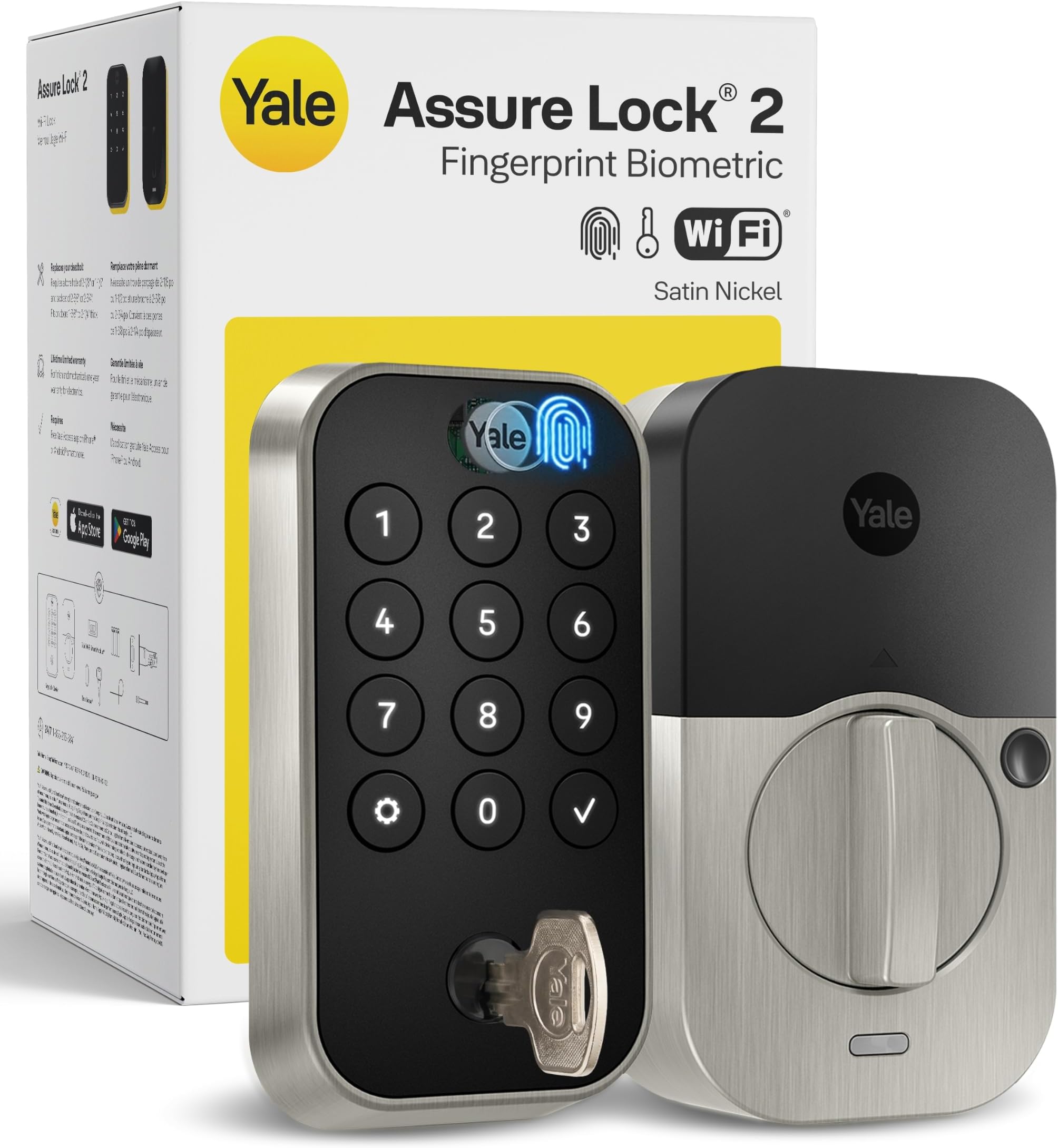
The Yale Security Assure Lock 2 Touch is a biometric smart deadbolt featuring ultra-fast fingerprint recognition, Wi-Fi connectivity for remote access, and hands-free auto-unlock. Designed for easy DIY installation, it integrates with major smart home systems and offers advanced security features like two-factor authentication, auto-lock, and tamper alarms, making it the ultimate upgrade for modern front doors.


| Brand | Yale |
| Item dimensions L x W x H | 0.9 x 2.5 x 4.9 inches |
| Lock Type | Biometric, Deadbolt, Keypad, Pin Tumbler |
| Material | Zinc |
| Recommended Uses For Product | Exterior Door, Front Door |
| Special Feature | Auto-Lock , Back-Lit Keypad, Battery Indicator, Fingerprint, Passcode Unlock |
C**K
⭐️⭐️⭐️⭐️⭐️ Keyless Freedom, Iron-Clad Security—My Front Door’s Best Upgrade Yet
Swapping my old deadbolt for the Yale Assure Lock 2 Touch took less than twenty minutes with only a screwdriver—no chiseling or wiring headaches—and the sleek black-suede finish instantly modernized the entire entryway. The very first fingerprint scan unlocked the door in under a second, and after enrolling my partner and teenagers, we ditched the jangling key ring for good (though the keyed cylinder is great peace of mind). The illuminated keypad glows on approach, so punching in a code at night is effortless, and one-time guest codes have saved me more than one frantic hide-a-key scramble. The built-in Wi-Fi module paired with the Yale Access app in two taps, letting me lock or unlock from anywhere and get real-time alerts the moment the kids get home from school. Vacation mode is priceless: a single toggle disables all fingerprints and codes except mine, so the house sitter can’t accidentally let in a plus-one. Integration with Alexa and Google Home means a quick voice command or routine checks the door status before bed, and geofencing auto-locks as soon as my phone leaves the driveway—no more “Did I lock the door?” u-turns. Battery life is stellar. After two months of daily touches, codes, and remote pings the meter still shows 80 %, and even if I ever miss the low-battery alert, a hidden USB-C backup port gives emergency power with a phone charger. The solid-metal escutcheon feels bulletproof, and the multi-point tamper alarms would wake the whole block if someone tried to force it. From effortless fingerprint entry to rock-solid smart-home integration, this Assure Lock 2 delivers polished, worry-free security that makes coming and going a breeze. Five stars without hesitation—my only regret is not upgrading sooner.
O**R
Best smart lock ever
Best smart lock ever. Compared to the cheaper one I had previously, which was super annoying, Yale comes through with a well designed lock. Things I like: Auto Unlock! ( Game changer works with Android and iPhone), one touch lock, actual buttons instead of touch screen - all features work great. Setup is also easy with very clear and well guided instructions.
G**L
Not Worth the Trouble
I strongly suggest you not buy this lock. I’ve lived with it for 9 months and am now removing it. This is a residential installation and the lock is used only 4;times per day. The first problem is the battery. It uses 4 non-rechargeable AA batteries. If they lasted awhile it wouldn’t be so bad. However, when using WiFi so you can access the lock remotely, the batteries last only 6 weeks. One of Yale’s solutions is to disconnect the lock from WiFi. That is, stop using one of the features that drew me to buy this model in the first place. Really, that’s your solution Yale? And even after disabling the WiFi access, you still get less than 3 months battery life. Also, the battery indicator in the phone app only shows battery charge when the battery is nearly depleted. The software is quirky and unreliable. The lock is supposed to detect whether the door is open or closed. At random intervals the system forgets these settings and you need to recalibrate the system so it can detect door open/closed state. The fingerprint reader works most of the time, but it usually takes 3 or 4 tries for it to recognize the print. On the plus side, the lock is easy to install and sturdily built. Initial program was quick and intuitive. On balance, this lock is definitely not worth the trouble and inconvenience. Maybe Yale’s other products are better.
J**Y
Great Lock, Great Price.
The Yale Assure Lock 2 Touch delivers sleek fingerprint access alongside keypad, app, and physical key options—providing versatile entry for family or guests. It integrates smoothly with major smart home systems including Apple HomeKit, Alexa, Google Home, and Matter (Wi-Fi version), and offers peace of mind with auto-locking and DoorSense features. The touchscreen, however, can be tough to read in direct sunlight, and it doesn’t support Apple Home Keys. Overall, it’s a feature-packed, stylish smart lock that balances convenience and security. Pros: Versatile entry methods (fingerprint, keypad, key, app), wide smart-home compatibility, auto-lock with DoorSense Cons: Keypad visibility in sunlight can be poor, lacks Apple Home Key support unless using the Plus model
J**S
Good product, but Android phone compatibility issues
Minus one star due to issues with Android phone (Pixel 7). I purchased 2 of these locks recently in last month or two. First lock the physical install went fine, however when it came time to setup it hung on the firmware update and would not proceed further. Ended up having to call customer support. Support was very helpful (no complaints at all with my experience with support) in the troubleshooting and going through trying to get the lock installed. However I ended up having to use my iPad Pro to install the lock and get it functional. After installing and getting setup with the iPad I was able to connect with my Android phone for other functionality. Knowing the above information when installing the second lock I was able to get through the whole install and setup process much faster. However I have had trouble with the Android app not showing the current state of the lock that I personally frequently use, it not recognizing finger pressing on the screen to unlock/lock the lock, connection issues where it won't connect to the lock via Bluetooth or wireless. But if I then grab the iPad to connect and control the lock it connects without issue and then suddenly the Android app will start functioning. So there apparently needs to be some investigation by the company into their Android compatibility and functionality. Otherwise the fingerprint setup, access codes and other functionality of locking and unlocking have worked fine as intended and shall see how the long term functionality and usage works out.
S**T
I like it
Really like this lock so far. My door measurements were within limits of what was required and installing was very easy. The only thing I had to do some McGuyvering on was installing the hidden magnet in door strike plate. I have a burglar resistant plate and I had to drill a hole in it to accept the magnet. It required a 5/8 inch hole and I only had a 1/2 in bit, so I drilled out to 1/2 inch then used my Dremel to expand to 5/8. The app was very easy to use to set up with my wifi (I got the wifi built in model). People complained about battery life but after having it a couple of weeks, it doesn't seem that bad. I put in slightly used AA batteries from my old lock and it showed 98% charge and now it shows 73%. I think the more you use the power motor on it, the quicker the batteries go. Most of the time when I go out, I manually lock and unlock the door when inside to save on battery life. The fingerprint reader has worked flawless so far, with just my wife and I in the system. Only a couple of small complaints- the lock -unlock knob inside is black along with the whole lock so when looking from afar to see if the door is locked or not, you have to walk up close to it to see which way the knob is turned. My old lock had a light that flashed every ten seconds or so ; green if lock was open, amber if closed. I ended up painting a white line on end of knob and that works ok but a little hillbilly. Also in the app, I tried to add my wife's pic to her name on my guest list, but the only way to do it is for her to download the Yale app, get synced with my app then she add her own pic. Way too complicated.
J**R
Yale Assure 2 Smart Lock Review – Worth Every Penny (Especially with the Biometric Upgrade)
We’ve been using the Yale Assure 2 smart lock and absolutely love it. The modern design looks fantastic with our stainless steel hardware and blends seamlessly into our home’s aesthetic. The app was a breeze to set up, and we had no trouble creating accounts for everyone in the household. The biometric fingerprint sensor is a total game changer—fast, secure, and incredibly convenient. We purchased the lock during our home renovations and loved the ability to create temporary access codes for contractors that could be used while away from home. The scheduling feature made it easy to allow access only on specific days and times. The app also keeps track of user activity and offers customizable smart notifications, which can alert specific users when certain people enter (or at any time, depending on your preference). It’s incredibly simple to lock or unlock the door remotely from the app, and adding guests takes just seconds. One of my favorite features is the ability to have the door automatically unlock when I arrive home based on my phone’s location. One recommendation: I wish there were a similar auto-lock feature tied to geolocation when leaving the house. Currently, the only auto-lock option is based on a timer, not on whether you’ve actually left the home. I hope Yale adds this in a future update. I did run into some issues integrating the lock with Apple HomeKit. If you remove the device from HomeKit, you’ll need to do a factory reset to re-pair it, which is a bit of a hassle. The lock does work with HomeKit, but I’ve found it to be occasionally non-responsive—though I’m not sure if that’s due to the lock itself or Apple’s platform. Despite that, I’d highly recommend the Yale Assure 2, especially with the biometric feature. It’s well worth the extra investment for the added convenience, flexibility, and peace of mind.
S**E
When it works it’s an awesome lock
Not going to lie, when this lock, including its advertised features, works it is an awesome lock. But the biggest issue is the battery life. If this lock is installed within a doorway that is frequently used, you are lucky to get 4 weeks worth. I even used the highest end AA batteries (which is nearly 2 - 3 times the cost) but same battery life. And the Yale app doesn’t show any battery life reduction (always showing 100%). You only know it’s the batterY with the consistent WiFi disconnect. Another major issue is the frequent reconfiguration of what an open/closed door is supposed to be. Since another major feature I require is the Auto lock capability when the door is closed. This feature works about 50% of the time. To combat the battery life issue, I have switched to recharging ones so I don’t waste too much money on batteries. Tread carefully on this model. Unfortunately I am stuck with it.
Trustpilot
4 days ago
3 days ago