


🚀 Elevate your workspace — the ultimate multi-device mouse for the modern professional!
The RAPOO MT760 is a versatile wireless mouse featuring Bluetooth 5.0 and 2.4GHz tri-mode connectivity, allowing seamless switching between up to 4 devices. It offers 7 adjustable DPI levels up to 4000 for precise tracking, 11 programmable buttons for enhanced productivity, and an ergonomic design tailored for comfort. Powered by an 800mAh rechargeable battery, it delivers up to 90 days of use on a single charge with USB-C fast charging. Ideal for professionals seeking efficient multi-tasking across computers, laptops, tablets, and smartphones.
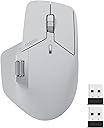


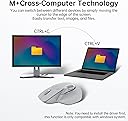




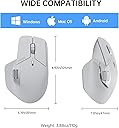


| Additional Features | 7 Adjustable DPI, 90 Days Battery Life, Ergonomic Design, Wireless Charging Enabled, Programmable Buttons, Up to 4 Devices, M+ Cross-Computer Technology |
| Antenna Location | Office |
| Are Batteries Included | Yes |
| Are Batteries Required | Yes |
| Asin | B0CMZ1PQV6 |
| Battery Average Life | 90 days |
| Best Sellers Rank | #70,703 in Computers (See Top 100 in Computers) #1,838 in Computer Mice |
| Brand | RAPOO |
| Button Quantity | 11 |
| Color | Gray |
| Compatible Devices | Personal Computer, Smartphone, Tablet |
| Connectivity Technology | Bluetooth |
| Customer Reviews | 4.2 4.2 out of 5 stars (265) 4.2 out of 5 stars |
| Enclosure Material | Plastic |
| Eu Spare Part Availability Duration | 90 Days |
| Finish | Matte |
| Hand Orientation | Right |
| Hardware Platform | Linux, Mac, PC |
| Included Components | 1 x MT760 Wireless Mouse, 1 x USB-C Charging Cable (USB-A to USB-C), 1 x User Manual, 2 x USB Dongles (One stored at the bottom of the mouse) |
| Item Dimensions L X W | 12.3L x 5.4W centimeters |
| Item Weight | 110 Grams |
| Manufacturer | Shenzhen Rapoo Technology Co., Ltd. |
| Mfr Part Number | MT760 |
| Model Name | MT760 |
| Model Number | MT760 |
| Mouse Maximum Sensitivity | 4000 Dots per Centimetre |
| Movement Detection | Laser |
| Number Of Batteries | 1 D batteries required. (included) |
| Operating System | Linux, Mac, Windows |
| Power Source | Battery Powered |
| Range | 10 |
| Style Name | Modern |
| Theme | OFFICE |
| Unit Count | 1 Count |
User
not bad
rubber white colour changed and weras off , but the mouse is very smooth and nice
User
خامات سيئة جدا
اللون ده اختيار في غاية السوء. بعد استخدام كام شهر اتحول مكان مسكة الايد للون أصفر بشع كانك مشتري منتج رخيص أو معمول تحت السلم. مش فاهم ليه منتج مفروض أنه بريميوم الخامات المستخدمة فيه تتأثر بالشكل البشع ده
User
Great tech mouse
Works very well, nice finish and clicking action. Much better value than the Logitech mx mouse and I think better build and design
User
A great alternative
I got this more out of curiosity than anything to simply try it but I've found that this is actually a good alternative to the more expensive brand that it emulates. I use the MX3 and 3s for both personal and work laptops and have used them since they released. I was actually looking for an alternate to the MX3 so I could leave it at work:-) For the MT760, the very first thing I noticed was that it's not near as comfortable but also very easy to get used to. It was pretty easy to set up. It's got some nice features like two dongles and 3 Bluetooth settings. One dongle is hidden via a nifty trap door thing. Though not as "well made" for feel, it is still has a very nice feel to it. It's quite light though but works for what I do. I'm an IT consultant.It came packaged quite nicely and came pretty well on time. One thing that I noticed in unpackaging it was the USB-C cable. It's a very nice cable and something one wouldn't expect in a product in this price range. From the controls point of view, the left/right click depth is longer than say the MX3s but easy to get used to. It's quite silent as well. It doesn't have that "free wheeling" scroll capability like the 3s but it is acceptable. My test for this will be when I use it for work today as I have some large datasets in Excel I need to work with :-) The left side wheel and buttons are quite close together and if you have larger hands, this may be an issue. I like to have those at the ball of my thumb and these are just slightly back of that when you first put your hand on the mouse. Just something that is easy to get used to though as well. Too early to tell on battery life.Nitpicks? Not all that many per se. From a usage standpoint, it so far works well. The manual though had very small print and I never could navigate the web page to get at the app. I may look hard at their web page once I get more time.Update- I've now used this at work for a few days, and for the most part, it works very well. The one thing that I did find was that the center scroll wheel was a little sensitive for me and it went into scroll mode a few times. Other than that, it held a charge well and overall worked good. For me, I'll keep this as a backup for work.
User
Mouse failed, support keeps asking for endless troubleshooting instead of honoring warranty
DO NOT BUY IT!I purchased the Rapoo MT760L mouse and the product became unusable very early in normal use. The cursor still moves, but the click buttons stop registering. In some cases, when the mouse is connected, the computer becomes unable to click at all, including with the laptop trackpad, until the mouse is disconnected or the computer is restarted.I tested the mouse on multiple computers and operating systems, including Windows, macOS, and Linux. I also tested different connection methods, including USB dongle, Bluetooth, and cable. The problem remained the same. I updated the drivers and firmware to the latest versions from Rapoo’s website, and the issue was only temporarily fixed before returning again.The most frustrating part has been the warranty support. Instead of moving forward with a replacement or repair after I provided troubleshooting details, screenshots, and video evidence, support kept asking me to repeat basic steps, check firmware again, send more screenshots, and even try using a hub. At this point, it feels like the customer is being asked to act as Rapoo’s technician instead of receiving proper warranty service.A mouse should not require this much troubleshooting just to perform basic clicks. I expected a reliable product and reasonable warranty support, but my experience has been very disappointing. Based on this issue and the support process, I cannot recommend this mouse.
Trustpilot
1 month ago
2 weeks ago