Buy anything from 5,000+ international stores. One checkout price. No surprise fees. Join 2M+ shoppers on Desertcart.
Desertcart purchases this item on your behalf and handles shipping, customs, and support to Hong Kong.
🚀 Elevate your dual-device setup with Anker’s 4K KVM Switch—where power meets precision.
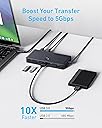
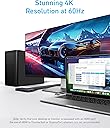
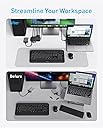
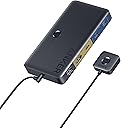
The Anker KVM Switch (Model A83K8) is a compact, surface-mount device designed to seamlessly toggle between one laptop and one desktop. It supports ultra-high-definition 4K@60Hz HDMI output, 5Gbps USB data transfer, and delivers up to 100W power delivery to charge your laptop while in use. Equipped with multiple USB ports and a magnetic remote button, it streamlines workspace connectivity and enhances productivity for professionals managing dual systems.


| ASIN | B0CS3H4TCL |
| Actuator Type | Push Button |
| Best Sellers Rank | #24,010 in Computers ( See Top 100 in Computers ) #51 in KVM Switches |
| Brand Name | Anker |
| Circuit Type | 2-way |
| Color | Gray |
| Compatible Devices | Laptop, Desktop |
| Connectivity Protocol | Wiring |
| Connector Type | Plug In |
| Contact Material | Copper |
| Contact Type | Normally Open |
| Control Method | Remote |
| Control Type | Basic Control |
| Controller Type | Magnetic remote button |
| Current Rating | 3 Amps |
| Customer Reviews | 3.6 3.6 out of 5 stars (153) |
| Global Trade Identification Number | 00194644194673 |
| International Protection Rating | IP00 |
| Item Dimensions | 13.4 x 7 x 1.9 centimeters |
| Item Weight | 150 g |
| Manufacturer | Anker |
| Material Type | Plastic |
| Model | A83K8 |
| Mounting Type | Surface Mount |
| Number of Items | 1 |
| Number of Positions | 2 |
| Operating Voltage | 5 Volts |
| Operation Mode | manual |
| Part Number | A83K80A1 |
| Smart Home Compatibility | Not Smart Home Compatible |
| Specification Met | Gathers specification |
| Switch Type | Bipolar Transistor |
| Terminal | Quick-connect |
| UPC | 194644194673 |
| Unit Count | 1.0 Count |
| Upper Temperature Rating | 35 Degrees Celsius |
| Wattage | 100 watts |
Z**E
Alle Anschlüsse funktionieren, Produkt kam ohne Probleme an, habe es mit Desktop-PC und MacBook verbunden und funktioniert alles ohne Probleme.
A**R
Perfect for sharing keyboard, mouse and one screen between one modern laptop and desktop PC. Modern thin and light laptops can suffer from lack of USB connectivity and neither do you want to be plugging and unplugging a set of cables every time you place or remove the laptop. As long as laptop has USB C this is a great solution. Bit of cabling is required to get you started - plug the existing HDMI monitor , keyboard and mouse into the KVM switch. One USB C cable ( provided ) between the laptop and the Anker USB 3.0 HDMI switch is all that is required here to make use of keyboard, mouse and screen. HDMI and USB ( cables provided ) from the Desktop is connected to the KVM switch and can use the provided wired remote control switch to change between using the desktop and using the laptop. The Anker USB 3.0 KVM Switch provides additional connectivity, which I have not yet used, for sharing other USB devices, such as USB stick, or indeed Audio via 3.5mm jack.
A**T
Works as advertised... Takes in type C input(display+usb) from one device and HDMI+USB from second device. The type C also works as a pass through charger if the dock is plugged in externally to a power adaptor.
I**E
It does what it says. Some buyers didn't read the description properly. This is for one laptop + one desktop, only PC1 has the power delivery, and you will need to plug in the hdmi cable for PC2, which should be the desktop pc.
M**0
I have been buying from Amazon forever and have never felt compelled to write a review before, but I have been so impressed at the functionality and value of this Anker KVM that I wanted share my experience. I have purchased several Anker products over the years and find that their products always tend to be high quality at an attractive price compared to traditional name brands. So I shouldn't have been too surprised when searching for a KVM to use with my work MacBook and my personal Windows PC that this Anker KVM showed up. When looking at it I was pretty surprised at all the features at the price point - which made me look closer to make sure it wasn't missing something. I have been using another brand's Thunderbolt docking station to connect all of my desktop accessories to my work MacBook so there is 1 cable USB-C charge+connectivity to the Mac. This has worked really well, but this docking station is $200 and it is only for the MacBook. My PC has been connected on a separate HDMI input on my monitor, so it is a bit of a process to switch over the monitor input and move keyboards and mice when moving between them. Given the price of the Thunderbolt dock, I was really surprised to see this KVM provide all the functionality I needed at 1/4 the original price, while adding the needed switching to my desktop PC. All my accessories connect and work perfectly on both the MacBook and the Windows PC. As other have commented, there is a bit of lag on the switch - but it is ~5-10 seconds at most. I now have single cable charge+connectivity on the MacBook, and a single USB-A 3.0 connection to the PC that works great as well. The HDMI video connection looks great with the required 4K @ 60Hz. A surprise was how much I like the little magnetic remote control switch - it snaps right onto a metal leg of my monitor riser for a very clean install with the KVM below the desk. I am hoping for good longevity with this - my experience with other Anker products has been quite good. Overall, so far anyway, I couldn't be happier. I get the idea that this is made for my specific scenario, and may not be as good an option for general KVM use cases, but for me this is absolutely ideal and a raging value.
Trustpilot
3 weeks ago
2 weeks ago