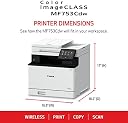
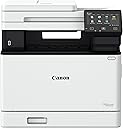
๐จ๏ธ Elevate your office game with speed, style, and smart tech!
The Canon Color imageCLASS MF753Cdw is a wireless, all-in-one laser printer designed for small to medium businesses. It delivers fast 35 ppm color and black & white printing, auto duplex printing and scanning, and supports mobile printing via the Canon PRINT app. With a 5-inch touchscreen, expandable paper capacity up to 850 sheets, and a 3-year warranty, it combines efficiency, convenience, and sustainability with ENERGY STAR and EPEAT Silver certifications.


| ASIN | B0BSMQTVBW |
| Additional Printer Functions | All In One |
| B&W Pages per Minute | 35.0 |
| Box Contents | Cartridge 069 CMY: Starter 1,100 Yield / Black, Standard: 2,100 Yield, Documentation, Fax Cord, MF753Cdw Product, Power Cord |
| Brand | Canon |
| Brand Name | Canon |
| Color Depth | 24 bits_per_pixel |
| Color Pages per Minute | 35 ppm |
| Colour | MF753Cdw |
| Compatible Cartridge | Canon Genuine Toner 069 / 069 H |
| Compatible Devices | Smartphones |
| Connectivity Technology | Ethernet, USB, Wi-Fi |
| Control Method | Touch |
| Controller Type | Android |
| Customer Reviews | 4.2 out of 5 stars 561 Reviews |
| Display Type | LCD |
| Dual-sided printing | Yes |
| Duplex | Automatic |
| EU Spare Part Availability Duration | 3 Years |
| Global Trade Identification Number | 00013803345162 |
| Hardware Interface | Ethernet |
| Initial Page Print Time | 7 Seconds |
| Ink Color | color |
| Item Dimensions D x W x H | 46.2D x 42.7W x 43.2H Centimeters |
| Item Type Name | Color Laser Printer |
| Item Weight | 48.5 Pounds |
| Manufacturer | Canon |
| Max PrintResolution Color | 1200 x 1200 dpi Dots Per Inch |
| Max PrintSpeed BlackWhite | 600 x 600 dpi |
| Maximum Copies Per Run | 99 |
| Maximum Copy Resolution Black and White | 600 x 600 dpi |
| Maximum Copy Resolution Color | 600 x 600 dpi |
| Maximum Copy Speed Black and White | 35 ppm |
| Maximum Media Size | 8.5 x 14 inch |
| Maximum Sheet Capacity | 250 |
| Model Name | iC MF753Cdw |
| Model Number | 5455C010 |
| Model Series | imageCLASS |
| Network Connectivity Technology | Ethernet, USB, Wi-Fi |
| Number Of Trays | 2 |
| Other Special Features of the Product | Auto Document Feeder, Auto-Duplex, Display Screen, Double Sided Scanning, EPEAT Silver, Energy Star, Network-Ready, Touch Screen |
| Output sheet capacity | 250 |
| Paper Size | Standard Cassette 3.9" x 5.8" to 8.5" x 14" / Multipurpose Tray: 3" x 5" to 8.5" x 14" Inches |
| Power Consumption | 650 Watts |
| Printer Output Type | Colour |
| Printer Type | Laser |
| Printing Media Type | Paper (plain) |
| Printing Technology | Laser |
| Processor Count | 1 |
| Resolution | 600 x 600 |
| Scanner Type | Sheetfed |
| Special Feature | Auto Document Feeder, Auto-Duplex, Display Screen, Double Sided Scanning, EPEAT Silver, Energy Star, Network-Ready, Touch Screen Special Feature Auto Document Feeder, Auto-Duplex, Display Screen, Double Sided Scanning, EPEAT Silver, Energy Star, Network-Ready, Touch Screen See more |
| Specific Uses For Product | Office |
| UPC | 013803345162 |
| Unit Count | 1.0 Count |
I**E
Excellent printer, but received grayโmarket unit; Serial not eligible for Canon registration
The printer itself is fantastic, fast, quiet, and produces excellent print quality. It offers one-pass scan at rapid speed and all the functionalities that this printer offers. If I were rating only the product, it would absolutely be five stars. Hands down. โ ๏ธ I discovered something important that other buyers should know. โ ๏ธ The unit I received appears to be a grayโmarket (nonโU.S.) model, even though it was sold through Amazon. The serial number cannot be registered with Canon USA, and Canon confirmed it is not a United States market unit, which means it is not eligible for US warranty or support. The System Manager ID also cannot be reset by Canon USA for this reason. The listing did not disclose that the product was sourced from outside Canonโs authorized US distribution channel. The printer works well, but buyers should BE AWARE of the warranty and support limitations that come with receiving an international model. Great product, but I strongly encourage the seller to ensure that only authorized US units are supplied, or clearly disclose when inventory is sourced from other regions. At this price point, consumers reasonably expect full manufacturer warranty support. Because the serial number on my unit cannot be registered with Canon USA, there is no valid U.S. warranty. Buyers should be aware of this before purchasing.
J**E
Game Changer
I was sick of going to print something after a month or two and finding the ink in my inkjet printer was dry. Then I either had to purchase brand name ink, or take the risk of the off-brand inks not being recognized by the printer, since they use chips on the cartridges and update the firmware on you, so that what you can get away with changes all time (a practice that should be illegal for consumables, but that's another discussion). I literally had cartridges in my old printer become 'unrecognizable' despite have been used before. I said I'm done with this garbage. Did some research, and found out that there are issue with the new 'well' format printers, where they waste your ink, or some even brick themselves when the waste storage fills up. Decided on a laser printer, so that I would never have to worry about not using it for a while and the ink drying up. It's also cheaper for toner in the long run. Then I read that this printer has a setting for 'use official Canon toner only' OFF BY DEFAULT. This is a major good-guy move for me, and sold me. The price is high, but I care about my prints, and I was wasting $20-40 on new ink any time I wanted to print a single page before with inkjet anyways. This comes with black and color toners, and I don't know how long they last in the long run, but I have been printing fairly often for around a year now (mostly black) and haven't run out yet. Letters are printing sharply. I was worried about printing color images, as people always say that inkjet is superior for that, but aside from trouble printing a very faint tan fade one time, the images have been fine. I think toner has come a long way. They also don't cause the paper to become warped and wrinkly like inkjet can. I also think that the slightly shiny look of toner looks more professional to me. The printer can handle quite thick paper/stock with no issue. I like to print cards, so this was important to me. Setup was super easy, and I got it connected to my wi-fi with no issue at all. Scans are good, and with the automatic feed tray, much easier than my previous home-level all-in-one printer/scanner (read the instructions, and do the scanner calibration print page like you are supposed to). Double-sided printing works perfectly. If you have a home-office, care about your prints, or are just sick of the money-grabs from the consumer-grade inkjet brands, then this is probably closer to what you want.
B**J
Fantastic Printer and Easy to Use!!!
I was a HP printer fan for forty years. In that time, I've always had a few problems with HPs printer software or some primitive aspects of each printer or the software package. I finally hit my breaking point with the purchase of my first home laser printer (HP Color Laserjet Pro MFP 3301fdw Wireless All-in-One Color Laser Printer). Junk software again, but I wasn't going to waste endless hours troubleshooting the scanning issue where the HP MFP 3301fdw would not free itself up to accept more scans. I am extremely computer savvy with a background in electronics, and HPs Laserjet Pro was a stopper for me. I worked with it for several hours trying to free up the queue issue. Finally, I boxed it up, sent it back to Amazon (thanks Amazon), and bought a Canon MF753Cdw. After a few days of waiting, I received the new Canon printer and set it up in about forty-five minutes. It was hard for me to buy a Canon because I'm a Nikon guy, but we're into printers here. Cleanup time took thirty minutes, so the total set up time tally was one hour and fifteen minutes. Easy to install, use, and reliable. I took it through a lot of tests, and it passed with flying colors. The touch pad can be awkward though. I used all kinds of touch pads on laptops in my life, and I was able to adapt to it. The printer was so easy to setup and install the software. Just follow the directions. I didn't encounter any issues as others have complained about in their reviews. Solid machine, and the value is fine because of its reliability so far. I highly recommend this printer that produces ultra clean, accurate, sharp, copies or images. Well done, Canon. Update (10/3/24): Still working great. The auto-feeder has no issues, and it's scanning alignment is excellent. I would highly recommend this printer.
M**E
great multifunctional printer
great printer / scanner / fax so far, requires a bit of tech hands to set it up properly to communicate with the other devices / computers in the network. First thing to do after you unpack and connect to power and local network, go to Canon website and install their drivers and utilities.
R**S
Prints great and fast, bought because HP toners' were so expensive, but found these are HIGHER!
UPSIDE - Will do what it is supposed to do, and quick in operation. Print quality is super crisp and impressed by it. Scans fast and has lots of bells and whistles regarding things it will do - a bit of a learning curve, but worth it. Don't use the fax, but there if ever wanted. This has a lot of things it will do for you, just have to learn them. DOWNSIDE - Unfortunately SONY followed HP printer software in deliberately blocked software so another (non OEM) replacement toner cannot be read by printer. This will not make me buy their super expensive toner refills, but will prevent me from ever buying another SONY printer. At least they didn't sabotage their software to slow down or stop printing if another toner is used like HP did - and got sued for it. A little annoying is the the printer drops printed pages in the center of the middle tray that has a downward curve leaving pages about an inch from the edge making them hard to pick up without wrinkling the papers edge. I know, not a biggie, but all my other 7 printers push pages out and easy to lift. This great printer came with a set of "teaser" toner cartridges that ran out of ink on few days. I should have checked on replacement cartridges before buying, as the printer cost me $589 with shipping. I found SONY toner cartridges priced for one )1) at $194 (069) to $245 (069H) costing me more than the printer. In closing, if you can afford the toner replacements, this is a great printer with an impressive fast 1st page and really super looking prints, better than some books I have. I have nothing but good to say about the printer, it prints a lot of different weight paper sizes with ease, double sided printing is easy and fast. You will not be sorry you bought this Canon imageCLASS MF753Cdw, but may when you have to replace the toner.
Trustpilot
1 month ago
2 weeks ago