Desertcart purchases this item on your behalf and handles shipping, customs, and support to Hong Kong.
💻 Unlock your data’s full potential — fast, flexible, and future-ready!
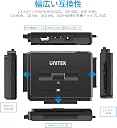
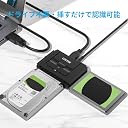
The Unitek USB-A IDE SATA Adapter is a versatile external drive converter supporting up to 18TB 2.5/3.5-inch IDE and SATA HDDs, SSDs, and optical drives. Featuring USB 3.0 with speeds up to 5Gbps and a 12V/2A power adapter, it ensures stable, high-speed data transfers. Ideal for professionals needing quick data recovery or migration from legacy drives, it combines broad compatibility with a sleek, portable design.
| ASIN | B00EHDTRJ6 |
| Amazon 売れ筋ランキング | パソコン・周辺機器 - 13,231位 ( パソコン・周辺機器の売れ筋ランキングを見る ) 変換コネクタ - 429位 PCパーツ - 2,300位 |
| おすすめ度 | 5つ星のうち4.1 8,933 レビュー |
| カラー | A IDE+SATA |
| コネクタタイプ | USB |
| コネクタータイプ | USB |
| パッケージ商品数 | 1 |
| ブランド | Unitek |
| ブランド名 | Unitek |
| ポート数 | 3 |
| メーカー名 | Unitek |
| メーカー型番 | FBA_Y-3322 |
| ユニット数 | 1 個 |
| 主電源のプラグタイプ | プラグがありません |
| 互換デバイス | SSD |
| 仕上げ | Hdmi。 |
| 付属品総数 | 1 |
| 保証内容 | 24ヶ月 |
| 入力電圧 | 12 ボルト |
| 原産国 | 香港 |
| 商品の用途 | PC, ノートパソコン。 |
| 商品の重量 | 7.2 オンス |
| 商品寸法 (長さx幅x高さ) | 9.6 x 6.9 x 1.6 cm |
| 商品本体サイズ | 9.6 x 6.9 x 1.6 cm |
| 商品用途・使用方法 | PC, ノートパソコン。 |
| 型番 | Y-3322A |
| 定格電流 | 2 アンペア |
| 対応デバイス | SSD |
| 色 | A IDE+SATA |
た**ん
期待通りの性能でした。
期待通りの性能でDVDや3.5インチSSDディスク、HHDもきちんと認識しました。
メ**ン
使えると思うよ。
全く問題無く使える。 梱包も綺麗、材質は値段相応。 転送速度はマシンに比例するのだろうね!
B**Y
とてもよかった
かなり古いハードディスクからデータを転送できた
よ**ん
古いハードディスクの整理に。
古いハードディスクの整理に購入。最近はSSDが主流なのでデータ移行できてよかったです。
R**C
最高に良い
使いやすいです
サ**ト
PCの突然トラブル データ回収に最適
PCにデータを残しての初期化が出来ず全初期化となった、HDDを外しSATAコネクタに接続、時間はかかったが大量のデータを無事回収出来て助かった IDE電源ケーブルは装着し難いようだ
い**ー
これ一台で殆どのHDDに対応してくれるので便利です
海**進
IDE HDDが使えず。
IDEのHDDが全然繋がらない。 今まで使っていたIDE HDDが認識されない。 IDEを利用している方には気を付けた方が良い。
R**1
Works Perfectly! A God-send for Crashed Computers.
The Unitek USB to IDE and Sata Converter is a life-saver! The device works perfectly and with zero complications to retrieve data from a hard drive--a task that might cost hundreds of dollars if performed professionally. What a great value! Caution: this device will not fix a hard drive that is itself damaged. It is for use if the hard drive is intact but the computer motherboard is damaged or fried and the computer will not boot. No instructions come with the Converter but they aren't really necessary. In order to make using the device easier, I recommend removing the hard drive from your desktop or laptop first. It's difficult if not impossible to attach the device to the hard drive if the drive is still installed in the computer. For a desktop, the removal of the drive is easy. Most desktop hard drives are mounted in a cage in the case. Simply detach the screws holding the cage to the case and then push down on a lever holding the cage to the case at the wall. The cage pops right out. There are many videos on YouTube that show how to do this. Takes about 30 seconds to accomplish. No need to remove the hard drive from the cage. Laptops can be a little more time-consuming. You probably will have to remove the back of the laptop--8 or 10 screws--to access the hard drive. Once it is exposed it simply needs to be disconnected and pulled out. Once you have the hard drive out, find the appropriate connector on the converter (there are 3 available) and plug it into the IDE or SATA port of the hard drive. Attach the power cord to the converter and plug it in. Turn on the power switch on the back of the converter. A blue light will go on. Now attach the included USB cable to the converter and plug the other end into a working computer. The old hard drive will show up on the working computer as a new external drive. Select it and it will open a File Explorer window. Generally, you will browse down to Users and find the user whose files are to be rescued. You will see all of the standard folders--Desktop, Documents, Pictures, Music--exactly as you would on the original computer's File Explorer. Copy and paste any or all folders or files you want to rescue to the new computer . That is all there is to it! I have even used the Unitek converter to transfer files from a Windows formatted hard drive to a Mac. Worked like a charm! Note that the Unitek website doesn't provide much help unless you are fluent in Korean. But documentation help is not really necessary. This is a really easy DIY project that will rescue your data and potentially save time, money and grief. Extremely simply and effective! So happy that I bought the Unitek converter!
G**E
Muy buen producto
Funciona de maravilla, aunque no he probado la función de auto respaldo todavía. Lo que si me deja un poquito insatisfecho es que el material se siente un poquito delicado, entiendase, no es de uso rudo, hay que tratarlo con cuiado, pero tampoco es que se vaya a romper en cualquier momento.
M**E
A life saver
My very old DELL Windows XP computer refused to start up, and I was convinced that all was lost. In a desperate last attempt, I decided to use this adapter kit to connect the IDE HD to my new Windows 11 computer via a USB cable. To my absolute amazement, the old hard drive that had been sitting idle on my counter sprang back to life. While I can't speak for the cloning feature since I haven't tried it yet, this adapter kit has proved to be nothing short of amazing. It has given my ancient hard drive a new lease on life and allowed me to access all the valuable data stored on it.
Z**B
Good Product
As Advertised.
ن**ر
شكرآ
شكرآ
Trustpilot
1 month ago
2 weeks ago