


Desertcart purchases this item on your behalf and handles shipping, customs, and support to Hong Kong.
🚀 Elevate your dual-monitor setup with 8K power and seamless control!
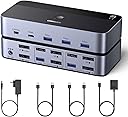
The UGREEN 8K@60Hz DisplayPort KVM Switch enables professionals to effortlessly manage two computers and dual monitors with a single keyboard and mouse. Featuring ultra HD 8K resolution support, 4 high-speed USB 3.0 ports, and a desktop controller for easy switching, this aluminum-built device ensures a clutter-free, efficient workspace compatible with Windows, MacOS, and Linux systems.


| ASIN | B0DXF5Z23S |
| Best Sellers Rank | #41 in KVM Switches |
| Brand | UGREEN |
| Built-In Media | 1*KVM switch, 2*USB A cables, 3 different specifications of power adapters, 1*desktop controller, 1*user guide |
| Cable Type | DisplayPort |
| Color | Multi |
| Compatible Devices | Laptop, Monitor, Personal Computer, Printer, Tablet |
| Connector Type | Plug In |
| Connector Type Used on Cable | Plug In |
| Customer Reviews | 3.7 out of 5 stars 744 Reviews |
| Item Highlight | with 4 USB 3.0 Ports, for 2 Computers Share Dual Monitors Keyboard Mouse Printer, with 2 USB Cables/Power Adapter/Controller |
| Item Weight | 800 g |
| Manufacturer | Ugreen Group Limited |
| Mfr Part Number | AK700 |
| Model Number | 55851 |
| Number of Items | 1 |
| Number of Ports | 6 |
| Power Source | AC adapter |
| Unit Count | 1 Count |
P**M
Great KVM switch for dual-computer setup | Easy to Use | Good Design | Reliable
The UGREEN DisplayPort KVM Switch works exactly as advertised and has been a great addition to my setup. I’m using it with a desktop and a laptop, sharing multiple DisplayPort monitors along with one keyboard and mouse. Switching between the two computers is very fast—almost instant. With a simple button press, everything (monitors, keyboard, and mouse) moves from one system to the other without any noticeable delay. This makes it really convenient for daily use. The build quality feels solid and durable. The casing is sturdy, and the ports on the back are spaced well, so plugging in cables is easy and not cramped. There’s also enough room to manage cables neatly with ties or straps. Setup was straightforward. The included instructions are clear and easy to follow. It comes with a power adapter (with a good cable length) and two USB-A cables, so you have everything you need to get started. I’ve tested it with both Windows and Linux systems, and it has worked without any compatibility issues so far. Another plus is the compact size—it doesn’t take up much desk space, which is always a bonus. I chose this product because UGREEN has a strong reputation, and based on my experience so far, it lives up to it. Keep in mind this review is based on less than 30 days of use (as of April 2026), but I’m very happy with the performance so far. Pros: Fast, seamless switching Solid build quality Easy setup Good port spacing for cable management Works with Windows and Linux Cons: None so far (based on short-term use)
G**X
Excellent quality
Perfect for me. This has been an absolute lifesaver for me. I finally found a kvm that supports dual 4k 240hz displays with no issues. All features work (Dolby vision, VRR, Gsync, etc). The USB ports are limited and I wish it had more, however the features work fine, as the ports seamlessly swap between my two computers (keyboard, mouse, hd, controller). Would recommend this for someone who needs a kvm for driving multiple displays for gaming or work at very high resolution and refresh rate.
S**H
Could Be Great But Not Sure of Its Purpose Now
I've worked with Enterprise KVM's as well as some Commercial and I thought this KVM was about to be the holy grail for gamers and teleworkers! It is able to do the max resolution, refresh rate, Gsync, and HDR of my gaming computer (5120x2160p@165Hz, 10-bit HDR) and still switch my devices to my other host PC for work. Unfortunately this doesn't last long because after a few switches between hosts, the screens will remain black and cannot be fixed until the host devices are hard restarted. Sadly, I didn't notice this the first few days I had it because I only swapped between the devices once or twice in that time period, resulting in me not even noticing the issue until after my trash had gone out. This is due to the lack of EDID emulation as mentioned in the product listing, which I didn't understand until now. Enterprise KVM's typically have this already so they have no issue with switching between host devices. The only experience I've had with EDID is for headless situations. The product listing fails to actually explain what this means and while it falls on the customer to understand this, I'd say a good 90% of customers won't, so here's your warning! With all of that said, what exactly does this device accomplish and who is the target audience? Without the EDID to switch between host PC's, this is just a KM switch as there is no video involved, at which point this is entirely overpriced for that function. It's also worth noting that I received the product as Open Box despite purchasing new; box seal was broken and cable packages were ripped open. Shame on you UGREEN! Pros: - Sleek looking - Small footprint - Full resolution, refresh rate, and HDR - Quick convergence after switching (rated at <7 seconds, I found it to be about 4) - Low Cost - Remote switch Cons: - No EDID Emulation, nor an explanation of this to the customer - Doesn't provide DisplayPort cables to the hosts but other models from UGREEN do
A**R
Great KVM, but doesn't work with HDMI converters. Straight DP to DP cables only!
Listing is incorrect: DO NOT USE DP TO HDMI CONVERTERS!! Overall, this KVM is great, but it took me a while to figure out why it wasn't working correctly - first one monitor would not work; I switched a DP-HDMI cable out for direct DP, and it worked. Then it had an issue where where everytime the KVM received no video signal, it would not recognize or turn on 2 DP out ports. I had a different brand DP-HDMI converter in there; switching them out for DP cables solved the issue. Now it's working flawless, but they really should not list that you can use converters!
P**N
Convenient tool to switch between work Macbook and Gaming PC
I work from my home desk often so I've been looking for a clean way to switch between "work mode" and "personal/game mode". I have 2x 144hz monitors (1080p/1440p) that I feed from either my MacBook Pro USB dock or my gaming PC tower. For the Macbook, I'm currently running a TobenOne Displaylink docking station with Display port cables running from the dock to this KVM. For the PC, it's just Display Port directly from the GPU to the KVM. I have NOT plugged in the provided power cable for the KVM as I have not notice a difference in functionality with it attached vs unplugged. It's possible it may only be needed if your USBs from the PCs do not provide enough power for the dock. I have all of my peripherals plugged into USB hubs that attach to the front USBs of this KVM so it all switches together. (Mouse, Keyboard, Sound Card, etc). I followed other reviewer's advice and only used Display Port to Display Port from the KVM to the monitors. I did test using USB-C to DisplayPort from the PC to KVM and that did work successfully. Only issue I had during setup was that for some reason, I has to swap the inputs into the KVM to get one of the computers working. I think this might have been user error, but just wanted to note it in case anyone else gets stuck. Once it's setup, I have had no issues switching back and forth between the two computers. It takes about 3 seconds for both monitors and all peripherals to switch over and be ready to go. I've tucked away the KVM and all of the cables under my desk and use the external switching remote to switch and it's nice to not have a mess of cables. I would recommend!
A**C
One of my best purchases for my setup
If there was a way to do a half a star, I would do 4.5 / 5. This has been great overall going between my laptop and desktop. Just some interesting visuals glitching and my keyboard randomly stopping working. Was easy to setup and work off the start.
S**L
Ugreen doesn’t even list it on their products page
Won’t recognize the second monitor even when I have two display port cables running from the computer to the KVM I’ve had this for 9 months. It gets two stars only (would probably be 4-5 stars) because it does seem like a solidly built product and has worked well with one monitor, switching between my work laptop and my Home gaming computer. But I bought this because it supported two monitors from two computers. While I can get a second monitor working if I run the cable directly from the computer to the monitor, I cannot get it to work if the monitors are connected to the KVM. And yes, I am running two DP cables from the PC to the KVM and then one DP cable from the KVM to each monitor. The biggest rub is that Ugreen doesn’t even list this product on any of their support or sales pages so there’s no way to get direct support. I bought Ugreen because they have great cables and power banks… but I’ll never buy any dock or KVM from the again.
I**R
Amazing KVM, supports high resolution and refresh rate
This is honestly a hidden gem for KVM's. I have gone through several KVM's, even spent a good amount of money on Level1Tech's KVM switch (which is known to be one of the best KVM's) However this one does everything better at fraction of the cost. Though it does not state to have EDID support, when switching between computers, I noticed that the windows that I had up remain in the same spot as they did, this might be due to the monitor's I have, I have not tested on any other hardware. This thing can handle a variety of resolutions and refresh rates. I have this connected to a 5120x1440p monitor and a 3440x1440p both at 144hz runs them no problem The HDCP 2.3 seems to work well, if you don't know what this is, when you have a monitor connected to a kvm switch, the hdcp protocol thinks its a recording device which will cause you screen to go black intermittently when watching something like netflix, amazon prime video, hbo max etc. Even the $400 Level1Tech KVM switch, goes black now and then because of the hdcp protocol. If you are a remote worker looking to switch between your work pc and gaming pc with no issue, this is the one. I hope Ugreen comes out with a triple monitor version.
M**O
Compact, effective and very reliable
Great product overall. The compact form factor makes it easy to tuck away if you are looking for a clean desktop aesthetic, but it looks good enough to leave on display. Currently outputting to 2, 4K screens at 210 Hz with seamless switching and zero issues after 6 months of constant home office/gaming use. The product comes with all the cables you need for a standard setup, but I used a separate USB-C to DP cable (I went with another UGREEN product) to support a laptop as the second source. Despite the mismatched inputs, there have been no issues with performance or reliability. Strongly recommended for remote workers and gamers alike.
D**R
Cambio fácil entre PCs Y dispositivos con el KVM UGreen: práctico y accesible
He probado varios KVM y, como persona con movilidad reducida que utiliza un QuadStick para manejar el ordenador, mi prioridad era la accesibilidad. No puedo usar teclado ni ratón de forma directa, así que necesitaba un sistema que me permitiera cambiar de equipo sin depender de combinaciones de teclas. Después de probar opciones que no reconocían mis comandos, opté por este modelo de UGreen, una marca en la que confío porque todos sus dispositivos me han dado buenos resultados. La experiencia ha sido excelente. Puntos positivos: Fiabilidad y calidad UGreen. Siempre funcionan a la primera. Botón físico con cable largo. Puedo colocarlo cerca y usarlo sin depender de atajos de teclado. Diseño limpio y flexible. Incluye cables USB-A a USB-A, pero se pueden sustituir fácilmente por USB-A a USB-C más finos. Gestión de energía inteligente. Cuando el PC está apagado, el KVM corta la corriente y todos los periféricos (teclado, ratón, micrófono…) quedan desactivados, evitando desgastes innecesarios. Compatibilidad sin problemas. Funciona tanto en Windows como en Mac. Antes como el ordenador se quedaba encendido. Aunque lo apagara siempre se ha quedado una luz y en el QuadStick a partir de ahora ya pueden descansar Y no estropearse! Aspectos a mejorar: El botón tiene una resistencia algo dura. Para personas con fuerza reducida, como es mi caso, cuesta un poco. Para el resto de usuarios puede ser perfecto. Accesibilidad: Este KVM resulta muy útil para personas que, como yo, no pueden usar atajos de teclado. El botón externo facilita muchísimo la vida y da independencia. Es un detalle importante que fabricantes como UGreen tengan este tipo de soluciones. En resumen, un producto fiable, bien diseñado y muy práctico tanto para usuarios convencionales como para quienes necesitamos opciones accesibles.
A**N
Praktisk
Funkar perfekt
K**N
Very Nice but not for Mini M1 👍
Worked perfectly out of the box for me. I had mini dp to dp leads on one pc and dp to dp on the other. Monitors were 2560×1440, 2x32" . Windows & Linux . No issues, flickering etc,perfect. If you've got something like a mini mac M1 this probably won't work for you. - Didnt for me. - Choose an HDMI kvm. The usb c to dp will be fine but the hdmi to dp won't work! This isn't due to limitations with this kvm but many kvms. The issue is with the cable limits; Converting hdmi video signal into a display port signal requires active protocol conversion and external power which a mac mini M1 is unable to achieve. Although there are multiple usbc ports Apple have made it mandatory to use the HDMI port as your primary display port on the M1 so thats where the problem lies :( - Found this out the hard way! You'll be better of using the alternative HDMI version of this kvm, which comes with hdmi cables as an added bonus. - This dp version comes with no cables. I also bought the hdmi version of this kvm for a different use case and it works fine with a mac mini M1 and Windows/Linux pc. Although 4k is not 8k. I've used an older Startech dual dp kvm for a decade, daily which looks pretty old school now. I was looking for shared data, usb c speed, while I flick from one screen to another. This one is modern, sleeker, smaller, 25% of the Startech price and has the facility to share usb data via the kvm, usb a or c, so you could add and retrieve files on both pc's without unplugging anything. Also having it hidden under the desk with a separate lead plugged in to a switch button is nice (pity it isnt wireless) gives more real estate on your desk. Really easy to go effortlessly back and forth with a logitech mx wireless keyboard and mouse with the usb dongle plugged into the kvm or via Bluetooth. The transition from one to another is slower than others, like 1-2 seconds than the Startech but that's not deal breaking for me considering the additional spec. The connection ports can be pretty stiff if you have a locking press button type of dp - I had to toggle quite a bit to get them out when I didnt and yanked it out, it required a bit of force the inside of the dp got stuck inside the kvm port, I had to tweezer it out. 😱 - That is a good thing imo as being too loose and coming out is the worst. Small toggles instead of yanking/pulling works fine. If you don't have the lockable push down tab/button type of dp leads then this doesnt apply. Overall like it. Hope it lasts as long as the Startech!
A**S
Tak sobie.
Dość przeciętna jakość produktu. Spełnia częściowo swoją rolę, ale nie jest idealnie. Dopiero w instrukcji wyczytamy, że przy połączeniu jednego monitora na wejściu mogą pojawić się problemy - i tak też jest w moim przypadku. Podłączenie laptopa, który ma tylko jedno wyjście jest problematyczne. Brak możliwości wyłączenia urządzenia (brak np przycisku), konieczne jest odłączanie przewodu. Wszystkie porty zewnątrzne to USBC, przez co mam problem z podłączeniem niektórych urządzeń współpracujących z USB2 (*oczywiście istnieje wsteczna kompatybilność, ale tutaj nie działa poprawnie z jakiegoś powodu. Gdybym nie potrzebował czegoś na szybko, pewnie bym odesłał. Moim zdaniem zbyt drogo jak na oferowane możliwości.
Trustpilot
1 month ago
1 month ago