🖨️ Elevate Your Printing Game!
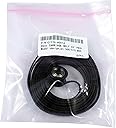
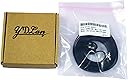
The C7770-60014 HP Designjet 500, 800 Belt is a high-quality replacement part designed for 42" plotters, made from durable polyurethane material. It ensures compatibility with various HP Designjet models, providing a reliable solution for your printing needs.
| ASIN | B00GIOL1CI |
| Brand | Laptopygp |
| Brand Name | Laptopygp |
| Color | black |
| Compatible Devices | Vacuum Cleaner |
| Customer Reviews | 4.0 out of 5 stars 77 Reviews |
| Manufacturer | Laptopygp |
| Material | Polyurethane (PU) |
| Material Type | Polyurethane (PU) |
| Part Number | C7770-60014 |
| Style Number | C7770-60014 |
| UPC | 625886677803 |
C**.
Fits great, works great.
Fits great, works great, got the plotter up and running after watching a youtube video on how to install. The quality of the belt is probably not at par with the OEM but its pretty decent and you can't beat the price, I use this plotter for light duty anyway. I recommend unless you are very high usage and can foot the cost of the OEM belt.
W**K
The printer must be calibrated after belt replacement.
It's the same situation as with an original HP belt replacement. After belt replacement, printer must be calibrated. It takes just a few minutes and the procedure can be initiated from the printer's "paper" menu. Make sure to load 36" roll or large sheet of paper (for the 42" model). Reload printed pattern with dots facing the printer - you need to rotate the printed sheet 90 deg counterclockwise. From the paper menu initiate scanning of the calibrated printout. Once it's done you are ready to print. The belt works as good as the original one. Replacement takes 1-2 hours depending on the skills. There is a YouTube video that explains the process. You will need a Torx screwdriver set for the job. Make sure to clean all the gunk from the old belt on the motor pulley. Also use the attached tension pulley to replace an OEM one. To lock tension pulley spring down, just press the tab below pulley until it locks in down position. To apply tension, use small flat head screwdriver to release plastic bracket holding the spring - there are two tabs that are latched on both sides of the spring.
S**K
junk belt
I purchased this belt 4 months ago to replace a belt that was shredding. The printer has seen very light use in the time since the belt has been replaced and the belt has formed "humps" or spots that are thicker than the rest causeing the carriage to clunk as this hump passes over the drive gear for the belt. I have suspicion that I did not receive an LPS belt, buyer beware, I am ordering a new one directly from the LPS website.
G**S
Quality replacement belt
This belt is made better with quality materials and should last as long, if not longer, than the OEM belt. Installation was extremely easy using the instructions that came with the belt and by viewing the step-by-step video by LPS Computer I found on YouTube (just search for HP Designjet 500 belt replacement). I would not hesitate to recommend this product and all the other quality products sold by LPS Computer.
J**S
Teeth all the way around, but still works.
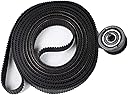
After reading the directions and watching some videos I was able to make the belt work with my Designjet 500PS+HPGL2 Card 42”. The difference with this belt and the OEM belts that are showen and talked about is that this belt has teeth all the way around. The OEM belt does not, and that is said to be one of the ways that the machine centres itself. This belt has teeth all the way around it, that was what scared me in the beginning and I almost returned it. Since I had 2 of the belts thinking that I had ordered them from different suppliers as the prices were different and the images for the product were different, but they were from the same supplier, kind of tricky on the supplier’s part but whatever. I was able to install one of the belts and it is working, I am not too sure about the quality yet but I will try and do an update later, non the less the belt does work, a couple of my 24 x 36 pages look a bit fizzy but I’m not too sure if that is because I printed my cad to a pdf and then printed the pdf to the printer or if it is just the belt. The first couple pages I printed did look a bit fuzzy but they were legible.
S**R
***Very confusing Designjet belt description….take heed!!****
***** there is a very important point to know that is not made clear on any of these postings about the HP DesignJet carriage drive belt. There is a DesignJet that has a 24 inch wide paper roll, and there is one that has a 42 inch wide paper roll. I did not know this…! The belt I need for the 24 inch paper roll is 42 inches. It looks like, from the way this is written, that the drive belt is 42 inches. It is not. It is for a different designjet printer that takes a 42 inch wide paper roll. The belt is actually 60 inches. So, if you order this, you’ll be very confused, because it looks like you have received a 60 inch belt in a 42 inch belt container. What is not clear is it is for the 42 inch wide paper roll unit that carries a 60 inch belt. Please take note so you don’t make the same mistake I am sure many many people have made****
J**.
Sceptical with generic parts...
Being an "old school" copier / printer technician for over 40 years I don't usually use aftermarket parts. Because my regular vendors were out of stock and needed it fast for one of my largest accounts I took a chance. Was worried when I saw the whole belt had grooves which OEM doesn't but worked fine with the non-grooved pulley they supply with belt. Of course the real test is how long will this belt last? Perhaps having grooves on whole belt helps with it lasting longer. Only time will tell. 3+ years on an average user machine would be acceptable. If the belt fails prematurely I will write another review to warn others.
T**T
Made a complex job easy
To replace the belt you have to take a lot of the printer apart. A download link for the service manual came with the belt. Without it, I doubt it's possible to perform the task. With it, installation was pretty painless and only took about an hour. I was also able to use the service manual to correct some other minor issues. Good company. Well worth the money.
Trustpilot
3 weeks ago
3 days ago