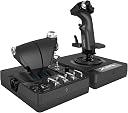
🕹️ Elevate your flight game—because average controllers just don’t cut it.
The Logitech G X56 H.O.T.A.S is a professional-grade flight simulator controller featuring 6 degrees of freedom, 189 programmable controls, and customizable RGB lighting. Designed for both VR and traditional flight sims, it offers independent twin throttles with adjustable spring resistance, ensuring precision and comfort. Compatible with Windows PCs via dual USB ports, it’s the go-to choice for serious sim pilots seeking immersive, customizable control.


| ASIN | B079Z3DSBK |
| Best Sellers Rank | 2,172 in PC & Video Games ( See Top 100 in PC & Video Games ) 3 in PC Joysticks |
| Country of origin | China |
| Customer reviews | 4.1 4.1 out of 5 stars (2,538) |
| Is discontinued by manufacturer | No |
| Item model number | 945-000059 |
| Product Dimensions | 18.5 x 22.5 x 26.6 cm; 2.28 kg |
| Rated | Not PEGI rated |
| Release date | 24 Aug. 2018 |
T**Y
Seems like the best value at this price point
In a nutshell I think this is probably the best throttle and stick at this price point. In fact it's a really good price for what you get. I'm very happy with this buy. The only negative thing I can say about the throttle is that it lacks 0%, 50% and 100% detents (e.g. for afterburner). Otherwise, tons of switches, ability to split the throttles, multiple modes.. all you need. The stick's great. Again plenty of buttons which feel really satisfying to use, the spring in the can be adjusted if you want an easier time moving the stick, or if you want to make it more difficult. In terms of feel it's good, but not incredible - going higher end would get you that, but we're in the mid-range. I am totally satisfied with the quality here. The software's garbage. You'll probably find yourself having to clear profiles every time you boot your PC, since you'll be using the ones in the game. Don't discount the X56 just because of the two clicks it takes to do that.
G**G
Logitech HOTAS X56
PROS • Ergonomic feel • Many customisations, hundreds of programmable controls • Easy plug and play, might need to tweak keybinds/settings • 30 buttons, some with multiple functions including: two way switches, knobs, triggers, hats, joysticks and sliders. • Compatible with many games including MSFS, DCS, Star Citizen, War Thunder, etc. • Split throttle, allowing for intense combat mechanics. CONS • A bit expensive for budgets, but I recommend as it is worth it. • Throttle is a bit stiff, even at the weakest setting, sometimes it moves across my desk. • Supposed reports of ‘ghost inputs’, I haven’t had a problem with these yet, pretty decent otherwise. OVERALL REVIEW The Logitech HOTAS X56 is a great hands-on piece of flight simulator hardware, with an excellent design and features for customisation. It has customisable RGB and is a great medium budget option for sim users. RATING - ⭐️⭐️⭐️⭐️⭐️ EDIT (1 year later) - The stick and throttle are still working perfectly fine, definitely no ghost inputs, still a 5 star worthy product, 100% worth the money.
S**E
Best HOTAS in its price range
After a year with the X56, I'm really happy with my purchase. I use this for DCS in VR and it works really well. The joystick is too big for my hands and I had to artificially raise the palm rest at the base (using layered cardboard) by about 1 cm so that I could rest my palm and still reach all the buttons but you have to be careful not to raise it too high as you can cover up the button at the very bottom of the actual stick. Once I found the right level to raise the palm rest then it was comfortable but be careful with this if you have small hands. The throttle is built really well and is comfortable. It also has heaps of buttons and switches which is excellent! It does have 3 things that you need to consider - The throttle movement is a little on the heavy side and doesn't slide easily. I would have liked it if it was a little easier but that's a preference thing and you get use to it. - The throttle doesn't have an afterburner indent. For those flying fighter jets, that means you won't get the physical nudge on the throttle once you've hit afterburners so might not realise they're on. Not the end of the world but something to think about. - The throttle takes lots of power and people have had issues with buttons being triggered randomly due to using a non-powered USB hub. Make sure you have a reliable direct USB connection to your PC or a powered hub to plug it in to. Overall, the HOTAS is the best in its class and to get anything better you would need to pay ~2-3 x more for a professional Warthog, WinWing or Vipril Hotas so although not perfect, it does represent good value for money.
B**N
Great feeling and perfectly acurate.
I love this thing. It has such a nice feel to the grasp for both hands and the buttons are all perfectly placed. I've had no problem with mine and I've had it a year now. The hat's on stick feel great to the thumb touch too. If I had one gripe it's that the joystick is a little large, but maybe I just have small hands. And in fairness it does come with a section to keep your hand reat a bit higher which is good. The colours of the lights are a nice touch and can be changed too. Great HOTAS set up for professional gamers.
A**N
Logitech X-56
Plus points: Throttle controls can be bound or unbound together to work as one lever or 2 Momentary switches spring back with good response. Everything easily within reach. Programming buttons - software allows adjustment of basically everything for use within games / Sims. Very very adjustable so many buttons. RGB lighting also very adjustable as well as brightness. Has mounting holes on the units to mount to desk / sim pit style brackets. Although the rubber feet do allow to be placed direct on a desk without it moving too easily. Bad points - Lack of an internal cable management for excess cable length. The throttle resistance knob is a bit sticky and often won't allow rotation. Even a minor adjustment results in either no resistance at all or stiffer than would be desirable. Summary - Having used HOTAS style controls in the past this is certainly my favourite to obtain. Controls are very adjustable and the ergonomics are superb. The build quality appears very sturdy as it should be for its cost. Would certainly do sim pit pilots proud. Only drawback being the throttle resistance knob
D**N
Juste parfait pour mon utilisation ( Élite Dangerous) j ai de grande mains et il est a ma taille c'est très appréciable j'avais l'ancienne version "RHINO" mais il y avait des imperfections qui ont étées corrigées avec cette dernière version
L**I
Ottimo prodotto costruito con cura da brand di alto livello (si parla di Logitech), per farvi capire la cura della costruzione all'interno della confezione ci sono altre molle da sostituire sotto la cloche per aumentare il feedback più morbido o duro della risposta della stessa. Altamente configurabile tramite il suo software, più essere aggiunta la pedaliera da acquistare a parte oppure in caso di rottura si sono sul sito Logitech diversi pezzi di ricambio, veramente ottimo prodotto
D**Y
Nach Jahren der Verwendung eines Saitek X45, war es mal Zeit für ein neueres Gerät. Hauptsächlich spiele ich nur Elite Dangerous und Microsoft Flight Simulator. Ja noch nach 11 Jahren spiele ich Elite, und das 2-3x die Woche. Mein alter HOTAS gab (natürlich) nach 11 Jahren irgendwann den Geist auf. Nun aber zum HOTAS: Der macht einen guten Eindruck, ist Stabil und hat eine Menge an Knöpfen. Das was man für Flugsimulatoren und Space Simulatoren benötigt. Der Stick besitzt - 4 Knöpfe - 1 Ministick (analog) - 3 Hats (digital) mit je 8 Kontaktpunkten. Das Throttle besitz: - Auf dem Boden des Throttle - - 7 Schalter, je 2 Positionen - - 2 Drehregler - - 1 Moderegler für 3 Modis (für Programmierbare Funktionen) - Am Throttlehebel - - 3 Knöpfe - - 1 Schieberegler - - 1 (ich sag mal) Schieberegler der wieder zur Mitte springt - - 1 Rädchen auf der Linken Seite des Hebel - - 2 Analoge Regler rechts, welche zusätzlich noch eine Knopffunktion haben - - Noch mal 2 Hats (digital) mit 8 Kontaktpunkten - - 1 analogen Ministick So lassen sich sowohl Spiele wie E:D als auch Flugsimulatoren keine wünsche mehr offen. Die digitalen Hats und Schieberegler verwende ich als Knöpfe so hat das Hotas insg. 60 Knöpfe. Dazu die analogen Steuerungen, welche dann eher für analoge Flugzeugeinstellungen wie z.B. bei Flightsimulator Landeklappen oder Störklappen und Trimmung verwende. Zusätzlich besitzt der Throttle an der Seite eine Feder, womit das Gleitgefühl eingestellt werden kann. Hier habe ich auf ganz leicht gestellt, so bleibt das Throttle auch an der Stelle auf meinem Schreibstisch. Anordnung der Steuereinheiten (Throttle): Je nach Stellung des Throttle, sind die Kippschalter am Boden schwer zu erreichen (beschriftet mit TGL1-4), daher habe ich dort eher unwichtige Funktionen oder Funktionen welche ich nicht im Flug benötige. Anders sind die Kippschalter unterhalb des Throttle, die sind gut erreichbar. Ich spiele oft mit einer HTC Vive (VR Brille) und auch mit der VR auf dem Kopf sind die Schalter eindeutig und sofort zu finden. Anordnung der Steuereinheiten (Stick): Auch hier sind die Knöpfe gut angeordnet. Ich habe aber relativ große Hände. Mit dem Daumen kann ich gut die 3 Hats erreichen, auch den Knopf über den Linken Hat. Ich kann mir vorstellen das hier allerdings Spieler mit einer kleineren Hand den rechten unteren Hat auf dem Stick als unangenehm finden, da dieser al Scharfkantig empfunden werden kann. Wenn ich hier den oberen Hat nutzen möchte, berührt ungefähr die Mitte des Daumes das untere Hat. Der kleine Finger liegt gut auf den Unteren Knopf auf dem Stick und erreicht noch den etwas weiter entfernten unteren Knopf. Neben den Hats auf der rechten Seite ist noch ein Knopf der leicht vom rechten Zeigefinger erreicht werden kann, sonst ruht der rechte Zeigefinger auf dem Trigger. Der Stick kann leicht in allen Richtungen Bewegt werden. Allgemeines: Ich hatte ja vorher ein sehr altes Modell (X45) dort war das Throttle per Kabel am Stick angeschlossen und nur der Stick per USB am PC angeschlossen. Der X56 benötigt 2 freie USB Port, da sowohl der Stick als auch das Throttle direkt am PC angeschlossen werden. Da ich viele USB Geräte verwende habe ich mir auch ein USB Hub mit eigener Stromversorgung zusätzlich bestellt. (Nicht nur für das HOTAS sondern auch und einfacher an USB 3.1 zu kommen, aber dazu gibt es eine Rezession an anderer Stelle) Nice to Have aber meines Erachtens völlig unwichtig ist, wenn der Treiber direkt von Hersteller verwendet wird kann die Farbe eingestellt werden in der die Bedienelemente leuchten. Die Treiber des Herstellers sind nicht nötig, da Windows 10 diesen korrekt erkennt.
B**N
Ik ben al 3dagen aant wachten ging normaal al geleverd moeten zijn ik krijg ook geen updates
D**Y
Excellent matériel ! Mon fils aime jouer sur des simulateurs de vol est ravi, c'est comme aux commandes d'un vrai avion et extrêmement réaliste car les commandes correspondent aux vraies.
Trustpilot
3 days ago
1 month ago