Buy anything from 5,000+ international stores. One checkout price. No surprise fees. Join 2M+ shoppers on Desertcart.
Desertcart purchases this item on your behalf and handles shipping, customs, and support to Hong Kong.
๐ฑ๏ธ Elevate your workflow and game with the Keychron M6 โ where speed meets precision.
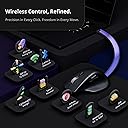
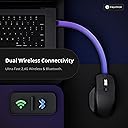
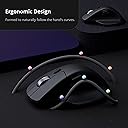
The Keychron M6 is a lightweight, ergonomic wireless gaming mouse featuring an ultra-fast 8000 Hz polling rate, a high-precision PixArt 3950 sensor with up to 30,000 DPI, and multi-mode connectivity including Bluetooth 5.3, 2.4 GHz wireless, and wired USB. It offers over ten programmable buttons, a premium metal infinite scroll wheel, and a web-based customization app compatible with Windows, macOS, and Linux, designed to boost productivity and gaming performance.


| ASIN | B0FP2F8843 |
| Antenna Location | Gaming, Office |
| Are Batteries Included? | Yes |
| Are Batteries Required | No |
| Best Sellers Rank | 5,377 in Computers & Accessories ( See Top 100 in Computers & Accessories ) 172 in Mice |
| Box Contents | Cable, Mouse, User Manual |
| Brand | Keychron |
| Brand Name | Keychron |
| Button Quantity | 4 |
| Colour | Black |
| Compatible Devices | Personal Computer, Smartphone, Tablet |
| Connectivity technology | 2.4 GHz , Bluetooth, USB |
| Country of Origin | China |
| Customer Reviews | 4.0 out of 5 stars 95 Reviews |
| Enclosure Material | Metal, Plastic |
| Hand Orientation | Right |
| Hardware Platform | Linux, Mac, PC |
| Manufacturer | Keychron |
| Model Number | M6S-A23 |
| Mouse Maximum Sensitivity | 30000 Dots per Inch |
| Movement Detection | Optical |
| Movement detection technology | Optical |
| Network Connectivity Technology | 2.4 GHz, Bluetooth, USB |
| Number of Batteries | 1 12V batteries required. (included) |
| Number of buttons | 4 |
| Operating System | Linux, Windows, macOS |
| Power Source | Battery Powered |
| Product Features | 2.4 GHz, Lightweight, Portable, Programmable Buttons, Wireless |
| Product Warranty | 1 Year |
| Special feature | 2.4 GHz, Lightweight, Portable, Programmable Buttons, Wireless |
| Style Name | 8K Hz Polling Rate |
| Unit Count | 1.0 count |
H**N
Perfect gaming equivalent of an MX master
The mouse is perfect for me, I wanted an MX Master however I cannot deal with the low polling rate for gaming, for me this is the next best thing. The mouse wheel takes some time to get used to as it scrolls either notch less or semi notch less but is great now I'm used to it. Button clicks are quiet and soft which is perfect for me, if you're used to normal gaming mice with hard loud clicks this will be a bit jarring.
F**O
Nice but
Nice one but it doesn't comes with usb C adapter to put in the laptop. Its Usb-a
D**S
Great MX Master Replacement
I'd give the mouse 4.5 stars. Connection is quick and easy. 2.4ghz adapter works great. 8k polling rate is smooth as butter. Mouse is light and feels good in the hand. Only real complaint is the button to change the mouse wheel scrolling. Its very clunky/hard to press and doesn't match the rest of the mouse. Battery life has great so far.
A**R
Great for office use
Love the quietness of the clicks, donโt feel self-conscious in the office. Remapping is nice and easy via Keychron launcher, no need to download software.
C**G
Good choice, but thereโs better
Good mouse. Suited more for smaller hands, less grippy than other mouseโs
A**Y
Not Great
Mushy buttons and shape that is awkward to pickup
S**A
Great mouse
Love the web based control panel and functionalities. Comfortable in the hand and very easy to use.
J**G
Good
Dont think ive left a review for anything in my life for a positive reason Im giving it 4 starts only because the side scroll wheel is a bit funky. But its such a comfortable shape and i cant get iver how satisfying the clicks are. Very clean design and easy to use highly recommend
F**D
Hands down one of the best value ergonomic mice that Iโve ever used...
Iโve been using this mouse for multiple months now and honestly it has impressed me way more than I expected! Iโve tried a lot of other mice over the years from Logitech, ROG, Razer, and other gaming/ergonomic brands, and somehow this ended up becoming my favorite overall. Before this, I mainly used my Logitech MX Master 4 along with a few gaming mice like the Logitech G Pro series. The MX Master felt nice at first, but after getting used to higher refresh rate mice (1k/8k hz), going back to 125hz honestly felt terrible and not responsive. Everything felt sluggish and bloated, almost like the cursor was dragging behind your movement. The skates also never felt smooth to me (especially on a glass mousepad) and the mouse itself always felt heavier than it needed to be. I also tried lighter gaming mice like the G Pro lineup, and while they were great for gaming, they became uncomfortable during longer work sessions. After consistently sitting at a computer for 7-12+ hours a day working, browsing, and gaming, my hands would usually end up cramped and uncomfortable, which made me realize that comfort matters a lot more than people think, especially for daily use. Thatโs what led me to trying the Keychron M6. I was skeptical at first because I wasnโt very familiar with Keychron and had never actually used any of their products before, but it honestly turned out to be one of the best decisions Iโve made for my setup. Right out of the box the experience felt premium. Packaging was clean, everything was sealed nicely, and setup was incredibly easy. The mouse immediately felt smooth on my glass mousepad and even worked great on my cloth pads too. The skates glide extremely well and the overall movement feels very responsive and natural. The 8K polling rate is genuinely noticeable too, especially on higher refresh rate monitors. Even switching between 1000hz and 8000hz is useful because you can actually customize the experience however you want it to be. The software experience also surprised me a lot. For this price range, Keychron honestly has some of the best software and physical mouse features Iโve ever used. You can customize buttons, polling rate, DPI, connection modes, and basically tune everything exactly how you want it without the software feeling bloated or annoying, especially since you can run it directly in your web browser without needing to install anything. I also really like that you can switch between bluetooth, their 2.4ghz receiver, and wired mode. The wired mode doubling as an off mode is also a nice touch. Everything overall just feels practical and designed by people who actually use computers daily. As for the actual feel, I first wasnโt sure about how the silent clicks were because I was used to louder tactile switches, but after using it for longer sessions I actually started liking them. Not hearing constant loud clicking for hours while working is surprisingly nice. The infinite scrolling mode is another feature I ended up using way more than expected. It feels weird at first, but once you get used to it, scrolling through documents, code, or long web pages becomes incredibly smooth and fast. On the other hand, the tactile scroll mode feels a little strange in comparison in my opinion, but itโs still nice to use when you want more precise control. Comfort-wise this mouse has been amazing for me. Iโve never had hand cramping or fatigue issues using this, even after very long sessions. My hand posture feels very natural and ergonomic without feeling oversized or awkward. My only small complaints are that the horizontal scroll wheel could feel a little bit smoother, and that the harder tactile scrolling mode on the main wheel feels slightly odd at sometimes. But honestly, those are very minor compared to how much this mouse gets right overall. For the price, I genuinely think this is one of the best value mice you can buy right now. It competes directly with mice that cost significantly more from these big brands while still offering features and performance that honestly feel ahead of them in some areas. This mouse completely changed my opinion of Keychron as a brand. It replaced my MX Master 4 entirely and I honestly donโt see myself going back. Therefore I would highly recommend giving the Keychron M6 a try, especially if you want something ergonomic, smooth, responsive, customizable, and genuinely enjoyable to use for both work and gaming. Hope this helps!
G**V
Good
Very nice! I would just prefer the buttons to be more clicky sounding
K**R
MX Master's Lower Quality Alternative with Better Features
This is basically an alternative to Logitech MX Master mice, but with a higher polling rate for those who want productivity and gaming features together. I've got the 8K version, as it was the only one with the metal scroll wheel. With a price tag of $140 this is an expensive mouse. My main problems: * Mushy left and right buttons with low feedback * Left and right buttons are not silent and also have noticeably different noises. My left button sounds way louder and cheaper * The scroll mode selector button should be pressed hard to change mode * Scrolling does not wake the mouse up so reading a long documents requires constantly moving the mouse to stop it from going into power save * Plastic side scroll wheel that is difficult to use * The overall shape of the mouse is uncomfortable for me * Keychron refers warranty to the supplier rather than upholding their own product
K**E
Keychron saved us all from the logitech slums
Finding Keychron this year has been a revelation for my desk. The V1 keyboard makes me embarrassed about the other budget keyboards I'd wasted money on. I didn't know! Anyhow, I needed a mouse so I checked them out. It came down to this or the Master 4, which is probably what you are looking at too reader. Let me tell you as someone who checked out both, the Keychron won in all ways but one. Let me preface this by saying that you have to get the 8k sensor model. I tried the 1k first and it was decent, it would be find as a secondary mouse, but this was meant to be my main personal mouse. It had to be great. I returned it and got the 8k and it's totally worth the $20. You're also getting glass contact pads and when you're on that higher polling rate, on a good mousepad with those pads? Oh it feels special. A smoothness that I didn't know existed. Logitech cannot compete here with the Master series. The clicks are silent yet responsive. I've never felt a mouse switch like this, but it is both completely silent, but not mushy. There is a very positive click felt in your finger, but as somewhat of a compulsive clicker, this is a great feature I never knew could be so well implemented. The material of the shell is a high-quality plastic. Does not feel cheap or biodegradable at all. I'd almost call it automotive grade in the best way possible. It's very smooth and I almost considered it smooth to a fault. That is until I realized it totally meshes in my mind with the butter smooth cursor tracking the physically smooth travel of the glass feet gliding across my mouse pad. The main scroll wheel is great. The 8k upgrades you to metal here and both the click mode and the infinite scroll feel great. Logitech might win here just a bit, but where they really win is the side scrolling. On the M6 it's fine, but on the Master it's great. The thing is, I don't use side scrolling enough to give up all the other upsides of the Keychron. One of the biggest I haven't even mentioned is not needing a constant 290MB service running in the background for your mouse! In fact, you don't need any at all! The settings are all configured through a web app. Just bookmark it to your favorite bar and you can always go there to change a setting. This is so much better than having it run non-stop when your computer is on and use all that memory. Not to mention the CPU cycles and suspicious outbound web traffic! Go Keychron! I run mine at 8k polling all the time with the 20k motion sampling. Yolo.
M**W
Productivity powerhouse.
I purchased this mouse alongside the Keychron B6 keyboard to use in my PC / Mac setup. This mouse is great for this because it has three different connection modes. You can choose a wired connection, the 2.4ghz connection with the dongle or bluetooth. I've tested all the different connection and they work perfectly. With one switch on the mouse I can switch the device to work from my PC to Mac. Using the Keychron launcher site you can customize the mouse in a variety of different ways to suit your personal workflow. The mouse is comfortable to use and i've found works great on lots of different surfaces. I have also used this mouse for a small amount of gaming and find that with the 8k polling rate it can keep up with FPS games with no issues at all.
Trustpilot
5 days ago
2 weeks ago