
WikiReader Pocket Wikipedia
Product ID: 913326
Details
- BrandPanDigital
- Display TechnologyElectronic Ink
- Connectivity TechnologyWi-Fi
- Memory Storage Capacity32 GB
- Battery Life3E+1 days
- Display resolution1024 x 768
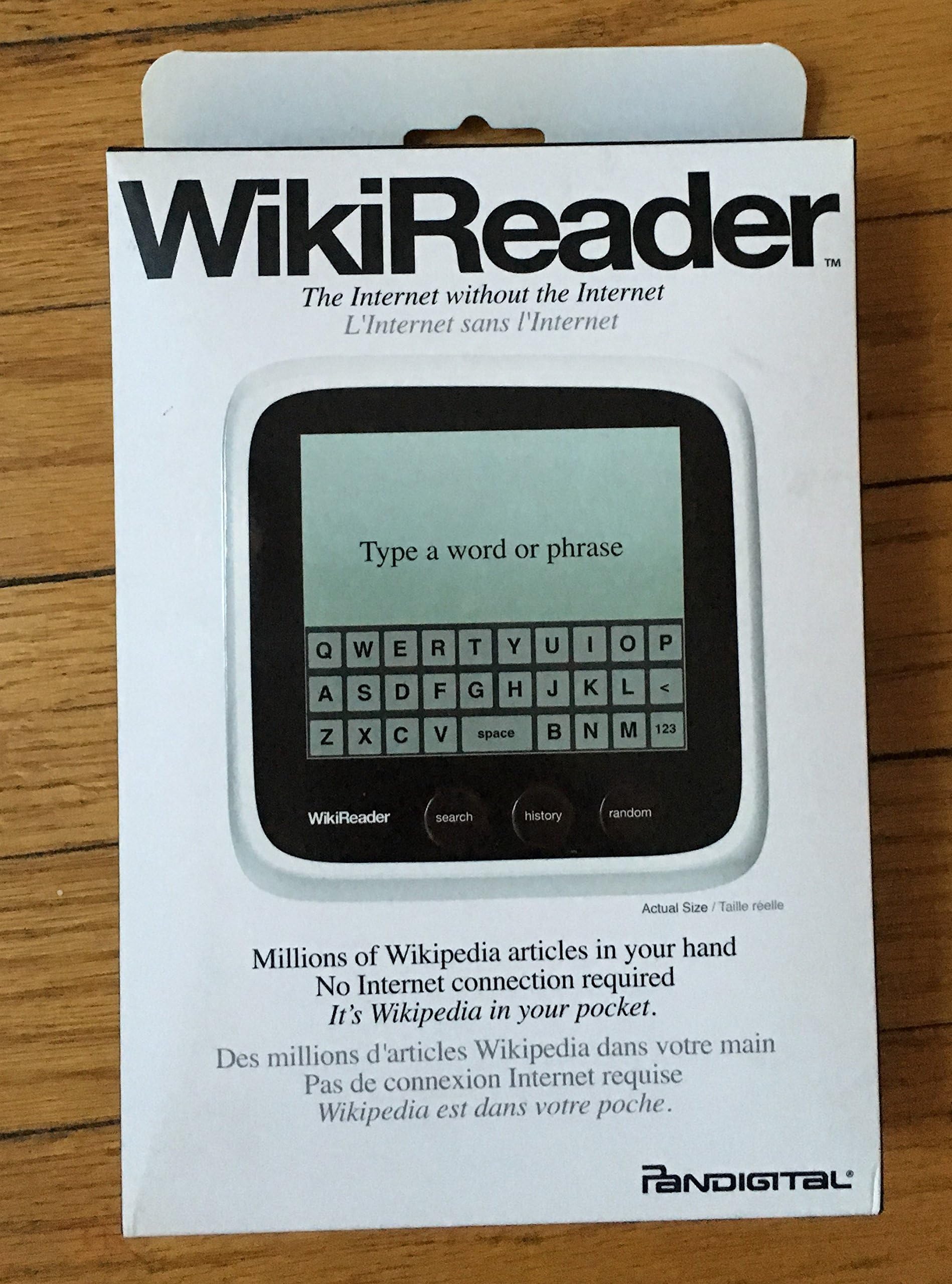
WikiReader delivers the joy of information by offering three million Wikipedia articles in one simple $99 handheld device. It turns on instantly and runs for months before its two AAA batteries need to be replaced. The large monochrome screen uses a touch interface. Articles scroll with a swipe of the finger and hyperlinks are selected with a simple tap. Three buttons—search, history, and random—offer the convenience of reading specific topics or the serendipitous pleasure of discovering something by chance within Wikipedia's rich array of articles ranging from Freud to Final Fantasy. Updates for WikiReader are provided quarterly and are available for free download. An annual subscription plan for updated microSD cards is also available for $29. For more information, including news, videos, and updates, Google for: The WikiReader Review: Great device, unusable as delivered, data corrupt on provided microSD card - Device shipped with corrupted 4GB microSD card and was unusable. Booted to logo, then did nothing. Tried to load latest Wikipedia export on existing microSD card but it is greater than 4GB by itself. Bought 16GB microSD card to replace shipped card (~$11), loaded Wikipedia, Wikitionary, WikiQuote, WikiTravel, WikiHow, Wookiepedia, Appropedia, and Project Gutenburg content on 16GB card (~9GB used) and everything worked fine. Great product, except it shipped in an unusable state and required an additional purchase to enable it. Functionally it works well. Provides rudimentary search (title only) of current library (you have to switch to the library you want to search and can only search one at a time...) As some have said, a bit tedious for long articles (navigation via links through the article's table of contents would be useful here... Review: Amazing Little Gadget - Handy to have Around - The WikiReader Pocket Wikipedia is a great little gadget. I find myself using it almost daily since I received it from desertcart about 6 months ago. It is much easier than powering up my laptop or getting out my tablet and the screen, though small, is certainly bigger than my smartphone. It is just a great little information powerhouse to have around. The screen measures about 3 3/4 of inch as a square and almost 5 inches diagonally. The screen itself is about 3 5/8 of an inch diagonally. That makes for a fairly large reading surface. The housing around the screen face is a white plastic. It seems moderately solid and sturdy, but I am not sure how it would hold up in a waist-high drop. And the glass screen certainly would not fare as well as the casing. Even more reason for me to be careful when using this WikiReader. In my tests of the unit, it has performed outstanding. Other than a slight delay it takes to load a topic (I guess from searching and loading one of the 3 million topics) the unit performs very well. The screen, in a well-lit area, is easy to read and the type is easy for my eyes to adjust in such well-lit areas. The on button is on the upper right lower side. It is very easy to find even if I am not looking for its position. The front of the device has the WikiReader logo and 3 buttons, from left to right: search, history and random. The search button does exactly as it indicates. A keyboard pops-up so I can enter search terms. I found the keyboard a bit small for my fingers, so I use a stylus with the keyboard - this seems to work out very well. The history button is very convenient, it lets me see at a glance all the pages I have visited on the WikiReader in chronological order. The random button is intriguing, if I just want to browse with no particular topic in mind, I hit the random button and it brings up any number of topics I would never search for with the search button. I have discovered some very interesting topics using this button. I was a bit anxious when I realized that Pandigital was the purveyor of this WikiReader. From what I had heard before purchasing this unit, Pandigital was not known for its quality products, however, that has not been the case with this device. The construction build of this unit is first rate. I speculate that the backers of this unit, and Wikipedia, imposed some pretty stringent manufacturing specifications for this gadget. It is a well-built unit. I have been using this small wonder for a little over six months, and it is one of those items where I state: What did I do before I found this device? Hope you enjoy it as much. Oh, one last item, kind of on a down note. I downloaded the update software from [...] for the free Update Application downloads to my PC for convenient transferring updates to my WikiReader. I downloaded the .zip file and installed the software, but I am unable to get the application to run. I plan on contacting WikiReader to determine what I have done wrong in my installation.
| ASIN | B002N5521W |
| Battery Average Life | 30 days |
| Battery Description | AAA |
| Battery Life | 30 days |
| Bluetooth support? | No |
| Brand | PanDigital |
| Connectivity Technology | Wi-Fi |
| Customer Reviews | 3.4 out of 5 stars 93 Reviews |
| Display resolution | 1024 x 768 |
| File Format | HTML |
| Human-Interface Input | Touchscreen |
| Item Weight | 4.48 ounces |
| Manufacturer | Openmoko |
| Memory Storage Capacity | 32 GB |
| Mfr Part Number | PANREADER |
| Model Name | |
| Model Number | PANREADER |
| Native Resolution | 1024 x 768 |
| Night vision | No |
D**E
Great device, unusable as delivered, data corrupt on provided microSD card
Device shipped with corrupted 4GB microSD card and was unusable. Booted to logo, then did nothing. Tried to load latest Wikipedia export on existing microSD card but it is greater than 4GB by itself. Bought 16GB microSD card to replace shipped card (~$11), loaded Wikipedia, Wikitionary, WikiQuote, WikiTravel, WikiHow, Wookiepedia, Appropedia, and Project Gutenburg content on 16GB card (~9GB used) and everything worked fine. Great product, except it shipped in an unusable state and required an additional purchase to enable it. Functionally it works well. Provides rudimentary search (title only) of current library (you have to switch to the library you want to search and can only search one at a time...) As some have said, a bit tedious for long articles (navigation via links through the article's table of contents would be useful here...
P**Q
Amazing Little Gadget - Handy to have Around
The WikiReader Pocket Wikipedia is a great little gadget. I find myself using it almost daily since I received it from Amazon about 6 months ago. It is much easier than powering up my laptop or getting out my tablet and the screen, though small, is certainly bigger than my smartphone. It is just a great little information powerhouse to have around. The screen measures about 3 3/4 of inch as a square and almost 5 inches diagonally. The screen itself is about 3 5/8 of an inch diagonally. That makes for a fairly large reading surface. The housing around the screen face is a white plastic. It seems moderately solid and sturdy, but I am not sure how it would hold up in a waist-high drop. And the glass screen certainly would not fare as well as the casing. Even more reason for me to be careful when using this WikiReader. In my tests of the unit, it has performed outstanding. Other than a slight delay it takes to load a topic (I guess from searching and loading one of the 3 million topics) the unit performs very well. The screen, in a well-lit area, is easy to read and the type is easy for my eyes to adjust in such well-lit areas. The on button is on the upper right lower side. It is very easy to find even if I am not looking for its position. The front of the device has the WikiReader logo and 3 buttons, from left to right: search, history and random. The search button does exactly as it indicates. A keyboard pops-up so I can enter search terms. I found the keyboard a bit small for my fingers, so I use a stylus with the keyboard - this seems to work out very well. The history button is very convenient, it lets me see at a glance all the pages I have visited on the WikiReader in chronological order. The random button is intriguing, if I just want to browse with no particular topic in mind, I hit the random button and it brings up any number of topics I would never search for with the search button. I have discovered some very interesting topics using this button. I was a bit anxious when I realized that Pandigital was the purveyor of this WikiReader. From what I had heard before purchasing this unit, Pandigital was not known for its quality products, however, that has not been the case with this device. The construction build of this unit is first rate. I speculate that the backers of this unit, and Wikipedia, imposed some pretty stringent manufacturing specifications for this gadget. It is a well-built unit. I have been using this small wonder for a little over six months, and it is one of those items where I state: What did I do before I found this device? Hope you enjoy it as much. Oh, one last item, kind of on a down note. I downloaded the update software from [...] for the free Update Application downloads to my PC for convenient transferring updates to my WikiReader. I downloaded the .zip file and installed the software, but I am unable to get the application to run. I plan on contacting WikiReader to determine what I have done wrong in my installation.
L**I
Defective product
The item worked fine for the first 2 times I tried to look something up but then it started displaying "No Wiki found"- as if the device is empty! I emailed the manufacturer at thewikireader.com, but their website says they only provide support for devices purchased directly through them- they never responded to my customer support request. Deal was too good to be true....
B**L
It lives up to it's claims
This product does exactly what it sets out to do; a few caveats though: The display is pretty lousy. it is difficult to read, not as fresh-looking as the Kindle or other readers... and only one font is available. The touchscreen keyboard is frustating to use.. the iPhone is so much better at this, in a smaller package. Also, it is a bit too large to carry in one's pocket, altough I think it's great for camping and for taking to the field (i.e. Military training excercise... my purpose for getting one)
M**S
Great item but could not read the screen
Great item but could not read the screen in any light except a very bright one pointed directly at the screen.
R**Y
New favorite gadget, with some room for improvement
A shopper encountering the WikiReader product page for the first time may be tempted to compare the it to other hand held gadgets that attempt to do everything, but charm of the WikiReader is in its simplicity. I like the fact that it gives me portable access to my favorite reference web site without the hassle of needing a connection. If I lose it or it's stolen, there's no personal data on it to worry about. It's small enough to take with you, very easy to use, does not require a data plan, and promises a long battery life. It comes on almost instantly after pressing the power button, and will turn itself off if left idle. It did not take long to get proficient at using the touch keyboard without hitting the wrong letters. I'm happy to say that foreign letters with accents are displayed correctly. I have had no trouble with the hardware, but did have some questions and found customer support to be excellent. There is some missing content, at least for now, and that's going to cost a star. Some articles are missing. Perhaps because they are not linked from other articles. The support person who quickly replied to my email assures me that this will be fixed in a future version. More significantly, tables are not included. I understand it's not possible to include certain content like all the color photos, but the tables include some important data. The challenge is that most tables in Wikipedia are too wide for the WikiReader display and it currently does not support panning left and right. I am confident they will figure out a way to include this data in the future and predict we users will be able to update our existing WikiReaders to show it.
J**E
Easily one of the year's best gadgets!
I purchased the WikiReader a few weeks ago, and I can't put it down. It's a great little gadget for anyone who is naturally curious or just likes learning about new things. Two points that I've seen in reviews that I'd like to address: 1 - Some people think the WikiReader is unnecessary and redundant because of other devices on the market (such as smartphones) which can search Wikipedia and do many other things -- since the WikiReader does only one thing (Wikipedia) it must be pointless. Well, there are *many* people out there who don't have a smart phone or aren't even very computer savvy. The WikiReader is easy enough for anyone to use, and even though it does only one thing, it does it very well. But the clincher for me is the fact that it's all completely offline. Since all 3 million Wikipedia articles are stored on a Micro SD card inside the WikiReader, you can literally use it anywhere, with no need for a wi-fi or cellular connection to do it. There's no other device out there which can make that claim when it comes to Wikipedia access. 2 - I've also read the complaint that since the WikiReader will only receive updates a few times a year, that it's a silly product -- because the Wikipedia site is always being updated, the version on your WikiReader will always be outdated. I find this line of thinking a little laughable. It's like saying that it's pointless to publish any sort of reference book because newer information is available on the internet. While it's true that some pop cultural articles may be outdated because of the constant antics of celebrities, I assure you that there's millions of other articles on Wikipedia on a myriad of subjects that won't be affected by the fact that the version of Wikipedia on your WikiReader is a few months older than what's on Wikipedia at this very moment. That's just my two cents on the WikiReader. It's a solid little device with great battery life that succeeds at what it was built for -- access to Wikipedia anywhere. 3 million fascinating articles in your pocket, anytime or anyplace you want. And it's getting better all the time: When I first unboxed my WikiReader, I found that scrolling down the page in longer articles was a little sluggish. I went to the WikiReader website and found that a fix had already been released. I downloaded the file (it was quite small), dragged and dropped it onto my Micro SD card, and noticed an instant improvement on page scrolling. It was nice to find that the WikiReader team is in touch with their consumers and constantly working on improvements for the device, and also that the update process is so painless.
N**L
Superb & Superlative
To have so much knowledge in such a small package is marvellous. I love that it switches on in less than half a second, with its' keyboard ready and waiting for you to expand your knowledge. There's no "connecting, please wait" no digging around in sub menus, it's just; Go! The screen has excellent clarity in good light [and I wholeheartedly endorse the lack of a backlight - battery life (and simplicity?) is paramount here], you don't expect a book to be self illuminating, right? The glass screen helps both the quality-product feel for a device that is so low-cost and it aids intuitive touch-screen scrolling and typing. Of the three(!) buttons, the "History" is the one I use most; as I read through an entry I keep finding new links I want to refer back to, which you can "collect" with just a tap of the new link (which takes you immediately to it). I switch back to the original topic (using "History") at exactly the place I left it, but now with a pile of "new" and related topics awaiting further exploration once I'm finished! I could go on, but suffice to say....in brief; speedy, small, robust, beautiful, FUN! It has not left my side since Christmas - it's always ready with fascinating reading material and fresh knowledge. As a bloke in his thirties should I be getting this hooked on something this small and shiny..? Yes!
Trustpilot
1 month ago
2 weeks ago