We remain fully operational. Our teams are working around the clock to ensure your deliveries continue safely.

下载应用程序



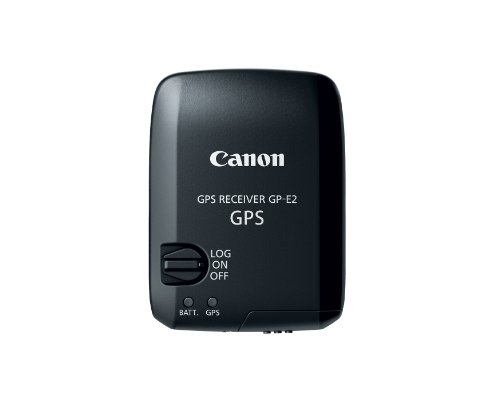


📸 Elevate Your Photography Game with Precision!
The Canon GP-E2 GPS Receiver enhances your Canon EOS 5D Mark III by embedding location data into your images, ensuring every shot is not just a memory, but a documented experience. With features like an electronic compass, atomic clock synchronization, and energy-efficient design, this device is perfect for the professional photographer on the go.
T**M
The GPS Solution We've Been Waiting For
I've used a number of different solutions to geotag DSLR images including a DeLorme GPS unit, a stand alone GPS logger, and Motion-X on the iPhone. All of them worked OK though all required time syncing beforehand and extra work after the fact to add the GPS data to the images; none of them were the perfect solution. The GP-E2 is that perfect solution I have been imagining and waiting for since the original 5D.With a 5D Mark III or a 1D X, all you do is slide this unit into the camera's hotshoe. It will update your DSLR's time setting automatically when configured to so do. It can be set to just geotag images or to record a track log. If you shoot with the unit mounted on your DSLR in track log mode, it will do both. When used off camera in track log mode, the included Map Utility software allows you to geotag both JPG and CR2 images after the fact using the recorded track log.I brought this unit with me on a recent three week trip through the national parks of Washington state. When I remembered (which, surprisingly, was almost every time I shot) I mounted the unit on my 5D3 before shooting. When I wasn't shooting, I removed the unit from the camera and both went into my f-stop Guru backpack with the GP-E2 unit still on and recording a track. I found that it acquired my position quickly and was able to receive a GPS signal even when in a less than ideal position inside my pack. In fact, at one point I put my pack inside my metal-roofed camper and drove to a nearby Walmart to park overnight. The unit accurately recorded my position down to the exact parking space.The geotagging part of the process is straightforward. Both RAW and JPG images contain position, altitude, and directional data as part of their metadata. They appear on the map where they should in Lightroom 4 (though LR4 doesn't do anything with the directional data). It all just works.Canon's Map Utility was not available for download on Canon USA's website when I looked so the software disc was required to install it. The Map Utility is used to download track logs from the unit, view those track logs on a map, sync data to ungeotagged images, and configure the GP-E2. It doesn't require an internet connection to save track logs, geotag images, or configure the GP-E2 but it does require a connection to view the track logs on a map. (It uses Google Maps.) Unfortunately, the software does not allow users to configure where it saves those logs so backing them up, moving them, or using them for other purposes is, at best, inconvenient.The GP-E2 will start deleting the oldest track logs when it runs out of space to save new ones. I was pleasantly surprised to discover that it didn't delete data during my trip. The manual suggests you can go a number of weeks before running out of space. My experience backs this up.The unit uses one AA battery. I used Eneloop rechargables, which paid for themselves over the course of this trip. One charge lasted just over a day, with the GP-E2 staying on for at least 8 hours per day.So is there anything I didn't like about the unit? A couple things. First, there are two LED status lights on the unit which blink to give feedback about reception and battery life. This sounds straightforward but Canon's implementation is not. For example, instead of relying on a green light for a good battery or good reception and a red light for low battery or bad reception, both lights rely on the rate at which they blink to provide battery and reception status. Except that sometimes a different interval means something and sometimes it doesn't. I eventually figured things out well enough to know when I had a good signal and when I needed to change the battery...but you shouldn't have to figure something like this out.My second gripe relates to the very nice case that is included with the GP-E2. Inserting and removing the unit from the case is such an exercise in frustration that I ended up doing something that I never do: modify it myself. I used a very sharp scissors to cut open a seam in order to make inserting and removing the unit easier. ("Easier" but still not easy.) Did no one notice this during the testing of this product? I would be tempted to think that it was just my case that had an issue if not for Martin Bailey's review of this product which mentions the same problem. Still, my solution looks fine--I used a butane lighter to seal the edges of my cut--and it makes the case serviceable.Despite these minor complaints, this unit is the geotagging solution I've been waiting for. Until GPS is built into DSLR camera bodies, it is hard to imagine a better GPS solution for compatible Canon bodies than the GP-E2.
D**E
Super Cool Technology...and they have now made it a lot easier to operate...
This was cool to get, set up and track our journey. They now have perfected the software and it was easy to use. It tracks your trip, whether on your camera or not (as long as it can lock on to a satellite), and will show you where you took the pictures, right down to the direction you were pointing the camera, when you upload it and check the map and track line. It is reasonably easy to use and well worth the expense. I am looking forward to using it on a cruise.One down side to the equipment. If you get into your vehicle, as an example, after walking a trail or getting out to photograph a lake or mountain range, you need to have the GPS in a place where the thing can continue to (hear) be locked onto satellites. What we found was we needed to take the unit off the camera and then set it onto the dash where it can "hear" the satellite pings. In other words, be locked on to a satellite to continue following your track. Unless you have a non-standard dash on your car or other vehicle, you will need something to keep it from sliding around up there, such as some kind of a little sandbag or other weight, or a hook to a wire to hold it in place (perhaps even hook and loop to attach it temporarily to the dash). If you don't put it somewhere in the vehicle where it can "see" the sky and continue to keep the satellite lock, you will lose the lock and it won't maintain your track. I you are out walking without the camera, you can clip it to your belt with the cute little leather pouch that comes with it. Or, if you have the camera, it will probably be attached. It isn't all that big, barely the size of a pack of regular cigarettes if you smoke or used to smoke. We don't but you get the comparison. Also, it uses a single AA battery, so we would recommend a lithium AA for extended time of operation.More Positives: When I took a little trip and then downloaded the pictures, I activated the software (and don't forget to do the download of the updated software, which is very easy), and then downloaded it to Google Earth Pro (which is now free and is also 3D if you don't know it yet), and it came up just like their regular maps...with all my pictures shown at the points where they were taken. I took a screen shot and sent it to several friends. To a one, they responded with comments like, "That is so cool...", and "How cool is that technology...", etc...Yes, a couple of hundred bucks is not cheap, but if you have it to spare this is worth your consideration. I put mine on the new Canon T6s when I got it about a month ago, and it worked and performed flawlessly. Just don't forget to go into the camera menu and turn on the GPS. The rest is really easy. I highly recommend it if you can swing the price of it. Make a great Father's Day Gift.
J**G
This device worked great on my 5DIII for a couple years then stopped ...
This device worked great on my 5DIII for a couple years then stopped working with no warning. Not sure if I have a bad device, but I would expect it work nearly forever as there are no internal moving parts. Oh well. I won't be replacing it with another.
B**Y
Limited functionality
Mostly my fault for not doing enough research prior to buying, but for the money the GP-e2 is very disappointing for the money you pay, especially on the new R series cameras. First and most importantly is that on the R series cameras it only works when mounted to the hot shoe which severely limits the use of a flash when use the receiver. I tried it with a flash trigger that had a pass through Hotshoe on top and it did not work. I think the only way (I have not tried yet) is to use the camera trigger port to send flash single to the flash or trigger, which means advanced functions such as hss, ttl and tcm are not usable. Second not a big deal but disappointing is that the compass function does not work with R series cameras.
TrustPilot
2 周前
2 周前