
🎥 Elevate your command center—because your workflow deserves the ultimate power play.
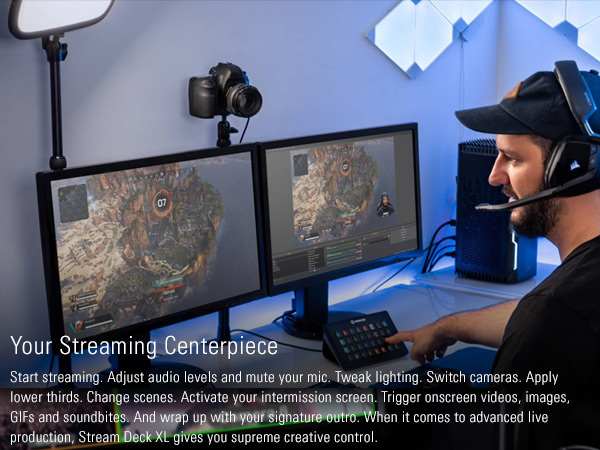
The Elgato Stream Deck XL is a professional-grade studio controller featuring 32 customizable LCD keys, USB 3.0 connectivity, and broad compatibility with popular streaming, productivity, and smart home apps. Designed for Mac and PC, it empowers users to automate complex workflows, control live productions, and personalize their digital environment with instant visual feedback and multi-action macros.




| ASIN | B07RL8H55Z |
| Additional Features | 32 customizable LCD keys |
| Antenna Location | Gaming, Office |
| Best Sellers Rank | #485 in Video Games ( See Top 100 in Video Games ) #43 in PC Gaming Keyboards |
| Brand | Elgato |
| Built-In Media | Stream Deck XL, USB-C to USB-C Cable, Magnetic Stand, Quick Start Guide |
| Button Quantity | 32 |
| Color | 32 Keys |
| Compatible Devices | Windows 10, macOS 10.13 |
| Connectivity Technology | USB |
| Customer Reviews | 4.7 out of 5 stars 8,177 Reviews |
| EU Spare Part Availability Duration | 2 Years |
| Enclosure Material | Plastic |
| External Testing Certification | Não Aplicável |
| Global Trade Identification Number | 00840006610373 |
| Hand Orientation | Ambidextrous |
| Item Dimensions L x W x H | 7.17"L x 1.34"W x 4.41"H |
| Item Height | 4.41 inches |
| Item Type Name | Stream Deck |
| Item Weight | 410 Grams |
| Keyboard Description | USB |
| Language | English |
| Manufacturer | Elgato |
| Model Name | Elgato Stream Deck XL-Advanced Stream Control, 32 customizable LCD keys |
| Model Number | 10GAT9901 |
| Number of Keys | 32 |
| Power Source | USB Powered |
| Style Name | 32 Keys |
| UPC | 840006610373 |
| Warranty Description | 2 year manufacturer |
M**L
High quality
Pricey but a very good quality item. The customizability, design app, and functionality is second to none. It's very straight forward and a joy to use.
T**T
Perfect for literally everything, NOT just streaming!
I can't even begin to tell you just how much I use this in my day-to-day. Well, actually I can, this is a review, it's kind of the point. But most people see "STREAM" deck and think "oh, this is for streaming". No, my mistaken friend, this is a multitool that is only limited to your imagination. Got a wireless keyboard? That's cool. What happens when it runs out of battery and you need to charge it? Make a folder on the Stream Deck specifically for shortcuts like Ctrl +, Ctrl X, Shift, Alt Tab, and more, and you've got all your non-typing needs met through it. Need some control in your life? This has plugins available through the program's built-in library for things like light control. As an example, I use Govee lights. From my Stream Deck, I can control which lights are on, what their brightness is, what their color is, and more! I also do game development on the side. Having to type out "\n<\n[3]>" to insert the name of the third character into text can get a little annoying every time you need to say their name. So I've got a system text button that types out fourteen different character names with a press of a button (the button in question has their face on them, too, did I mention image button customization?), as well as thirteen color codes to change the text's color mid-sentence. Of course, you can also use this to LAUNCH programs as well. If you're like me and you have hundreds of programs and you don't have your desktop icons turned on, going into your folders or scrolling through your program bar can be a hassle. Add buttons for it! You can even set up folders to hold game series (KH or FF anyone?), a folder for emulators, you can even put in Steam games. Forget the games for a bit, literally every single "exe" file can be executed with a single press of a button. And of course, lastly, YES I use mine for streaming too. Switching between scenes, opening up a dynamic text file to change the weekly shout-out, turning on/off my microphone, instant clips, alerts, chat commands...heck, I even have three clocks on here to show me the times of other viewers' time zones so I can stream a game THEY like when they're actually awake. And the multi-action tool allows me to create a button that does five or six different things in a row, which is perfect for if you need to put your streams into a lockdown for something serious. All in all, I haven't found a single thing this Stream deck CAN'T do. And if there IS something, the additional add-on plugins easily fix that. 10/10 would recommend for any streamer, but also any computer user to make life so much simpler and easier.
M**S
The perfect streaming tool!
The Elgato Stream Deck XL is a game-changer for content creators, streamers, and anyone looking to streamline their workflow on both Mac and PC platforms. With 32 customizable macro keys and the ability to trigger actions in a wide range of applications, this advanced studio controller has become an integral part of my content creation setup. Here's why I'm so impressed with the Elgato Stream Deck XL: 1. Unparalleled Customization: The 32 macro keys on the Stream Deck XL are fully customizable, allowing me to create and assign a wide range of actions and shortcuts. Whether I'm streaming on Twitch, recording a YouTube video, or working on a creative project, I can tailor the keys to my specific needs. 2. Streamlined Workflow: This controller significantly streamlines my workflow. With a single press of a button, I can launch applications, switch scenes in OBS, control audio levels, trigger transitions, and much more. It's like having a personal production assistant at my fingertips. 3. Wide Application Compatibility: The Stream Deck XL is compatible with a plethora of applications and software, including OBS Studio, Twitch, YouTube, Photoshop, Premiere Pro, and many others. It adapts seamlessly to various creative and streaming tasks. 4. Easy-to-Use Software: Elgato's companion software, the Stream Deck app, is user-friendly and intuitive. Creating and organizing macros is a breeze, thanks to the drag-and-drop interface. The software also provides regular updates and improvements. 5. Dynamic and Versatile: In addition to static icons, the Stream Deck XL supports dynamic actions. You can display real-time information, such as current viewer counts, system performance metrics, or chat messages, directly on the keys. It's an invaluable tool for staying connected and informed while streaming. 6. Premium Build Quality: The Stream Deck XL boasts a premium build quality. The keys are responsive and have a satisfying tactile feel, ensuring that every press is precise and reliable. The device feels solid and durable, designed to withstand heavy usage. 7. Comprehensive Integration: I appreciate how well the Stream Deck XL integrates with popular streaming platforms like Twitch and YouTube. It simplifies tasks like going live, managing chat, and engaging with viewers, making the streaming experience more enjoyable. 8. Endless Creativity: The only limit to what you can do with the Stream Deck XL is your imagination. Whether you're creating complex macros or simple shortcuts, it's a versatile tool that adapts to your creative needs. 9. Great for Multi-Tasking: If you juggle multiple applications and tasks during your streams or content creation sessions, the Stream Deck XL becomes your command center. It reduces the need to alt-tab or navigate through menus, saving time and effort. 10. Enhances Professionalism: The Stream Deck XL enhances the professionalism of your streams and content. It allows you to execute actions seamlessly, creating a polished and engaging viewer experience. In conclusion, the Elgato Stream Deck XL is a powerhouse for content creators and streamers, delivering an unmatched level of customization and efficiency. Its intuitive interface, wide software compatibility, dynamic capabilities, and premium build quality make it a standout studio controller. Whether you're a seasoned streamer or just starting your content creation journey, the Stream Deck XL is a valuable investment that elevates your productivity and creativity to new heights. It's become an integral part of my setup, and I can't imagine my workflow without it.
S**W
Most Useful PC Peripheral Ever?
If you haven't already decided to purchase a Stream Deck you're probably balking at the price and/or saying "I can do that with a programmable keyboard and some stickers!" And you'd be right... if you weren't also completely wrong. Each key is a mini screen that can display just about whatever you want and even change conditionally based on what you have active or pressed last. You can rearrange and re-label those keys and their graphics at will by just dragging them around in the software. Try that with stickers and a key pad! If you want macros the software again makes it much easier than most other devices or scripts do, and you don't have to assign and remember a keyboard combo to activate it or worry about key conflicts - it's all contained to that one Stream Deck key. While it can do nearly anything you can dream up, the Stream Deck's focus is, of course, streaming. Where it's just plain nifty in general usage it becomes absolutely indispensable if you're a streamer. It supports all major streaming software either right out of the box (OBS, Xsplit, etc) or with easily downloaded add-ons (GeForce Experience controls). Just drag and drop the actions to a button and configure what source, scene, etc it points to. Naturally it integrates with other Elgato products seamlessly. I have one page of my XL dedicated to volume control of my Wave Link sources as well as toggles to change speaker/headphone outputs. If you have Elgato's keylights it can control those, too. You can even control your Stream Deck with another Stream Deck! (Insert meme here...) The software is continuously being developed and updated - with the most recent update adding a plethora of sound effects and royalty free music to download and use at will. The open SDK allows third parties to make add-ons, too. I have added controls for Nvidia and TeamSpeak 3 to mine and they work seamlessly, once again eliminating the need to assign and remember keyboard macros. For gaming, there's still plenty of uses. While you wouldn't use it for critical functions like motion or firing, you can still get plenty of uses out of it for things like menu shortcuts, dropping position markers, chat macros, etc. I use my mini to access my most used commands while racing so I don't have to hunt and peck at my keyboard at 200 mph, for example. The main con is the price. The standard and the XL will make you pause at first, but I've found them to be worth every penny and I'm continuously evolving the way I use them. The mini... is overpriced. Not gonna lie. I got mine on sale at about half price, and I only really recommend it at around that price. The standard and XL pretty much never go on sale, so don't hold your breath on those two of that's what you're after. The other cons, minor ones at that, are the lack of removable USB cable for the standard and mini, and the flimsy stand that I constantly flatten accidentally when I move the standard 15 key Stream Deck around. So to make a long story longer - if you are a streamer, content creator, or use a lot of macros in your workflow then you will not regret getting a Stream Deck. If you're looking at it for game purposes, make sure it's not for fast-paced stuff like movement in an FPS. For flight and racing sims it's pretty much the perfect "button box" replacement.
C**.
Get this for live streaming, easy to use w/Vmix!
LOVE, LOVE, LOVE this thing! I wish I would’ve added this to my sports live stream broadcasts years ago! Easy to use! Works GREAT with Vmix!!!
H**V
Insanely Powerful Tool for More Than Just Streaming
I first used the Stream Deck XL in a mega church and was blown away by how powerful it is. It goes way beyond streaming — you can download custom profiles straight from the Elgato store, or integrate with Bitfocus Companion like I did for my podcast setup. I use it to control OBS and my Obsbot cameras, and I even started using the native Office profiles for productivity. There’s a huge library of plug-ins and profiles, and you can create your own custom menus. Whether you're producing podcasts, running presentations, or controlling multiple devices, this thing is a beast.
J**J
Overall pretty cool if you don't mind mushy buttons
I give 5 stars for software and functionality. It's a cool piece of kit that is useful in gaming and productivity. It can do literally anything you tell it to. Really, really cool and customizable. But - I wish the switches weren't mushy dome keypad feeling switches. You can push in corners halfway around the dome without feeling the tactile bump pressed fully down, and it will register the action. I'm sure it's a limitation of a screen being built into each key, but if they could get it feeling like a mechanical tactile keyboard switch, I would instantly upgrade. A part of me almost wished I just bought a mechanical keypad of some sort instead, but I know I wouldn't find software as feature rich elsewhere.
A**N
A Game Changer for Work and Play: Elgato Stream Deck XL
The Elgato Stream Deck XL has been one of the most transformative purchases I've made. Initially, I acquired it to elevate my D&D sessions with immersive sound effects and quick shortcuts, which it did brilliantly. However, its true value became evident when I integrated it into my office setup. The Stream Deck XL has significantly boosted my productivity and efficiency, allowing me to create shortcuts that streamline my workflow. Moreover, the built-in clock feature is a godsend, reminding me to take necessary breaks to maintain my focus and energy throughout the day. The Elgato Stream Deck XL is more than a tool for entertainment; it's a serious asset for any business professional looking to optimize their workday. Pros: Versatility: Highly effective for both gaming and professional use. Customizable Shortcuts: Enhances efficiency with easy-to-program keys for frequent tasks. Built-in Clock: Encourages healthy work habits with break reminders. Cons: Learning Curve: Initial setup and customization can be time-consuming. Price: May be considered pricey for those not planning to fully utilize its capabilities. In conclusion, the Elgato Stream Deck XL is not just for fun—it's big business, offering substantial benefits that can transform your work and play.



