We remain fully operational. Our teams are working around the clock to ensure your deliveries continue safely.

下载应用程序



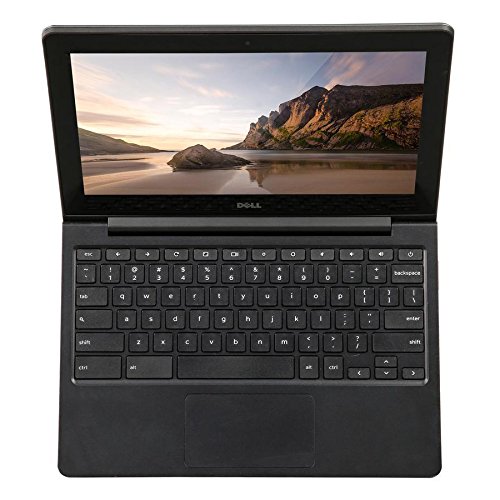


🚀 Compact power, endless possibilities — stay ahead with Dell Chromebook 11!
The Dell Chromebook 11 features an 11.6-inch HD display with a 180-degree hinge for versatile viewing. Powered by an Intel Celeron N3060 dual-core processor and 4GB RAM, it delivers smooth multitasking on Chrome OS with automatic security updates. Lightweight and durable, it includes spill-resistant keys, rubberized edges, and built-in cloud integration for seamless productivity on the go.
| ASIN | B00K1FY3M0 |
| Batteries | 1 Lithium Polymer batteries required. |
| Brand | Dell |
| Card Description | Integrated |
| Chipset Brand | Intel |
| Color | Black |
| Computer Memory Type | Unknown |
| Customer Reviews | 4.2 4.2 out of 5 stars (87) |
| Date First Available | April 30, 2014 |
| Flash Memory Size | 16 GB |
| Graphics Coprocessor | Intel HD Graphics |
| Hard Drive | 16 GB 16GB eMMC |
| Item Dimensions LxWxH | 21 x 3.5 x 14.5 inches |
| Item Weight | 4 pounds |
| Item model number | 730-8301 |
| Max Screen Resolution | 11.6” 1366 x 768 |
| Number of Processors | 1 |
| Operating System | Chrome OS |
| Power Source | Battery Powered |
| Processor | 2.1 GHz celeron |
| Processor Brand | Intel |
| Product Dimensions | 21 x 3.5 x 14.5 inches |
| RAM | 4 GB DDR4 |
| Screen Resolution | 1366 x 768 pixels |
| Series | 730-8301 |
| Standing screen display size | 11.6 Inches |
| Wireless Type | Bluetooth |
J**N
Too good to leave to the kids
This computer is wicked fast, runs for 7 hours of intense internet use on a single charge, has a keyboard that is quiet, feels great, and has good key travel, has a solid multitouch touchpad, and is probably durable enough to survive a landing on the beaches of Normandy. It is one of the best computers I've owned (with a couple caveats), and it is most definitely the cheapest. If you're tempted to drop ~$1,000 on Apple's latest luxury item, think again. This computer will do everything a Mac can do for just $250, as long as you learn to be careful about the 16 GB SSD size and do a little tinkering under the hood. Dell may bill it as a cheap, durable computer for schools, but this machine is way too good to be left to the kids. HARDWARE ========== I've owned my Dell 11 for 6 months now and never once has it started lagging or dropping frames on me. I'll have 23 tabs open, one of which is playing a YouTube video, while Spotify is running in the background and I'm viewing a Javascript-heavy page like Google Maps, and the computer's fan doesn't even whirr up. The 1.4 GHz Intel i3 processor is very snappy, and if you plunk down the extra cash for 4 GB of RAM (do it!) you'll be able to run any mixture of programs with ease. The SSD means it boots into Linux Mint in <10 seconds. The build is very sturdy, clean, and simple. The computer is slim and encased in gun-metal gray plastic - a clean look that has drawn compliments more than once. The screen is covered by glass like a touchscreen (without the touch functionality), and some reviewers have complained that this limits the viewing angles and the gloss makes it hard to see the screen in bright settings. All true, but it also means the screen is impossible to damage short of taking a hammer to it. As I mentioned in the first paragraph, the keyboard is one of the nicest I've used. MacBook keys don't have enough key travel for my taste, but the Dell hits the sweet spot where the keys are just the right height, but also quiet. I used the famed Lenovo Thinkpad keyboard for a year, and I honestly prefer the Dell's keys. Unlike the Thinkpad, they don't make a clacking sound like an AK-47 when you're writing an email. The only downside of the keyboard - and it may be a significant one depending on how much of a power user you are - is that the keyboard uses the simplified (dumbed down) Chromebook keyboard layout - no Super key, no home, no end, no page up/page down, and all the function keys mapped to volume, brightness, or other commands. Sometimes this can be frustrating when you have to count up to figure out which key is F5 to refresh a page, but eventually you get used to it. Regarding other features: the speakers are LOUD and clean sounding, despite the fact that there are no speaker ports. The touchpad is smooth and clicking feels great, although it isn't quite as sensitive to fine movements as other touchpads I've used. The webcam and mic work exactly as you would want them do. Pro-tip: do yourself a favor and peel off that hideous primary-color grade-school looking "chrome" sticker on the front of the machine. It looks like a bumper sticker on a BMW, but once you peel it off you're left with the nice light grey word "chrome" and a slightly indented circle. Looks very cool. CHROME OS ========== Chrome OS is clean and sexy but very, very short on features. You're out of luck if you want to use Steam (though Shovel Knight and Risk of Rain run beautifully on this computer!), VLC, Gimp, or a host of other programs. Follow my advice, wipe Chrome OS and install Linux. I'm using Linux Mint - not even a lightweight distro, but I wanted the features and hey, it runs beautifully. Don't use Crouton to run Linux alongside Chrome OS unless you think you can survive with just 6 GB of SSD space (spoiler: you can't). But if you wipe Chrome OS, hey presto, you have a full-featured machine with just enough storage space that can edit photos, run games, play movies in VLC, or do anything else you want it to do. To wipe Chrome OS and boot from Linux have to get down and dirty with changing the firmware, unscrewing a write protect screw, changing the Bios, and fiddling with Mint to make it work with the Dell's hardware, but it isn't too difficult, and hey, if you brick your device it's easy as pie to reboot from a Chrome recovery USB. Do yourself a favor, wipe Chrome OS, and run Linux, and you have hands-down the best computer $250 can buy. CON: STORAGE SPACE =================== Only one main con to this machine: the 16 GB SSD. Chrome machines are obviously stateless and store everything in the cloud, so if you plan to keep Chrome OS the storage size should be ample. But if you follow my advice and install Linux you'll find yourself constantly monitoring your storage space, especially if you use 4 GB of the SSD for swap space like I do. But as long as you store photos and other big files in the cloud and don't try to install The Witcher 3 or something, you should be okay. I have all the programs I could ever need with about 1.5 GB of free space left over. CONCLUSION =========== This machine is a fast, unostentatious workhorse, and once you do some tinkering with it you'll have a dream computer. Buy it and laugh at all the poor suckers spending more than $1,000 for their glitzy new MacBooks.
C**T
Overall though I like the Dell
No complaints with this chromebook except for screen quality. Unless you are looking at the screen at a precise angle, the display is very muted, not bright at all. If you are standing with the chromebook on a counter trying to look at the screen, you have to tilt it as far back as it will go, but even then it's not far enough for clarity and brightness. Overall though I like the Dell. It's fast, good battery life, and great browsing device if that's about all you want to do. Perfect for students that have google accounts. Video and audio much better than my more expensive Asus android.
M**N
Extremely disappointed
I purchased this for my grandson for Christmas. He uses it with headphones for school. The headphone jack no longer works, so the equipment is useless. I also purchased a year warranty and cannot get anyone to respond to my inquiries!!!! Do not buy unless it is locally where you can get information on return/repair.
D**N
Nice computer, lousy durability. Figure 1 year with daily usage.
Great when it's new, but it's not built to last. Have owned two of them now, and have concluded they have fatal design flaws for durability: 1. The keys fall off and there is no way to replace them. Analyzing it closer, they use a plastic hinge behind the key, instead of metal as in other laptops. That wears out and boom, it falls off. Computer shop couldn't fix it. Couldn't even swap keyboards -- it's built in to the motherboard. 2. Hinge that holds monitor, on left side, has very weak support, which then breaks the plastic. Computer shop worker told me that every unit he's seen, was broken at that point. I can only conclude Dell does this on purpose. Their engineers can't be that bad, and since this model has been on the market for years, they've seen the repairs for those who have paid big bucks for an extended warranty. Both of mine started falling apart after one year, less than two. Pitiful. Who wouldn't pay an extra $20 for better keyboard technology and a little metal to support the hinge? No one. You lost me, Dell. Bought two of your laptops based on your *past* reputation for quality. This is bad engineering, most likely intentional.
S**L
but it's great for travelling as it's light and fast
I was aware of the chromebook's limitations but you really do miss some of the functionality of a fully grown laptop, but it's great for travelling as it's light and fast.