Some deliveries may take a little longer than usual due to regional shipping conditions.

下载应用程序


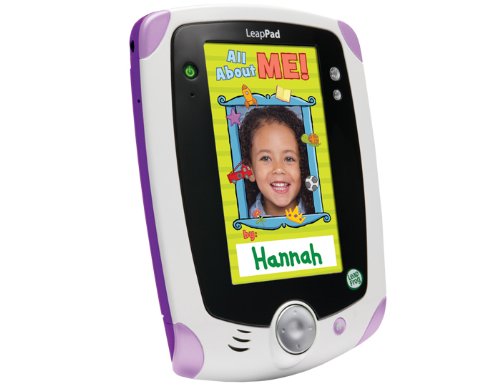


🚀 Leap into learning and creativity — the tablet every young innovator deserves!
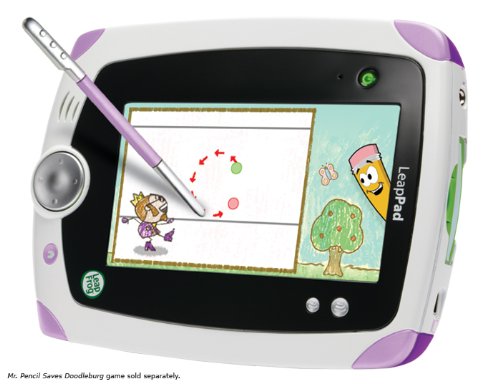
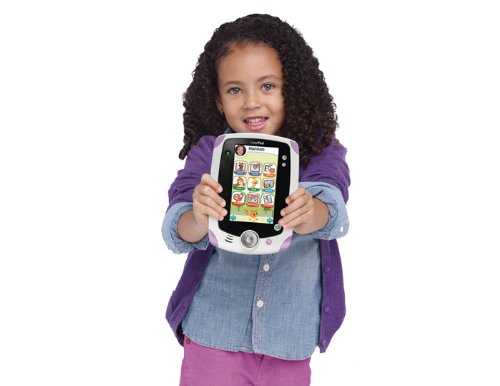
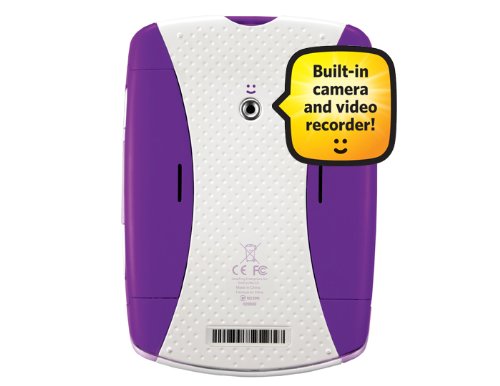
The LeapFrog LeapPad Explorer is a robust, kid-friendly learning tablet featuring a 5-inch touchscreen, built-in camera/video recorder, and 2GB memory. It offers over 100 educational games, apps, and interactive eBooks that adapt to children aged 4-9, fostering creativity and personalized learning. Durable and designed for active use, it also provides parents with tools to track progress and share milestones, making it a top choice for early childhood education and entertainment.
| ASIN | B004Z7H15Q |
| Batteries | 4 AA batteries required. |
| Best Sellers Rank | #964,518 in Toys & Games ( See Top 100 in Toys & Games ) #822 in Electronic Learning Systems |
| Customer Reviews | 4.2 4.2 out of 5 stars (513) |
| Is Discontinued By Manufacturer | No |
| Item Weight | 1 pounds |
| Item model number | 80-32400E |
| Manufacturer | Leapfrog |
| Manufacturer recommended age | 4 - 8 years |
| Product Dimensions | 0.95 x 5.1 x 7 inches |
U**G
Great toy
I got this for my daughter's birthday. So far she loves this toy. She's always been envious of my smart phone and PSP, so I finally decided to get a digital toy for her. I've read some reviews talk about the slow initial install/download speed, but I didn't find it particularly slow. I think I was done in about 15~20 minutes. However, you have to make sure to set the IP of the device in Network connections (it creates a virtual Network card) to a static IP, otherwise the device isn't recognized. The slow part is when it tries to update the firmware/os I think. However, there was a time where it just blinks the sync... message for a fair amount of time. You just have to be a little patient. I think they should've done a better job on letting us know what it's doing, so we know atleast it's doing something. Some of the highlights are * It has a camera/video camera. Although quality is even worse than my feature phone, it has a nice cute interface. * It has nice educational games. I especially like the one where it helps you write letters the proper way. * You can have up to 3 profiles (so my little one can play with it too) Some downsides are * It's a bit hefty with the batteries in. * The games are relatively expensive (You can't download stuff off of Android market for example) All in all I think this is a great little toy for my kid. ---- Update after a few months of usage ---- My kid still likes this toy. We bought our first game (tinkerbell game). This game actually uses the d-pad. However the d-pad is a bit flaky as some times it doesn't register up/down. You have to wiggle the d-pad for it to work again.
K**R
Great product for kids (and adults too!)
I purchased two leap pads for my 3 year old niece and 4 year old nephew this past Christmas. Had to stand in line for 3 hours in middle of night to purchase one at Toys R us. The 2nd one was ordered from Amazon. The first thing I have to tell you is that this product held the interest of the kids for hours on end. My nephew sits in his bed every night playing games before he falls asleep holding his leap pad. My favorite game is the Disney characterizers art. I've actually learned how to draw icky Mouse, and your kids will also be able to do so with the step by step instructions. The product appears to be very durable, withstanding the unintentional abuse of a 3-4 year old. They've dropped them, sat on them, and stepped on them, and they keep working. Mind you, I did purchase a buyer protection program from Toys R Us, just in case. It's an expensive gift, and the warranty covers full replacement cost for any kind of damage. One of the features the kids especially love, is taking pictures/videos of themselves and others. Very easy to use, again, with step by step instructions a child can easily follow. I would highly recommend this product for children who are inquisitive, but to young to appreciate the functionality and cost of something like an iPad or tablet.
D**M
Great, even for not quite yet 3 year olds!
Our daughter who just turned 3 in April has had her "c'puter" (Leappad) since Christmas of 2011 and is amazing on it. She really "gets it" even though it is rated for 4+. Maybe the rating is more about avoiding her walking around with the leappad obediently following her on its "leash" as she likes to do, dragging it by the stylus and cord... not as much about the games. I like that its rugged, the apps are at least somewhat adaptive, and she can play to her heart's content without much worry on our part due to potential content or accidental setting changes. It also talks her through her options, rather that just expecting her to know where to go on her own... She really loves it, and honestly, so do we! It does munch through batteries, but we bought the Sanyo Eneloop Ni-MH Charger and 8 Rechargeable AA and 4 Rechargeable AAA Batteries which allows us to charge one set while using the other! Couldn't be happier, and it will "grow with her" for some time going forward, as she progresses through the various games and levels!
J**N
The seller had great patience with me when I received the item and thought it was defective.. however It turned out I was the defective one lol! He kindly explained how it worked to me and with great patience made sure that I understood and got it working correctly. Thank you .. The item came as described and in good working condition.
X**C
I've just bought this for my 5 year old daughter's birthday and I have to say it's fantastic. She enjoys playing on my touchscreen phone but the availability of learning apps isn't great, so I thought this would be an ideal gift as I wanted more educational games for her to play. Being in her 1st year at school she is just starting to learn to read and write, the fact that this has a stylus pen is a great help with that, so rather than just using the touch screen with your fingers (which is ok for some games) she can hold and use the pen and learn to write properly. When it arrived a few days before her birthday, I took it out of the box to set it up, this required 4xAA batteries (I used rechargeable) and then connecting it to a PC to download the LeapFrog software to the PC then installing the 4 free apps onto the LeapPad. I know a few reviews have had issues with this, I didn't experience any, it was very straight forward. It took a little bit of time to set it all up and download, but that's what you get with modern technology, no different than today's mobile phones or tablet PC's. Essentially, this is a children's tablet PC, so you'll have to expect a little bit of IT literacy to set it up (nothing too major though, just follow the instructions!) You can set-up profiles on the leappad, ideally if you have more than one child as they can make and save their own content unique to them rather than feel like they are sharing with their siblings and risking arguments. This took a couple of minutes to set-up and was easy to transfer a picture of my daughter from the PC to it so when she opened it on her birthday she had a profile with her picture on it and it made it feel a bit special (like it was all designed for her!) The included apps are already talked a lot about in the product description, so I won't go into too much detail, but essentially there are 3 included a Pet, which you can wash/feed/play with, good for learning to write individual letters (although not taught phonically which is a shame). An Art studio, to draw and paint (plus take your own photos and draw on them) and then a create your own story book, where you can take pictures, draw and record your voice to create a story about you. They are all very entertaining for 'free'. Along with these you get a choice of another free app, sadly it's not out of the whole range, just a pre-selected few to choose from, which was a shame. I went for a video, while I would have rather chose something interactive, the video taught repetitive words and phonics. I was pleasantly surprised when she played this video for the first time, it was about 30mins long and she was glued to it, wasn't going to turn her into Einstein, but has helped her to spell a few basic 3-4 letter words, I'm talking 1st year of school stuff here though, so if you have older kids I'd try something else. My daughter was lucky enough to get the tangled game for her birthday too, another great app, she loves Disney anyway so was always going to play it, this is when the potential really shows, the game tells the story and then at intervals has activities and balances these nicely to drip feed different skills and learning, so it would be say story-drawing-story-spelling-story-word matching. Really good learning experience in my option. You can also set the age and words for this game by connecting it to PC and going into the LeapPad connect software, again great to ensure they are being taught in line with what they are learning at school and don't get frustrated by not being able to do things that are beyond their current abilities, and if they are finding it easy you can turn it up. Once they've used the leappad you can again hook it back up to the PC and track their learning progress, in sort of a stepping stone map, it shows in age ranges their skill on all the learning area's the games are capable of providing and if there are area's not taught or they are struggling on it recommends games that teach that skill (clever marketing!). All in all a great product, I really can't fault it, would be nice to have a bigger 'free' app include and of course connect it to the PC can be time consuming, but the value of this is that it will always be up to date and you can track their learning. It doesn't have to be isolated learning too, as it's big enough for you to sit down and help or watch with them. I can't think of a better way for a gadget head dad like me to be able to get involved in my daughters learning, when she gets a new app for it I think I'm more excited than she is! (Just want to add that I was lucky enough to pay around £65 for this, I've noticed due to demand the price is now over £100! While it's still worth the money, if you can wait until after Christmas and pay a more reasonable price for it)
B**U
EXCELLENT PRODUCT. MY BABY LOVES IT.
M**N
This was bought for my 3 year old daughter and she loves it. It is really easy to use and she can navigate through all the apps, games and books that she has on her's. She also is learning off this through play, which I find is the best way kids learn. I also love that you can connect it to your computer and see your child's progress and what they have learned and what they spend their time on. There is several things you can do with this leap pad, my daughter loves the pet pal on it, which teaches to look after your pet by feeding, playing and bathing your pet. The playing is writing letters on this and then it spells a word eg. Bounce and the pet then bounces. She also loves the e-book she got with it.
R**N
My 5yr old daughter LOVEs this and so i do i! Its not only her wanting to play it but me and her gandparents too!! Theres lots of choice of games which are fantastic, you can choose what level your child as at and it will show the approprite games and such on the app centre. So much fun to be had the screen is bright and big enough to see nicely. Its made really well and is a quality product. So so easy to use and to download apps and play games on. Couldnt recommened it enough! aswel as being fun theres a lot of learning to be done on it too! Big hit with us!
TrustPilot
1 个月前
1 周前