We remain fully operational. Our teams are working around the clock to ensure your deliveries continue safely.

下载应用程序


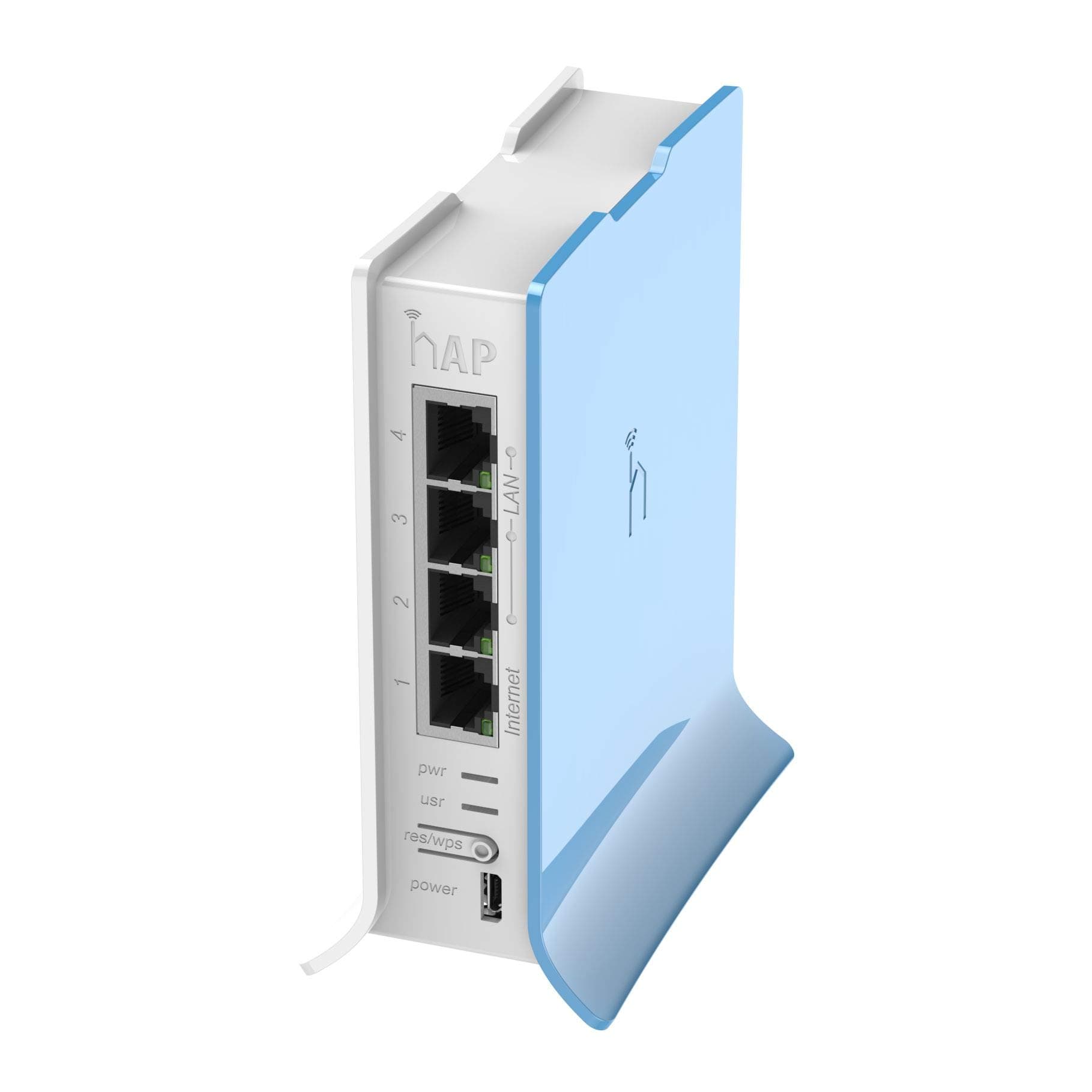
🚀 Elevate your network game with Mikrotik’s compact powerhouse!
The Mikrotik RB941-2nD-TC hAP Lite is a compact, high-performance wireless access point featuring a 650MHz CPU, 32MB RAM, and dual-chain 2.4GHz Wi-Fi supporting 802.11b/g/n standards. Equipped with four 10/100Mbps Ethernet ports and RouterOS L4 license, it offers advanced network management capabilities including bandwidth shaping and firewall controls. Ideal for apartments, homes, or small offices, it ensures reliable connectivity with easy WPS setup and durable operation across a wide temperature range.
| ASIN | B016E93MX2 |
| Antenna Location | Home |
| Antenna Type | Internal |
| Best Sellers Rank | #247 in Computer Networking Wireless Access Points |
| Brand | MikroTik |
| Built-In Media | 5V 1A power adapter |
| Color | Multicolor |
| Compatible Devices | Personal Computer |
| Connectivity Protocol | Wi-Fi, Ethernet |
| Connectivity Technology | Ethernet |
| Control Method | Touch |
| Coverage | Indoor, small spaces |
| Customer Reviews | 4.6 out of 5 stars 666 Reviews |
| Data Transfer Rate | 300 Megabits Per Second |
| Frequency | 2.4 GHz |
| Frequency Band Class | Single-Band |
| Global Trade Identification Number | 00602003746567 |
| Is Modem Compatible | No |
| Item Weight | 162 Grams |
| LAN Port Bandwidth | 10/100 megabits_per_second |
| Manufacturer | Mikrotik |
| Maximum Upstream Data Transfer Rate | 300 Megabits Per Second |
| Mfr Part Number | RB941-2ND-TC |
| Model Name | hAP lite TC |
| Model Number | RB941-2ND-TC |
| Number of Ports | 4 |
| Operating System | RouterOS |
| Other Special Features of the Product | WPS |
| RAM Memory Installed | 32 MB |
| Security Protocol | WPS |
| Special Feature | WPS |
| UPC | 602003746567 |
| Warranty Description | No Warranty |
| Wi-Fi Generation | Wi-Fi 4 |
| Wireless Communication Standard | 802.11b, 802.11g, 802.11n |
| Wireless Compability | 802.11b, 802.11g, 802.11n |
B**Y
My setup is quite unusual so ordinary routers either fall short or I need to flash alternative firmwares to make the best out of them
This is a fabulous product at this price point. It comes with the RouterOS 4.0 level license. Yes, it has a steeper learning curve than the other home routers in the markets. But, it does try to offset that with the Web UI and Wizard setup. My setup is quite unusual so ordinary routers either fall short or I need to flash alternative firmwares to make the best out of them. This little router gives me the flexibility and reliability of the RouterOS. I use my office connection at home through a Radio setup beaming signal from my office building to my bedroom window (yeah, lucky me I live close to my office pro- eliminates commute time - cons been I am the first to call in an emergency).Our office closes at 4.30pm and after that, all the bandwidth just sits there. So I have distributed the bandwidth with a license exempt band to my home and our office guest house. Coming back to the router, I have setup it up in such a way that I can control the bandwidth during the day at my home for a minimum of 256kbps for an emergency while in the evening hours it bumps up 80% of the bandwidth for me and 20% for the guest house. I know, I could have done this from the office end as well as we are using Mikrotik there as well. However, I just like the control at the receiving end and this gives me the flexibility to configure a hotspot both on wifi- and wired network. I have setup priority for VOIP and Gaming devices. The wireless signal as most will enjoy has a decent coverage and I haven't had the need to restart the router for any fluctuations in power as I do experience that with other routers at my location. Note: User manager will not work on this as the hAP lite does not support it, I guess its hardware limitation. But overall, it is a bang for the buck device and overall a little flexible powerhouse. To get the best of the device, do understand/learn the Mikrotik RouterOS configuration through WinBox. All the best. Hope this helps.
C**.
Outstanding price, Great hardware, great software. Still working 4 years after it was purchased.
I've been using this device on and off for 4 years now. What can I say as an access point? It is after configuration? Downright bulletproof. I've even used it with some weird configurations. Power over electrical then connected to this to make an access point in a random place? Oh yes. This thing has more power than most people will ever use other than they want more speed out of it. What can I say?? For the wireless specification of the chipset and the CPU power, it's great. Just make sure to use the phone app for configuration. Oh yeah, make sure to let it firmware update whenever it wants. It just gets better as it goes along.
F**0
Awesome AP and great little stand alone device
For a sub $30 router this is pretty much a solid buy. Set up can be confusing, but quick settings are provided. If your really new and just need something going quick give those a try. I also recommend that you change your admin user login and its password to something else, Winbox makes this pretty much a snap. Also be sure to download both the new firmware and the updates to RouterOS when you get it, Firmware updates are available in System > Routerboard, and System > Packages for the OS updates. IPV6 is disabled by default, but you can enable the package there if you want it. You can customize the quick settings in Winbox as a download from their site, or from the web interface which it has a basic setup for from the default gateway address. The quick settings have a really good firewall setup and the rest of the stuff to get you started and there is a ton of customization you can do. I bought one to test it out as an access point using CAPSman, a wireless centralized AP manager. Overall this is great. Its a little 2.4G model, but they also have a dual band for not much more. It would work well stand along as a router, or along side other products and I think you'd be happy either way. The price is awesome for this little box, and the Level 4 license is plenty. I'll be picking a couple more up and giving them out for some better routers than your at home fair.
R**S
Great router, very configurable, though takes some fiddling to configure the first time.
Bought this little router to function as a WiFi bridge to replace a D-Link router flashed with DD-WRT that failed after a couple years. Extremely configurable - you can do just about anything with this little box, from providing basic WiFi access point functionality for your home, to advanced routing, VPNs and more. The only downside is that you can do just about anything with it - there are so many options that I would not necessarily recommend it for a non-techie type person. I only ran into one problem when trying to set it up as a WiFi bridge to connect a few hard-wired devices to my wireless network - I had to put the wifi interface into station-pseudobridge-clone mode to get it to work like DD-WRT as I was having it connect to a non-RouterOS access point. This was not obvious and took some reading to figure out. But I liked the hAP Lite so much overall that I ended up replacing my access point with a RB951G-2HnD which allowed me to put the hAP Lite wifi interface into station-bridge mode which gets things working as expected. BTW, the hAP Lite is very low power. You can power it with almost any 5V micro-USB power source. It only draws about 3 watts when powered up.
L**O
Durable and reliable
Very powerful to manage my home network, as the years went on and I outgrew this hardware, I can say it helped me learn and improve my skills while using it.
D**G
Replaced a $35 Pi with a $25 Mikrotik to perform the same job.
Gotta say I'm a big Mikrotik fan. I have deployed dozens of them for work and home. I am currently dependant on my cell phone hotspot to provide internet to my home network which is composed of Cisco and Mikrotik devices. I was using a Raspberry Pi as a 802.11 Station and then NATing and routing traffic on the Pi for the rest of my network. That was a bit of a kludge and needed maintenance and upkeep, for example when I switch hotspot between phones or even different network Mifi device. So I ordered this to replace that Pi. $10 less and I get a feature rich, quality network device that integrates well with the rest of my network. I was able to set up very simple scripts that I simply click to run to switch between the various Hotspot devices that I regularly use. I would like to see more low end MIkrotik support 5Ghz band. That is my biggest complaint with this, but I could have spent a few more $$ to get a more powerful and dual band model.
S**A
It's the best performing router I've had and I've had much more ...
I'd give this more than five stars if I could. It's the best performing router I've had and I've had much more expensive routers from D-Link, Linksys, Netgear and TP-Link. This was up and running in five minutes and I was instantly amazed at how fast the internet was. No more lag even without any fancy options configured. It just works and the Router OS is great and provides so much more information about traffic that the locally available big name brands. This will work easily if you just plug it in but custom configuring it will require some home work and an understating of networking is a must! I am an I.T. guy so this was easy to customize but non-I.T. customers should not expect to log into the unit and easily configure. Plug it in and use it....it's great.
J**.
Cheap and effecient
Nearly as small as a raspberry pi: Xbox360 for scale. This thing is tiny, fast , cool running, and low power requirements. The signal rate is very good and the speed is as good as my other access points. It's also nice because Mikrotik has a mobile app for android that makes setting these up and monitoring them much easier. This little access point is very powerful and once you figure out how to manage it using the tool winbox , its rock solid and fast. The only caveat is it does not have a gigabit network port. You can use this device to do more than just act as an access point, but given the low memory and slower CPU I think it is best suited as a wireless access point. The Wireless AP portion of the device is very configurable and I would consider it on par with any enterprise offering, this supports LEAP/PEAP and had built in radius and can do WPA/2 Enterprise.
TrustPilot
2 个月前
5天前