


🚀 Elevate your brand with every mail—postcards that print sharp, tear clean, and deliver impact!
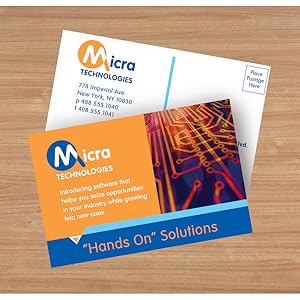
Avery Printable Postcards (4.25" x 5.5") come in a pack of 120 premium 65 lb matte white cards designed for laser and inkjet printers. Featuring micro-perforations for easy separation and double-sided print capability, these postcards meet USPS standards and are ideal for professional branding, marketing, invitations, and announcements. Compatible with Avery Design & Print software, they offer a seamless way to create polished, custom postcards on demand.


| ASIN | B0000C0CJA |
| Best Sellers Rank | #3,136 in Office Products ( See Top 100 in Office Products ) #1 in Postcards |
| Brand | Avery |
| Brand Name | Avery |
| Brightness | 99.00 |
| Color | Textured White |
| Customer Reviews | 4.7 out of 5 stars 3,880 Reviews |
| Global Trade Identification Number | 00072782033804, 50072782033809, 60072782033806 |
| Included Components | Matte Postcards, Inkjet, White, Textured, Matte, 4-up |
| Item Dimensions L x W | 5.5"L x 4.25"W |
| Item Height | 0.4 inches |
| Item Type Name | Matte Postcards, Inkjet, White, Textured, Matte, 4-up |
| Item Weight | 0.81 Pounds |
| Manufacturer | Avery |
| Material | Paper |
| Material Type | Paper |
| Sheet Count | 120 |
| Size | 4.25" x 5.5" |
| UPC | 641438646332 072782033804 806791882562 640206469630 641438087487 696732590317 638458726595 823019495120 804993344253 800188061769 068000344173 801593081250 999993559537 800011124340 809301864522 666673156477 999993012445 031113326664 638084529591 021112713541 638458758404 791836828332 |
| Unit Count | 120 Count |
| Warranty Description | No |
J**.
Great, if used correctly
These postcards (Avery 8386 Matt White Postcards) do the job well. From the other reviews, I've noticed some people having trouble in ways which may be user-error. First, I'd like to point out that the product listing may include other versions, so this review does not apply to them. There are variations which are glossy, sized differently, or position the post card differently. Be careful of which one you are looking at. Second, these post cards are finely perforated, but you have to follow directions. When viewed from the side labeled "Front Side," fold the perforations away from you first, then towards you after you have fully flattened the perforation. If you do that backwards, you may end up with some tearing which makes the edges look more ragged. These are do-it-yourself postcards so you shouldn't expect the edge to look like it was cut with a razor, but at least use it correctly so it doesn't look like a torn coupon. Now, on to what I like about this particular version... The print quality on these when using my Brother laser printer is good and complete. Some paper types (glossy, for example) may result in printing variations which don't look good because the toner may not adhere well to glossy pages. This paper is not glossy and does not have this problem. The postcards are arranged so there is a half inch between them. This allows you to print over the edge of the postcard so it does not have to have a margin. This is a super nice touch which isn't available in most other versions. The down side is that only two postcards fit per page. If you want four per page, you have to go with a version that doesn't allow for edge-to-edge printing. These postcards are fairly heavy at 230 g/m2 (around 155 lbs). That's much thicker than premium copy paper but not as thick as a standard business card. It feels like a typical thickness for a postcard. There are other versions (even by Avery) which are thinner, so keep this in mind when you're shopping! You can get cheaper cards but they might be thinner and feel flimsier. Okay, now for the not-so-great... I can't fault Avery for this because their card measures exactly 4"x6" according to my ruler, but I had to adjust where I print on a page in Microsoft Publisher to treat the top edge of the top postcard as being an eighth of an inch higher than it should be and the lower edge of the bottom postcard as being an eighth of an inch lower than it should be. This treats the postcards as if they are actually 4 1/8" x 6" rather than their true dimensions. Otherwise, the graphics on one postcard print lower than the other. I'm not sure how this happens, but I assume there is some sort of scaling going on (even though scaling is disabled). I print arrows along the edges of the page where I believe the breakaway lines should be so I can confirm that what's on my screen will match what's on the page and I recommend you do the same. If you put the alignment arrows close enough to the edge of the page, you won't see them on the postcard anyway. Keep in mind that every printer will print some pages a little higher or a little lower, so these alignment marks really just help you confirm the relative dimensions of everything. Always allow for about an eighth of an inch of variation from page to page, depending on your printer. This is the case even with professional printing services. Update (7/7/2020): I discovered the printer issue was the result of using the default printer driver from Microsoft. The size is now accurate after installing Brother's raster printer driver. This is only a problem people might run into if they avoid installing printer manufacturer bloatware. I didn't need their full install package, just the raster printer driver. So far that's it, I'll update this review if I think there is something worthwhile to say.
W**Y
REALLY HAPPY with the quality of these for printing my 4 x 6 Recipe Cards
I'm using this to print my family recipe cards on 4 x 6" Avery card stock in my ink jet printer. Since they can be printed double sided and there are two cards per page, you have to get a little creative. I made ONE file by first opening the Avery 8386 template in MS Wods, then "inserted" a blank page above the template, then copied the template from page two, then pasted it onto page one. Don't change the margins. That gives you a template that you can print double sided from ONE file, for two different recipe cards. The cards are strong enough to hold up like a good index card, but I will be covering each with a separate plastic cover for long-term use when I gift them. They separate very easily and cleanly from the page margins by simply folding the perforations back and forth. Couldn't be happier.
T**E
Good quality and easy to use.
These worked out fantastic…. I used the Avery templates and was able to print front and back and print with my at home printer, super easy and they came out great for marketing information for an event. Easy and looked professional.
K**N
Nice post card sheets
Worked well for our needs. The sheets fed well in the printer, separated well from the perforations, and worked well with MS Word.
R**L
The sturdy cardstock provides an excellent base
These postcards are a great choice for creating professional name tags when laminated. The sturdy cardstock provides an excellent base, giving the name tags a solid and durable feel. Once laminated, they look polished and high-quality, perfect for events or meetings where a more formal touch is needed. Their versatility and easy customization make them a practical and cost-effective option for personalized name tags.
P**L
Great postcards!
I'm using these for a poetry postcard project I participate in every year. While it's not for a business/company, I like my images to look professional. I ran my first four (I use photographs I take or collages I construct) first on Avery matte finish. I didn't like the way it picked up the ink. So I ordered glossy. I was truly amazed at how much better they looked compared to the matte finish. I'm using a very ordinary HP inkjet printer, so not the best, but I still like the results. I'm so grateful to Avery for continuing to improve their software over the years. I totally depend on it for doing notecards and postcards. Of course, I'm a dinosaur! I fell in love with making notecards just when most people stopped using notecards and postcards as much. The postcard program is great. You work with your image, then click 'back of card' and you can put in your address, etc. and even make a descriptor, which I then easily turn and use as a divider between my poem and the address. My overall rating is a 4 because the cards are a little thin. But in my experience with the postcard project they go thru the mail just fine. The P.O. seems welcoming to them--I've received odd-sized cards, thick cards and thin ones. The image I'm submitting has been edited with a filter--I'm not sure how it will look in this review.
J**D
Ideal for Invitations
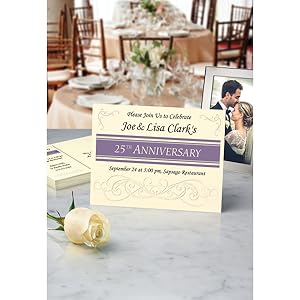
Ideal for creating postcard invitations for events using the Avery templates.
L**C
Avery labels are always fantastic
This was a really good price. It was $10 off any place I could find anywhere else! Avery labels are the best.
TrustPilot
2 周前
2 个月前



