We remain fully operational. Our teams are working around the clock to ensure your deliveries continue safely.

下载应用程序


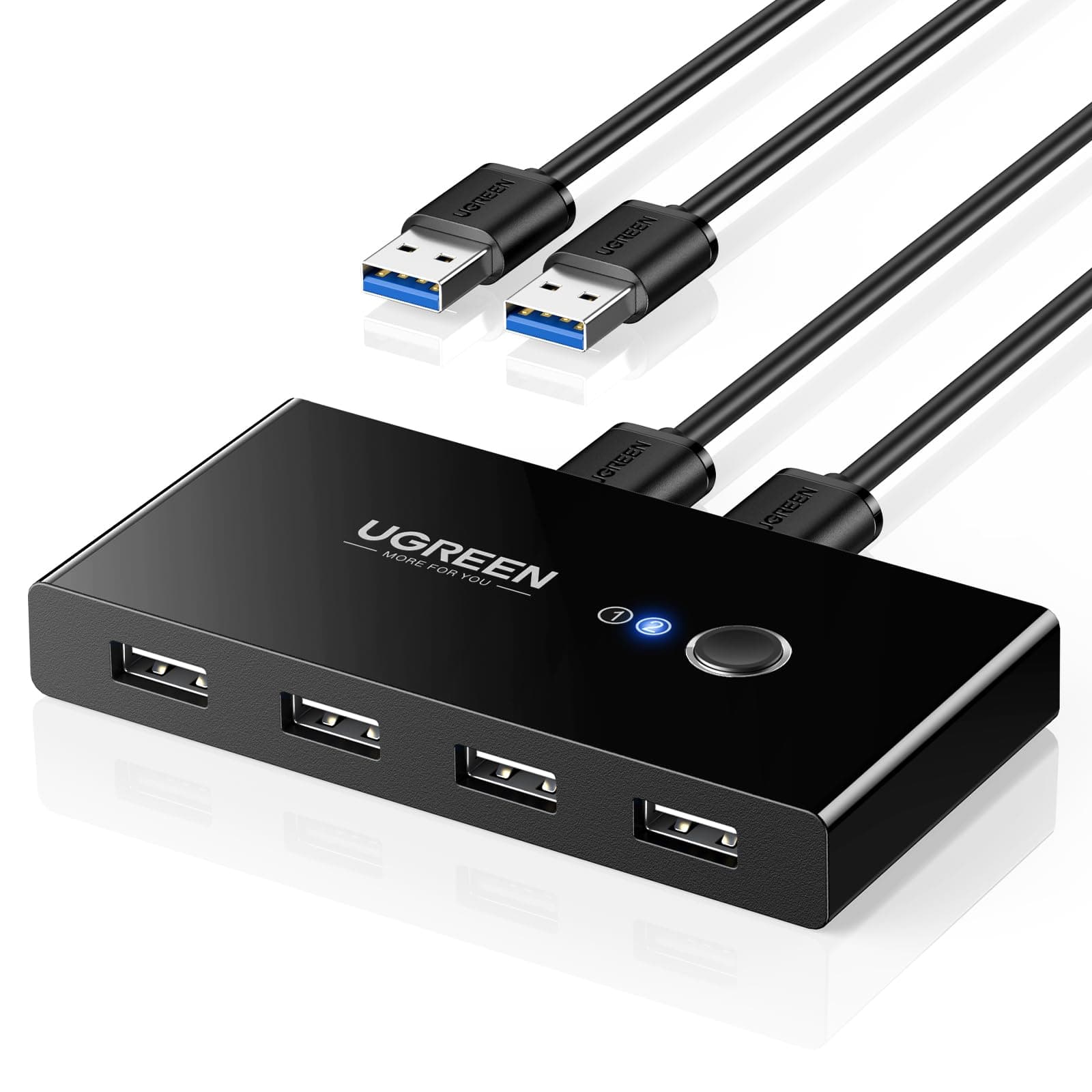
🔀 Master your workspace flow with UGREEN’s seamless USB switch!
The UGREEN 4 Ports USB 2.0 Switch is a compact, plug-and-play device enabling two computers to share up to four USB peripherals effortlessly. Featuring a one-button push switch with LED indicators, it ensures instant toggling between systems while maintaining stable connections through USB 2.0 technology. Its dedicated 5V micro USB power port enhances compatibility with power-hungry devices like external hard drives and scanners. Compatible across Windows, Mac OS, and Linux, this switch is a productivity booster for professionals juggling multiple machines.


| ASIN | B01MXXQKGM |
| Actuator Type | Push Button |
| Best Sellers Rank | 1,233 in Computers & Accessories ( See Top 100 in Computers & Accessories ) 1 in KVM Switches |
| Brand | UGREEN |
| Circuit Type | parallel |
| Colour | multicolour |
| Connectivity Protocol | usb 2.0 |
| Connector Type | ['USB-A'] |
| Contact Material | Copper |
| Contact Type | Switch |
| Control Method | Touch |
| Controller Type | Push Button |
| Country Of Origin | China |
| Current Rating | 0.5 Amps |
| Customer Reviews | 4.4 4.4 out of 5 stars (10,019) |
| Global Trade Identification Number | 06957303837670 |
| International Protection Rating | IP40 |
| Item Dimensions | 10.5 x 5.3 x 1.6 centimetres |
| Item Type Name | Adapter UGREEN 4XUSB 2.0 - Preto |
| Item Weight | 150 Grams |
| Manufacturer | Ugreen Group Limited |
| Material | Plastic |
| Model Number | 30767 |
| Mounting Type | Plug and play |
| Number of Items | 1 |
| Number of Positions | 4 |
| Operating Voltage | 5 Volts |
| Operation Mode | Manual |
| Specification Met | Ip54/Ip55 |
| Switch Type | Push Button |
| Terminal | kvm |
| Unit Count | 1.0 Count |
| Wattage | 50 watts |
S**Y
A simple and quick solution to switching USB devices between machines
For a while now I've been working from home on both my work Windows laptop and my iMac. I have to use both, but it's frustrating to move from the iMac, with a keyboard and a good mouse, to a laptop keyboard and a (frustrating) mousepad. It's obviously not the same, or as good, and that reduces my productivity and increases my frustrations! Enter the UGREEN USB Switch Selector. It's really simple, doesn't take up too much space and works perfectly. It allows me at the touch of a single button, with no delay, to switch my mouse and keyboard from the iMac to my Windows laptop. Transformed how I work at home, but pity it introduces more cables to manage and tidy away. *** Pros *** - Easy to set-up - Comes with good quality USB cables - Has an option for a 5v micro USB charger if you need to power devices through the switch - Small format - Absolutely no delay when switching - Can be used to switch 4 USB devices - Good packaging, which can be recycled - Great value *** Cons *** - USB cables are placed at the front and back of the device, which means cables aren't as neat as they could be - You need to be able to reach the device, so you can't tuck the device away *** Note *** - Can only be used to switch between two devices
G**O
Works, one appearance issue
Works well as a switch for usb peripherals. My only complaint is that the light displaying which computer you are using is the reverse of the usb slots at the back for some reason (if number 2 is lit up the left usb is the active one, if number 1 then the right).
D**M
It works and is cheap.
It's a KM switch, what else do you need to know? It works well, connects my ROG Scope keyboard and Logitech G502 mouse to both my work rig and my gaming rig. The only thing I would say is a minor downside is that if I want to switch from the work pc to gaming pc, I have to switch on the gaming pc, then press the KM switch to switch across to it when it's loaded up windows in order for the pc to recognise the input. This often messes with the RGB lighting on the keyboard until I turn on the ROG armoury crate to detect the keyboard and change the setting. Minor hassle and possibly software related, but overall the switch works and that's what is most important.
D**H
Perfect, Just Buy IT!!
I have been debating getting something like this for a while now but kept putting it off as money not needed to be spent. Recently I needed to do something on my desk and the 2nd keyboard and mouse just made it really awkward so I bit the bullet and bought this. Connected it up, plugged in the wireless keyboard and mouse and both worked instantly on both pc's when pressing the button. Now I just need to remember to press the button when I want to control the 2nd pc. What would be nice is if Ugreen could make a version that can be used in a rack, to connect to say 7 or 8 servers and be as cheap or close to as cheap to save buying the "Enterprise" version and have them cost anything up to £1000 at a time.
A**R
Works perfectly
Works perfectly. Bought to switch between home pc and work laptop using same mouse keyboard. Plugged in and works immediately. No noticeable delay on switch when pressing button
M**I
Great connecting devices
Great easy to set up, used with 2 computers and only one printer
T**E
Two PCs to one keyboard & one mouse
Bought to replace an old VGA KVM switch, I wanted a switch to connect a USB keyboard and a USB mouse to two PCs. This is the kit to do the job. The USB switch is extremely light with two connectors on one side that connect to two PCs. The other side of the switch has four USB connectors, these connect to your keyboard, mouse, USB stick, scanner, etc. I even connected a 2.5" USB hard drive to one of these ports. Installation is dead easy, use the supplied cables (1.5m long) to connect one of the rear ports to one PC and the other cable to connect to a second PC. Plug in your USB keyboard and mouse to the ports on the front of the switch and turn your PCs on. The switch is USB powered so does not need a PSU but if you want to connect a power hungry device then there is the option to connect a 5v PSU to the switch. In operation, the switch has a single button on top that swtiches between the two ports on the back. There is an LED on top near the selector switch to indicate which port is in use. Downside - now and again the switch refuses to enable my keyboard so I have to unplug it from the switch and plug it in again, I suspect this is a fault of my keyboard but don't have another to test.
B**B
Works basically as USB hub that can be shared/switched.
I've had cheap USB hubs before that have had issues with for example not working with some things OR being odd after coming out of sleep, this one is fine. I've had cameras, phones, wireless mouse. and even a bluetooth dongle in it, all worked fine. I've used it switching back and forth mostly for a wireless mouse and it switches fine for me (two windows computers). Things like BT dongles have especially had issues with hubs for me in the past but no issues with this (not sure about BT switching but I only use that on one computer). It can take extra power unlike some such devices, but I haven't needed that as nothing I've plugged in is "charging" or anything and needing the extra juice.
M**N
Lacking power cable.
M**.
Questo piccolo dispositivo ha risolto un grosso problema che avevo: gestire facilmente le periferiche USB tra due computer diversi. La configurazione è stata estremamente semplice e intuitiva. Basta collegare i due PC alle porte USB designate sullo switch e poi collegare le periferiche USB (come stampanti, tastiere, mouse, hard disk esterni, ecc.) alle porte rimanenti dello switch. Il passaggio da un computer all'altro è rapido e senza intoppi. Premendo un pulsante sullo switch, posso facilmente commutare tra i due PC e utilizzare le periferiche come se fossero direttamente collegate al computer attivo. La compatibilità è un grande vantaggio di questo dispositivo. Ho testato il UGREEN 4 Porte USB 2.0 Switch su computer con sistemi operativi diversi (Windows e macOS) e ha funzionato perfettamente su entrambi. Inoltre, la velocità di trasferimento dati è stata molto buona per le periferiche USB 2.0, senza alcun ritardo o rallentamento evidente. La costruzione dello switch è solida e resistente, con un design compatto che si adatta facilmente alla scrivania senza occupare troppo spazio. La presenza di indicatori LED per mostrare quale computer è attivo è un tocco utile e intuitivo. In sintesi, il UGREEN 4 Porte USB 2.0 Switch per 2 PC è un dispositivo affidabile e altamente funzionale che ha semplificato notevolmente la mia vita quotidiana. Mi ha permesso di gestire agevolmente le periferiche USB tra i miei computer senza alcun problema. Lo consiglio vivamente a chiunque abbia bisogno di una soluzione per la condivisione di periferiche USB tra più computer.
R**E
J'ai commandé ce produit pour pouvoir connecter ma Xbox à mon clavier Souris plus à mon ordinateur clavier souris sans devoir changer les fils à chaque fois. J'en suis très content fonctionne très bien et très rapide de changement grâce au bouton pour switch entre la console et l'ordinateur, je recommande grandement cet achat
T**S
I recently purchased the UGREEN USB Switch Selector, and it has made a significant difference in my home office setup. This device allows two computers to share up to four USB devices, making it incredibly easy to switch between my work and personal computers. Pros: 1. Easy Switching: The one-button swapping feature is incredibly convenient. With just a press of a button, I can switch my mouse, keyboard, printer, and scanner between my two computers without any hassle. 2. Plug and Play: Setup was a breeze. The device is plug and play, requiring no additional drivers or software. It worked perfectly straight out of the box. 3. Solid Build Quality: The build quality of the switch is excellent. It feels sturdy and durable, with a sleek design that fits well on my desk. 4. Stable Connection: The USB connections are stable and reliable. I haven’t experienced any interruptions or disconnections while using my peripherals through the switch. 5. Included Cables: The inclusion of two USB A to A cables is a nice touch. It saved me the trouble of having to buy extra cables and ensured I had everything I needed to get started immediately. Cons: 1. USB 2.0 Only: This switch is USB 2.0, which is fine for most peripherals like a mouse, keyboard, and printer. However, if you need higher data transfer speeds for devices like external hard drives, you might want to consider a USB 3.0 version. Overall, the UGREEN USB Switch Selector has greatly enhanced my productivity by making it easy to share USB devices between two computers. It’s reliable, easy to use, and comes with everything you need to get started. Highly recommend for anyone needing an efficient solution for managing multiple computers with shared peripherals!
D**É
Like many people lately, I've got to use a work laptop at home, alongside my own personal computer. With two monitors to share and a keyboard/mouse/webcam to share as well, I bought this little USB switching hub. It allows 4 devices to be shared between two computers. The single button will switch from machine 1 to machine 2. Switching takes around 3.5 seconds. Major big plus: it works. All the time. As expected. No need to reboot "once in a while". Devices always get detected. No perceptible input lag when gaming (I ain't pro gamer though!). One of the reasons I chose USB 2.0 is that I suspected it would help "just working, all the time". So far so good. One computer is a Ryzen 7 machine, the other is a corporate Lenovo Thinkpad with a Thunderbolt dock. Only con is that you end up routing a lot of cables (five cables for three devices/two computers), all on your desk so you can reach the button on the box. I routed everything under my 32" main monitor, so it works out well, but it may be challenging if you wish a clean empty desk... So at the end, definitely recommended if you are looking for a simple, no frill way to share up to four devices between two machines. (for those curious why not a total KVM solution? Sharing two monitors require six more cables (2 per machines + to the actual monitors), that would have ended as a real cable mess behind the desk! Most monitors will sport several inputs, and it is actually possible to switch input _from the computer OS_ for most monitors)