We remain fully operational. Our teams are working around the clock to ensure your deliveries continue safely.

下载应用程序


Buy anything from 5,000+ international stores. One checkout price. No surprise fees. Join 2M+ shoppers on Desertcart.
Desertcart purchases this item on your behalf and handles shipping, customs, and support to Hong Kong.
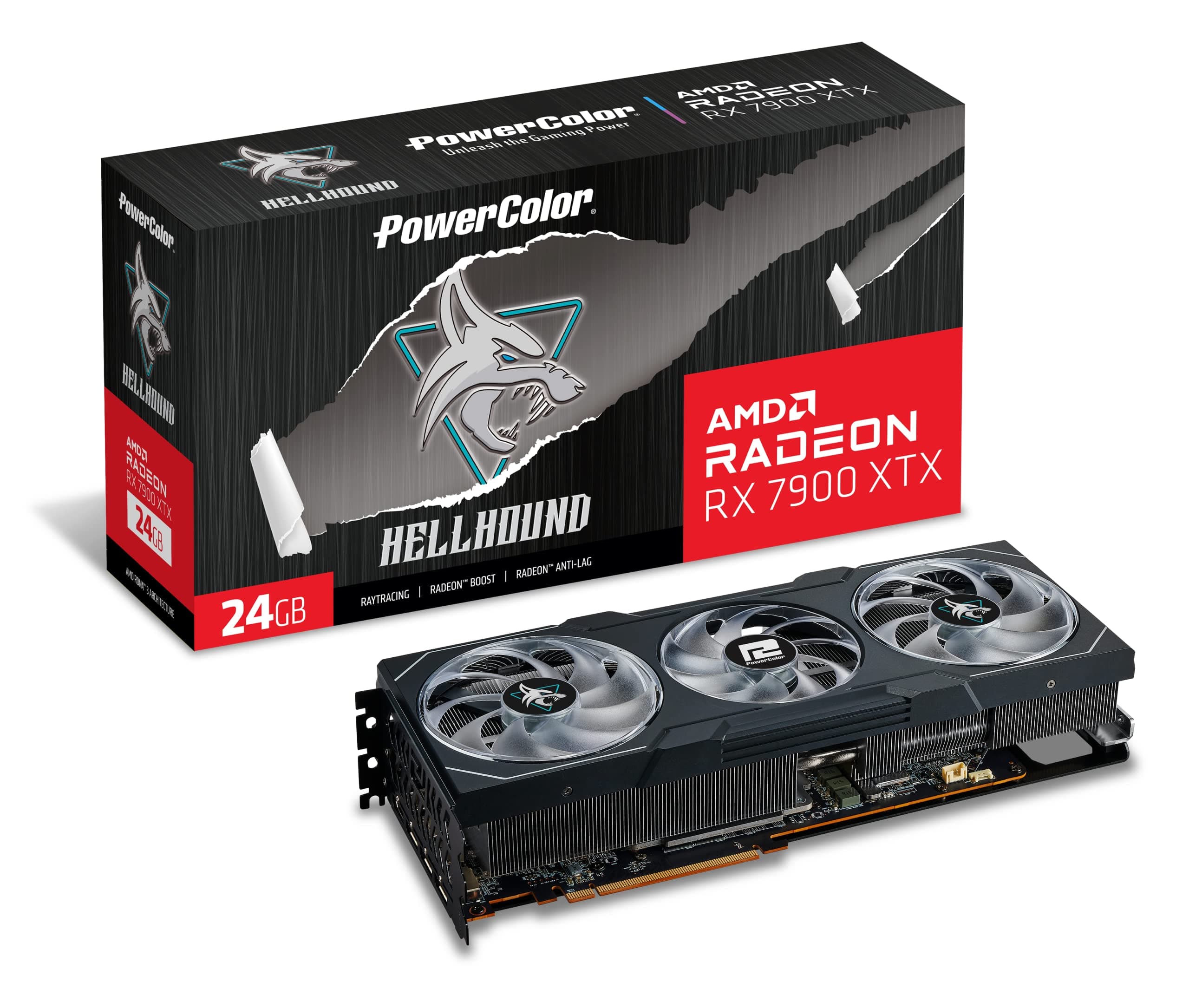
🔥 PowerColor Hellhound: Unleash the beast, stay cool, and game like a legend! 🎮
The PowerColor Hellhound AMD Radeon RX 7900 XTX is a high-end graphics card featuring 24GB of GDDR6 memory, 6144 stream processors, and a boost clock up to 2525 MHz. Designed for 4K gaming and demanding creative tasks, it boasts an advanced cooling system with 8 copper heat-pipes and quiet fans, maintaining temperatures under 70°C even under heavy load. With efficient power consumption around 360W (415W when overclocked), customizable RGB lighting, and a robust aluminum backplate, this card delivers premium performance and reliability at a competitive price point.


| ASIN | B0BMWSRM7W |
| Antenna Location | Gaming |
| Best Sellers Rank | #68 in Computer Graphics Cards |
| Brand | PowerColor |
| Built-In Media | Graphics Card |
| Compatible Devices | Desktop |
| Customer Reviews | 4.0 4.0 out of 5 stars (288) |
| Display Resolution Maximum | 7680x4320 |
| GPU Clock Speed | 2525 MHz |
| Graphics Card Interface | PCI Express |
| Graphics Card Ram | 24 GB |
| Graphics Coprocessor | AMD Radeon RX 7900 XTX |
| Graphics Description | PowerColor Hellhound AMD Radeon RX 7900 XTX with 24GB GDDR6 memory, 6144 stream processors, up to 2525 MHz boost clock |
| Graphics Ram Type | GDDR6 |
| Item Dimensions L x W | 13.31"L x 5.79"W |
| Item Weight | 1.5 Kilograms |
| Manufacturer | PowerColor |
| Memory Clock Speed | 2000 MHz |
| Model Name | RX7900XTX 24G-L/OC |
| Number of Fans | 3 |
| Video Output Interface | DisplayPort, HDMI |
| Video Processor | AMD |
| Warranty Description | 2 year limited |
J**S
A Great value high end GPU for the price.
Just like my 3080 12GB it’s quiet. It stays between 70c under load . I get over 150fps at max settings on 1440p. The hellhound wins for half the money you get better performance than a 4090. Pros : + Card contains a huge heat sink with 8 copper heat-pipes for high cooling + in hot summer.. Temperature does not exceed 63c at 100% usage.. and with a OC it does reach 67c + Fans speed are quiet and even with OC it's barely audible + Watt consumption around 360w & the max OC is 415w, while other models with OC consume around 460w (less watts = less heat) + The fans have cyan and violet lights, and they can be turned off if you don't like them + The card came with a small holder (the card is huge, so you need to put a small holder under it to reduce weight and heaviness so that it does not affect the motherboard) + Aluminum back cover to dissipate heat and help hold the card together + The price of the card is cheaper than other cards of the same class, as well as its cooling is very excellent for its price + Better than Sapphire Pulse.. which have smaller heatsink (Pulse have 6 heat-pipes Vs Hellhound 8 heat-pipes) & more aggressive annoying fans (Pulse 1600RPM Vs Hellhound 1200RPM).. it's like 5c less temps compared to Pulse, while it's like 9c if U match it with1600RPM speeds Negatives: - Needs excellent case fans, given that all cards that exceed 300w or higher cause heat to the internal parts - As far as I know.. majority of modern high-end cards contain Coil whine.. and it is cannot be heard unless you are very close to the case.. and coil whine is also present with NVIDIA cards as well Final Note: The card is worthy and considered a class 3080 & sometimes it's beat 3080 by a little margin, it comes with 24GB Vs 12GB of RTX 3080, which is something that will benefit you in modern games and upcoming heavy games, 750w is the minimum .. But if you have a high wattage processor like 12700k or beyond, than you may need 800w, and it needs a Mid Tower case or bigger, because the length of the card is 32cm (big but not huge like Merc310 which is like 35cm) The card is worth it as long as it does not exceed the official price or less.. and sometimes you can get it for less than the official price, but it is preferable to buy it if you have a 4k screen, and it is not suitable for regular 1080p screens.. after all, this is high-end GPU which is 2nd strongest card in performance after 4090 (7900xtx is more like OC 4080 with RT off)
S**.
READ HERE! RX 7900 XTX HellHound
Thermaltake Full Tower Chaser MK-II i7 4790k (Not Over Clocked) Gigabyte Z97-UD5H MOBO 16 GB TeamGroup DD3 @ 2400 MHZ CS 10 (I set the command rate from 2 to 1 with no voltage changes) Corsair H80i AIO CPU cooler (fan1 is pull from inside, fan2 is push out back). I have a Thermaltake! I can! Acer 27" 2K 144hz with FreeSync Started with a 750W Platinum PSU, Switched to a 1000W Platinum PSU. The card is very big, barely got it in an old Full Tower (I haven't bought a MID Tower in 14 years, so not sure how a new one would do it). The Back stand does work if you install it right! I don't wanna have to try to find another Z97X MOBO! It's very adjustable, just keep it off the fans please! I have a 120MM 2,000 RPM fan next to the power supply for more air, but the base is MAGNETIC and it fit really snug next to that fan to give the support it needs on the back. It lifted the back about a 1/8 ", which I need because I still have a PCI SoundBlaster X-Fi Extreme that I use and it sits 2 slots below it. This would cause HEART PROBLEMS for Rookies, But I have a Thermaltake Filtered case and all is good. Before I bought the RX 7900 XTX HellHound, I did some research on older CPU'S with newer video cards. I found a video of a guy using an i7 4790K with an RX 7900 XTX Sapphire. The 1080p, 2K, 4K results showed that A bottle neck from the CPU at 1080P was inevitable, however; The 2k vs. 4k results were astounding.! He Overclocked the CPU to 4.6 GHZ but used DD3 1600 MHZ Memory. He ran the RX 7900 XTX on PCIE 3.0 X16 (which is the same as PCIE 4.0 X8) And lost may be 10 frames/sec vs. a modern CPU but using 100% of his overclocked CPU. The thing I picked up on was the memory speed and overclocking. If Amazon will allow me to explain. Computer Memory also has TIMMINGS.! Going to a higher Grade of DDR also means the TIMMINGS increase. So, you can achieve better timings (The LOWER the BETTER) On DDR3 VS. DDR4. My build is above. DDR3 at 2400 MHZ is DDR4 speed but with much better timings. I researched a review that put 2400 MHZ at the sweet spot for Memory on gaming. Anything Higher was a waste, and anything lower really sucked. So here I am in the same boat but with much better Memory. All my games worked fine except 1 (War THUNDER). I did a test drive of an Israeli Tank to test the game with the new card and drivers (Highest Settings) and it restarted my PC. As in all Science I had to recreate the same conditions. It happened again. I Knew it was because the POWER FEAUTURES of my PSU! In the Morning I got a 1000W Platinum PSU and had to take my Computer apart and put it back together! WHEW! It sucks. But IT WORKED! Got it all right the first shot (And some good cable Management). YOU WOULD NOT BELIEVE WHAT IM TELLING YOU NOW! On a 2k 144HZ FreeSync Monitor I'm 201 frames/sec in War Thunder with no glitches! IT GETS BETTER! Rome 2 Total War test is at 119 FPS. All games look and play magnificent! But my CPU USAGE STAYS AT 25%! I've tested, retested, used several programs! All Confirm that the most CPU usage I use with a i7 4790k with DDR3 2400 MHZ case 10 and manually set to a 1T command rate is MAX 28% at 2K. Thank You.
B**.
It keeps crashing on simple games on medium settings for me i dont understand why. please help me.
Its a great GPU but for some reason I think mine is broken. since day one its not done much. no its not being bottlenecked. no i didnt install it incorrectly, YES i do have a sufficent power supply box in my pc. ive had this GPU since Nov 24th, 2024. almost a whole year. from day one its been a little strange, it felt broken but i toughed it out because i thought i just wasnt using the settings right in the amd software adrenaline edition thing. but needless to say. its been giving me issues with playing games. it will crash on games that it should handle with ease. for example fortnite. that game should be easy for it to handle on MEDIUM settings. and it continues to crash. its strange to me. crashes on other games as well all on MEDIUM settings. and its mind boggling. it will be fine for a moment then suddenly the gpu will spike to 100% usage then crash. and usually thats fine, but for some reason its doing it and crashing. which means somethings absolutely wrong with the GPU. and before you say that it must be a software update that i need. Its up to date. from the website. IF YOU could please reach out to me and maybe, if possible send me a replacement and i send the one i have back i would appreciate it so much. I believe that this GPU is GREAT i just dont understand why its doing this to me. and if you are wondering why i took so long to post my review. its because i wanted to make sure it was something that i tried fixing myself and its not something that i can easily fix. even with lowering game settings on a BIG GPU and wot not. it is still not capable of running without crashing. at least 3 times per game session. until i just give up and stop playing the game. My name is Brian. I really would like some help please.
S**G
ADVERTENCIA: La base que incluye para sostenerla tarjeta obstruye facilmente el movimiento de un abanico, recomiendo ampliamente ponerlo en la esquinita, por que aunque la pongas normal y a simple vista no obstruye, creeme que no permite que las aspas giren, no se arriesguen y ponganlo en la esquinita. Tenia un gabinete chiquito con poca respiracion al frente Delta Corsair RGB, no era suficiente ventilacion, la tarjeta llegaba a 99c en la parte mas caliente del gpu, al poner la mano encima del gabinete se tocaba hirviendo. Una pesadilla por que el estudio se sentia como un sauna. Luego cambie por una Lancoool 216 RGB y bajo como 15 a 10 grados dependiendo el juego, ahora lo maximo que se calienta es a 90 centigrados una parte del gpu, la otra queda en 70 o 80 grados, lo cual es una temperatura muy respetable, este gabinete le da mejor ventilacion y le puse un abanico extra que agarre aire de abajo y se lo aviente hacia arriba.Aclaro que no alguna ventilacion liquido, es solo de aire, mi cpu tiene un bequiet, los dos abanicos al frente uno abajo y otro tras. El Hellhound es mas frio que el Devil, por lo que no tendras problemas si noe s liquida tu ventilacion. El gpu hace ruido al jugar al maximo, pero no es molesto el ruido, ya que tenia un Ps4 y vaya que sonaba como avion con los ultimos juegos como god of war, ese si hace ruido en verdad. El psu que te recomiendan es de 800 watts y estuve usando uno de 750 watts, no exploto pero se sentia en ratos que jaloneaba, lei por ahi que el problema con estas nuevas tarjetas de gama alta tanto amd como nvidia, son picos de potencia espontaneos. Por lo que cambie de psu a uno de 1200 watts Thermalwake y ha trabajado de maravilla, incluso algunas temperaturas bajan mas, procesando cosas normales como youtube y trabajos de diseño la temperatura ronde de 40 a 50 grados en verano, supongo que en invierno van a ser mas bajas por vivir en el norte donde hay un caloron. Batalle en acostumbrarme al nuevo software, por ejemplo habia juegos que solo me daba 90 frames y moviendole a los settings de la tarjeta aun en ultra pudo jugar BF2042 a 160 fps todo en ultra a 1440p. He estado usando la tarjeta en undervolt, yestos son los resultados que me dan. No me interesa mucho el overclock aun por que siento que tiene que pulirlo mas el driver. Los nuevos drivers hace que consuma menos watts en idle, es decir al estar en computadora encendida sin jugar. Si tienes televisor LG o alguna otra marca con VRR, es la mejor tarjeta, nunca batallo siempre la detecta a la primera, con mi rtx 3070 anterior habia veces que tenia que desconectar una y otra vez en cada puerto hasta que la reconociera. Aqui no hay ese problema siempre la detecta sin fallo alguno. Recomendacion: Si tu gabinete cabe muy apenas la tarjeta, por milimetros, si tu psu es bajo, recomiendo actualizarlos antes de cambiar a xtx, ya que demandan mucho espacio para ventilacion y buena fuente d epoder para estabilidad, si tienes gabinete pequeño y un psu de 750 watts todo esta bien para la 7900 xt.
J**C
I have had several 7900 xtx cards, mostly sapphire nitro +. I needed a smaller card for a new build and they are to large. I tried the power color red devil spectral 9070xt and it is way to long. Insert the hellbound 7900xtx. It's only a 2 x8 pin power card which is surprising but can pull over 350 watts with ease. After my system not recognizing the card and some sweaty panic moments thinking I bought a dudd, I managed to delete all the amd software and start fresh. Working now 100 percent and seems to perform as good as the sapphire cards. Overall I am happy with this card for performance vs cost as a 4090 is unobtainium these days. For reference my case is a thermal take tower 500 and this card fits with around 3 mm of clearance for length. Phew!
C**T
carte graphique puissante mais le logiciel qui va avec crash régulièrement et ne semble pas être prévu pour les jeux de plus la fenêtre au lancement des jeux est gênante et inutile et ne peut pas être désactivé. Si vous jouer acheter une carte gforce car elles sont plus performante en jeux et ne présente aucun des problèmes que vous aller rencontré avec cette carte graphique.
M**.
These gpu's are fast, with 24Gb of memory, any game my gaming kids throw at it just produces fps so high, all I now hear is wow after wow, they are expensive but have been worth every penny, i built two gaming rigs both using these cards in an AM5 platform and can say they were very easy to install, they come with additional mounting arms to support them which was great, they are quiet and have very big heat fins on them, they come with 3 fans to help keep them cool, the build quality is very high and overall gaming performance is impressive, check you have enough room in your case as these will take up 3 slots on the rear of your case and are long. You wont be disappointed - one last thing, you will need a 900w or higher PSU, I bought the corsair RM1000X which allows these GPUs to run without issue.
J**I
Very good product! After 1 year it gave me 0 problems! Pros: - Ease of use or installation. - Build quality and materials.