We remain fully operational. Our teams are working around the clock to ensure your deliveries continue safely.

下载应用程序


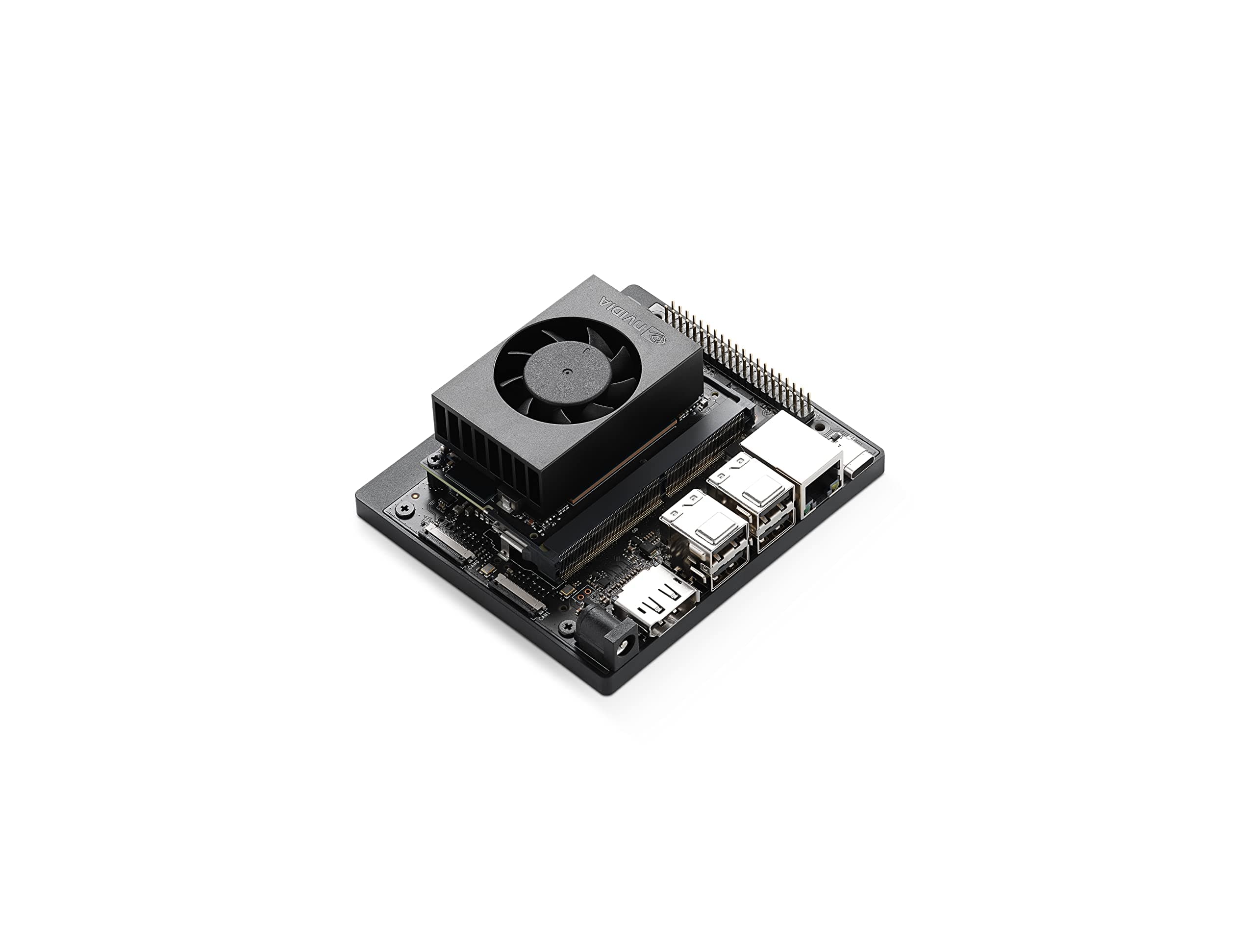

🚀 Power your AI vision with NVIDIA’s smartest edge developer kit yet!
The NVIDIA Jetson Orin Nano Super Developer Kit is a compact, high-performance AI platform delivering up to 67 TOPS, powered by a 6-core ARM Cortex-A78AE CPU and Ampere GPU. Designed for developers and innovators, it supports advanced AI models including vision transformers and large language models, with extensive connectivity options and a robust NVIDIA AI software ecosystem. Ideal for prototyping next-gen robotics, smart cameras, and autonomous machines, it offers unmatched efficiency and scalability at an accessible price point.
| ASIN | B0BZJTQ5YP |
| Best Sellers Rank | #4 in Single Board Computers (Computers & Accessories) |
| Brand | NVIDIA |
| Built-In Media | Quick Start and Support Guide, Type B (US, JP) Power Cable, Type I (CN) Power Cable |
| CPU Model | 6-core ARM Cortex-A78AE v8.2 |
| Compatible Devices | Various |
| Connectivity Technology | USB, DisplayPort, Ethernet, GPIO |
| Customer Reviews | 4.2 out of 5 stars 341 Reviews |
| Global Trade Identification Number | 00812674025261 |
| Item Dimensions L x W x H | 6"L x 3"W x 8"H |
| Item Weight | 1.7 Pounds |
| Manufacturer | NVIDIA |
| Memory Storage Capacity | 8 GB |
| Mfr Part Number | 945-137766-0000-000 |
| Model Name | Jetson Orin Nano 8GB |
| Model Number | 945-137766-0000-000 |
| Operating System | Linux |
| Processor Brand | ARM |
| Processor Count | 1 |
| RAM Memory Installed | 8 GB |
| RAM Memory Technology | LPDDR4X |
| Ram Memory Installed Size | 8 GB |
| Total Usb Ports | 5 |
| UPC | 812674025261 |
| Warranty Description | 1 year manufacturer |
| Wireless Compability | Bluetooth |
P**.
Excellent microservices AI server. Servers my purposes.
This is my microservices AI Server. Running faster-whisper ASR, piper TTS, Ollama with gemma3:4b, qdrant RAG in docker with several collections, several python scripts - one being before the ollama pipeline, uses keyword detection on my query, allows me to access weather, web search, qdrant RAG zim RAG. Voice in, processing, voice out. Really happy with this board
R**N
Irritating to set up but runs like a dream once it is.
This thing is a colossal pain in the ass to set up. My advice, skip the messing around with SD cards etc. Take a old laptop, install Nvidia Ubuntu with console, and install it directly to the nvme (get one too, you'll thank me). No cards no bs. You will probably need to build llama.cpp from source to integrate the cuda cores etc so it can take care of the hardware for inference. But once that's all done and set up, it runs great. I keep it at max power, running qwen 3.5 3B with vision. And I get around 16+ tokens a second. Pain to set up but worth it.
R**O
An absolute monster of a board!
First things first, this board is absolutely beautifully designed. The location of the SD Card and where you can add your NVMe drives make logical sense. It ships with factory firmware that requires an update before use. It is a bit of work to find the firmware update and is a rather large file that you will then need to flash onto an SD Card using BalenaEtcher, which is about 30 minutes of waiting depending on your download and cpu speeds. The UEFI bios is very well organized and structured and does have TPM 2.0. It does not have an OS installed by default, so you will need to install one via SD Card or NVMe slots. Which means you can use official Nvidia images or you can use custom ones. The official image is also a bit of a pain to find, but again, once you download it, you need to flash it onto an SD Card using BalenaEtcher. Your mileage may vary for how long this process will take. For me, it was around 10 minutes. The construction of this thing is super solid. Has a very solid base that the SBC connects to, the CPU is more of a Compute module setup so you could possibly change it for a newer MU unit later without needing a new base. The standard use case for a board like this is local LLM inference, my use case is currently getting my custom OS to boot on it and then move to local LLM inference later.
C**.
after this experience I won't be able to look at any nvidia product without gagging
what a waste of time, not worth my sanity. another day and I'd likely take a sledge hammer to it. nvidia software, their os, the sdk, the code examples (jetson lab), all of it is just absolute garbage. first, you must have real computer (vm won't do) with intel and ubuntu 22.04 just to flash the nvme. then you find out nothing works. first clue was their "readme" link they placed on the desktop "for my convience", which doesn't work, points to nothing. snap needs downgrading before you can run any program. then there are the ai software examples from their own lab. I wasted a week so far trying. only ollama native or container work. I can't make anything else work, and these are their own "tutorials" for this board. all I learned from those is to stay far away from nvidia. I don't believe any of that software, the os and the tutorials are tested or that they are maintaned. their support forums have nothing useful. none of the speech or image or vision tutorials work, all I get is errors, or no response. docker containers start, but nothing listens on the ports I'm supposed to browse to. a swap file is necessary to run anything because the os and nvidia crapware already use about 2-3 GB, leaving very little for models. performance is disapointing, the advertised 67 tops is a lie, marketing bs. in the "super" mode it throttles down immediatelly, actually it trottles down in all power modes. the fan does nothing because it defaults to quiet mode, and you must find a way to set it to allow it to do its job of actually cooling the chip. every step is a struggle, hours of trying, hundreds of gigabytes of wasted downloads. I bought this nvidia dev kit because of the hardware specs:, 1024 cudas, 32 tensors, 2 pcie slots, gpio, 2 csi cameras. but it's all useless without working software and drivers and documentation, and nvidia people have no clue how to code. I know nvidia since mid 90s, their video card drivers were always horrible.
A**R
Perfect AI micro-computer
Easy setup, well-capable micro-computer. Runs 1B LLMs at 35tps with super mode enabled.
T**R
Troublesome to Setup | Hope these steps will help you from a needless return
OK, The board is awesome as a physical device. Many reviews here already speak to that fact. However, if the firmware is faulty then the board is absolutely useless. I already have a board that I bought in early 2025, and it works beautifully. My entire AI ecosystem runs on some really excellent Small Language Models. Come 2026, it was shocking to realize that the Jetpack 6.2.1 is an unmitigated disaster after it is setup per vanilla instructions. Ollama is completely dysfunctional with CUDA memory errors and Ollama 500 server errors. Fortunately, as of Feb 2026, an update has been released to help users update to Jetpack 6.2.2. This version is not an ISO, but a series of steps you have to run to apply the fix to the 6.2.1 ISO. Here below are the overall series of steps that I followed and I have the board running. These instructions are applicable to most common end users interested in using AI, rather than using the board for other applications. Hopefully this will save you the trouble of returning the board when the firmware is actually at fault! 1. Download and install the Jetpack version 6.2.1 following the vanilla jetson nano instructions 2. Once you have the OS setup and running, do not run any other updates or optimizations! 3. Instead look for NVIDIA forum thread titled "Ollama errors orin nano", and navigate to post 48 ( the solution) 4. Follow the instructions to launch the "nautilus" application, followed by the update and upgrade steps 5. Once upgrade is complete, perform all the RAM optimizations, and setup the 16GB swap file on SSD or SD card 6. Vanilla-install Ollama (not the NVIDIA docker version), and then move the installation folders to the SSD * Look for "jorgedelacruz" article on Ollama installation which is pretty spot on. * NOTE: If you don't have an SSD then everything runs on your SD card most likely shortening its lifespan. 7. Best way to confirm if Ollama can swap models is to disable the desktop and run tests from Putty console 8. Pull a smaller model such as llama3.2:latest followed by a slightly larger model such as qwen2.5:7b 8.1 Load one of the models, chat with it and exit the chat; run the "ollama ps" command to ensure that model is still in memory 8.2 Now load the second model, and if it loads then you know that Ollama is working the way it should. The picture attached shows my ultimate test. The Orin Nano swaps 3 different models when it runs this sequential flow and runs the entire AI flow successfully. Why 3 stars? It's just for the hardware. The quality and assurance of the software setup has seriously taken a reputational hit.
G**H
Powerful AI capabilities and inexpensive
Setup was a little tricky, but I was able to get everything running in under 3 hours. Ai performance is fast with a 8b model. This is a Raspberry pi on steroids and can't wait to start building on this powerful little platform.
R**K
Cool dev kit
Cool little development kit for experimenting with CV, robotic modeling, and applications. Took some time, but relatively easy to flash the OS and associated packages, drivers, and SDKs using NVIDIA SDK Manager on my Ubuntu workstation. Can't wait to start developing some cool stuff.