Desert Online General Trading LLC
Dubai, United Arab Emirates
Desert Online General Trading LLC
Dubai, United Arab Emirates


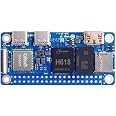
🍊 Power your next-gen projects with the Orange Pi Zero 2W — small size, massive potential!
The Orange Pi Zero 2W is a compact single-board computer powered by a 1.5 GHz Allwinner H618 quad-core Cortex-A53 processor and Mali G31 GPU. It features 1.5GB LPDDR4 RAM, 16MB SPI flash, WiFi 5, Bluetooth 5.0, and multiple expansion ports including USB 2.0, Micro HDMI, and 40-pin GPIO headers. Compatible with Android 12 TV, Debian, and Ubuntu, it’s designed for versatile applications from smart home devices to IoT projects.
| Processor | 1.5 GHz |
| RAM | LPDDR4 |
| Wireless Type | 5 GHz Radio Frequency, Bluetooth |
| Brand | Generic |
| Series | Zero 2W |
| Item model number | 1.5GB |
| Operating System | Android 12, Debian, Linux, Ubuntu |
| Item Weight | 1.06 ounces |
| Product Dimensions | 2.56 x 1.18 x 0.05 inches |
| Item Dimensions LxWxH | 2.56 x 1.18 x 0.05 inches |
| Color | Zero 2W 1.5G |
| Processor Brand | Allwinner |
| Number of Processors | 4 |
| Manufacturer | shenzhenshixiaotudoukejiyouxiangongsi |
| ASIN | B0CHMH16X4 |
| Date First Available | September 9, 2023 |
M**.
works and pretty powerful little computer
Since that RPi Zero 2w sold out at Microcenter and RPi 5 not available at that time, I decide to try out Orange Pi zero 2w which have more memory and processing power (quad core 1.4ghz). It's well worth money. The only thing I had trouble with variant of Linux (Arch, Debian, and Armbain and lastly Ubuntu). Tried Arch and it runs smoothly and quick, Debian runs good but screen bit blurry, Armbain failed to boot because it's for Orange Pi Zero, not Zero 2w. All 3 of Linux distros failed to download softwares that I need because server at "HaweiCloud.com" are lacking updates which needed for Orange Pi... Also Widevine will not install for Chromium nor DRM for Firefox.Because I want to watch Netflix (to test out how it runs on it). Lastly installed Ubuntu from Orange Pi download and ran good. Was able to get it updated and installed several apps except Firefox. I just found website that will allow me to install custom Linux with all options, https://uthings.uniud.it/building-mainline-u-boot-and-linux-kernel-for-orange-pi-boards .. Orange Pi will not boot Raspbery OS because of boot file are not the same. You will have to create or download one made for Orange Pi just like non-Raspbery signal board computer that have different chipsets, each of them have its own U-boot file.. Try download and install aarch64, not Armhf file. It runs on 64 bit. It will be great project to work on...
K**G
Great value
It it really cheap compared to other SBC's, and it is performing really well. Small size allows you to run this thing anywhere with small power adapter. I printed small box and installed in my electrical panel. It has HomeAssistant OS on it and controls my house. Setup was easy and all operating systems available in their website. Has good community support but compared to RPi its quite small community. One of the great things about the board, it comes with external antenna and this gives you better wifi connectivity. Since its really small it does not feel like it will get broken easily or get any damage but getting an enclosure or printing one is the best choice.
C**H
awesome little board
software support is not stellar (first 2 armbian images would not boot, 3rd time is the charm). However the AllWinner datasheets are fantastic, you can program DMA, UART, SPI, I2C, etc all directly from the info in the datasheet. just mmap /dev/mem and start setting registers. Kernel support and DTB overlays are iffy, however OpenGL support seems stellar /dev/dri/cardX shows up perfectly. I2S worked out of the box for me. Idles much cooler than RPi chips. Pin compatibility with rpiX is so/so, a couple pins may be different, check the datasheet. GPIO rise and fall times are not stellar (IMHO). I'm a bit spoiled from using rpi5 with nice clean crisp 20Mhz GPIO. You may need to add a schmidt trigger to get nice clean GPIO edges. Power draw is a little high in the default config. Read the datasheet on the PMU to turn off un-needed components.
D**N
It works, barely
No assurance of security. Don't use the linked ubuntu image, it contains a backdoor. Most SD cards won't work, you have to have good quality new sandisk cards to work. It was workable with Armbian OS, but just barely. The OpenGL ES support is barely there. Just get a raspberry pi.
T**C
It CAN run Klipper, but...
...only on one USB C port. And you gonna need either a HUB or OTG cable in order to 3D printer's MCU be recognized by Klipper. There is color coded GPIO pin bracket...but if you want to power your board via GPIO, you need to have low power solder iron with the pointy tip...because IT IS NOT soldered to the board. Tedious job... but it can be done.The ONLY working OS image is bit outdated, and since this is not RPi, challenging to get up to date.When you overcome all the obstacles, Klipper works fine but OrangePi will ocasionally "forget" how to connect to a network...nothing that a few power OFF/ONs could not solve.All in all ...it works. Will I buy it again? NO! (or maybe, if it's like in $20ish price range)If you intrigued by Klipper and need a SBC to start; look further. Seriously.
TrustPilot
1 个月前
1 个月前