We remain fully operational. Our teams are working around the clock to ensure your deliveries continue safely.

下载应用程序


Buy anything from 5,000+ international stores. One checkout price. No surprise fees. Join 2M+ shoppers on Desertcart.
Desertcart purchases this item on your behalf and handles shipping, customs, and support to Hong Kong.
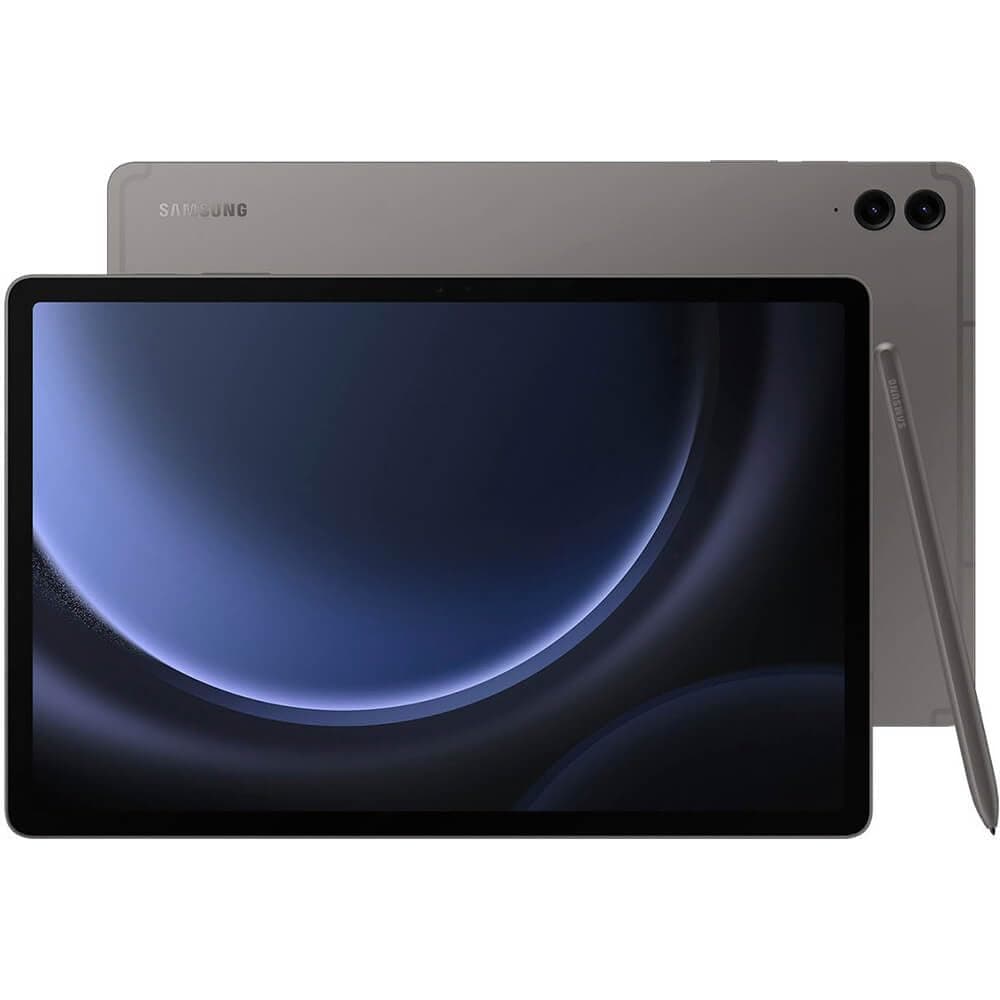
🚀 Power, Precision & Portability — The Ultimate Tablet for the Ambitious Millennial
The Samsung Galaxy Tab S9 FE+ is a sleek, durable 12.4-inch Android tablet featuring a powerful 2.4 GHz Exynos processor, 8GB RAM, and 128GB storage expandable up to 1TB. It boasts an IP68 rating for water and dust resistance, a long-lasting 20-hour battery with Super Fast Charging, and an ultra-responsive S Pen for creative and professional use. With a vibrant 2560x1600 display, dual speakers, and an 8MP camera optimized for video calls, it’s designed to keep you productive and entertained wherever you go.


| ASIN | B0CCBWYZKY |
| Age Range Description | Adult |
| Aspect Ratio | 16:9 |
| Battery Average Life | 20 Hours |
| Battery Capacity | 8000 Milliamp Hours |
| Battery Power | 8000 Milliamp Hours |
| Best Sellers Rank | #15,982 in Electronics ( See Top 100 in Electronics ) #354 in Computer Tablets |
| Brand | Samsung |
| Built-In Media | Data Cable, Ejection Pin, Galaxy Tab S9 FE, S Pen |
| CPU Model Number | Samsung Exynos 2100 series |
| Camera Description | Front Rear |
| Cellular Technology | 4G |
| Color | Gray |
| Compatible Devices | Samsung devices with One UI 2.5 or later |
| Connectivity Technology | Wi-Fi |
| Customer Reviews | 4.6 out of 5 stars 1,169 Reviews |
| Display Refresh Rate in Hertz | 60 |
| Display Resolution Maximum | 2560 x 1600 (WQXGA) |
| Display Type | LCD |
| Flash Memory Supported Size Maximum | 128 GB |
| Front Photo Sensor Resolution | 8 MP |
| Generation | 10th Generation |
| Graphics Coprocessor | Mali-G78 MP10 |
| Graphics Description | Dedicated |
| Hardware Interface | USB |
| Human-Interface Input | Touchscreen with Stylus Support |
| Item Dimensions L x W x Thickness | 11.24"L x 7.3"W x 0.26"Th |
| Item Weight | 1.3 Pounds |
| Manufacturer | Samsung |
| Memory Slots Available | 1 |
| Memory Storage Capacity | 8 GB |
| Model Name | Tab S9 FE+ |
| Model Number | SM-X610NZAAXAR |
| Model Year | 2023 |
| Native Resolution | 2560 x 1600 pixels |
| Number of Rear Facing Cameras | 1 |
| Operating System | Android |
| Other Special Features of the Product | Lightweight |
| Photo Sensor Resolution | 8 MP |
| Processor Brand | Samsung |
| Processor Description | Samsung Exynos 1380 |
| Processor Speed | 2.4 GHz |
| RAM Memory Installed | 8 GB |
| Rear Facing Camera Photo Sensor Resolution | 8 MP |
| Screen Size | 31.1 Centimeters |
| Speaker Description | dual speakers |
| Specific Uses For Product | Online classes, multitasking, creative work, outdoor activities, semi-rugged environments |
| Total Usb Ports | 1 |
| UPC | 887276784304 |
| Video Capture Resolution | 2560 x 1600 or lower (e.g., 1920 x 1080, 1280 x 720, 3840 x 2160) |
| Video Processor | ARM |
| Warranty Description | 1 Year Manufacturer |
| Warranty Type | Limited |
| Wireless Compability | 802.11ax |
| Wireless Provider | Telcel |
| Wireless Technology | Wi-Fi |
R**.
Awesome Tab; Just make sure you need the size.
Hello, this is my first review on Amazon. This review comes courtesy of a longtime Samsung user. Included is a picture of my S9 FE+ 256GB next to my second S6 Tab Lite (I lost the first one ;( ) shot on a S20 FE 5G. I will be comparing to my S6 Tab Lite. I really like the S6 Lite. I got it for $200 at Walmart (for both S6's). For comparison, I was given a Nexus 7 back in 2012, which was also purchased for $200. The Nexus is now 12 yo, and barely works. Using the S6 has been awesome. It's only chugged during intensive moments in gaming, and it only froze for a second or two. With three times the RAM as the S6, I don't think I'll have any problems for a long time.nThe size of the S6 Tab Lite is a lot more manageable for me. I could use it (the S6) one handed if I was only really using one half of the screen. I definitely can't with this! That being said, as somebody who's working on an engineering undergrad degree, I found the screen of the S6 too small. This screen feels big enough to use on most days. And with 256 GB instead of 64 GB, I can have games and lots of notes. A few notes: the S9 pen is a bit thicker and has a smaller button than the S6 pen. Second, I was getting better rear photos on the S6 than the S9, I don't know why. I hope it's user error. I'll update you on that. Finally, the S6 feels slimmer in my hand even though they're the same thickness, thanks to the S6 having rounded corners versus the sharper/more upright edges on the S9. Conclusion: For relaxation, the S6 is better, assuming you're not playing hard-core games (it ran fine on Honkai ... on the lowest settings). For work, the extra real estate pays dividends and with a good keyboard case, should be good to replace the laptop most of the time. Proper Review: When I wrote this originally, I didn't have the Samsung portfolio case. I left a review there about a month ago. (Short and sweet: It's very expensive, but it's also perfectly suited to what I need from this device. Backlighting would be nice, but I don't find it to be as much of an issue as I did a month ago.) Update on the camera: I think I smudged up the camera when grabbing the first time. I took a picture of an outdoor scene, and although it wasn't sharp, it wasn't really fuzzy either. I haven't done a side-by-side comparrison with the S6 Lite though. I'll update this update if I determine that smudges weren't the cause of the picture quality deficit. I learned about more software features, like RAM+ and wireless mirroring. In options, it gives the ability for up to 8 GB of virtual RAM. However, I also noted that 4 GB of RAM+ was selected and turned on by default. When I turned it off, it still showed up as 12 GB. Hopefully, this means I can have 20 GB of RAM, although I can't possibly imagine I'd need that many. I've noticed that the tablet seems to use at minimum around 4-5 GB of RAM. Makes me wonder how the S6 Lite manages to run Honkai Star Rail. I've seemed to have more performance issues in games than the S6 on higher settings, but the battery life is much better. It feels like this will never die! The S6 could only do 3-4 hours of gaming, but this can do much more, I think atleast twice as much, maybe triple? This also has faster charging speeds. Let me demonstrate the battery life. I have 1hr 15 minute classes. With note-taking almost the entire time, this went down 7%. At that rate, that's probably almost 16 hours of on-screen time! This tablet really is something special, especially with the portfolio case. It's small enough that I feel comfortable walking a mile to class with this in my hands (in a 13' Macbook case lol), and it's big enough that I can get work done on it - as long as I'm not constantly switching tabs. Windows is better for rearranging tabs, although Samsung provides more freedom - I just don't find that freedom useful personally. I still stand by my opinion that gaming is easier on the smaller screen - I accidentally pressed the accelerator in RR3 numerous times on the S9 FE+, but that never happened on the S6 Lite. Anyways, that's it for me. I'd highly recommend getting the extra RAM, especially if you're like me who was raised to use stuff until it falls apart. If you're a student, I couldn't recommend this tablet more strongly.
T**Y
Very intuitive and
They are excellent tablets. I gave them to older family members, and they loved them. They tried to learn the tablet, and I felt like that meant something. Storage can be expanded on with SD, I believe, the screen size is respectable, resolution is crisp, and the Wi-Fi is decent. The family traveled with it to foreign countries and had no issues.
A**G
Excellent Android OS based tablet!
Excellent tablet! I typically use apple products, but I play percussion at my church and they started using devices similar to this for music charts on the screen versus paper charts. I decided to get my own because a lot easier to be able to prepare my music in advance, write notes on it, see my players schedule, etc. I had a little bit of a learning curve because I’ve never really used android products before, but that went fairly smooth. This device holds a charge really well-I can leave it on all morning during rehearsals and performances, and it drops by maybe 20%. And I’m looking at music charts constantly during that time, using a Bluetooth switch to go between pages. , It also has a great looking display. Very vivid and crisp. Looking at Facebook I was amazed, because everything is so much bigger and clearer than on my phone. I’m definitely glad I got this!
T**R
Quality!
I am so glad I got this tablet. It works well and is of the highest quality. The color is nice. I like the touchscreen feature. It is durable and well worth the money.
A**R
Very easy to use
I absolutely enjoy my new tablet. Price was high, this said, prior to this one i got the Doogee, and had to immediately returned it back to amazon. So i went for the brand i know is reputable. And I did. It was so easy to set up. The style can do everything: draw, notation, and even highlight. Perfect for what i need it for. The sound from the speaker are clear, love the wide screen. the images as sharp love the graphics. I still have to learn how to use some of the apps i downloaded like the song book for my guitar. Now I take my guitar lessons on the road with me or any trips i have and never miss out on reading, or my guitar lessons. I also play games and movies. Perfect tablet for my needs.
T**.
Great tablet
4.5 STARS This is a great tablet just not as good as the oled ones ,but for the price and even the screen is near oled picture quality.
C**R
It Works
It was hard to buy this, to me, expensive device. I use my 2019 A tab all day long. (even though I have a very nice desktop computer and a fancy S22 ultra phone). I read, write, research, play stupid games, shop, watch videos, access my printer, do everything with it. i\It can't stay connected to wifi 6, ane won't restart correctly. Some sites were not rendering correctly. So, time for a new tablet. It seemed like complete overkill to buy this tablet. Don't you think so? But it is a gift, that I was encouraged to accept. We had a lot of AMEX reward dollars that made it easier to buy now that Amazon accepts them. I was, again, encouraged to get this big size. It is pretty big. Is that necessary? I doubt it. So far it runs well. It magically linked with my phone and now is a second phone. Along with my Samsung watch. See, I told you, too much stuff. To me it charges very slowly. A full charge lasts a long time. I am slow to get used to new things, but I think I like this device. Maybe there was a tablet priced between the Tab A and this one. Ok this is the one between the tab A and the S9 tab, I get it. I like that it is water resistant, but I never dunked the old Tab A. I bet this new tablet will be $200 off in six weeks. Oh, well.
P**I
Beautiful gadget
The Galaxy S9 FE+ tablet is much bigger than I initially expected, but it’s absolutely stunning. The premium design, paired with how thin and lightweight it feels, makes it a joy to use. It’s worth every penny, offering exceptional performance and the ability to multitask seamlessly, thanks to its split-screen functionality. The S Pen is a standout feature—responsive, precise, and perfect for note-taking or creative tasks. The camera quality is impressive for a tablet, and the sound output is nothing short of fantastic, providing an immersive media experience. Overall, this tablet combines beauty, power, and versatility in one sleek package. Highly recommend it!