We remain fully operational. Our teams are working around the clock to ensure your deliveries continue safely.

下载应用程序


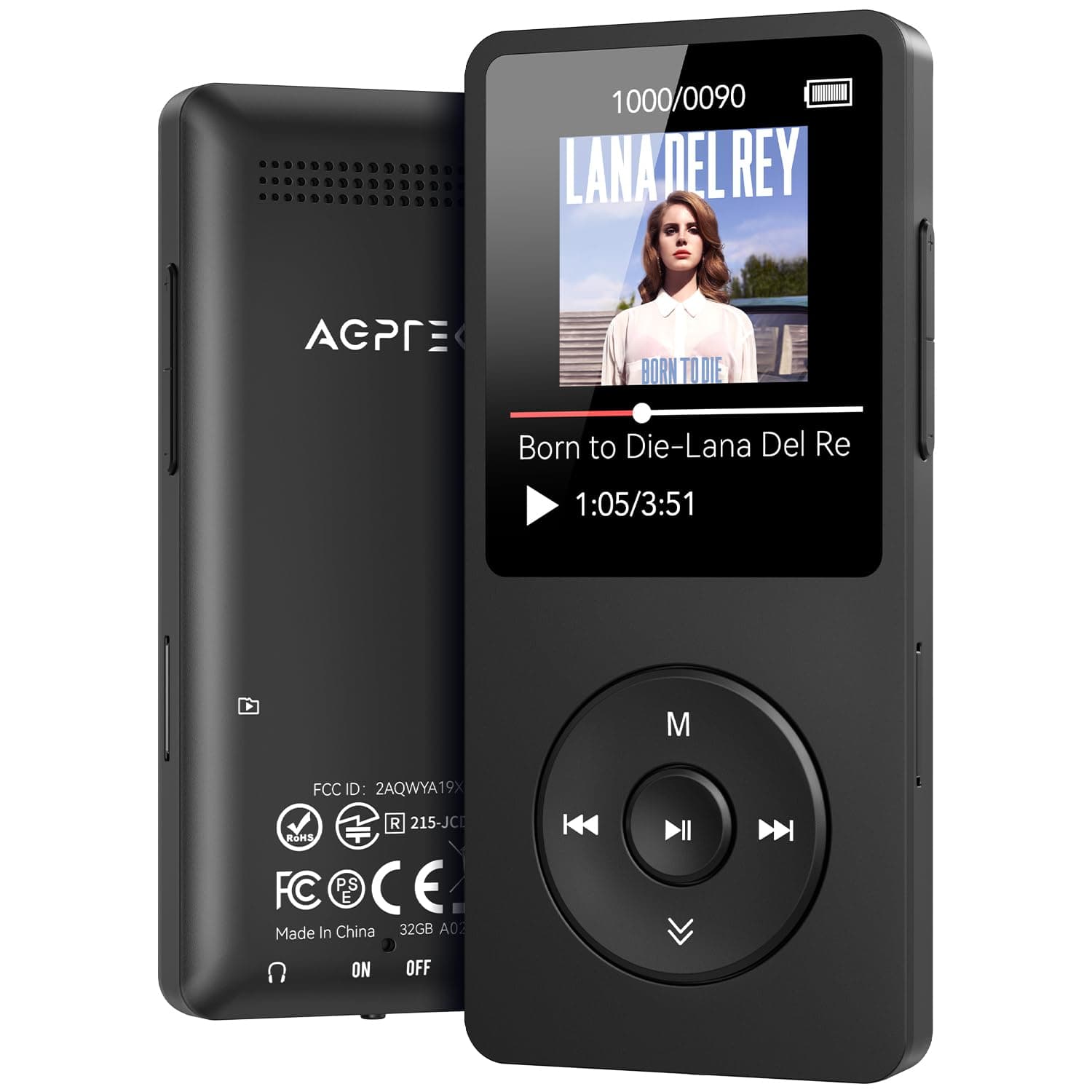
🎧 Elevate your soundtrack—wireless freedom meets marathon battery life!
The AGPTEK A02 MP3 Player is a sleek, portable music device featuring Bluetooth 5.3 for reliable wireless audio, 32GB internal storage expandable up to 128GB, and an impressive 40-hour battery life with fast Type-C charging. Its 1.8-inch screen and classic button interface offer easy navigation, while support for multiple audio formats, FM radio, and voice recording make it a versatile companion for active professionals seeking a lightweight, durable music player.


| ASIN | B0CH9WWWHN |
| Additional Features | FM Radio, Voice Recorder |
| Battery Average Life | 40 Hours |
| Best Sellers Rank | #2,207 in Electronics ( See Top 100 in Electronics ) #8 in MP3 & MP4 Players |
| Brand | AGPTEK |
| Built-In Media | MP3 Player |
| Color | Black |
| Compatible Devices | Laptop, Personal Computer, Headphone, Earphone |
| Component Type | Memory |
| Connectivity Technology | Aux, Bluetooth |
| Customer Reviews | 3.8 out of 5 stars 6,031 Reviews |
| Display Technology | LCD |
| Item Weight | 0.12 Kilograms |
| Manufacturer | AGPTEK |
| Memory Storage Capacity | 32 GB |
| Mfr Part Number | SMPA02 |
| Model Name | A02 |
| Model Number | A02 |
| Screen Size | 1.8 Inches |
| Special Feature | FM Radio, Voice Recorder |
| Supported Media Type | Micro SD |
| Supported Standards | AAC, APE, FLAC, MP3, OGG, WAV, WMA |
| Warranty Description | 1 year warranty |
C**S
Small, lightweight, improved BT MP3 player.
This is a great inexpensive MP3 player! I was looking for a wireless MP3 player to use with Bluetooth earbuds at the gym to replace my ancient iPod nano and wired headphones. I also own a non-Bluetooth version A02S. This player is labeled A02XT on the back, and appears to be a newer version of the model as it had several additional side buttons which do not show in the pictures on the Amazon webpage nor on AGPTEK's website. There are now Volume Up and Volume down buttons on one side, and a Back button on the other side in addition to the 5 buttons shown on the front. These make changing volume and going back one screen so much easier and intuitive than with the prior A02 player on which you needed to manipulate several buttons on the front to go Back one screen or change volume. Bluetooth setup was very easy and haven't had any random disconnects. Sound quality is excellent. Be aware that the volume maxes out when using Bluetooth at a medium loud level, not super loud. You can copy songs from an iTunes playlist to this player, and have it play in the same order by doing a copy and paste (not drag & drop) of songs in the iTunes playlist into one of the Playlists in the folder on the MP3 player which can be seen in the Finder. If you select that Playlist to play songs on the MP3 player, the songs will play in exactly the same order as in your iTunes playlist with no change in sequence. It does take some time to transfer songs from your computer to the MP3 player especially you try to fill all 32GBs with songs. I did cause the player to freeze up when I erroneously pressed the Back and Vol down buttons together. To unfreeze, hold Play/Pause button about 10 seconds, screen goes off, then powers on, and all is good, no loss of files. I haven't tried any of the other capabilities (voice recordings, photos, etc) but I only purchased the player to play songs, and it does this perfectly.
A**N
New and improved player in my favorite Agptek A02 line of products
I've had several versions of Agptek since about 12 years ago, when I purchased Agptek A02 (non-bluetooth). Sice then I also bought Agptek A02ST (with bluetooth), and now this one, Agptec A02XT. I also bought Agptek A09X, which I did not like at all, mainly for being too big and too heavy. All of my Agptek A02 models share identical body, and very similar controls and operating system (with minor tweaks). The noticeable improvements from ST to XT version are change from micro USB to USB-C, much more reliable bluetooth connection, and internal memory increased from 16GB to 32GB. I paired 5 different bluetooth headphones and earbuds with it on first attempt, and they all communicate properly with the player to control volume, pause/play/ skip forward or back etc. What I love about Agptek A02 line of products is their small size and light weight (perfect for running and gym), reliability, durability and storage capacity with added external SIMM card. By the way, I stuck a 256GB card full of music in this player, and it read it flawlessly, so the manufacturer's recommendation of up to 128GB is very conservative. All of my music files are in mp3-320kbps format. It can play lossless flac files too, but I see no reason to do it on a portable player of this class. Sound quality is very good, but not HiFi, with some barely audible electronic hiss in the background. I like the controls wheel (it's not a scroll wheel), that you can feel with your fingers, so you can easily operate it in total darkness. And the battery life is absolutely amazing. I find the user interface easy to use, although definitely old school. So, if you are not comfortable with organizing your files in folders, copying them from a PC, and browsing through them, this player may be not for you. In summary, for under $30 (plus whatever you choose to pay for the SIMM card), it is a bargain.
J**S
Great mp3 player, terrible interface
I had to struggle a lot before I was able to make up my mind on a rating for this player. I've mostly used Phillips brand players in the past because I refuse to put up with the monstrosity of a piece of software that is iTunes and I think Apple products are ludicrously overpriced, which rules out most of the market. But Phillips isn't really doing the mp3 player market anymore, so I had to look elsewhere. Here's what I wanted out of an mp3 player to replace my aging Phillips 8GB: better battery life, higher song capacity, good audio quality, better playlist functionality. I definitely got the first three and only narrowly missed the last one, which is not a reflection on Phillips having good playlist support so much as AGPtEK somehow managing to make playlist functionality WORSE, which I wasn't aware was possible. This mp3 player has fantastic battery life, is very small and light, can be upgraded if I choose to buy a memory card even though the 16GB capacity is pretty roomy already, and has no problems with audio playback quality that I can find. I was able to use Windows Media Player for the initial import of music, which was nice and simple, but that's where my good experience with this player ended. I knew that in order to use the playlist capability I would need to build the playlist in a separate media program (they suggest Media Go or MediaMonkey- I chose the latter) and then import it if I didn't want to be stuck with only the three basic slots on the player for playlists-on-the-go and add each song individually through the player menus, which I have been stuck doing on my Phillips players and is a terrible way to pick out the 75 songs you want on your running playlist from the 150 albums on the player. Anyway, just take my word that this mp3 player has a horrible user interface. If you access your albums through the "music" function it scrambles the order of songs in the album, regardless of title or listed order. It will display them properly if you access them through "folders" but doing that breaks the repeat function and it will immediately go to the next album in the list when you reach the end of the album. My initial import was sorted alphabetically but albums I've added since then immediately go to the bottom of the list in chronological order. I manually created a folder within the folders for playlists and manually made a folder for each playlist, which works pretty well except that, to my great perplexity, the SECOND playlist I synced to that folder (songs in playlists need to be duplicate songs on the player, which I knew going in and was fine with because the player is roomy enough to handle it) also dragged along duplicate album folders for every song in the playlist and dropped them in roughly chronological order at the bottom of my album listing, so now I have 50 or so junk album folders with one or two songs in them cluttering up the bottom of my actual album list. But hey, at least I got the playlists to work, even though any changes to it need to be made by deleting it, editing it in MediaMonkey, and then re-syncing the whole playlist. In the end, I had the presence of mind to realize that this player is really doing everything that I wanted. The folder-album interface problem is not intuitive, but I understand it and can work around it and it isn't THAT inconvenient. It would be inconvenient if I was trying to walk someone else through the process of finding an album or making a playlist, but since I understand it and I'm the only one who uses the player, that's not a problem for me. As it was, I spent probably a solid forty minutes trying to get the playlists to work and not screw up the rest of the interface and only marginally succeeded at the latter part. But still, it was a low-cost player and like I said, it does everything I want it to do with very little actual inconvenience, which is why I decided it was worth four stars.
A**E
Two models, same brand, same issues on both, overall a complete waste of time and money.
I bought two by this brand the AGPTEK A02 and the AGBPTEK Touch and I returned both because they equally sucked and ended up frying my brand new SD card. I really liked the look of the touch but I also wanted something with physical buttons that I wouldn't have to look at to skip through songs, but they were both just absolutely terrible. They use the same interface and the sound quality on both was abysmal. When I tried the first device in my car it was so awful I was terrified my speakers got blown out or something because when I tried the second device it was the same - the bass was so buzzy you couldn't understand anything - tested with the same song on both - then I tried my phone bluetooth (again, same song) and it was just fine. I tried them on my earbuds, same issue. I tried adjusting the sound style on the devices and it didn't really make a difference, the only way to listen to either one bearably was to basically adjust the bass on my car settings so low it was practically off and at that level what's the point of listening to music. The speakers on both units were also horrid quality, which didn't matter because I wasn't planning on listening to music on the actual device anyway, but if I had wanted to use it as a backup they aren't worth having as a feature. I checked the SD card on my computer and the songs played fine so it wasn't anything to do with the song quality or the SD card, I was in a crunch about to leave for a road trip and decided to take both of them anyway since it's really what I bought it for, but that turned out to be a mistake. About an hour in while trying to change songs from one playlist to another on the external card as it was playing on the device it froze up and restarted. When it booted back up it was back on the same track and it wouldn't let me go forward/back/switch to anything else it just kept freezing and restarting. I tried the SD card on the other device and it said card not found. Ended up just breaking down and paying for ANOTHER month of Spotify just to get through my trip, which is what I was trying to avoid in the first place. When I got home I plugged the SD card into my computer and it said it was corrupted, so somehow the player fried my brand new card that I literally just bought to use with it.
J**T
AGPTEK A02 MP3 player review
So I will start off with the what's good: The sound quality is amazing, especially for a device that only cost me about $40. Paired it with a decent set of headphones or earbuds (I have a pair of Bose QC35 headphones) and it is high-quality sound for a very budget-friendly price. If you need it, it also has an FM radio, as well as the ability to record sound, play videos, and show pictures. Now the bad: One thing I really don't like is the way the "up" button on the navigation menu functions. If you are like me, you are buying this because you have hundreds of CD's worth of music you want to put into one place. And-depending on what direction you are searching through your stuff-what you will have a tendency to do is to hold the "up" button down to keep looking. However, continually holding the "up" button down on the Agptek will send it into search mode. I do like the search function, but I wish they would have put it somewhere else, such as a long push on the menu button. Another thing is how it reads the track order. I have a lot of CD's that I encoded a while ago to Mp3 format. A player such as one of the Sansa Sandisk units-or a player with Rockbox installed- will read the correct track order with no problem. This one? It's a bit of a crap-shoot. Sometimes it gets it right....other times, not so much. But the biggest problem I have is with the build quality: After only about a month of use, the headphone jack is already malfunctioning, playing sound only out of one side (unless you hold it just right). Yes, I know that I can just use Bluetooth headphones.....but that's not the point. So I guess my next step for this player is to take it apart and try and solder the headphone jack in place, and then see if I can install Rockbox onto it. Dear AGPtek: at one point in time, I do believe you were going to partner with Rockbox to make a player with Rockbox Pre-installed . Any chance this could still happen??!!
C**E
Works great
Solid MP3 player, easy to transfer songs onto. Just FYI if you have headphones that use a USB-C jack, those won’t work. It has to be like the regular stick jack or bluetooth. Super small and easy to carry around.
P**N
This thing is a beast....
I got my son this MP3 because he has started getting more and more into music, but Spotify Kids is a bitch to set up and won't let us add our son to our account. My son is also too young to have a cell phone. So an MP3 was the perfect solution. It's really easy to add music and I can quickly add any songs to it when my son has a new song he really likes. I do have the complaint though that depending on how you have your songs labeled by artist or album etc. It's annoying to change because you can't change it on the MP3 or in the window for the MP3 on your PC when you plugged it in. You have to change on your drive on your pc and then drag it back onto the MP3, unplug the MP3, see if songs sort like you want, and if they don't fix it and check again. The charge however is great!! It holds a charge forever it feels like and charges quickly. Connects to Bluetooth easily. The sound that comes out of the MP3 when you don't have headphones is decent. Navigation is a bit annoying but if my 8 year old can get the hang of it you can too. Now... the sturdiness of this thing... is insane... this thing reminds me of the beast MP3's of my use with how they could survive anything. Why? Cause this thing went through the washer and it still works. Perfectly. Charges, connects to my PC, plays music just like it did before ending up in the washer. Now I can't speak on most features on this thing. I can only talk about using it for music, but in that regard it is well worth the money. It's perfect for kids not just for all the above stuff, but also the size. It's SO small!! But that is perfect for a kid! It fits perfectly in my sons tiny jean pockets!
J**N
So this is a pretty good mp3 player for the price
So this is a pretty good mp3 player for the price, and the fact it also has expandable memory. It's got an equalizer which I don't usually see on cheaper mp3 players, head phone jack is in a good place for people who put this in pants pocket, on and off switch doesn't mean wearing out any buttons on the faceplate (I was beginning to kill the buttons on my last one just from frequent use and having to hold the buttons to turn the thing off). I'm literally only using this for mp3s so I don't care about any other features like playlists, podcasts, radio etc. So that said one of my problems is the fact you have to hold the face plate buttons to access volume control, instead of just having dedicated buttons for it on the front or sides. I usually just end up going back to the song selection, since you first have to 'wake up' the device to light the screen from clicking any button, THEN click/hold the button to get to the function you want. I've kinda gotten used to it but volume control I feel like should be dedicated to its own button. My biggest issue though, is that it lists all the mp3s on one singular list if you're accessing all songs, instead of listing them alpha numerically in their own lists (meaning, all songs start with A in their own column, and you can scroll through column A, B, C etc, individually instead of having to scroll through every song that starts with an A to get to songs that start with B...to get to songs that start with C...etc). I like to shuffle but sometimes I want to listen to a particular song, so I have to scroll through 200 songs to get to it, if I just want to listen to that one and let it shuffle through all songs again after. It's easy enough to access them by album or author, but you'll only shuffle through that list afterward and it won't move onto another album/author after that, it'll just play through that list only. I didn't think that having individual alpha numeric columns would be such a non-existent feature for mp3 players but after melting my walkman and trying to save some money tried two different mp3 players (lost the first replacement lol) it's become obvious how frustrating that is. Maybe I just need to figure the thing out more but scrolling through 200+ songs largely in foreign characters that aren't even listed alphanumerically in the master list is like its own circle of hell (I can't figure out if the thing is sorting by file name or the file information as I have songs that start with numbers, letters, and japanese characters peppered one after the other when I know they shouldn't be according to their file info) But hey, if literally all you want is to shuffle, this mp3 player is totally a steal for what you get, and sound quality is more than I would have expected. edit: After having this for awhile, I'm really unhappy with the shuffle function. It 'randomly' gives me the exact same list of songs (even if slightly out of order, but very often in the exact same order) when it shuffles from the song is starts on, which since it becomes locked just from being in my pants pocket, is always the same song so it's always the same list. Trying to find a song on one large master list is still a circle of hell, and I honest to god don't know how the Mp3 player orders things. Like it's picking some as files names, and some as title names, but I still have a master list that looks something like: 1 - a song 2 - another song apple apples 05 - zebras initial d 06 - [foreign character song name] bears I never thought this would be so annoying. Because like I said in the old review, while you can look under artist/album, aside that it clearly doesn't list that information correctly, the device will shuffle ONLY from that album/artist after you pick it from that list...which doesn't work when you have 2 songs from one album, so it will only shuffle those 2 songs until you go back to your master list. I can't believe how much I hate this device for this reason alone, not to mention the joke of a shuffle. Also, this thing has the slowest fast forward/rewind ever. Just imagine only the tiniest bit faster than real time. Anyway, the thing still works with heavy use and holds a really long charge, not sure it's 70 hour playback but even half of that is pretty dang good