We remain fully operational. Our teams are working around the clock to ensure your deliveries continue safely.

下载应用程序


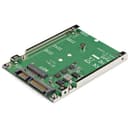
![StarTech.com M.2 SATA SSD to 2.5" SATA Adapter [NOT NVMe], Open-Frame Bracket, 7mm High, M2 Hard Drive Adapter - TAA](/_next/image?url=https%3A%2F%2Fm.media-amazon.com%2Fimages%2FI%2F81LqrwoUgaL.jpg&w=3840&q=75)
🚀 Transform your storage game with sleek speed and cool efficiency!
The StarTech.com M.2 SATA SSD to 2.5" SATA Adapter enables professional users to upgrade any 2.5" SATA bay with an M.2 SATA SSD, supporting multiple drive sizes (2230-2280) and delivering up to 6Gbps transfer speeds. Its open-frame design enhances heat dissipation, ensuring reliable performance. Easy to install with included mounting hardware, this TAA-compliant adapter is backed by a 2-year warranty and lifetime support, making it an ideal choice for boosting system responsiveness and storage flexibility.


| ASIN | B00ITJ7U20 |
| Best Sellers Rank | #128 in SATA Cables |
| Brand | StarTech.com |
| Built-In Media | 1xMounting Screw Kit,1xInstallation Manual |
| Color | Black |
| Compatible Devices | Supports 7mm or larger 2.5" SATA bays, Supports full length M.2 SSD Solid State Drives (2230, 2242, 2260, 2280) Compatible Devices Supports 7mm or larger 2.5" SATA bays, Supports full length M.2 SSD Solid State Drives (2230, 2242, 2260, 2280) See more |
| Connector Type | Auxiliary |
| Customer Reviews | 4.0 out of 5 stars 1,519 Reviews |
| External Testing Certification | CE, FCC |
| Global Trade Identification Number | 00065030855600 |
| Item Dimensions | 3.9 x 2.8 x 0.3 inches |
| Item Type Name | Drive Bay Adapter |
| Item Weight | 0.04 Kilograms |
| Item dimensions L x W x H | 3.9 x 2.8 x 0.3 inches |
| Manufacturer | StarTech.com |
| Model Number | SAT32M225 |
| Number of Items | 1 |
| Number of Ports | 1 |
| Package Quantity | 1 |
| Power Plug Type | No Plug |
| Specific Uses For Product | personal |
| UPC | 065030855600 |
| Unit Count | 1.0 Count |
| Warranty Description | 2 Years |
| Warranty Type | Limited |
M**H
Supports Samsung EVO 860 sata M.2 SSD, couple notes worth to mention
Purchased to clone my current laptop's SSD to a bigger capacity, using the laptop's 2.5 inch HDD tray. It did the work flawlessly. The new SSD was Samsung 860 EVO M.2 500GB. A few notes though, small details but maybe useful for someone. Pros: this adapter supports NOT FORMATTED (not allocated) disks, which is a big plus! Per my knowledge, none of the current m.2 to USB adapters support not-formatted SSDs, which means you have to remove your current SSD, install the new one, format it, remove, reinstall original SSD, only then the new SSD can be used with a USB adapter, rather inconvenient procedure. This was one of reasons I purchased this specific adapter. And it worked just fine, the cloning software identified the new SSD adapter as a non-allocated disk and cloned right away. The PCB, soldering, assembly of the adapter, metal rails show a good quality, not some cheap crap that I usually see at this price range. Cons: 1. The adapter is kind of mirrored/reversed, the power and data sockets are at the reverse side compared to a standard 2.5 inch HDD/SSD sockets. In desktops it may not be an issue as power/data cables are separate and you can install the adapter the way you want to for SSD's optimal heat dissipation. In laptops though, most of the time 2.5 inch drives are installed the aluminum cover looking outside (PCB side inside) of the laptop, and only one combo cable is attached which usually cannot be reversed. Example: Dell inspiron 7559 laptop. The only way this adapter gets into the 2.5 inch bay, is with SSD facing inside the laptop which is not good for heat dissipation at all. No way I could install it SSD facing outside as the laptop connector is right-angle and cannot be flipped. Just compare the connectors location of the adapter to any 2.5 HDD connectors, you'll get the point. This should be considered if you're worried about SSD cooling using thermal pads etc. 2. The mount and screw for 2280 SSD protrudes from the adapter edge by about a millimeter, causing the laptop's HDD bracket to be bent slightly to fit the adapter. You don't get a flush edge which is kind of upsetting, but it did not cause issues fitting in the bay. If your laptop SSD bracket is not flexible enough, you may have issues installing this with 2280-long SSDs. Wish the manufacturer placed the SSD connector 1mm further inwards, so that the mount did not go beyond the edge and would sit flush. Overall, an excellent product and well deserved 5 stars if you do cloning, or install in desktop. For permanent install I'd give 4 stars because of heat dissipation issue due to reverse install in some laptops. Something to consider depending on your application.
M**I
Practico y funcional
Excelente calidad
J**.
Did not work
Did not work. The M.2 would not fully seat into the device. After more force than I was comfortable with is was almost in but the computer would not recognize it. The same M.2 fit and worked normally in another device.
R**K
Works great for M.2 SATA SSD to replace 7mm 2.5" drive - plug and play!
Have a WD SA500 M.2 SSD, needed to mount it in a 2.5 inch drive slot because I don't have an M.2 PCIe/NVMe slot. It was plug-and-play, no drivers, worked with Win10 and MacOS. This kit has 1 M.2 slot, and metal rails to mount perfectly as a replacement for a slim-line (7mm height) 2.5 inch SATA drive. Can also be mounted in place of a 3.5" SATA if you add a 2.5 to 3.5 metal bracket kit. Just remember - its M.2 SATA, it is not compatible with M.2 PCIe/NVMe. See the photos of the product for the keying on the slot that can be supported. StarTech also has a carrier for 2 or 4 M.2 SATA SS, if you need to have more M.2 SATA SSDs..
K**N
Worked, partially
I used the two adapters in my Startech cloner usb 3.0 model and I got mixed results. I have cloned other drives, mostly all to upgrade without the full reload and have never had a failure. I cloned one Windows 10 drive so I could upgrade to a much larger SSD than what was supplied with the laptop and it worked, for about 16 hours. Then total crap and the drive didn't die, but got some serious corruption going. I ended up putting the old drive back in as I didn't format it yet, everything was cool. Next I cloned the data drive to upgrade to a bigger size and this worked without issues. The computer was not a Lenovo with extra hardware security or anything weird like that and I haven't tried again since. Overall the use of the adapters went well, easy to slide the drive in and secure it with the screw.
I**Y
Will not work with NVME m.2
While they do state amongst their images and data that this is not the case, this is a heavily returned ityem for a reason. Make sure you aren't trying to use an NVME m.2 drive with it. That seems to require a different adapter with a more specialized connector than typical SATA.
C**.
Great Product, easy to use
These adapters made duplicating my M.2 NGFF drive a breeze. Simply mount the SSD into the StarTech Adapter and follow the instructions for your drive duplicator. In mine the cloning process took about 15 minutes total beginning to finish.
S**N
Buen adaptador si no tienes la opcion de conectores de unidades m.2 a tu computador
el adaptador es muy sencillo, una tarjeta que incluye sus tornillos para agregar la unidad m.2 en mi caso busque un adaptador con conectores Sata, hay que poner atenciòn a este detalle pues hay otros adaptadores que vienen con conector U.2 y el comun de las computadoras no son compatibles con este tipo de coneccion. Habiendo revisado previamente estos detalles , compre la unidad m.2 con conector sata y este adaptador con el que funciono inmediatamente, no se necesitan drivers ni nada complicado. Luego de conectada la unidad a mi motherboard, ya solo fue de clonar mi disco duro y reiniciar desde esta unidad. Todo funciono perfectamente. Quiero agregar una actualizaciòn sobre este producto. Quise agregarle un disipador de calor para mantener mas fresco mi ssd e intente con unos disipadores que yo tenia pero me encontre con el problema que con cualquier disipador, al colocarlo la base de este topa en la tarjeta, esto es debido a que el conector M.2 es muy bajo y casi no queda espacio, solo el M.2 encaja perfecto pero no permite agregarle un disipador pues este topa con algunos de los circuitos de la base de la tarjeta, creo que deberian tomar en consideraciòn esta observaciòn si piensan agregar un adaptador de estos.