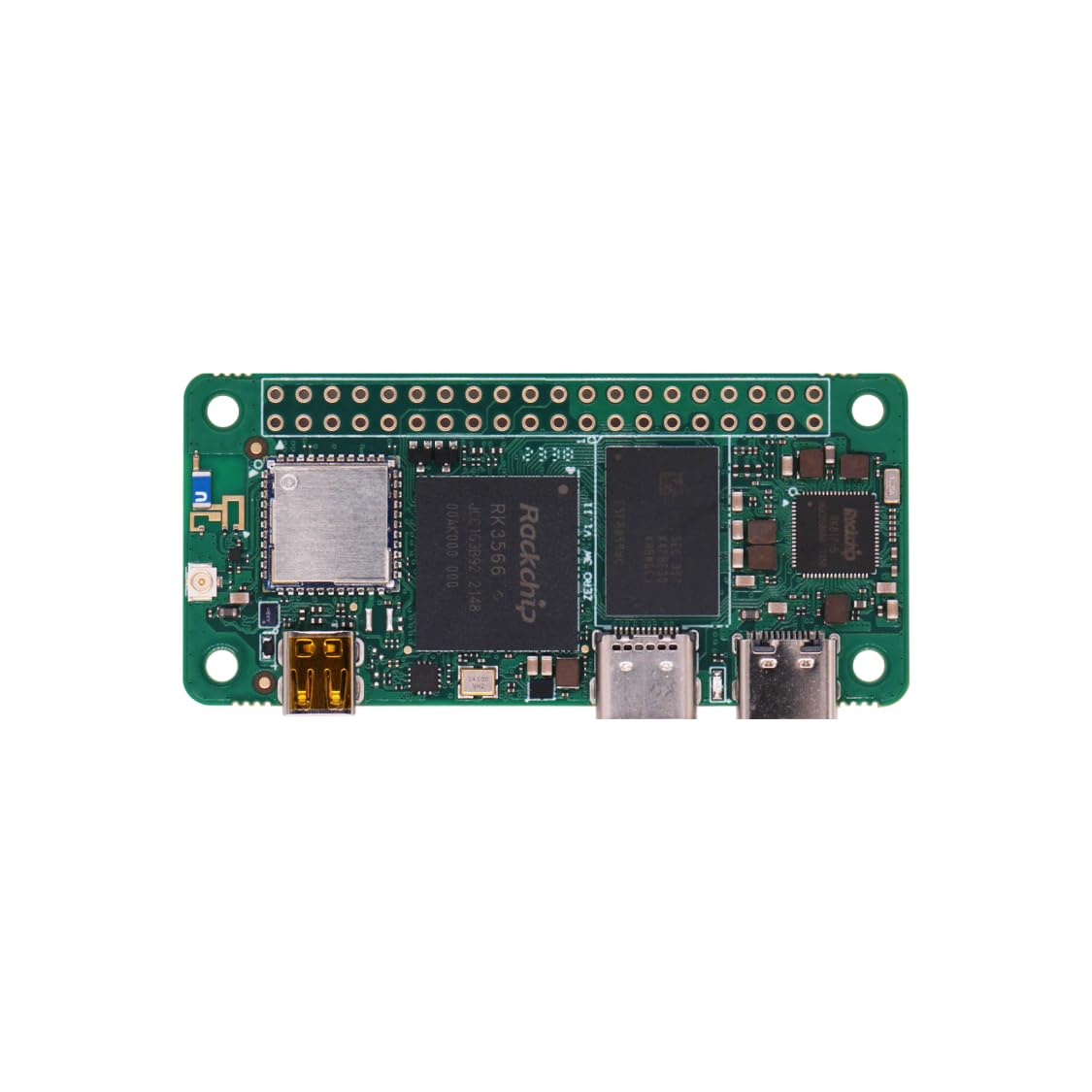
🚀 Power your projects with the Radxa Zero 3W — the ultimate zero compromise SBC!
The Radxa Zero 3W is a compact single board computer powered by a Rockchip RK3566 quad-core CPU, Mali-G52 GPU, and NPU, featuring 8GB LPDDR4 RAM, USB 3.0, micro HDMI output at 1080P, and 5GHz WiFi. Designed for makers and professionals, it offers Raspberry Pi Zero W compatibility with enhanced speed and connectivity, enabling subscription-free smart displays, media streaming, and versatile DIY applications.


| ASIN | B0CZD4GZYG |
| Best Sellers Rank | #1,957 in Single Board Computers (Computers & Accessories) |
| Brand | Radxa |
| Customer Reviews | 4.1 4.1 out of 5 stars (35) |
| Date First Available | April 15, 2024 |
| Item Weight | 0.48 ounces |
| Item model number | Radxa ZERO 3W 8GB No eMMC with GPIO |
| Manufacturer | Radxa |
| Number of Processors | 4 |
| Operating System | Linux |
| Package Dimensions | 2.52 x 1.22 x 0.15 inches |
| Processor Brand | Rockchip |
| RAM | LPDDR4 |
| Series | Radxa Zero 3W |
B**O
Forget the Pi
Forget the Pi Zero, this Radxa even at 1gb runs rings around the pi zero (I do have both). Setting it up was a bit tricky and took a bit of research online. I'm running the 1g version off of a SD card as a picture frame to replace my Nixplay, who decided to begin charging for photo storage over 500mb! The Radxa 3w is running with a 10inch HDMI touch display. With minimal scripting I now have a complete picture frame replacement at half the cost of the commercial product, local wifi access, unlimited storage and NO SUBSCRIPTIONS!!! The performance is so good on the Radxa that I just ordered the 2gb version to replace my GMK G5 as a home status display. This my new favorite Zero form factor SBC.
J**N
Super-powered Zero-W 2
Warning: You need to know a bit about linux or be able to do a lot of internet sleuthing / troubleshooting to get this working. It didn't take me long (about 10 mins). You just have to fill out the "before.txt" file in your microSD after you install their official image with your user, password, enable ssh, and put in your wifi info, then ssh into it. You'll need to do QoL stuff like disable sudo password etc. This is essentially a super-powered raspberry pi zero w 2: - Same GPIO - Same energy draw ( a tiny bit more ) - USB-C Ports! - It is about 2-3x faster than a zero-2! - It has USB 3.0, not just USB 2.0 so you can stream video from a webcam etc! - It has 5ghz wifi! What's not to love?
R**N
Powerful tiny SBC, if you know how to use it
Very powerful SBC for its size (compared to the pi zeros), a good value for what it is. Has enough resources for a lot of tasks for what you would use this for, and it even has hardware encoder/decoders for video. However, one bad thing is the software support. Drivers and kernel overlays can be a bit of a pain, and there isn't much documentation for stuff like RKmpp, but once you get it running it is a beast.
M**R
... 🧐 something doesn't seem right ...
umm, not exactly sure how to review a delicate computer board that doesn't appear to be in new or working order ... looking forward to receiving a replacement and i will edit this review accordingly ... ... it looks like the plastic box it came in was reasonably constructed, and although the pins and connectors are all smashed, nothing seems actually "broken", so I would consider the unit to be well built ... ... it is amazing that nothing cracked or broke off the circuit board given the evidence of the troublesome adventure it must have gone through ...
M**N
Steep learning curve but once you figure out how it works it runs smoothly
It takes a while to figure out how to install an OS on eMMC. Other than that, it runs alright, albeit the software support isn't the greatest, and I can't install a newer Debian than an old Bookworm. The device itself runs pretty hot, so some kind of a passive heatsink is recommended. I'm using it as a Pihole + Unbound DNS server and access point in hotels and other public places. The form factor/performance/price ratio is probably the best on the market right now.
R**S
Might be more stable in a few years.
This ought to be a good product, but there were several irritating things. The camera connector broke very quickly it is just badly designed. The connectors are not the same as a Pi Zero 2W so do not expect to be able to use this as a drop in more powerful replacement. The Ubuntu install for this is bloated and feels fragile. Just not a broad base of support. Perhaps it is just a too new product, I bought two and might be able to find some use for it, but not as camera tool unless I can redesign the camera connector and find why theirs is so odd. Should have waited to see if they are around in a year.
J**T
Bait and switch
Bought an 8gb ram, got 8gb ram. It came in a 4gb cover, but once I flashed an os and checked, it's 8gb. It runs great 👍 👌
K**N
This is probably the best of the Zero form factor units.
This is probably the best of the Zero form factor machines. A55 quad core instead of A53's, better Wifi, full-size antenna connector, actual USB 3.0 connectivity on the second USB-C. Stable glitch free 4k, unlike some others in this class. Also, the eMMC is MUCH faster than a sd card (168mbps vs 13 in my testing). Factory images aren't the strongest, but the Ubuntu 24 image from Riek works 100% and has no issues.
E**Z
Habe den Radxa Zero 3 W zusätzlich zum Raspberry Zero Pi 2 bestellt und gestestet. Beim Radxa Zero 3 W hatte ich über den Raspberry-Imager ein Armbian Image auf eine 64 GB micro SD Card geladen. Die Software Armbian hatte ich zuvor direkt über Radxa Website runtergeladen. Auf dem LCD Monitor 19 Zoll funktioniert das Modul einwandfrei (Bootvorgang startet). Bei einem 43 Zoll LED TV Marke Telefunken (Hersteller Vestel) musste ich etwas Geduld mitbringen. Zunächst kam beim Anschluss am TV folgende Fehlermeldung: "dwhdmi-rockchip fe0a0000.hdmi: IRQ index 1 not found ... rk817-battery: Failed to find matching dt id ... rockchip-dmc dmc: failed to get power_model node ... Started Plymouth Boot Screen... Reached target Graphical Interface." Danach ging ich auf Ursachenforschung. Schaltet als erstes den Fernseher mit der richtigen HDMI Quelle ein und starte das Radxa Modul mit Ein-/Ausschalter Netzteil. Der Bootvorgang zeigte wieder die Fehlermeldung und danach einen schwarzen Bildschirm. Gemäß einer Empfehlung wartete ich einige Minuten mit dem schwarzen Bildschirm ab, bis das Modul die Auflösung am Fernseher selbstständig anpasste ebenfalls der Bootvorgang startete. Während dem Betrieb ist mir aufgefallen, dass das Modul sehr warm wird (aktive Kühlung wäre ratsam). Zusätzlich versuchte ich den mittleren USB C Slot mit einem "Ugreen"-USB C auf USB Adapter zu erweitern, um mit USB-Hub (ohne eigenes Netzteil) zu erweitern. Leider ohne Erfolg, dass Modul greifte auf den USB- Hub bzw. den angeschlossenen Bluetooth Adapter nicht zu, obwohl ich für den Radxa zwei Netzteile mit ausreichend Strom (5,1 V Output) angeschlossen hatte. Als ich den USB-Hub entfernt und den Bluetooth Dongle der RII Tastatur an den "Ugreen"USC C /USB Adapter angeschlossen hatte, reagierte der Radxa auf den Dongle, wodruch man das Betriebssystem Armbian bedienen konnte. Anscheind ist auch eine Herausforderung, dass das Radxa Modul überhaupt auf einen erweiterten USB- Hub ohne eigenes Stromnetzteil regiert. Beim Raspberry Zero 2 Pi 2 war der Anschluss eines erweiterten USB-Hub ohne eigene Stromversorgung mit micro USB- Adapter problemlos möglich, obwohl der Raspberry Zero Pi 2 W deutlich langsamer ist und weniger Leistung hat.
T**K
Worst kind of a SBC. The software and hardware both are garbage. SD card slot is completely flawed on purpose so you buy their eMMC module. You can broke many SD cards without inserting it even once. On the other hand on Raspberry it is super easy. But on this listing this is not clear if the board is with eMMC or without. I have figured out that when it is without eMMC the size of eMMC is not mentioned. You will struggle with this without actually ever knowing what this board is capable of.
T**R
Das Board ist unvollständig bestückt. Es fehlen sowohl der eMMC-Chip als auch der Maskrom-Button. Auf den Produktbildern ist jedoch beides abgebildet. Somit ist das Angebot zumindest irreführend. Leider habe ich den Rücksendezeitraum verstreichen lassen, bevor ich das Board in Betrieb genommen habe und mir der Fehler aufgefallen ist.



