
🚀 Elevate Your Data Game with UGREEN NASync DXP8800 Plus!
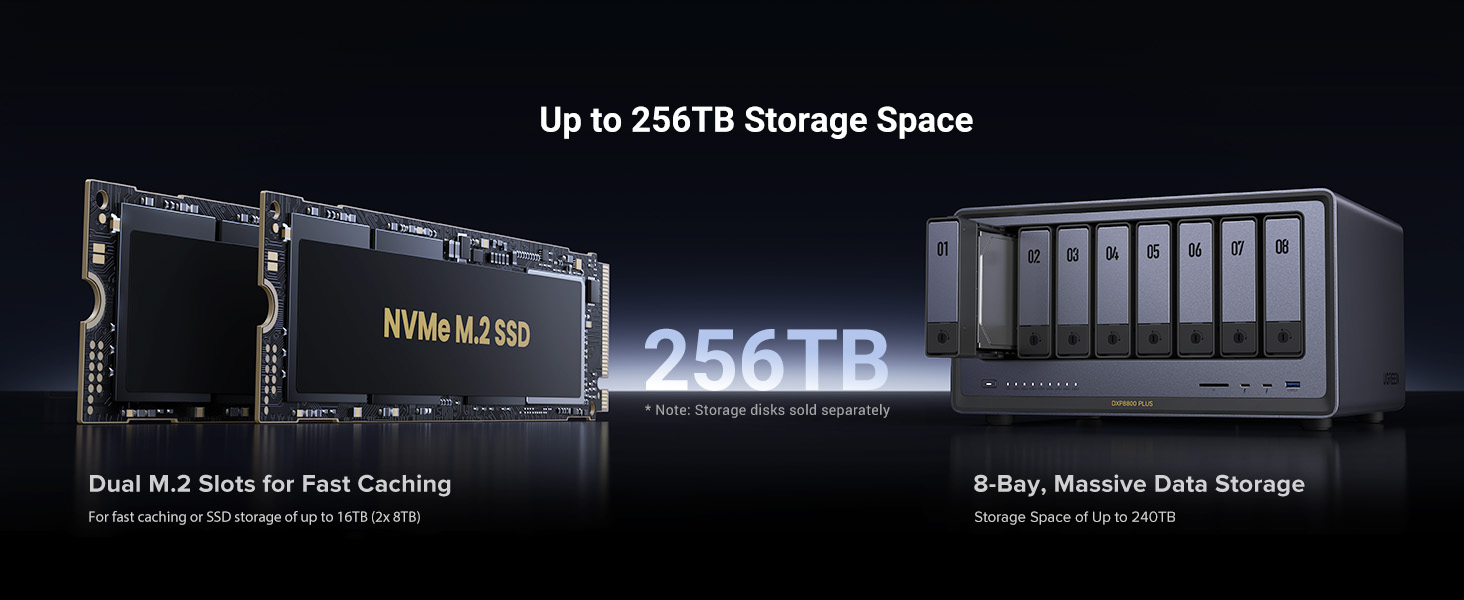
The UGREEN NASync DXP8800 Plus is a high-performance 8-bay desktop NAS featuring a powerful 12th Gen Intel i5 10-core CPU, 8GB DDR5 RAM, and 128GB SSD for system responsiveness. It supports up to 208TB of storage via 8 SATA and 2 M.2 NVMe slots, and dual 10GbE ports deliver blazing 20Gbps network speeds. Designed for professionals seeking massive, secure, and fast local storage, it integrates an all-in-one NAS app and advanced encryption to safeguard your data while enabling smooth multi-device access.




| ASIN | B0D22HGH4N |
| Are Batteries Included | No |
| Batteries | 1 CR2032 batteries required. |
| Brand | UGREEN |
| Color | gray |
| Customer Reviews | 4.5 4.5 out of 5 stars (1,279) |
| Date First Available | September 29, 2024 |
| Hard Disk Description | 8 x SATA and 2 x M.2 NVMe Slots |
| Hard Drive Interface | Serial ATA-600 |
| Item Weight | 10.5 Kilograms |
| Item model number | DXP8800 Plus, 8-Bay |
| Lithium Battery Energy Content | 220 Watt Hours |
| Lithium Battery Packaging | Batteries contained in equipment |
| Lithium Battery Weight | 3.2 Grams |
| Manufacturer | Ugreen Group Limited |
| Number Of Lithium Ion Cells | 1 |
| Package Dimensions | 52 x 37 x 30 cm; 10.52 kg |
| Series | DXP8800 Plus |
A**ー
Amazonをずっとみてましたが私に見落としか販売はされませんでしたにで、クラファンで購入しました。 LANハブとPC LANを10Gpbsにすればハードディスクでも(RAID5)書込み1000M/Sが出ます。 メモリはサムスン製のDDR54800 8GBが入っていたので16GBに増設しました 設定に(12TB x4個)RAID5に16時間くらいかかりました。使用領域は32.6Gbです。 家族で分割して使うのでちょうどいか少し多いです。撮り溜めたiPhoneのビデオなどが結構容量があって困っていました。閲覧権限も付けられるので素晴らしいです。 SSDの領域を(4TB x2)キャッシュにするか、読み書き領域にするか迷ったのですが頻繁に読み出すファイルもないし、少し早くなっても誤差程度なので読み書きにしました。 写真を主に入れましたがスマホからの読み込みが早くなりました。(従来のNASと比べ3倍くらい) また、1〜30日限定で指定のファイルを遠方の知人にダウンロードしてもらえます。 家族動画とか送るとWi-Fi(5Gでも大丈夫ですが通信容量で嫌がられる)でダウンロードして貰えば相手も見れるので活用方法は多いです。 URLの作り方はファイルを指定してURL作成を選ぶだけの簡単操作です。 仮想マシンも入れられるのでLinuxやwindowsをインストールできますが残念ながらスマホからは操作できません。PCからです。 この時SSDを読み書き領域にしておけばHDDかSSDか選べます。 こんなに便利なら6ベイのタイプにしてRAID10とか組めば良かったです。 もうキャンペーンが終わったのでこのタイプでも10万円します。 2ベイタイプは安いですがLANが2.5GBpsなのです。PCが2.5Gでしたら2ベイ買って20TBのHDD2個積んでRAID1で18TBほど使えますが 20TBのHDDって高いですよね。 12TBのHDDなら安売りを待てば使用時間0時間のホワイラベルが◯万円後半で買えます。4台買っても7◯円台で入手できます。 本当に待たないと良品は出てきません、中身は運任せです。Amazonで手堅く買った方が近い値段で安心できます。 購入の際にHDDチェックアプリを用意して購入(新古か中古)したら直ぐにチェック。 説明にないエラーが万が一あったら返品すれば当たりを引けます。 ※エラー品以外を無闇に返品すると返金は50%になります。 無闇な乱用はやめましょう、しかし嘘をつく業者の方が悪いのでキッチリチェックしましょう。 エラーが出た場合、Amazonカスタマーセンターにどうやって返品したら良いか相談すると円滑です。今多くのストアが優良なので妙に安い怪しいところを選ばなければ良品が届きます。 SSDなど市場に流通しているのは現在(2025/5)4TBまでです。すごい値段で8TBがあります。 それ以上で格安だったら99.999%偽物だと思います。数年後だったら分かりません。 HDDの偽物は少ないですがリマークなどはあるでしょう。調子の悪い中古などご注意ください。 ※私はNAS兼用のHDDを買いましたが、NAS専門ではありません、平均稼働時間から150万時間から考えれば兼用で良いかな..と妥協しています 壊れた時にメンテにかかる時間を考えると大容量にしないで良かったとも思います。 皆さんもAmazonでHDD探し頑張ってください 不良品を簡単に返品できるメリットを最大限に活用してください。 NAS専用HDDでしたら8TBx4個がオススメです 中古でも150〜200万時間対応と思えば3000時間くらいの使用なら前の持ち主に人柱になってもらったと考えることができます。 NASからプログラムを動かしても気にならないくらい調子良いです。※全てのプログラムが入るわけではありません
K**O
初めてのファイルサーバーでしたが、導入は非常に簡単でした。 win / Mac / iPhoneからもアプリで軽快に動いていますし、win とはLANで直結して軽快にバックアップできています。(HDD→HDDで100-160MB/s程度 FastCopyを使用して2.5TBのバックアップに4時間程度) おかげで動画編集のストレージ環境の不安が払拭できました。 余っていた2.5HDDも積んでみましたが、少しネジ位置を変えたり、付属のネジで固定(短いプラスドライバーも同梱されています)すれば無事使えました。 こちらは家族用の共有フォルダとして使用していこうと思います。 独自のOSを積んでおり、PC環境からブラウザ経由で見ると仮想PCの様なウィンドウが開きます。 写真や動画のバックアップ、閲覧する機能も普通にアプリの様な形態で、違和感なく操作。 試しに、iPhoneの写真や動画をバックアップしてみましたが、自宅に要る時間だけ、バックグラウンドで動作させ続けたところ、35,000ファイル 1.3TBで3日かかりました。 iCloudからダウンロードしては転送し…みたいなことだったので、かなりしんどそうでしたが、バックアップが完了してみれば、純正アプリくらいの軽快さで動いています。(閲覧しにいくのがめんどくさいのでわざわざここをメインにはしませんが) 更にしまいこんでいた3.5HDDなども積んでみましたが、こちらはしっかりとステータスに『危険』と表示されたので、むしろ安心できました。 速く健全なHDDを沢山積んで、クラウドサービスからの脱却を進めていきたいと思います。 クイックリファレンス的なものだけで、詳しい説明書といったものはありませんでした。 日本サイトはまだクラウドファンディング色の強い、導入ページのみでしたので、LANの直結などはChatGPTに教えてもらってサクっと解決しました。 ChatGPT曰く「すごく良いマシン持ってますよ!」だそうです。 そのうちマイクラサーバーなど仲間内のゲームサーバーも立ててみたいです。
伊**用
PPPoE接続すらできない。 IPoE環境とかクライアント側でポート制御できない状態だと外部とのやり取りがよく分からんサービス経由限定になる。NASのWANアクセスのためだけにさらにルータを外付けするのは流石に馬鹿馬鹿しいんだよなぁ…… のっけからこんな調子だもんでウェブサーバとかも無い。 全部Dockerでやれって事かもしれんけど、初心者向けでは無いよなコレ。 SATAは6ポート全てがチップセット直結というわけではなく、1~4ポートはASM1164 (Gen3x2 16Gbps) による接続のため、6Gbps x4 = 24Gbpsに届かずで、つまり SSDを接続しても最大速度は出ませんし、なんならHDDのアクセス速度が100%に行く事すら無いという有り様です。 RAIDの初期構築で特殊な動作しているためである可能性もありますが。 M.2 SSDキャッシュは容量をどこまで使うかは設定こそできるものの、何故か設定した容量に関係無くディスク全体をパーティションで埋めてしまうので、Samsung Magicianとかを使ったオーバープロビジョニング領域の確保ができません。 あと、M.2の格納スペースは窒息環境です。 放熱ゴムを取り付けても歪まないように放熱ゴムを切り貼りしたり補強板入れたりThermalright TR-M.2 2280 TYPE A G付けたり…… まぁ色々やってもやるだけ無駄ですね。 ああ、でもヒートシンク付きのSSDがそのまま入るのはイイ所だと思います。Synologyとかこういうの入りませんからね。 ファンは9cm 2500rpm x2とCPUのファン(径や回転数はわかんない)があり、全速力で回すとソコソコ五月蠅いですが、通常の速度であればむしろディスクの方が五月蠅いので、まぁこんなもんかなぁ感…… PWMファンですが、設定は全速、ノーマル、サイレントの3速なので細かい調整は効かない模様。 これ使えるって言ってる人、外付けのストレージとして動けばいいぐらいの感覚なんでしょうかね? NASをサーバに近い使い方しようと考えている人は素直にSynologyとかQNAP使った方がいいです。
M**S
Es un NAS increíble y las capacidades que tiene da mucho margen para sus usos Solo me gustaría que en la galería de fotos se pudieran etiquetar las fotos para poder organizar mas facialmente las fotos
J**N
Review: I’ve wanted to dive into the NAS world for a while, and the timing was perfect when I saw Ugreen entering the market. Even though I had some initial reservations about them being "the new kid on the block," after some research, I realized this is the ideal machine for someone who wants powerful hardware without the steep learning curve of more established brands. Pros: Tool-less Installation: Installing hard drives and SSDs was incredibly smooth and straightforward. User-Friendly Interface: The UGOS operating system is very intuitive. It feels modern and easy to navigate for a beginner. Build Quality: The chassis feels premium and solid, exactly what you’d expect from Ugreen’s hardware. Compatibility: I love that it allows you to use any brand of HDD/SSD without restrictions or compatibility warnings. Cons: External Power Brick: It uses an external power supply, which means one more cable/brick to manage behind your desk. App Ecosystem: Since Ugreen is new to the NAS market, their app store isn't as extensive as competitors like Synology or QNAP yet. Software Polish: While the UI is great, I noticed some translations (especially in the Spanish localized version) felt a bit clunky, though they are still perfectly understandable. Final Verdict: If you are a novice looking for a relatively powerful NAS that is easy to set up and looks great on your desk, this is it. It’s a solid investment for home storage and media.
T**Y
Definitely a solid NAS. I bought it 6 months ago and used a lot to write a detailed review. Pros: +Good quality hardware. +NVME & HDD storage pool options. +Ultra High speed access/transfers with 10Gbit Ethernet on NVME Storage pools. I think this is the key reason I have chosen this NAS. I can easily reach over 1GBytes/sec. speeds over the 10 GBit network (even can go faster with 2 ethernet link aggregation). I almost stopped using my external NVME drives after having this NAS. (This is really Great!!) Before this NAS I was planning to have Synology DS923+ and 10 Gbps network upgrade. But NVME storage pool is not available unless you don't purchase Synology nvme drives which is even more expensive than MacBook SSD upgrades!!! Besides you cannot find any Synology NVME over 2TB!!! Go to hell Synology!!!! +Silent cooling. +Very fast in general and Very fast startup/shutdown. (Thanks to having a separate NVME drive for operating system) Previously with my old QNAP NAS, it takes ages to boot up so I was never shutting it down and the times I don't it was consuming power for nothing. Now I don't hesitate to Shut down, it boots up less then a minute!! +Compatible with all HDDs I have. +Freedom for using and OS you want. Actually I am using with stock Operation System (UGOS Pro). But I have plans to try TruNAS someday. Cons: -Original Operation System is good, fast and stable, But still needs improvements. For example; manually adjusting the fan speeds, Or conditional adjustments like QNAP has "if X drives goes over 40C increase the fan speed". There few more things that I don't see in the their software, so still there is room for improvement. But still at least faster than QNAP's slow QTS system. -NVME cooling is not efficient. Actually fan doesn't have any effect on SSD cooling. Initially I was using 4TB WD SN850X. Several times I heard the FAN speed up when I was writing on SSD. I checked the system if there is another reason, CPU was cool everything was cool but NVME was over 50 C. And due to fan has no effect on SSD compartment it doesn't cool the SSD down and it blows high for nothing during this write process. So you have to find a cool working SSD with this NAS. But it is kind of hard since it is a NAS and the SSD you choose should have DRAM and TLC Nands. Mostly you can find this combination in higher and drives which are generally get hot. Seagate firecuda 530 and Samsung 990 Pro or any other cooler working SSDs are better options for this NAS. - Similer issue with above SSD compartment is very slim and you cannot use SSDs with original heatsinks. I already had a 8TB WD SN850X (with original heatsink) and I couldn't use it as well. I didn't want to remove the heating cuz I know it will be hell hot. In general finding the perfect SSD for this NAS is really tricky. But there are some 3D print options on the web to make this compartment larger to use heatsink or even to attach another fan for SSD compartment, but in my opinion FAN is unnecessary, if you can install a proper heatsink, I believe all SSD will be fine.
M**L
I’ve been following the UGREEN NASync series since its Kickstarter days, and as soon as it hit Amazon Canada, I didn't hesitate. After nearly a year of daily use, I can confidently say this is one of the best tech investments I’ve ever made. The "Apple Tax" Solution: The real value of this NAS became clear when I bought my new MacBook. As many know, upgrading internal storage on a Mac is incredibly expensive. By using the DXP2800 as my personal cloud, I was able to buy the base model laptop and store all my heavy files, photos, and media on the NAS. I can access everything from anywhere in the world, saving me hundreds of dollars in hardware upgrades. Performance & Reliability: Even with the stock 8GB DDR5 RAM (I haven't felt the need to upgrade yet), the Intel N100 CPU handles everything smoothly. I primarily use it for: Automatic Photo Backups: It syncs my phone photos instantly, allowing me to keep my phone storage free. Media Streaming: It serves as a flawless movie hub for my home. Fast Connectivity: The 2.5GbE port is a must-have. A great pro-tip: if you need even more speed, you can use one of the USB ports for an extra ethernet adapter! Software & Build: UGREEN has been very consistent with software updates. The app is intuitive and improves every month. The build quality is premium and feels like it was designed to last. It’s quiet, efficient, and fits perfectly on my desk. Pros: Significant long-term savings on phone/laptop storage. Easy M.2 NVMe and RAM upgrade paths. Solid 2.5GbE performance out of the box. Consistent software improvements. Cons: As a "light to moderate" user, I haven't found any real flaws. It does exactly what it promises. Final Verdict: If you want to own your data and stop paying for monthly cloud subscriptions or overpriced hardware storage upgrades, this is the way to go. Highly recommended for families and small teams!
D**N
It's not often that I write 'glowing' reviews, but putting together the UGREEN DXP6800 has been a real treat. I've outfitted the NAS with six 12TB Western Digital Blue drives in a RAID 6 configuration, added two Samsung 990 NVMe SSDs for cache, and expanded the RAM to 16GB. The DXP6800 is really well constructed and more importantly, well thought out. The drive installation is super simple and the access to the SSD and RAM is excellent. One of the nicest things about this product is the comprehensive documentation. Every feature, every setting, every option is outlined in very thorough detail and written by someone who obviously understands the product inside and out, and is also fluent in English. This is the best documentation I've seen on a high-tech product in a long time. The features and performance are also top-notch, with an impressive lineup of additional (and USEFUL) apps that can be installed - and again, with full documentation on each app as well (and a good overview describing what the app is before even installing it). I was able to put the array together, get it configured, stripe the drives, assign the SSD as read/write cache, create user accounts, install SMB to map it as a 'network drive' and DLNA for the media server - and every step just made sense. There wasn't a single time where I was scratching my head, wondering how something was supposed to work ... it just works as it's supposed to. I'm very pleasantly surprised.
TrustPilot
1 周前
2 个月前



