
下载应用程序



🚀 Elevate your Linux WiFi game with speed, range & security that means business!
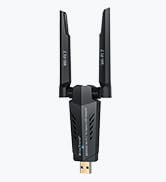
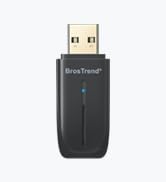
The BrosTrend AC1200 Linux WiFi Adapter delivers blazing dual-band speeds up to 867Mbps on 5GHz and 300Mbps on 2.4GHz, compatible with over 30 Linux distributions and Windows. Featuring dual 5dBi rotatable antennas for extended range and advanced WPA3 security, it’s designed for professionals seeking reliable, high-performance wireless connectivity on desktops, laptops, and Raspberry Pi devices.






| ASIN | B07FCN6WGX |
| Best Sellers Rank | #220 in USB Computer Network Adapters |
| Brand | BrosTrend |
| Color | Black |
| Customer Reviews | 4.2 4.2 out of 5 stars (1,768) |
| Date First Available | July 9, 2018 |
| Is Discontinued By Manufacturer | No |
| Item Dimensions LxWxH | 3.7 x 3.9 x 7 inches |
| Item Weight | 2.12 ounces |
| Item model number | AC3L Linux WiFi Adapter |
| Manufacturer | BrosTrend Technology LLC |
| Number of USB 3.0 Ports | 1 |
| Operating System | Supports Linux Kernels up to 6.9; Ubuntu 24.04~16.04 (all flavors), Raspberry Pi OS 12~8, Debian 12~8, Linux Mint 21~18, LMDE 6~1, Zorin OS, elementary OS, MX Linux, Linux Lite and More |
| Product Dimensions | 3.7 x 3.9 x 7 inches |
| Series | AC3L Linux WiFi Adapter |
| Voltage | 5 Volts |
| Wireless Type | 2.4 GHz Radio Frequency, 5.8 GHz Radio Frequency, 802.11a/b/g/n |
D**R
Easy install on Linux.
I recently purchased the BrosTrend Linux WiFi Adapter, and I must say I am thoroughly impressed with its performance. This little device has made a significant difference in my overall computing experience, and I couldn't be happier. First and foremost, the installation was an absolute breeze. As someone who has struggled with setting up other WiFi adapters in the past, I was pleasantly surprised at how straightforward the process was. It seamlessly integrated with my Linux system, and within a matter of minutes, I was up and running with a stable and reliable internet connection. The signal strength and speed of this adapter are exceptional. I live in a large house with multiple walls and floors, and I was worried about the range and signal quality. However, the BrosTrend Linux WiFi Adapter has exceeded my expectations. It provides a strong and consistent connection throughout my home, and I no longer experience any lag or buffering when streaming or gaming. What's also worth noting is the compact and sleek design of this adapter. It's small enough to remain inconspicuous when plugged into my laptop, and it doesn't obstruct other USB ports. Plus, it doesn't get in the way when I'm on the move, making it perfect for both home and on-the-go use. I also appreciate the driver support for Linux. BrosTrend has done an excellent job ensuring that their product is compatible with a wide range of Linux distributions, which is a big plus for users like me who prefer open-source operating systems. Overall, the BrosTrend Linux WiFi Adapter has made a significant difference in my daily computing activities. It's reliable, fast, and hassle-free. If you're a Linux user looking to improve your wireless connectivity, I wholeheartedly recommend giving this adapter a try. It's a fantastic investment that will undoubtedly enhance your online experience.
R**7
Great WiFi Adapter for a Good Price
I've been a Linux geek for thirty years and I have a long list of experiences with hardware that was supposed to work well with Linux but either didn't do that or only did it after after hours (and hours!) of frustrating research and experimentation. So it's nice when a product shows up that is just as advertised and a good performer as well. This adapter qualifies on both counts. I needed an additional adapter for a laptop I use for WiFi systems analysis and this one has good reviews and recommendations. Also, BrosTrend is known in the Linux world as a solid company. So I bought it. I ran into a glitch installing the driver, didn't immediately understand the problem, and clicked on over to the troubleshooting area on the BrosTrend website. Bingo. In, literally, a few seconds the site indicated that the problem was because UEFI Secure Boot was enabled. I should have noticed (I've only been doing this stuff forever!) but I didn't. Thanks to the thoughtful and well-written troubleshooting info on the BrosTrend site, I fixed the issue with a few keystrokes. The adapter works exactly as expected and I have another helpful gadget for analyzing the messy and crowded wireless networking universe. The adapter is recommended and BrosTrend is *highly* recommended.
S**K
Best Adapter for Linux packet monitor/inject
Works great with Arch linux right out of the box. Supports monitor/injection and is fast and efficient, especially for the price. 100% solid product.
L**R
Several Scares with a Perfect Result
I brought the first scare on myself by ordering a product with only ONE review, something I virtually never do. But this device offered what I needed, so I took the chance. And I'm mighty glad I did. The Ethernet connection on my old PC (running KDE neon 5.13.1) had suddenly dropped from a download speed of 6 Mbps to a little over 1. Some tests indicated that the culprit was a degraded hardware component on the motherboard. My second scare came when the device arrived. The very attractive package was a blister pack you could actually open with your bare hands. However, the included Quick Installation Guide included instructions only for Windows and OS X. Uh, oh. A mini CD was enclosed and the Linux directory included a bewildering array of files, including PDFs and source code. Scare #3! I went back to the Amazon page and found this paragraph: Comes with an expertise Linux Support Ticket via email for installation on Linux OSes listed above, please send us an email at [email protected] for help, please tell us your OSes type and order number in the email. My email got a fast response that attached a PDF installation guide. I was pleased to see that the guide WAs brief and very specific for Ubuntu/Debian systems. You execute a command that installs software needed to compile the driver and then does the compilation and installation of the driver. The procedure requires a wired connection to the Internet, which could be a problem. A link is provided that would enable you to download the .deb file on another machine. However, they recommend that you not use this approach unless you have to. After the prompt was returned I plugged the device in and it was immediately recognized by the system. I shut down the PC, disconnected the Ethernet cable, and rebooted. I used the KDE System Settings to add the woreless device. My "perfect result" is that I am once again getting downlaod speeds of over 6 Mbps. Update: After using this device for a month, here are some added observations. On my hard drive I have three Linux systems in separate partitions with the device working on all of them: Linux Mint-XFCE, KDE neon, and Lubuntu. Doing a major update that included the Linux kernel caused me to lose the connection with the device. Help from TrendTech support got me going again. I just had to execute two commands: sudo dpkg-reconfigure rtl8812au-dkms sudo modprobe 8812au Today I did similar updates with Linux Mint and KDE neon. The fix was again necessary with the former but not with the latter. I continue to be very pleased with my purchase.
C**O
Produit efficace avec un câble de rallonge pratique, qui aurait cependant gagné à être souple et tressé, il est un peu raide et déstabilise le support. Cette clé est détectée et marche automatiquement avec les noyaux linux 6.5 et plus récents, avec le driver standard rtw88_8822bu. Par contre pour les distributions plus anciennes (par ex Debian 12) il faut installer le driver fourni par le constructeur sur son site deb.trendtechcn.com mais il fournit un script automatique pour cela. Aussi, la clé marche parfaitement avec "network-manager", l'interface graphique standard des bureaux linux. Mais en mode serveur sans écran, il faut aussi l'utiliser, via la commande "nmcli", en évitant que "network-manager" ne vienne perturber votre config réseau existante. En effet, je n'ai pas réussi à me servir des autres commandes non graphiques telles que iwconfig, iw, wpa_supplicant, ... qui ne retournent pas d'erreur mais n'établissent pas la connection. Bref, aucun souci si vous l'utilisez sur un desktop linux moderne. Sur des serveurs, cela demande d'un peu plus se pencher sur la configuration si vous n'utilisez pas "network-manager".
N**E
Works great.
C**A
Con esta antena si funciona el WiFi. Fácil de configurar en Linux mint y en Windows funciona directamente.
N**.
Fué muy fácil de instalar, no tuve necesidad de hablar con soporte las mismas instrucciones, me funciona en Debian 11
O**N
Arc linux kurulu PC’ye USB’ye takar takmaz çalıştı. Driverını benim kurmama gerek kalmadı. Çekiş gücü ve ping değeri de çok iyi. Yaklaşık bir aydır kullanıyorum bir problem yaşamadım.