Desert Online General Trading LLC
Dubai, United Arab Emirates
Desert Online General Trading LLC
Dubai, United Arab Emirates


🖥️ Elevate your desk game—comfort and control at your fingertips!
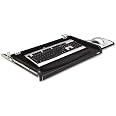
The 3M Adjustable Under-Desk Keyboard Drawer KD45 offers three height settings for ergonomic typing, a wide tray that fits most keyboards, and a smooth sliding mechanism powered by steel ball bearings. It includes a gel leatherette wrist rest and a retractable mouse platform with a precise, battery-saving mouse pad. Designed for durability and comfort, it comes with a 2-year warranty and fits desks 24-25" wide.


| Manufacturer | 3M Office Products |
| Brand | 3M |
| Item Weight | 6.91 pounds |
| Product Dimensions | 25 x 16.5 x 0.31 inches |
| Item model number | KD45 |
| Is Discontinued By Manufacturer | No |
| Color | Black |
| Material Type | Plastic |
| Number of Drawers | 2 |
| Total Recycled Content Percentage | 25 |
| Number of Items | 1 |
| Size | 4" x 60 ft |
| Manufacturer Part Number | MMMKD45 |
R**S
Fits a Model M fullsize keyboard!
Fits a Model M fullsize keyboard! I bought another under desk tray, and cheaped out, big regret I had to take that one down, and put this one up, and wow it is so much better, it is tougher, and very large. The 3M name is not only the name this is the real deal!
A**R
3M Adjustable Under-Desk Keyboard Drawer easy to install and very sturdy.
I received this under desk keyboard drawer in the morning at 11:00am and had it installed and using it 30 minutes later. Not hard to install. I just taped the paper template to the bottom of the desk and then drilled the 8 pilot holes for the screws. I then installed the brackets and here one has to be careful. Look at the installation guide and make sure the opening of the brackets all point to the back of the desk other wise you will not be able to put in the keyboard tray. I did not tighten the brackets per the instructions and then hooked the tray rails to the brackets and tightened every screw. I put the hand rest and the mouse surface and I was done. Very easy install and I really like the sturdiness of the tray and mouse pad.
M**E
A nice keyboard drawer with a few minor issues.
It's a nice keyboard drawer and it was pretty easy to install.I'm using it with a full sized Microsoft split key, ergonomic keyboard and the keyboard fits within the drawer with about an inch or so of space on the side of the keyboard.The mouse tray works but could be a bit stronger. My logitech optical mouse tracks very well on the provided mouse tray cover/insertI gave it 4 stars because I'm a little OCD and don't like my keyboard trays to bounce or wobble. This one, when not fully extended bounces like crazy. Even when fully extended and "tight", there's still some bounce and play to it. Not a major deal breaker, just putting it out there for others, like myself, who may pay attention to these sorts of things.For the price, it's a decent buy but if I have to replace this drawer in the future, I'd probably buy a wood unit which might feel a little more 'solid'.
C**R
Perfect for my desk
I use an ergonomic keyboard and roller-ball type mouse, so it needs a lot of space. This is one of the only under-desk keyboard trays that is large enough for my use. The slide out mouse pad is handy, although I will rarely use it. The tray was a little difficult to mount because my adjustable height desk had a center bracket to hold the motor assembly. However, we were able to work it out and it fits perfectly in the end. The tray slides in and out easily, and it sits low enough to where I can type with it fully under the desk if I want to. The tray feels fairly sturdy, but I avoid leaning on it, just in case. I would definitely recommend this product.
C**S
Expensive mistake
This was installed under a basic IKEA desktop. I was concerned whether the desk was sturdy enough to hold it, but that worked out fine. All good for a week or two. One day as I moved my right hand from the keyboard to the mouse pad, I felt a sharp pain -- my finger had grazed the edge of the metal strap holding the tray below the desk, slicing alongside my fingernail. OUCH. After disinfecting and bandaging up, I gingerly touched the other exposed metal edges - most were smooth, but that one was very sharp. Tried to be mindful, but a few days after, I repeated that motion and re-opened the "wound." So I duct-taped that edge -- not a great look, but who cares, right? I'd passed the return date. Then - about a week later, when I slid the tray out from under the desk as usual, the right end just dropped down almost an inch, leaving the tray slanted and loose. No clear way to adjust, so I shoved it back out of the way and left it alone for several days. Today, I got under the desk -- tried to reposition the tray at all four points underneath -- something's just wrong. It won't stay in place. $75 was a lot for me to spend. I'm pretty unhappy with this. If you get it anyway, install and put it to work right away, for several days running. Just in case you need to send it back. And be sure to check out any metal edges that your hand might come in contact with for those sharp edges. Best of luck.
C**D
This GREAT 3M KD45 Keyboard drawer is designed to last a decade or more
I bought this KD40 from Amazon Used - Like New for $38.42 with free shipping (instead of NEW) to replace my 10 year old 3M KD50 (which had an "extra" sliding mouse pad tray on the L. side). This keyboard drawer really works great and I was even able to install the R. drawer from my old one, since the old KD50 and the new KD40 drawers are identical. This new unit even has a medal stiffener (mounted underneath) to prevent the drawer from sagging in the middle, which my old drawer did not have so I'm even happier, since that improvement will make the new one last even longer, Thanks 3M!p.s. This excellent keyboard drawer now pulls out very smoothly and offers a very stable typing surface that can be moved under the desk when the keyboard is not in use, which makes it perfect for using it with a wireless bluetooth keyboard and/or in a small office space where having more desk space is important.
M**I
Yes, I'm typing on it right now...
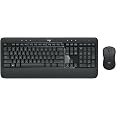
The item is as described by the seller with the size and mounting of the pull-out keyboard tray. However, there is a lot to be learned once it comes out of the box.Pros: Large tray, easy to accommodate a wide variety of keyboards, mounting reference sheet included to help with brackets, and does have a slide out pad on the side for the mouse.Cons: Little too much room between the edge of the pins and brackets that allows for the tray to slide around. Mounting will take some trial and error (with holes) to see where it will best sit under the desk even after using the reference guide. The slide-out mouse pad can be left out with the mouse top only if you use the lowest setting for the brackets. If you use the second or third slot, then the mouse pad has to be pushed back in every time. Plus you cannot rest your hand on the mouse pad as its on the flimsy side.Overall its not a bad tray and does accommodate the Logitech K350 Wireless Keyboard and Mouse pretty well. Could be a little more solid feel with the smaller pins on the side, but still does the job.
TrustPilot
1 个月前
1 个月前